
1. Продукт бүтүп калдыview
The BUTFULAKE GH1 Gaming Headset is designed to provide an immersive audio experience for gamers across various platforms. Featuring 50mm magnetic neodymium drivers, a noise-cancelling microphone, and comfortable over-ear design, this headset aims to enhance your gaming sessions with clear sound and communication.
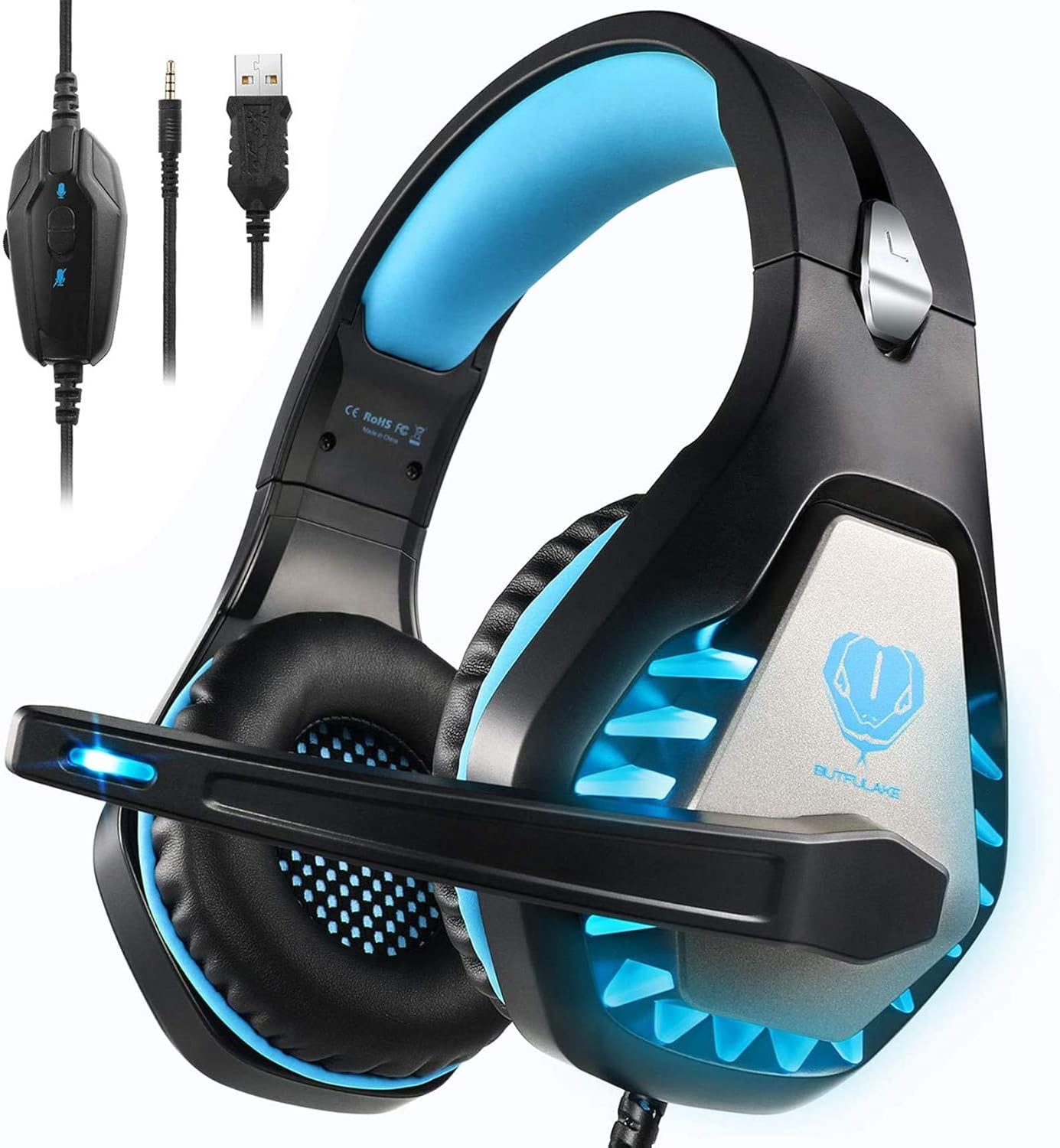
Image 1.1: The BUTFULAKE GH1 Gaming Headset, highlighting its design and connectivity options.
2. Негизги өзгөчөлүктөрү
- Clear & Accurate Positional Audio: Equipped with 50mm Magnetic Neodymium drivers for a wider soundscape and precise positional audio, allowing detection of in-game actions from various directions.
- Powerful Bass & Surround Sound Audio: Simulates 360-degree positional surround sound for realistic depth, ensuring every sound detail is heard.
- Узак мөөнөттүү ыңгайлуулук: Lightweight design with an adjustable headband and soft, deep ear cushions made of breathable leatherette to effectively release heat and pressure, providing comfort and sound isolation for extended use.
- Көп платформа шайкештиги: Features a 2-meter 3.5mm audio cable, compatible with PS series controllers, Xbox One series controllers, Nintendo Switch, PC, cell phones, and tablets. Note: An extra Microsoft adapter may be required for older Xbox controllers.
- Үндү оңой башкаруу: Includes an analog volume control wheel and a microphone mute switch on the cable. The USB connection is solely for LED light effects and does not transmit sound.

2.1-сүрөт: Шайкештик аяктадыview for the GH1 headset across different gaming platforms and devices.

Image 2.2: Illustration of the noise-isolating microphone's function.
3. Пакеттин мазмуну
Пакетиңизде бардык буюмдар бар экенин текшериңиз:
- BUTFULAKE GH1 Gaming Headset (with integrated 3.5mm audio cable, USB cable for LED, and in-line control)
- Y-Splitter Adapter (for PC connection)
4. Орнотуу нускамалары
Follow these steps to connect your BUTFULAKE GH1 Gaming Headset to your device:
- Connecting to PS4/PS5, Xbox One (New Version), Nintendo Switch, Mobile/Tablet:
Plug the 3.5mm jack of the headset directly into the controller (PS4/PS5, Xbox One) or the device's audio port (Nintendo Switch, Mobile/Tablet).
- Connecting to Xbox One (Old Version):
An additional Microsoft adapter (not included) is required to connect the 3.5mm jack to older Xbox One controllers that lack a built-in 3.5mm interface.
- Компьютерге/ноутбукка туташуу:
Use the included Y-Splitter Adapter. Connect the headset's 3.5mm jack to the Y-splitter, then plug the green connector of the Y-splitter into your PC's headphone jack and the pink connector into your PC's microphone jack. Ensure both the headset microphone and computer microphone settings are enabled in your system's audio preferences.
- Powering LED Lights:
Plug the USB connector into any available USB port on your console, PC, or a USB power adapter. This USB connection is solely for powering the blue LED lights on the headset and does not transmit audio.

Image 4.1: User wearing the GH1 headset during a gaming session.
5. Иштөө нускамалары
Once connected, operate your headset using the in-line controls:
- Үндү башкаруу дөңгөлөгү: Located on the in-line control unit. Rotate the wheel up to increase volume and down to decrease volume.
- Микрофондун үнүн басуу которгучу: Also on the in-line control unit. Slide the switch to mute or unmute the microphone.
- Микрофонду тууралоо: The microphone arm is flexible and can be adjusted 120 degrees to position it optimally for voice pickup.
- Гарнитураны тагынуу: Adjust the headband to fit comfortably on your head. The soft memory earmuffs are designed to provide comfort and sound isolation.

Сүрөт 5.1: Детальдуу view of the in-line audio controls.
6. Техникалык тейлөө
Гарнитураңыздын узак убакытка кызмат кылуусун жана оптималдуу иштешин камсыз кылуу үчүн, төмөнкү техникалык тейлөө көрсөтмөлөрүн аткарыңыз:
- Тазалоо: Use a soft, dry cloth to wipe down the headset. For the ear cushions, a slightly damp кездемени колдонсо болот, бирок колдонуудан мурун алардын толугу менен кургак экенин текшериңиз. Катуу химиялык заттардан же абразивдүү тазалоочу каражаттардан алыс болуңуз.
- Сактагыч: Гарнитураны салкын, кургак жерде, күндүн түз нурунан жана өтө жогорку температурадан алыс сактаңыз. Кабелдерди чаташтырып албаңыз.
- Колдонуу: Do not pull on the cables to disconnect the headset. Always grasp the plug firmly. Avoid dropping or subjecting the headset to strong impacts.
7. Кыйынчылыктарды
If you encounter issues with your BUTFULAKE GH1 Gaming Headset, refer to the following common problems and solutions:
| Көйгөй | Мүмкүн себеп | Чечим |
|---|---|---|
| Гарнитурадан үн жок |
|
|
| Микрофон иштебей жатат |
|
|
| LED жарыктары иштебейт |
|
|
| Үн сапаты начар же бурмаланган |
|
|
8. Техникалык шарттар
Detailed technical specifications for the BUTFULAKE GH1 Gaming Headset:
| Өзгөчөлүк | Деталь |
|---|---|
| Модель аты | GH1 |
| Байланыш технологиясы | Зымдуу (3.5 мм уяча) |
| Наушник уясы | 3.5 мм Джек |
| Аудио драйвер түрү | Динамикалык драйвер |
| Аудио драйверинин өлчөмү | 50 миллиметр |
| Жыштык диапазону | 20 Гц - 20 000 Гц |
| Noise Control | Үн изоляциясы |
| Микрофон | Noise Cancelling, Adjustable 120° |
| Башкаруу ыкмасы | In-line Touch (Volume, Mic Mute) |
| LED өзгөчөлүгү | Blue LED lights (USB powered, for aesthetics only) |
| Шайкеш түзмөктөр | PS4, Xbox One, PC, PS5, Laptop, Mac, Nintendo Switch |
| Материал | Пластик |
| Элемент Салмагы | 350 грамм (12.3 унция) |
| Продукциянын өлчөмдөрү | 7.87 x 8.27 x 3.86 дюйм |
| UPC | 824007205417 |
9. Кепилдик жана колдоо
For warranty information and customer support, please refer to the documentation included with your purchase or visit the official BUTFULAKE website. Typically, warranty details, return policies, and contact information for technical assistance are provided by the seller or manufacturer.