
Introduction
The August Audar Smart Band KERi is a versatile health and fitness tracker designed to monitor various aspects of your well-being. This manual provides detailed instructions for setting up, operating, maintaining, and troubleshooting your device to ensure optimal performance and a seamless user experience. Please read this manual thoroughly before using your Smart Band.
Жайгашуу
1. Charging the Smart Band
Before initial use, fully charge your Audar Smart Band KERi. The device features a convenient integrated USB charger. Simply remove the strap from one end of the tracker to reveal the USB connector.

Image: The Audar Smart Band KERi being plugged into a USB port for charging. The image highlights the integrated USB connector on the device.

Сүрөт: деталдуу view of the Audar Smart Band KERi's integrated USB charging port, showing how it connects to a power source.
- Connect the USB connector to any standard USB charging port (e.g., computer, USB wall adapter).
- Экрандагы батарея индикатору кубаттоо процессин көрсөтөт.
- A full charge can provide up to 30 days of battery life.
2. Installing the Audar App
To unlock the full potential of your Smart Band and view your health data, download the official Audar app on your smartphone.
- Scan the QR code provided in the product packaging or search for "Audar" in your device's app store.
- The app is compatible with both Android and iPhone devices.

Image: Screenshot of the Audar app interface, displaying health data and showing icons for Google Play and Apple App Store downloads.
3. Смартфонуңуз менен жупташуу
- Смартфонуңузда Bluetooth иштетилгенин текшериңиз.
- Open the Audar app and follow the on-screen instructions to search for and connect to your KERi Smart Band.
- Confirm the pairing request on both your phone and the Smart Band if prompted.
4. Баштапкы конфигурация
- Once paired, the app will guide you through setting up your personal profile, including age, height, weight, and gender, for accurate data tracking.
- Synchronize the time and date with your phone.
Иштөө нускамалары
1. Негизги навигация
The Audar Smart Band KERi features a color touchscreen display for easy navigation.
- таптаңыз: To select an option or wake the screen.
- Серпүү: To scroll through different menus and data screens.
2. Иш-аракеттерди көзөмөлдөө
The Smart Band automatically tracks your daily activity.

Image: A person running outdoors with the Audar Smart Band KERi on their wrist, showing the display with steps, distance, and calorie data.
- Кадамдар: Күн бою жасалган кадамдардын санын эсептейт.
- Аралык: Estimates the distance covered based on your steps and profile маалыматтар.
- Калориялар: Calculates calories burned during activity.
- GPS көз салуу: When connected to your smartphone, the app can use your phone's GPS to map your route during outdoor activities.
3. Ден соолуктун мониторинги
The KERi Smart Band provides continuous and on-demand health monitoring.
- Жүрөктүн кагышын көзөмөлдөөчү: Measures your heart rate in real-time. Access this feature from the band's menu or through the app.
- Кан басымы Монитор: Provides an estimate of your blood pressure. For accurate medical readings, consult a healthcare professional.
- Кандагы кычкылтектин мониторинги: Сиздин кандын кычкылтек менен каныккандыгын өлчөйт.
- Уйку монитору: Automatically tracks your sleep patterns, including deep sleep, light sleep, and wake times. View detailed analysis in the Audar app.
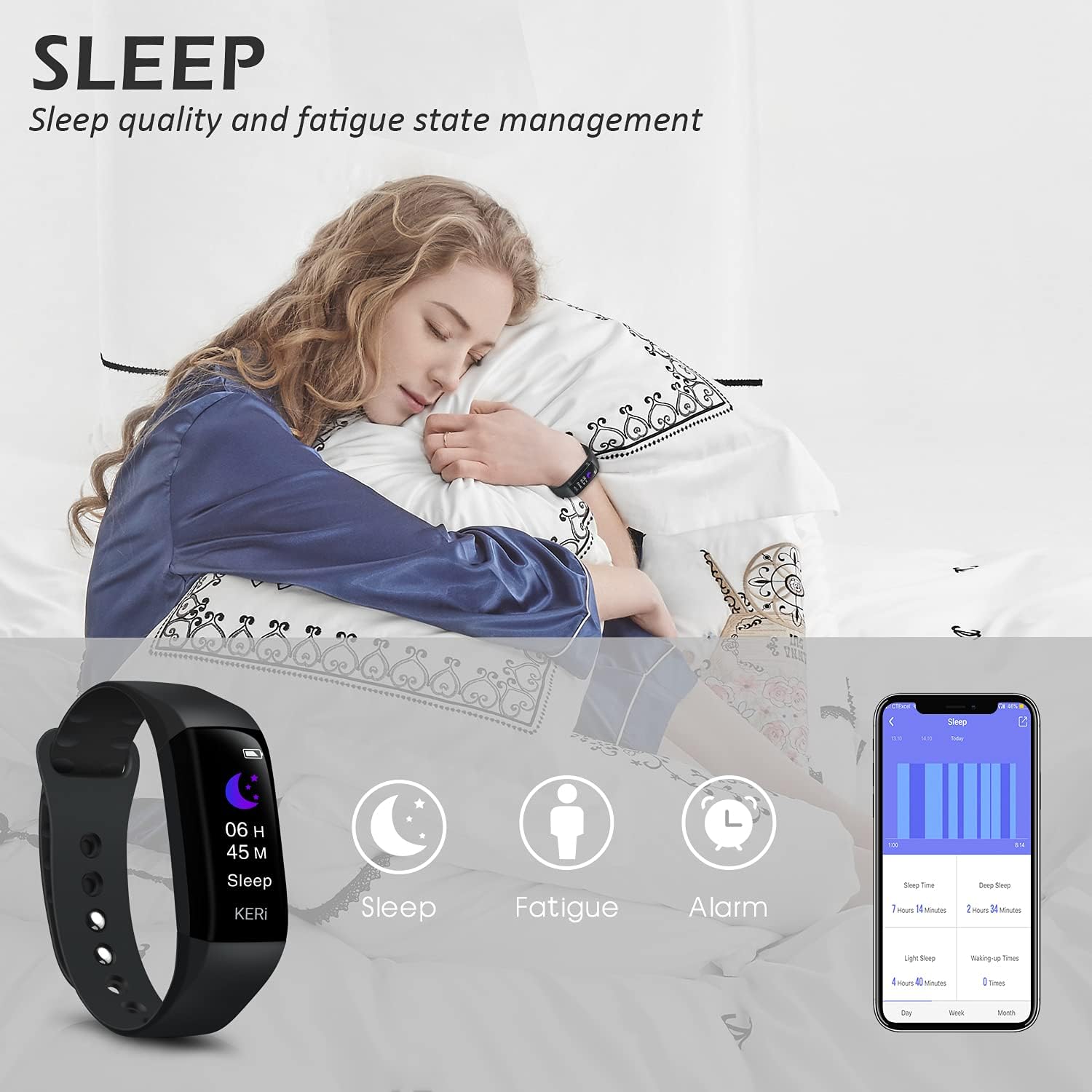
Image: A person sleeping with the Audar Smart Band KERi on their wrist, showing the band's display indicating sleep duration and an accompanying smartphone app displaying sleep analysis.
4. Эскертмелер
Receive alerts directly on your wrist when connected to your smartphone.

Image: A close-up of a wrist wearing the Audar Smart Band KERi, with the screen showing an incoming call notification.
- Чалуулар жөнүндө эскертүүлөр: Displays incoming call notifications.
- Билдирүү эскертүүлөрү: Shows notifications for SMS, WhatsApp, Messenger, and other selected apps.
- Configure which app notifications you wish to receive through the Audar app settings.
5. Кошумча функциялар
- Remote Camera Control (Shake Shooting): Use the band to remotely trigger your smartphone's camera by shaking your wrist.
- Менин телефонумду тап: Activate this feature from the band to make your paired phone ring, helping you locate it.
- Ойготкуч саат: Set silent vibrating alarms through the app.
- CareMate Function: Share your health data with family members through the app, allowing them to monitor your well-being remotely.

Image: Screenshots of the Audar app demonstrating the CareMate function, showing how users can subscribe to and view family members' health data.
Техникалык тейлөө
1. Тазалоо
- Regularly clean your Smart Band and strap to prevent skin irritation and maintain device hygiene.
- Аппаратты жумшак менен сүртүңүз, гamp кездеме. Катуу химиялык заттарды же абразивдүү тазалагычтарды колдонуудан алыс болуңуз.
- Заряддоодон мурун заряддоо контакттары таза жана кургак экенин текшериңиз.
2. Сууга туруктуулук
The Audar Smart Band KERi is IP67 waterproof.

Image: The Audar Smart Band KERi being splashed with water, illustrating its IP67 waterproof capability. Icons for heart rate, calories, steps, distance, SMS alerts, and blood oxygen are also visible.
- It is resistant to rain, sweat, and can be submerged up to 1 meter underwater for a limited time.
- It is suitable for showering and swimming in shallow water.
- Avoid prolonged exposure to hot water, steam, or high-velocity water.
3. Сактоо
- Аппаратты колдонбогондо салкын, кургак жерде сактаңыз.
- Ашыкча температурадан сактаныңыз.
Проблемаларды чечүү
If you encounter issues with your Audar Smart Band KERi, refer to the following common solutions:
| Көйгөй | Мүмкүн себеп | Чечим |
|---|---|---|
| Device does not turn on or respond | Батарея аз | Аппаратты жок эле дегенде 30 мүнөткө кубаттаңыз. |
| Смартфон менен жупташтыруу мүмкүн эмес | Bluetooth өчүк, колдонмодо көйгөй бар, түзмөк байланыш аймагынан тышкары | Ensure Bluetooth is on. Restart phone and band. Reinstall app. Move band closer to phone. |
| Туура эмес ден соолук көрсөткүчтөрү | Improper fit, movement during measurement, sensor obstruction | Ensure band is snug but comfortable. Remain still during measurements. Clean sensor on back of band. |
| No data synchronization to app | Bluetooth connection lost, app not running in background | Check Bluetooth connection. Ensure app has necessary permissions and is running. Manually sync from app. |
| Батареянын иштөө мөөнөтү кыска | Frequent notifications, continuous monitoring, old battery | Reduce notification frequency. Disable continuous monitoring for certain features. Ensure full charge. |
Эгер көйгөй чечилбесе, кошумча жардам алуу үчүн колдоо бөлүмүнө кайрылыңыз.
Техникалык шарттар

Image: A diagram illustrating the dimensions of the Audar Smart Band KERi, including screen size and band length.
| Өзгөчөлүк | Деталь |
|---|---|
| Модель аты | KERi |
| Бренд | Август |
| Screen Size | 0.96 дюйм |
| Дисплей түрү | LCD |
| Резолюция | 240 x 240 |
| Байланыш технологиясы | Bluetooth, USB |
| Зымсыз байланыш стандарты | Bluetooth |
| Операция системасы | Android (Compatible with Android & iPhone) |
| Metrics Measured | Heart Rate, Blood Pressure, Sleep Duration, Blood Oxygen |
| Өзгөчөлүктөр | Alarm Clock, Calorie Tracker, Notifications, GPS (via phone), Remote Camera Control |
| Сууга туруктуулук деңгээли | IP67 (Waterproof up to 1 meter) |
| Батарея клеткасынын түрү | Литий полимери |
| Батареянын орточо иштөө мөөнөтү | 30 күнгө чейин |
| Band Материал түрү | Резина же силикон |
| Иштин материалдык түрү | Керамикалык |
| Элемент Салмагы | 29 грамм |
| Элементтин өлчөмдөрү | 25.8 x 2.2 x 1.3 сантиметр |
| Band Length | 130 - 190 Millimetres |
| Түс | Кара |
Кепилдик маалымат
For detailed warranty information regarding your August Audar Smart Band KERi, please refer to the warranty card included in your product packaging or visit the official August webсайт. Кепилдиктин шарттары аймакка жана сатуучуга жараша өзгөрүшү мүмкүн.

Image: The contents of the Audar Smart Band KERi product box, showing the smart band, charging cable, and instruction manuals.
Кардарларды колдоо
If you require further assistance or have questions not covered in this manual, please contact August customer support through one of the following channels:
- Онлайн колдоо: Visit the official August webКөп берилүүчү суроолор, колдоо макалалары жана байланыш формалары үчүн сайт.
- Электрондук почта колдоо: Refer to your product packaging or the August webкардарларды тейлөө электрондук почта дареги үчүн сайт.
- Бренд дүкөнү: Сиз да зыярат кылсаңыз болот Август айындагы бренд дүкөнү көбүрөөк продукт маалымат жана колдоо ресурстар үчүн.