
1. Киришүү
This manual provides comprehensive instructions for the installation, operation, and maintenance of your Aigital 300Mbps WiFi Extender. This device is designed to expand your existing WiFi signal coverage, eliminate dead zones, and provide a stable wireless network throughout your home or office. Please read this manual carefully before using the product.
2. Продукциянын өзгөчөлүктөрү
- Кеңейтилген WiFi камтуусу: Equipped with high-gain antennas to expand WiFi coverage and eliminate dead zones.
- Жогорку ылдамдыктагы аткаруу: Offers up to 300Mbps data transfer rate, suitable for HD video streaming and online gaming.
- Бир нече иштөө режимдери: Supports Repeater Mode for signal boosting, Router Mode for creating a new wireless network, and AP Mode for converting a wired connection to wireless.
- Оңой орнотуу: Features quick setup options including WPS and web интерфейс конфигурациясы.
- Кеңири шайкештик: Compatible with 99% of routers on the market and works with any wireless devices.
3. Пакеттин мазмуну
- Aigital 300Mbps WiFi Extender Unit
- Instruction Manual
4. Продукт бүтүп калдыview
Familiarize yourself with the components of your Aigital WiFi Extender.

Сүрөт 4.1: Алдыңкы view of the Aigital WiFi Extender, showing indicator lights for LAN, WAN, WPS, WLAN, and Power, along with the WPS button.
Индикатор жарыктары:
- LAN: Indicates connection to a wired device via the LAN port.
- WAN: Indicates connection to the internet (Router Mode).
- WPS: Flashes during WPS setup, solid when connected via WPS.
- WLAN: Зымсыз байланыштын активдүүлүгүн көрсөтөт.
- Күч: Түзмөк күйгүзүлгөнүн көрсөтөт.
Баскычтар жана порттор:
- WPS баскычы: Used for quick, secure connection to a router supporting WPS.
- Калыбына келтирүү баскычы: (Typically a small pinhole) Used to restore the device to factory default settings. Note: Ensure the device is powered on when performing a reset.
- LAN/WAN порту: An Ethernet port that can function as either a LAN port (for connecting wired devices) or a WAN port (for connecting to a modem/router in Router Mode).
5. Орнотуу колдонмосу
There are two primary methods to set up your Aigital WiFi Extender: using the WPS button or via a web браузер.
5.1. WPS Setup (Recommended for Repeater Mode)
- Күйгүзүү: Plug the Aigital WiFi Extender into an electrical outlet near your main router. Wait for the Power light to become solid.
- Роутерде WPSти активдештирүү: Press the WPS button on your main wireless router. Refer to your router's manual for the exact location and procedure.
- Extender боюнча WPSти активдештирүү: Within two minutes, press the WPS button on the Aigital WiFi Extender. The WPS light on the extender will flash.
- Туташуу: Wait for the WPS light on the extender to become solid, indicating a successful connection. The extender will automatically adopt your router's WiFi name (SSID) with "_EXT" or "_Plus" appended, and the same password.
- Көчүрүү: Once connected, you can unplug the extender and move it to a location halfway between your router and the WiFi dead zone. Ensure the WLAN light remains solid, indicating a good signal.
5.2. Web Interface Setup (For all modes)
- Күйгүзүү: Plug the Aigital WiFi Extender into an electrical outlet.
- Connect to Extender's Network: On your computer or mobile device, connect to the WiFi network named "Wireless-AC" or "Aigital_XXXX" (where XXXX are the last four digits of the MAC address, usually found on a sticker on the device). This network will initially have no internet access.
- Мүмкүнчүлүк Web Интерфейс: ачуу а web браузер (мисалы, Chrome, Firefox) жана териңиз
192.168.10.1дарек тилкесине кирип, андан кийин Enter баскычын басыңыз. - Кирүү: Кириңиз
adminfor both the username and password (default). - Режимди тандоо: On the setup page, choose your desired operating mode:
- Кайталоо режими: Select your existing WiFi network from the list, enter its password, and click "Apply".
- Багыттоочу режим: Configure WAN settings (e.g., PPPoE, Dynamic IP, Static IP) and set up a new WiFi network name and password.
- AP режими: Connect an Ethernet cable from your main router to the extender's LAN/WAN port. Configure a new WiFi network name and password for the extender.
- Толук орнотуу: Follow the on-screen prompts to finalize the configuration. The extender will restart.
- Relocate (for Repeater/AP Mode): After successful setup, you can unplug and relocate the extender to an optimal position.
6. Иштөө режимдери
The Aigital WiFi Extender supports three distinct operating modes to suit various networking needs:
6.1. Repeater Mode
In Repeater Mode, the device extends the range of an existing wireless network. It receives the wireless signal from your main router and re-transmits it, effectively boosting coverage to areas with weak or no signal. This mode is ideal for eliminating WiFi dead zones.
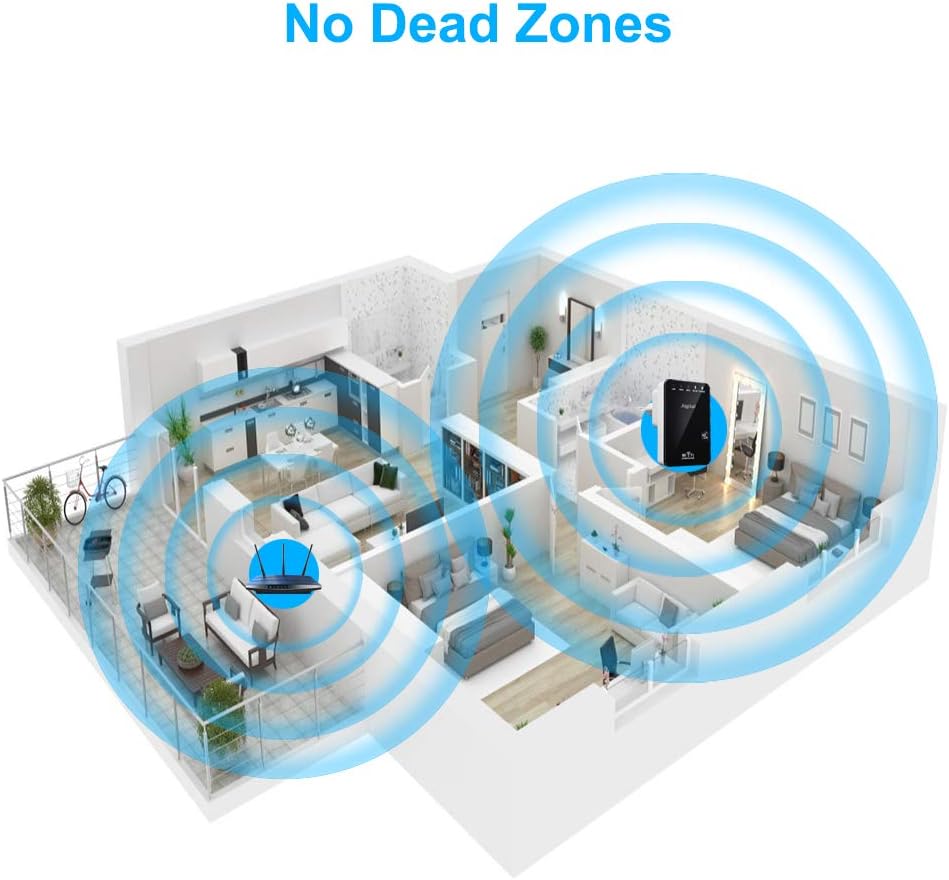
Figure 6.1: Illustration of WiFi signal extension, demonstrating how the Aigital Extender expands coverage throughout a multi-room environment.
6.2. Роутер режими
In Router Mode, the device functions as a primary wireless router. It connects to a modem via an Ethernet cable (using the LAN/WAN port) and creates a new private wireless network. This mode is suitable if you need a basic router for a small network.
6.3. AP (Кирүү чекити) режими
In AP Mode, the device converts a wired network connection into a wireless one. You connect an Ethernet cable from your existing router or network switch to the extender's LAN/WAN port, and the extender broadcasts a new WiFi signal. This is useful for adding wireless capability to a wired-only network or creating a separate WiFi network.
7. Кыйынчылыктарды
If you encounter issues with your Aigital WiFi Extender, refer to the following common problems and solutions:
| Көйгөй | Мүмкүн болгон себеп / Чечим |
|---|---|
| No Power / Lights Off | Кеңейткичтин иштеп жаткан электр розеткасына бекем сайылганын текшериңиз. Башка розетканы колдонуп көрүңүз. |
| Cannot connect to the extender's setup network (e.g., "Wireless-AC") | Ensure the extender is powered on. Try restarting your computer/device. Perform a factory reset on the extender (see below). |
| Extender connected but no internet access | In Repeater Mode, ensure the extender is within range of your main router and has a strong signal (WLAN light solid). Verify your main router has internet access. Reconfigure the extender via the web interface, ensuring the correct WiFi password for your main router is entered. |
| Weak signal from the extender | Relocate the extender to a position halfway between your main router and the desired coverage area. Avoid physical obstructions like thick walls or metal objects. Reduce interference from other electronic devices. |
| WPS setup fails | Ensure your main router supports WPS and that you are pressing its WPS button correctly. Try the web interface setup method instead. |
| Кирүү үчүн сырсөзүңүздү унуттуңуз web интерфейс | Заводдук абалга кайтарууну аткарыңыз. |
| How to perform a Factory Reset | With the extender powered on, use a paperclip or a thin object to press and hold the Reset button (usually a small pinhole) for 5-10 seconds until all lights flash. Release the button. The extender will restart with factory default settings. Note: If the reset button does not respond, ensure you are pressing it firmly enough and that the device is powered on. |
8. Техникалык шарттар
| Өзгөчөлүк | Деталь |
|---|---|
| Бренд | Айбан |
| Модел | Aigital 300Mbps WiFi Extender |
| Зымсыз байланыш стандарты | 802.11a/b/g/n, 2.4 GHz Radio Frequency, 5.8 GHz Radio Frequency |
| Маалыматтарды өткөрүү ылдамдыгы | 300 Мегабит секундасына |
| Жыштык тилкесинин классы | Dual-Band (2.4G and 5G) |
| Продукциянын өлчөмдөрү | 3.9 x 4 x 3.8 дюйм |
| Элемент Салмагы | 5.6 унция |
| Өндүрүүчү | Айбан |
| Биринчи жеткиликтүү күн | 24-декабрь, 2019-жыл |
9. Техникалык тейлөө
To ensure optimal performance and longevity of your Aigital WiFi Extender, follow these maintenance guidelines:
- Тазалоо: Түзмөктү жумшак, кургак чүпүрөк менен акырын сүртүңүз. Суюк тазалоочу каражаттарды же аэрозольдорду колдонбоңуз.
- Вентиляция: Ensure the device is placed in a well-ventilated area. Do not block the ventilation holes.
- Курчап турган чөйрө: Аппаратты экстремалдык температурага, нымдуулукка же тике күн нуруна тийгизүүдөн сактаңыз.
- Программалык камсыздоонун жаңыртуулары: Өндүрүүчүнүн расмий маалыматын мезгил-мезгили менен текшерип туруңуз website for any available firmware updates. Updating firmware can improve performance and security.
10. Кепилдик жана колдоо
For specific warranty information, please refer to the warranty card included with your product or visit the official Aigital webсайт. Кепилдиктин шарттары жана шарттары аймакка жана сатып алуу күнүнө жараша өзгөрүшү мүмкүн.
If you require technical assistance or have questions not covered in this manual, please contact Aigital customer support through their official channels. Details are typically available on the product packaging or the manufacturer's webсайт.
Эскертүү: Сатып алуу квитанциясын кепилдик дооматтары үчүн сатып алуунун далили катары сактаңыз.