
Andoer HDV-201LM
Andoer HDV-201LM 1080p Digital Video Camera User Manual
Model: HDV-201LM
1. Киришүү
This manual provides detailed instructions for the safe and effective use of your Andoer HDV-201LM Digital Video Camera. Please read this manual thoroughly before operating the device and retain it for future reference.
The Andoer HDV-201LM is a 1080p Full HD digital video camera featuring a 5-megapixel CMOS sensor, capable of capturing video at 1920x1080p at 30 frames per second and still images up to 24 megapixels (interpolated). It includes a 16X digital zoom, a 3.0-inch TFT-LCD screen with 270-degree rotation, and supports external accessories via a hot shoe mount.
2. Пакеттин мазмуну
Төмөндө тизмеленген нерселердин баары пакетиңизге камтылганын текшериңиз. Эгерде кандайдыр бир буюмдар жок же бузулуп калса, сатуучуга кайрылыңыз.
- 1 x Andoer HDV-201LM Digital Video Camera
- 1 x Camera Bag
- 2 x Rechargeable 3.7V 800mAh Batteries (one pre-installed)
- 1 x USB кабели
- 1 х AV Cable
- 1 x Алыстан башкаруу
- 1 x Camera User Manual (English)
- 1 x 0.39X Wide-Angle Lens
- 1 х тышкы микрофон
- 1 x Microphone Connection Cable
- 1 x Microphone User Manual (Chinese)
Note: A memory card is not included. A Class 10 or higher SD card (up to 32GB) is strongly recommended for optimal performance.
3. Бөлүктөрдү идентификациялоо
Familiarize yourself with the various components of your digital video camera.

Сүрөт 3.1: Алдыңкы view of the Andoer HDV-201LM camera with attached wide-angle lens and external microphone.

3.2-сүрөт: Детальдуу views highlighting the hot shoe mount, control buttons, battery compartment, and 1/4-inch tripod thread.
- Объектив: Main optical component for capturing images and videos.
- LCD экран: 3.0-inch TFT-LCD display for viewing and menu navigation. Rotates 270 degrees.
- Кубат баскычы: Камераны күйгүзөт же өчүрөт.
- Record/Stop Button: Видео жаздырууну баштайт же токтотот.
- Сүрөт баскычы: Сүрөттөрдү кыймылсыз тартат.
- Чоңойтуу рычагы (W/T): Санариптик масштабды тууралайт (Кең/Телефото).
- Меню баскычы: Камера жөндөөлөрүнө жетет.
- Чабыттоо баскычтары: Менюда навигация жана тандоо үчүн колдонулат.
- Ысык бут кийим орнотуу: For attaching external accessories like microphones or LED lights.
- Tripod жип: 1/4-inch thread for mounting the camera on a tripod.
- Батарея бөлүмү: Кайра заряддоого болгон батарейканы камтыйт.
- SD карта уячасы: Эстутум картасын салуу үчүн.
- USB порт: For connecting to a computer or charging.
- AV чыгаруу: For connecting to a television.
- LED толтуруу жарыгы: Provides additional illumination in low-light conditions.
4. Орнотуу
4.1. Батареяны заряддоо
- Батарея уясынын капкагын ачыңыз.
- Insert the provided 3.7V 800mAh battery, ensuring correct polarity. If an insulator tab is present, remove it before insertion.
- Батарея уясынын капкагын жабыңыз.
- Connect the camera to a power source using the USB cable. The charging indicator will illuminate.
- Толук заряддалгандан кийин индикатордун жарыгы өзгөрөт же өчөт.
4.2. Эстутум картасын салуу
- Камера өчүк экенин текшериңиз.
- SD карта уячасын табыңыз.
- Insert a Class 10 or higher SD card (up to 32GB) into the slot until it clicks into place.
- Алып салуу үчүн, картаны ал чыгып кеткенче акырын басыңыз.
4.3. Attaching the Wide-Angle Lens
- Remove the protective cap from the camera lens.
- Carefully screw the 0.39X wide-angle lens onto the camera's main lens thread until secure.

Figure 4.1: The camera with the 0.39X super wide-angle lens attached, demonstrating its expanded field of view.
4.4. Attaching the External Microphone
- Slide the external microphone into the hot shoe mount on top of the camera.
- Connect the microphone cable to the camera's external microphone input port.
5. Камераны иштетүү
5.1. Күйгүзүү / Өчүрүү
- To power on, open the LCD screen or press the Күч баскычы.
- To power off, close the LCD screen or press and hold the Күч баскычы.
5.2. Видеолорду жаздыруу
- Ensure the camera is in video mode (indicated on the LCD screen). If not, press the Mode которуштуруу үчүн баскыч.
- басыңыз Жаздыруу/Токтоо button to start recording. A red indicator will typically flash.
- басыңыз Жаздыруу/Токтоо жазууну токтотуу үчүн кайра баскычын басыңыз.
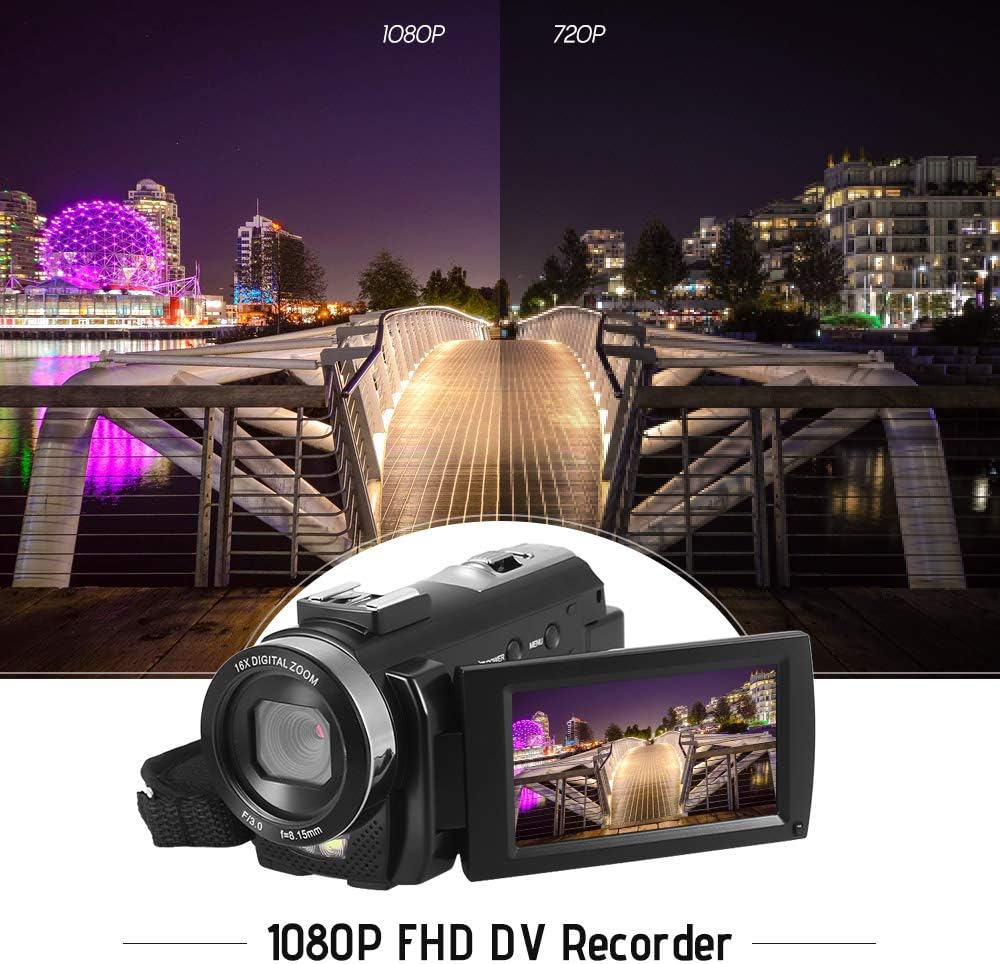
Figure 5.1: The camera is capable of recording in 1080p Full HD and 720p HD resolutions.
5.3. Сүрөт тартуу
- Ensure the camera is in photo mode. If not, press the Mode которуштуруу үчүн баскыч.
- ЖК экранды колдонуп кадрыңызды тартыңыз.
- басыңыз Сүрөт button to capture an image.
5.4. Digital Zoom колдонуу
- колдонуу W (кең) жана T (Telephoto) lever to adjust the 16X digital zoom.

Figure 5.2: The camera's 16X digital zoom allows for closer views of subjects.
5.5. Меню Жөндөөлөрү
- басыңыз Меню орнотууларга жетүү үчүн баскыч.
- Use the navigation buttons to scroll through options such as:
- Ак баланс: Auto, Daylight, Cloudy, Fluorescent, Tungsten.
- Сахна режими: Auto, Night, Portrait, Landscape, Backlight, Sport, Party, Beach, High Sensitivity.
- Атуу режими: Single, Continuous.
- Таасир: Adjust ±3.0EV.
- Авто таймер: Off, 2s, 5s, 10s.
- Авто өчүрүү: Off, 1min, 3min, 5min.
- Тил: English, German, French, Spanish, Italian, Turkish, Russian, Portuguese, Dutch, Simplified Chinese, Traditional Chinese, Japanese, Polish.
- Башка функциялар: Face Detection, Smile Capture, Beauty Face, Anti-Shake.
- басыңыз OK or Жаздыруу/Токтоо тандоолорду ырастоо үчүн баскыч.
- басыңыз Меню чыгуу үчүн кайра баскычын басыңыз.
5.6. Сыналгыга туташуу
- Use the provided AV cable to connect the camera's AV output to your television's AV input.
- Select the correct AV input channel on your TV to view camera content.
6. Техникалык тейлөө
6.1. Камераны тазалоо
- Камеранын корпусун тазалоо үчүн жумшак, кургак чүпүрөктү колдонуңуз.
- Объектив жана ЖК экран үчүн атайын линзаны тазалоо чүпүрөктү жана эритмени колдонуңуз. Катуу химиялык заттардан алыс болуңуз.
6.2. Сактоо
- Камераны салкын, кургак жерде күндүн тике тийген нурунан жана экстремалдык температурадан алыс сактаңыз.
- Камера узак убакыт бою колдонулбаса, батареяны алып салыңыз.
7. Кыйынчылыктарды
| Көйгөй | Мүмкүн себеп | Чечим |
|---|---|---|
| Камера күйбөйт. | Батарея түгөнүп калган же туура салынган эмес. | Charge the battery fully. Ensure the battery is inserted with correct polarity and the insulator tab is removed. |
| Видео жаздырууга же сүрөткө тартууга болбойт. | Эстутум картасы толгон, салынбаган же бузулган. | Эстутум картасын салыңыз. Керексиз жок кылуу files or format the card (this will erase all data). Replace the card if corrupted. |
| Poor video/image quality. | Жетишсиз жарык, кир линза же туура эмес орнотуулар. | Ensure adequate lighting. Use the LED fill light if necessary. Clean the lens. Adjust white balance and scene mode settings. |
| Камера катып калат же жооп бербей калат. | Программанын катасы же батареянын аздыгы. | Remove and reinsert the battery to reset the camera. Ensure the battery is charged. |
8. Техникалык шарттар
| Өзгөчөлүк | Спецификация |
|---|---|
| Бренд | Андоер |
| Модел | HDV-201LM |
| Сүрөт сенсору | 5 Мегапикселдик CMOS сенсору |
| Video Resolution | 1920x1080P (FHD 30fps), 1280x720 (HD 30fps), 640x480 (VGA 30fps), 320x240 (VGA 30fps) |
| Video Format | AVI |
| Сүрөттүн чечилиши | 24MP (Interpolated), 20MP (Interpolated), 16MP (Interpolated), 12MP (Interpolated), 10MP (Interpolated), 7M Wide (Interpolated), 5MP, 3MP, 2M Wide, VGA |
| Сүрөт форматы | JPG |
| Digital Zoom | 16X |
| Объектив | ff (F/3.0 f=8.15mm) |
| Max диафрагма | 8.15 F |
| LCD экран | 3.0-inch TFT-LCD (16:9), 270-degree rotation |
| Сактагыч | SD Card (up to 32GB, Class 10 recommended) |
| Байланыш | USB 2.0, AV Output (NTSC/PAL) |
| Электр камсыздоо | 1 х 3.7V 800mAh кайра заряддалуучу батарея |
| Алыстан башкаруунун батареясы | 1 x 3V CR2025 Battery |
| Операциялык системаны колдоо | Windows XP/Vista/7/8/10 |
| Өзгөчөлүктөр | Anti-shake, Face Detection, Smile Capture, Beauty Face, Self-Timer, LED Fill Light, Hot Shoe Mount |
| Өлчөмдөр | 13.5 x 5.5 x 6.5 cm (5.3 x 2.2 x 2.6 in) |
| Салмагы | 273g (9.6oz) with battery |
| Түс | Кара |
9. Кепилдик жана колдоо
Кепилдик жөнүндө маалымат жана техникалык колдоо алуу үчүн, сатып алууңуз менен кошо берилген документтерди караңыз же сатуучуга кайрылыңыз. Кепилдик боюнча дооматтар үчүн сатып алууну тастыктаган документти сактап коюңуз.
Ask a question about this manual
Ask about setup, troubleshooting, compatibility, parts, safety, or missing instructions. Manuals+ will review the question and use this page’s manual context to help answer it.