
1. Киришүү
The WAVLINK 8-Port Fast Ethernet Switch is designed to expand your network connectivity with ease. It features 8 RJ45 ports supporting 10/100 Mbps auto-negotiation and Auto-MDI/MDIX, eliminating the need for crossover cables. This plug-and-play device is ideal for extending network connections in various environments, from home offices to conference rooms, providing a reliable and efficient solution for your networking needs. It incorporates Green IT technology for energy saving.
2. Пакеттин мазмуну
Пакетиңизде төмөнкү заттар бар экенин текшериңиз:
- WAVLINK 8-Port 10/100 Mbps Fast Ethernet Switch (Model RC-N081M2-EU)
- Кубаттуу адаптер
- User Manual
3. Продукциянын өзгөчөлүктөрү
- 8 RJ45 10/100 Mbps ports with auto-negotiation and Auto-MDI/MDIX.
- Green IT technology for up to 75% energy savings.
- IEEE802.3x flow control ensures reliable data transfer.
- Durable ABS plastic housing for desktop mounting.
- Plug and Play: No configuration or software required.
- Layer 2 switch functions including IGMP Snooping, Port Mirroring, and Spanning Tree.
4. Техникалык жабдыктар бүттүview
The WAVLINK Fast Ethernet Switch features a compact design with essential ports and indicators for easy monitoring and connectivity.
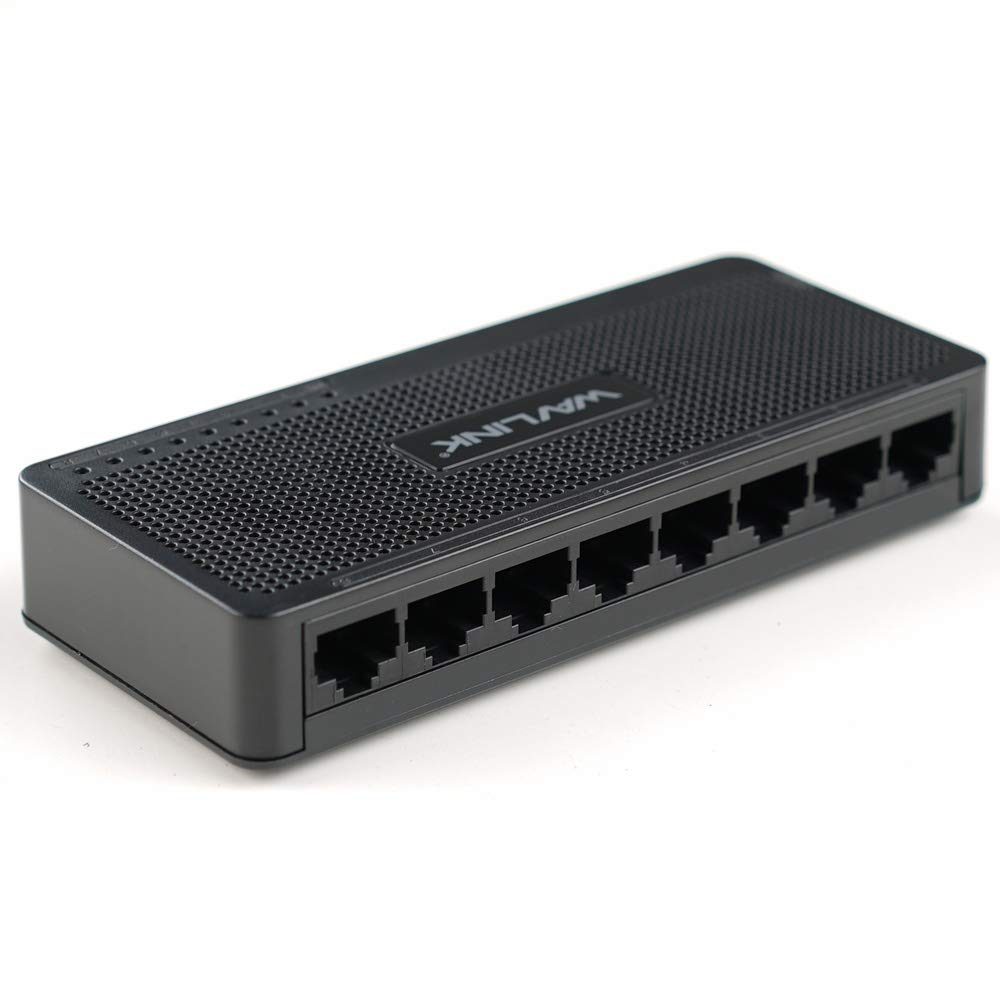
4.1-сүрөт: Жогорку view of the WAVLINK 8-Port Fast Ethernet Switch, showing the brand logo and ventilation holes.
Front Panel
The front panel includes the 8 RJ45 Ethernet ports and LED indicators for status monitoring.

Сүрөт 4.2: Алдыңкы view of the switch, displaying the eight RJ45 Ethernet ports.
- RJ45 порттору (1-8): Connect your network devices (computers, printers, gaming consoles, etc.) using standard Ethernet cables.
- LED көрсөткүчтөрү: Each port has an associated LED that indicates connection status and activity.
Арткы панель
Арткы панелде, адатта, кубат киргизүү порту жайгашкан.

4.3-сүрөт: Каптал view of the switch, illustrating its compact dimensions (13cm x 5.5cm x 2.1cm) and the power input port.
- Кубат киргизүү: Берилген кубат адаптерин бул жерге туташтырыңыз.
5. Орнотуу колдонмосу
The WAVLINK Fast Ethernet Switch is designed for simple plug-and-play installation. No complex configuration is required.
5.1 Которгучту туташтыруу
- Жайгашкан жери: Choose a stable, flat surface for the switch, such as a desktop. Ensure adequate ventilation around the device.
- Туташуу кубаты: Plug the provided power adapter into the switch's power input port, then plug the other end into a standard electrical outlet. The power LED on the switch should illuminate.
- Роутерге/модемге туташуу: Use an Ethernet cable to connect one of the switch's RJ45 ports to a LAN port on your router or modem.
- Тармак түзмөктөрүн туташтыруу: Connect your computers, printers, network-attached storage (NAS), gaming consoles, or other network devices to the remaining RJ45 ports on the switch using Ethernet cables.

Figure 5.1: Connection diagram illustrating how the switch integrates into a network, connecting to a router and multiple end devices like computers, printers, and gaming consoles.

Figure 5.2: Visual representation of the plug-and-play setup, showing Ethernet cables ready for connection to the switch's ports.
Once all connections are made, the switch will automatically detect and configure the connected devices. The corresponding port LEDs will light up to indicate an active connection.
6. Которгучту иштетүү
The WAVLINK Fast Ethernet Switch operates automatically once powered on and connected. It functions as a central connection point for your wired network devices.
- Маалыматтарды өткөрүү: The switch intelligently forwards data packets between connected devices at 10/100 Mbps speeds.
- Автоматтык түрдө MDI/MDIX: This feature automatically detects the type of Ethernet cable (straight-through or crossover) and adjusts accordingly, simplifying connections.
- LED көрсөткүчтөрү:
- Катуу жашыл: Туруктуу шилтеме байланышын көрсөтөт.
- Жаркылдаган жашыл: Порттогу маалыматтардын активдүүлүгүн көрсөтөт.
- Өчүк: No device connected or device is powered off.

Figure 6.1: The Ethernet switch acting as a splitter, providing additional wired connections for multiple devices such as laptops, gaming consoles, and printers.
7. Техникалык тейлөө
To ensure optimal performance and longevity of your WAVLINK Fast Ethernet Switch, follow these simple maintenance guidelines:
- Тазалыкты сактоо: Regularly wipe the exterior of the switch with a soft, dry cloth. Avoid using liquid cleaners or aerosols.
- Вентиляция: Ensure that the ventilation holes are not blocked to prevent overheating.
- Коопсуз өчүрүү: If you need to power off the device, disconnect the power adapter from the electrical outlet.
- Экологиялык шарттар: Operate the switch within the recommended temperature range of 0°C to 40°C (32°F to 104°F). Avoid extreme humidity.
8. Кыйынчылыктарды
If you encounter issues with your WAVLINK Fast Ethernet Switch, refer to the following common problems and solutions:
8.1 Күч жок
- Кубат адаптери өчүргүчкө да, иштеп жаткан электр розеткасына да бекем туташтырылганын текшериңиз.
- Башка аспапка сайып, розетка иштеп жатканын текшериңиз.
8.2 No Link/Activity LED
- Ethernet кабели коммутатор портуна жана тармак түзмөгүнө бекем туташкандыгын текшериңиз.
- Кабелдин бузулушуна жол бербөө үчүн башка Ethernet кабелин колдонуп көрүңүз.
- Туташкан тармак түзмөгү күйгүзүлгөнүн жана туура иштегенин текшериңиз.
- Аппаратты которгучтун башка портуна туташтырууга аракет кылыңыз.
8.3 Тармактын ылдамдыгы жай
- Ensure all connected devices and cables support 10/100 Mbps speeds.
- Туташкан түзмөктөрдө ашыкча тармак трафигин же өткөрүү жөндөмдүүлүгүн көп талап кылган тиркемелерди иштеп жатканын текшериңиз.
- Verify that your router/modem is providing adequate internet speed.
9. Техникалык шарттар
| Өзгөчөлүк | Description |
|---|---|
| Бренд | WAVLINK |
| Модель номери | RC-N081M2-EU |
| Порттардын саны | 8 |
| Порт түрү | RJ45 |
| Маалыматтарды өткөрүү ылдамдыгы | 10/100 Мбит/сек (Fast Ethernet) |
| Автоматтык сүйлөшүүлөр | Колдоого алынган |
| Auto-MDI/MDIX | Колдоого алынган |
| Агымды башкаруу | IEEE802.3x |
| Турак жай материалы | ABS пластик |
| Орнотуу | Иш такта |
| Иштөө температурасы | 0°C ~ 40°C (32°F ~ 104°F) |
| Өлчөмдөрү (болжол менен) | 13 см x 5.5 см x 2.1 см (5.1 дюйм x 2.2 дюйм x 0.8 дюйм) |
10. Системалык талаптар
The WAVLINK Fast Ethernet Switch is compatible with any operating system that supports standard Ethernet connectivity. No specific drivers are required for the switch itself.
- Microsoft Windows (10/8/2012/7/2008/Vista/2003/XP/2000/Me/NT/98/95/3.11)
- macOS
- NetWare
- UNIX
- Linux
11. Кепилдик жана колдоо
WAVLINK products are designed for reliability and performance. For warranty information and technical support, please refer to the warranty card included with your product or visit the official WAVLINK webсайт. Кепилдик дооматтары үчүн сатып алуу дүмүрчөгүңүздү сактаңыз.
For further assistance, you may contact WAVLINK customer support through their official channels.