
Introduction
Thank you for choosing the FunKey DP-88 II Digital Piano. This manual provides essential information for the safe and efficient use of your instrument. Please read it thoroughly before operating the piano and keep it for future reference.
The FunKey DP-88 II is designed for beginners and experienced players alike, offering 88 hammer-action keys with touch dynamics, a wide range of sounds, and comprehensive accompaniment features.

Figure 1: The FunKey DP-88 II Digital Piano.
Пакеттин мазмуну
Пакетиңизде төмөнкү нерселердин бардыгы бар экенин текшериңиз:
- FunKey DP-88 II Digital Piano
- Economy Keyboard Bench
- Наушник
- Piano Method Book for Beginners
- Кубаттуу адаптер
- Колдонуучунун Колдонмосу (бул документ)

Figure 2: Included components of the FunKey DP-88 II digital piano set.
Жайгашуу
1. Ассамблея
The FunKey DP-88 II digital piano is designed for quick and straightforward assembly. Follow the instructions provided in the separate assembly guide (if included) or the visual cues on the packaging. Ensure all components are securely fastened before use.

Figure 3: The FunKey DP-88 II digital piano is compact and designed for quick assembly.
2. Кубатты туташтыруу
- Кубат адаптерин пианинонун арткы панелиндеги DC IN уячасына туташтырыңыз.
- Кубат адаптерин ылайыктуу розеткага сайыңыз.
3. Connecting Pedals and Headphones
- Connect the pedal unit cable to the designated pedal input on the piano.
- For private practice, plug the included headphones into the 6.35 mm headphone jack.

Figure 4: Rear panel connections for the FunKey DP-88 II digital piano.
Иштөө нускамалары
1. Күйгүзүү/өчүрүү
басыңыз КҮЧ button located on the control panel to turn the piano on or off. The LCD display will illuminate upon power-on.

Figure 5: Intuitive control panel with LCD display for easy navigation.
2. Үндү тууралоо
колдонуу МАСТЕР ТОМУ knob or buttons to adjust the overall output volume of the piano. This affects both the built-in speakers and headphone output.
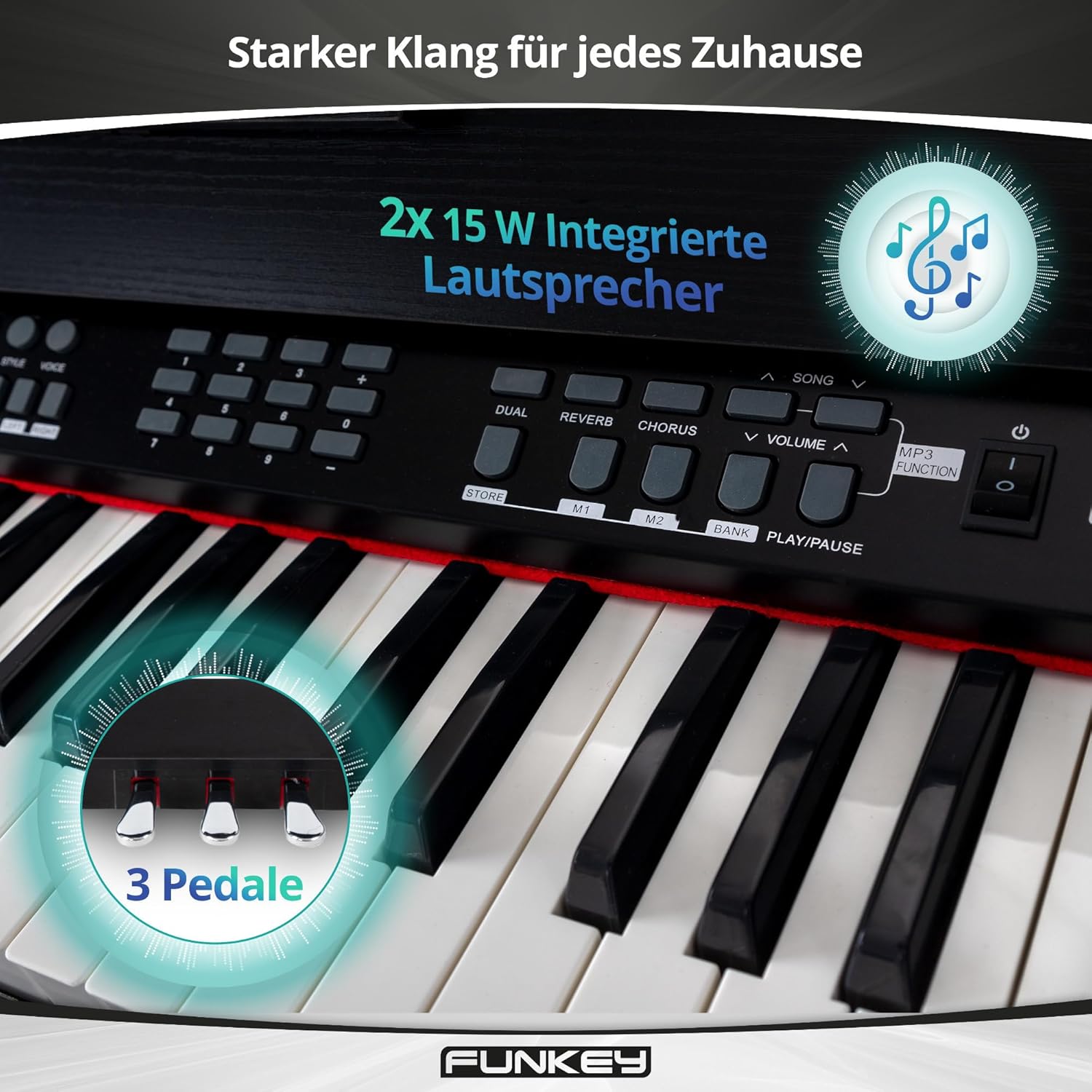
Figure 6: Integrated stereo speakers and three pedals for expressive play.
3. Selecting Sounds and Rhythms
- The DP-88 II features 360 different sounds. Use the ҮН selection buttons to browse and choose your desired instrument voice.
- Access 160 accompaniment styles using the РИТМ section. These provide a full band backing for your playing.
4. Learning Functions
The piano includes a learning function with three difficulty levels for both hands, displaying notes directly on the LCD. It also features 80 inspiring demo songs to aid your musical progress.
- Кош функция: Play two sounds simultaneously, such as piano and strings.
- Бөлүү функциясы: Divide the keyboard into two sections, allowing different sounds for the left and right hands (e.g., bass in the left, melody in the right).

Figure 7: Creative learning features of the FunKey DP-88 II.
5. Metronome, Record & Playback, MP3 Player
- Метроном: Use the built-in metronome for timing practice.
- Жаздыруу жана ойнотуу: Capture your performances and listen back to them.
- MP3 ойноткучу: Play along with your favorite songs via the integrated MP3 player.

Figure 8: Features for creative recording, precise practice, and playing along.
6. Effects (Reverb & Chorus)
Орнотулган санариптик эффекттер менен үнүңүздү жакшыртыңыз:
- Реверб: Adds a spacious, echoing effect, simulating different acoustic environments.
- Хор: Баштапкы сигналды бир аз жөнгө салуу жана кечиктирүү менен байыраак жана коюураак үн жаратат.
Техникалык тейлөө
1. Тазалоо
- Тазалоодон мурун ар дайым кубат адаптерин ажыратыңыз.
- Пианинонун бетин сүртүү үчүн жумшак, кургак чүпүрөктү колдонуңуз.
- өжөр кир үчүн, бир аз гampкездемени суу жана жумшак, абразивдүү эмес тазалоочу каражат менен сүртүңүз. Ашыкча нымдуулуктан алыс болуңуз.
- Do not use chemical solvents, alcohol, or abrasive cleaners, as these can damage the finish.
2. Сактоо жана кам көрүү
- Пианинону салкын, кургак жерде, түз күн тийбеген, экстремалдык температура жана жогорку нымдуулуктан алыс сактаңыз.
- Avoid placing heavy objects on the keyboard or control panel.
- Protect the keys from dust using a keyboard cover when not in use.
Проблемаларды чечүү
| Көйгөй | Мүмкүн себеп | Чечим |
|---|---|---|
| Күч жок | Power adapter not connected; power outlet not working. | Ensure power adapter is securely connected to the piano and a working power outlet. |
| Үн жок | Үнү өтө төмөн; кулакчындар туташып турат; туура эмес үн тандалды. | Increase MASTER VOLUME. Disconnect headphones if using speakers. Select a different sound. |
| Ачкычтар жооп бербейт | Piano in a specific mode (e.g., demo mode); internal error. | Restart the piano. If the issue persists, contact customer support. |
| Бурмаланган үн | Volume too high; faulty connection. | Lower the MASTER VOLUME. Check all cable connections. |
Техникалык шарттар
| Өзгөчөлүк | Деталь |
|---|---|
| Ачкычтар | 88 Hammer-action keys with touch dynamics |
| Үндөр | 360 |
| Rhythm Accompaniments | 160 стиль |
| Полифония | 128-нот |
| Демо ырлар | 80 |
| Окутуу функциясы | Yes (3 difficulty levels, notes on LCD) |
| Эффекттер | Кайталоо, хор |
| Метроном | Ооба |
| Жаздыруу жана ойнотуу | Ооба |
| MP3 Player | Ооба |
| Баяндамачылар | Integrated stereo (2x 15W) |
| Байланыштар | Power adapter, USB to Device, 6.35 mm Jack output, Foot pedal, MIDI In/Out, USB to Host, 6.35 mm Headphone Jack |
| Өлчөмдөрү (WxDxH) | 135 x 39 x 77.5 см (53.1 x 15.4 x 30.5 дюйм) |
| Салмагы | 29.4 кг (64.8 фунт) |
| Түс | Кара |
Кепилдик жана колдоо
Кепилдик маалымат
Please refer to the warranty card included with your product or contact your retailer for detailed warranty information. Keep your proof of purchase for any warranty claims.
Кардарларды колдоо
For technical assistance, spare parts, or service inquiries, please contact the retailer where you purchased the FunKey DP-88 II Digital Piano. You may also visit the official FunKey webкошумча ресурстар үчүн сайт.
Кошумча ресурстар
Learning Aid Video: Piano Note Strips
Video 9: This video demonstrates the installation and use of piano note strips, which can be a helpful visual aid for beginners learning to identify notes on the keyboard. This complements the included piano method book.