
1. Киришүү
This user manual provides detailed instructions for the installation, operation, and maintenance of your BAFANG C965 LCD Display. This display is designed for use with Bafang Mid Drive motors that utilize the UART communication protocol. Please read this manual thoroughly before using the product to ensure safe and correct operation.
The BAFANG C965 LCD Display offers essential information for your electric bicycle, including speed, battery level, assistance level (PAS), and trip data, enhancing your riding experience.
2. Коопсуздук маалыматы
- Always ensure the display is securely mounted and all cables are properly connected before riding.
- Do not attempt to open or modify the display unit. This may void the warranty and cause damage.
- Keep the display screen clean and free from obstructions to ensure clear visibility of information.
- Дисплейди узак убакыт бою өтө жогорку температурага же түз күн нуруна дуушар кылбаңыз.
- In case of malfunction, refer to the troubleshooting section or contact Bafang support.
3. Пакеттин мазмуну
Пакетиңизде бардык буюмдар бар экенин текшериңиз:
- BAFANG C965 LCD дисплей блогу
- Рулду орнотуучу кронштейн
- Control Button Unit
- Колдонуучунун Колдонмосу (бул документ)
4. Орнотуу жана орнотуу
Follow these steps to install your BAFANG C965 LCD Display:
- Дисплейди орнотуу: Attach the handlebar mounting bracket to your bicycle's handlebar. The bracket is compatible with handlebar diameters of 22.2mm, 25.4mm, and 31.8mm. Secure the C965 display unit into the bracket.
- Кабелдерди туташтыруу: Connect the 5-pin female connector from the display unit to the corresponding male connector on your Bafang Mid Drive motor system. Ensure the connection is firm and secure.
- Mounting Control Buttons: Position the external control button unit on your handlebar within easy reach. Connect its cable to the display unit.

Figure 1: Bafang C965 LCD display unit with cables and mounting bracket.
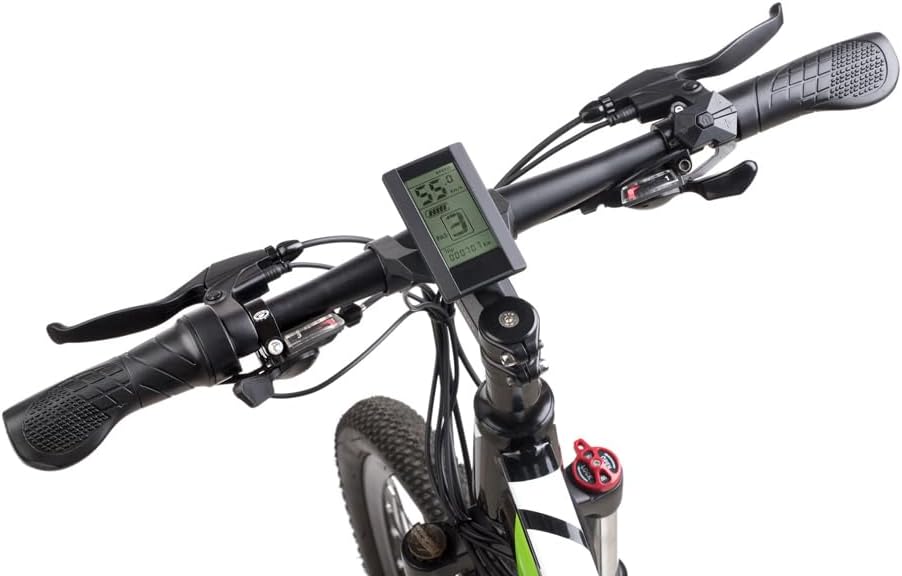
Figure 2: Bafang C965 LCD display mounted on an e-bike handlebar.
5. Иштөө нускамалары
Once installed, operate your BAFANG C965 LCD Display as follows:
- Күйгүзүү/өчүрүү: Press and hold the power button on the external control unit to turn the display on or off.
- Adjusting PAS Level: Use the '+' and '-' buttons on the control unit to increase or decrease the Pedal Assist System (PAS) level.
- Маалымат дисплей: The display cycles through various information screens. Use the 'M' (Mode) button to switch between different data views such as trip distance, total distance, average speed, max speed, and time.
- Фараны башкаруу: If your e-bike system supports it, a dedicated button or a long press of a specific button (refer to your motor's manual) may control the headlights.

Figure 3: Bafang C965 LCD display showing active riding data.
6. Display Functions and Indicators
The C965 display provides various indicators and data points:
- Ылдамдык көрсөтүү: Shows current speed, average speed (AVG), and maximum speed (MAX).
- Батарея көрсөткүчү: Батареянын калган заряд деңгээлин көрсөтөт.
- PAS деңгээли: Indicates the current pedal assist level (0-9 or 0-3, depending on configuration).
- Mileage Indicator: Shows trip distance and total odometer reading.
- Күч көрсөткүчү: Displays real-time motor power output.
- Убакыт: Current time or trip duration.
- Тормоз көрсөткүчү: Тормоз басылганда күйөт.
- Ката көрсөткүчү: Displays error codes if a system fault occurs.
- Фараны күйгүзүү: Indicates when the e-bike's headlights are active.

Figure 4: Bafang C965 LCD display icons and basic specifications.
7. Техникалык тейлөө
To ensure the longevity and optimal performance of your C965 display:
- Тазалоо: Дисплейдин экранын жана корпусун жумшак менен сүртүңүз, damp кездеме. Абразивдүү тазалагычтарды же эриткичтерди колдонбоңуз.
- Суу каршылык: The display has an IP65 waterproof rating, meaning it is protected against dust and low-pressure water jets. Avoid submerging the unit in water.
- Температура: Operate the display within its specified temperature range of -20°C to 60°C.
- Кабелдик текшерүү: Бардык кабелдерди жана туташтыргычтарды эскирүүнүн же бузулуунун белгилерин мезгил-мезгили менен текшерип туруңуз.
8. Кыйынчылыктарды
If you encounter issues with your BAFANG C965 LCD Display, consider the following:
- Дисплей күйбөйт:
- Электр велосипединин аккумулятору заряддалганын жана туура туташтырылганын текшериңиз.
- Check all cable connections between the display, control unit, and motor for looseness or damage.
- Verify the power button is pressed correctly.
- Туура эмес ылдамдык/аралык көрсөткүчтөрү:
- Check the speed sensor and magnet on your wheel for proper alignment and cleanliness.
- Ensure the wheel circumference setting in the display's advanced settings (if accessible) is correct.
- Көрсөтүлгөн ката коддору:
- Refer to your Bafang motor's specific error code list for detailed explanations and solutions. Common issues include motor, controller, or sensor faults.
- Often, turning the system off and on again can clear temporary errors.
- Баскычтар жооп бербейт:
- Check the connection of the external control button unit to the display.
- Ensure buttons are not physically stuck.
If problems persist after attempting these steps, contact Bafang customer support or your authorized dealer for assistance.
9. Техникалык шарттар
| Өзгөчөлүк | Спецификация |
|---|---|
| Модель номери | C965 |
| Дисплей түрү | LCD |
| Байланыш технологиясы | Зымдуу |
| Сенсор түрү | Speed sensor, Voltage сенсор |
| Монтаж түрү | Рулду орнотуу |
| Адам интерфейсинин киргизүү | Buttons |
| Суу өткөрбөйт рейтинги | IP65 |
| Max Speed Limit | 70 км/саат |
| Батарея менен камсыздоо Voltage | 36V/48V |
| Иштөө температурасы | -20°Cден 60°Cге чейин |
| Шайкеш келген рулдун диаметри | 22.2мм / 25.4мм / 31.8мм |
| Туташтыргыч түрү | 5 пин аял |
| Пакеттин өлчөмдөрү | 9.65 x 9.4 x 9.4 см |
| Пакет Салмагы | 159 грамм |
| UPC / GTIN | 779296258319 |
10. Кепилдик жана колдоо
BAFANG products are typically covered by a manufacturer's warranty against defects in materials and workmanship. The specific terms and duration of the warranty may vary by region and retailer. Please retain your proof of purchase for any warranty claims.
For technical support, warranty inquiries, or spare parts, please contact your original retailer or visit the official BAFANG webкардарларды тейлөө байланыш маалыматы үчүн сайт.