
1. Киришүү
The TP-Link RE455 AC1750 WiFi Range Extender is designed to expand your existing WiFi coverage, eliminating dead zones and providing a high-speed, reliable wireless connection throughout your home. This device supports dual-band WiFi (2.4 GHz and 5 GHz) with speeds up to 1750 Mbps (450 Mbps on 2.4 GHz and 1300 Mbps on 5 GHz) and includes a Gigabit Ethernet port for wired connections. It is compatible with all standard internet routers and gateways.
2. Коопсуздук маалыматы
- Өрт, электр тогуна урунуу жана адамдардын жаракат алуу коркунучун азайтуу үчүн ар дайым негизги коопсуздук чараларын сактаңыз.
- Бул түзмөктү сууга, отко, нымдуулукка же ысык чөйрөгө тийгизбеңиз.
- Аппарат менен кошо берилген кубат адаптерин гана колдонуңуз.
- Аппараттын жакшы желдетилген жерге коюлганын текшериңиз.
- Avoid placing the range extender near strong signal obstructions such as thick walls (brick, marble, concrete, armored glass) or metal objects, as these can significantly degrade WiFi performance.
- Keep the device away from sources of interference like Bluetooth devices, microwave ovens, and refrigerators.
- For optimal performance, place your main router and the range extender in elevated positions, avoiding enclosed spaces like cupboards.
3. Пакеттин мазмуну
Пакет төмөнкү нерселерди камтышы керек:
- TP-Link RE455 AC1750 WiFi Range Extender Unit
- Ыкчам орнотуу колдонмосу
4. Физикалык бүтүрүүview
The TP-Link RE455 features a compact design with integrated power plug and three external antennas for enhanced signal coverage. It includes a Gigabit Ethernet port for wired connections and various indicators and buttons for easy management.
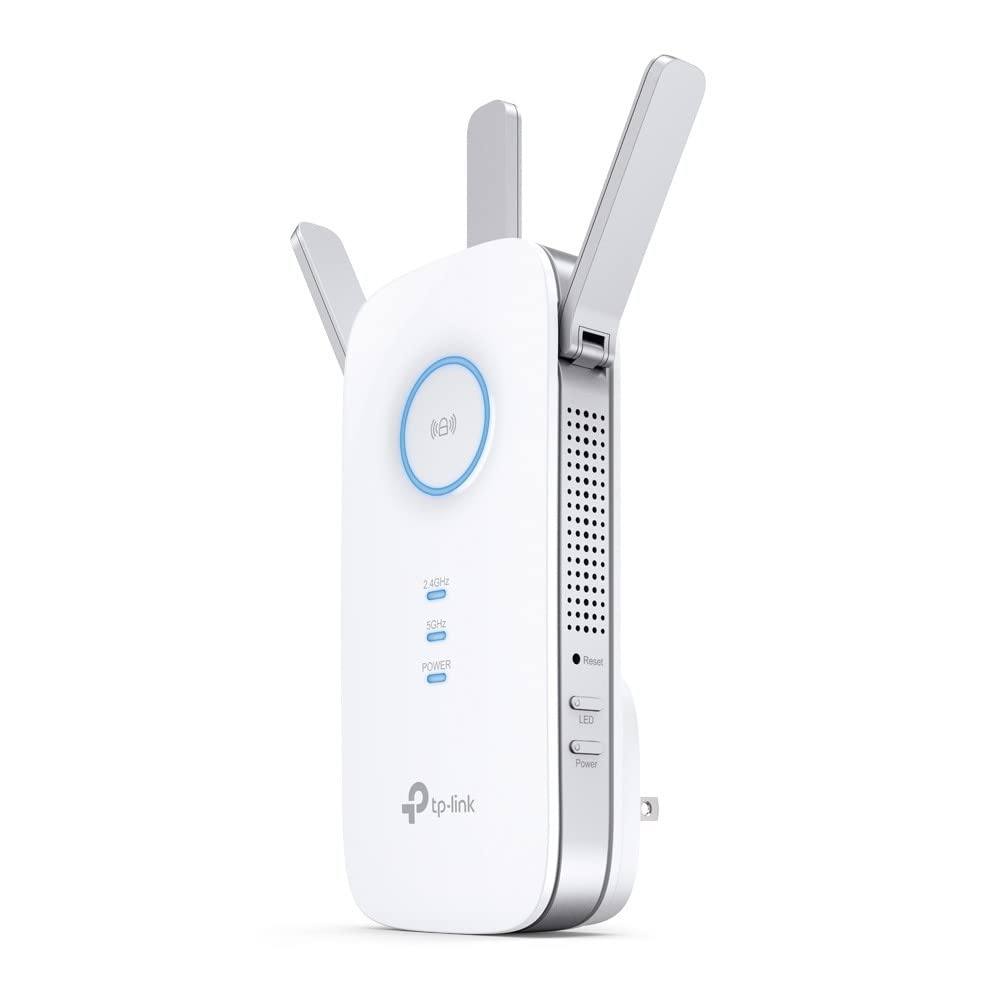
Image: TP-Link RE455 AC1750 WiFi Range Extender showing its front, side, and back with dimensions (Height: 16.3cm, Width: 7.64cm, Depth: 6.65cm). The device has three adjustable external antennas, ventilation holes, a power plug, and a Gigabit Ethernet port.
Негизги компоненттер:
- Тышкы антенналар: Three adjustable antennas to optimize WiFi signal direction and strength.
- Электр сайгычы: Дубал розеткасына түз туташуу үчүн интеграцияланган.
- Гигабит Ethernet порту (RJ45): For connecting wired devices like PCs, gaming consoles, or smart TVs, or for use in Access Point mode.
- WPS баскычы: For quick and easy setup with a WPS-enabled router.
- Калыбына келтирүү баскычы: To restore the device to factory default settings.
- Кубат баскычы: Аппаратты күйгүзүү же өчүрүү үчүн.
- Сигнал индикаторунун LED: Provides visual feedback on the signal strength received from the main router, helping to determine the optimal placement for the extender.
5. Орнотуу
The RE455 can be set up using two primary methods: via the WPS button or through the TP-Link Tether app/web браузер.
Метод 1: WPS баскычын колдонуу (тез орнотуу үчүн сунушталат)
- RE455ду негизги роутериңиздин жанындагы электр розеткасына сайыңыз.
- Негизги роутериңиздеги WPS баскычын басыңыз.
- Within two minutes, press the WPS button on the RE455. The RE LED on the extender will start blinking.
- Once the connection is established, the RE LED will turn solid, indicating a successful connection. The extender will create a new WiFi network with the same name as your main network, appended with "_EXT" (e.g., MyHomeWiFi_EXT). The password will be the same as your main WiFi network.
2-ыкма: TP-Link Tether колдонмосун колдонуу же Web Браузер
- RE455 вилкасын электр розеткасына сайыңыз.
- Download the TP-Link Tether app from your mobile device's app store, or open a web browser on a computer and navigate to the default setup address (usually tplinkrepeater.net).
- Connect your mobile device or computer to the RE455's default WiFi network (e.g., "TP-Link_Extender" or "TP-Link_RE455"). The default password can be found on the device label.
- Follow the on-screen instructions in the Tether app or web interface to select your main WiFi network and enter its password.
- The RE455 will connect to your main router and extend its network.
For detailed video tutorials on setup, search for "Tplink Repeater Installation" on YouTube.
6. Иштөө режимдери
The RE455 supports two main operating modes:
6.1. Range Extender Mode (Default)
In this mode, the RE455 wirelessly connects to your existing router's WiFi network and extends its coverage to areas with weak or no signal. This is the most common mode for expanding your home WiFi.
- Негизги роутериңизге зымсыз туташат.
- Extends the WiFi signal to eliminate dead zones.
- The Gigabit Ethernet port can be used to connect a wired device (e.g., PC, game console) to the extended network.
6.2. Кирүү чекити (AP) режими
In AP mode, the RE455 transforms your existing wired network into a wireless one. This is useful if you have an Ethernet connection in an area but no WiFi, or if you want to create a new WiFi network.
- Connects to your router via an Ethernet cable through its Gigabit Ethernet port.
- Creates a new WiFi network, providing wireless access to the wired connection.
- This mode can replace the WiFi functionality of a less performant router.
7. Optimal Placement Guidelines
Proper placement of your RE455 is crucial for maximizing WiFi coverage and performance.
- Midway Point: Place the range extender roughly halfway between your router and the area where you need improved WiFi coverage. It should be within the range of your main router's WiFi signal.
- Сигнал көрсөткүчү: Utilize the Signal Indicator LED on the RE455 to find the best location. A solid blue light typically indicates a good connection to the router.
- Тоскоолдуктарды болтурбоо: Walls made of brick, marble, concrete, or armored glass, as well as large metal objects, can significantly block WiFi signals. Position the extender to minimize such obstructions.
- Жогорку позиция: Placing the extender in a higher position, such as on a shelf, can help signals travel further and avoid ground-level interference.
- Интерференцияны азайтуу: Keep the extender away from other electronic devices that emit radio frequencies, such as cordless phones, Bluetooth devices, microwave ovens, and large appliances like refrigerators.
8. Техникалык тейлөө
- Тазалоо: Түзмөктү жумшак, кургак чүпүрөк менен акырын сүртүңүз. Суюк же аэрозоль тазалагычтарды колдонбоңуз.
- Программалык камсыздоонун жаңыртуулары: Мезгил-мезгили менен TP-Linkти текшерип туруңуз webсайтына же Tether колдонмосуна кирип, оптималдуу иштөөнү жана коопсуздукту камсыз кылыңыз.
- Кайра иштетилүүдө: If you experience connectivity issues, try restarting the device by unplugging it from the power outlet for a few seconds and then plugging it back in.
9. Кыйынчылыктарды
- Интернетке кирүү жок:
- Негизги роутериңизде активдүү интернет байланышы бар экенин текшериңиз.
- Verify the RE455 is properly connected to your main router (check the Signal Indicator LED).
- Try repositioning the RE455 closer to your main router.
- Алсыз сигнал же жай ылдамдык:
- Relocate the RE455 to a position indicated by a strong signal (blue LED).
- Minimize physical obstructions and interference sources between the extender and your devices.
- Ensure your main router is also optimally placed.
- Cannot Connect to the Extender's WiFi:
- Confirm you are using the correct WiFi password for the extended network.
- If you changed the network name or password, ensure your devices are updated.
- Try restarting both the extender and your device.
- Заводдун баштапкы абалга келтирүү: If issues persist, you can perform a factory reset by pressing and holding the Reset button for approximately 5-10 seconds until the LEDs flash. After a reset, you will need to reconfigure the extender.
10. Техникалык шарттар
| Модель номери | RE455 |
| Зымсыз стандарттар | IEEE 802.11ac/n/a (5 GHz), IEEE 802.11n/g/b (2.4 GHz) |
| Маалыматтарды өткөрүү ылдамдыгы | Up to 1750 Mbps (1300 Mbps at 5 GHz, 450 Mbps at 2.4 GHz) |
| Жыштык тилкелери | Кош диапазондуу (2.4 ГГц жана 5 ГГц) |
| Антенналар | 3 Тышкы антенналар |
| Ethernet порту | 1 x 10/100/1000 Mbps Gigabit Ethernet Port (RJ45) |
| Иштөө режимдери | Диапазонду кеңейтүүчү/Кирүү чекити |
| Өлчөмдөрү (W x D x H) | 7.64 см x 6.65 см x 16.3 см (болжолдуу, сүрөттүн негизинде) |
| Салмагы | 7.41 унция (болжол менен 210 грамм) |
| Түс | Ак |
| Камтуу аймагы | Up to 200 square meters (2150 sq ft) |
| Шайкеш түзмөктөр | Routers, Wireless Access Points |
11. Кепилдик жана колдоо
The TP-Link RE455 AC1750 WiFi Range Extender comes with a 3 жылдык өндүрүүчүнүн кепилдиги.
For technical support, warranty claims, and more detailed product information, please visit the official TP-Link website or contact their customer support. Keep your purchase receipt for warranty purposes.