
1. Киришүү
The V7 KW550ESBT Bluetooth Keyboard is designed to enhance your productivity with versatile connectivity options. This compact, ultra-slim keyboard offers a comfortable and quiet typing experience, featuring laser-etched keys for long-lasting durability. It supports connection to multiple devices via Bluetooth or a 2.4 GHz USB dongle.
Негизги өзгөчөлүктөр төмөнкүлөрдү камтыйт:
- Seamless switching between up to 2 Bluetooth devices or connection via the included 2.4 GHz USB dongle.
- Scissor-switch keys for comfortable and quiet typing.
- Laser-etched keys for enhanced durability.
- Ultra-slim and compact design.
- Includes two AAA batteries for immediate use.
2. Пакеттин мазмуну
Сураныч, пакетте төмөнкү нерселерди текшериңиз:
- V7 KW550ESBT Bluetooth Keyboard
- 2.4 GHz USB Receiver (dongle)
- 2 x AAA батареялары
- Колдонуучунун Колдонмосу (бул документ)

Image: The V7 KW550ESBT keyboard shown with its accompanying 2.4 GHz USB receiver, ready for connection.
3. Орнотуу
3.1. Батареяны орнотуу
- Баскычтоптун астыңкы жагындагы батарея бөлүкчөсүн табыңыз.
- Батарея уясынын капкагын ачыңыз.
- Туура полярдуулукту (+/-) камсыз кылуу менен эки AAA батарейкасын салыңыз.
- Батарея уясынын капкагын бекем жабыңыз.
3.2. Connecting via 2.4 GHz USB Dongle
- Remove the 2.4 GHz USB receiver from its storage slot (usually within the battery compartment or a dedicated slot).
- USB кабыл алгычты компьютериңиздеги же түзмөгүңүздөгү жеткиликтүү USB портуна сайыңыз.
- The keyboard should automatically connect. If not, ensure the keyboard is powered on and the connection indicator light (if present) is active.
3.3. Bluetooth аркылуу туташуу
The V7 KW550ESBT keyboard supports connecting to up to two Bluetooth devices.
- Баскычтоп күйгүзүлгөнүн текшериңиз.
- Press and hold the Bluetooth pairing key (refer to keyboard layout for specific key, often indicated by a Bluetooth symbol or 'BT1'/'BT2') for a few seconds until the Bluetooth indicator light starts blinking, indicating it's in pairing mode.
- Түзмөгүңүздө (компьютер, планшет, смартфон) Bluetooth жөндөөлөрүнө өтүңүз.
- Издөө available devices and select "V7 KW550ESBT" (or similar name) from the list.
- Жупташтыруу процессин аяктоо үчүн экрандагы көрсөтмөлөрдү аткарыңыз. Сизден клавиатураны колдонуп экранда көрсөтүлгөн кодду киргизүү суралышы мүмкүн.
- Repeat for a second Bluetooth device if desired, using the other Bluetooth pairing key.
3.4. Туташкан түзмөктөрдүн ортосунда которулуу
To switch between connected devices (Bluetooth 1, Bluetooth 2, or 2.4 GHz USB), press the corresponding function key (e.g., Fn + BT1, Fn + BT2, or Fn + 2.4G if available). Refer to your keyboard's specific layout for these keys.
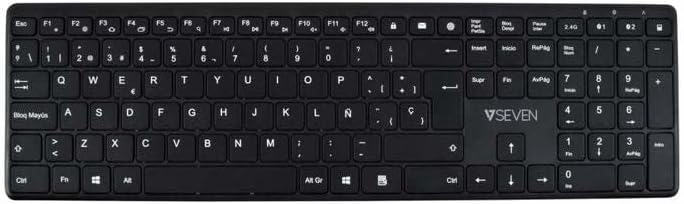
Сүрөт: жогорудан төмөнгө view of the V7 KW550ESBT keyboard, showing the full QWERTY layout and function keys.
4. Баскычтопту иштетүү
4.1. Standard Key Functions
The keyboard features a standard QWERTY layout with all essential alphanumeric keys, punctuation, and modifier keys (Shift, Ctrl, Alt, Windows/Command).
4.2. Мультимедиа жана функция баскычтары
The top row of keys (F1-F12) often doubles as multimedia or special function keys. These functions are typically accessed by pressing the Fn key simultaneously with the desired F-key. Common functions include:
- Volume control (mute, decrease, increase)
- Media playback (play/pause, previous, next)
- Экрандын жарыктыгын жөндөө
- Издөө функциясы
- Кулпу экраны
Refer to the icons printed on your specific keyboard's F-keys for exact functionality.
4.3. Quiet Typing Experience
The scissor-switch key design minimizes typing noise, making it suitable for quiet environments.

Сүрөт: Side profile of the V7 KW550ESBT keyboard, highlighting its ultra-slim design.
5. Техникалык тейлөө
5.1. Тазалоо
Клавиатураңызды тазалоо үчүн:
- Turn off the keyboard and disconnect it from your device.
- Бир аз жумшак, түксүз кездемени колдонуңуз dampсуу же жумшак тазалоо эритмеси менен.
- Wipe the keycaps and surface gently. Avoid excessive moisture.
- Ачкычтардын ортосундагы чаң жана таштанды үчүн кысылган абаны колдонуңуз.
5.2. Батареяны алмаштыруу
When the keyboard's performance degrades or the battery indicator (if present) signals low power, replace the AAA batteries as described in Section 3.1.
6. Кыйынчылыктарды
If you encounter issues with your V7 KW550ESBT keyboard, try the following solutions:
| Көйгөй | Мүмкүн чечим |
|---|---|
| Баскычтоп жооп бербей жатат |
|
| Ачкычтар жабышчаак же жооп бербейт |
|
| Bluetooth жупташтыруу ишке ашпай калды |
|
7. Техникалык шарттар
| Өзгөчөлүк | Деталь |
|---|---|
| Бренд | V7 |
| Модель номери | KW550ESBT |
| Байланыш технологиясы | Bluetooth, 2.4 GHz Wireless (USB Dongle) |
| Keyboard Description | Мультимедиа |
| Сунушталган колдонуу | Office |
| Өзгөчө өзгөчөлүк | Bluetooth |
| Түс | Кара |
| Стиль | Classic |
| Продукциянын өлчөмдөрү | 16.1L x 4.7W x 0.8H сантиметр |
| Материал | Пластик |
| Power Source | 2 x AAA Батареялар (кошулган) |
8. Кепилдик жана колдоо
For warranty information and technical support, please refer to the documentation provided with your purchase or visit the official V7 webсайт. Кепилдик дооматтар үчүн сатып алганыңыздын далилин сактаңыз.