
1. Продукт бүтүп калдыview
The atolla 60M Laser Rangefinder (Model T201) is a high-precision measuring device designed for both indoor and outdoor construction work. It offers various measurement modes, ensuring accuracy and ease of use for professionals and DIY enthusiasts.

Image: atolla 60M Laser Rangefinder with features such as high precision, AAA battery, dustproof, multiple modes, waterproof, 4-line display, 20 data records, and mute button.
Негизги өзгөчөлүктөрү:
- Бир нече өлчөө режимдери: Includes single measurement, continuous measurement (with min/max function), area, volume, and indirect measurement (Pythagorean function with 2 or 3 points). Measurement range from 0.15m to 60m.
- Жогорку тактык: Achieves a measurement accuracy of +/- 2mm with advanced laser technology.
- Таза LCD дисплей: Four-line backlit LCD for easy reading, even in dark environments.
- Integrated Bubble Levels: Two bubble levels for vertical and horizontal laser alignment.
- Кеңири функциялар: Unit adjustment (meter/inch/foot), 20 data record storage, addition, subtraction, auto-calibration, and mute function.
- Туруктуу дизайн: High-quality PC and ABS plastic casing provides IP54 dust and splash protection.
- Энергияны үнөмдөө: 3 мүнөт аракетсиз болгондон кийин автоматтык түрдө өчүрүлөт.
- Компакт жана көчмө: Easy to carry in a bag or jacket pocket, includes a hand strap for secure handling.
2. Орнотуу
2.1 Батареяны орнотуу
The atolla T201 Laser Rangefinder requires 2 AAA batteries (included). To install or replace batteries:
- Аппараттын артындагы батарея бөлүкчөсүнүн капкагын табыңыз.
- Капкакты жылдырыңыз.
- Туура полярдуулукту (+/-) камсыз кылуу менен эки AAA батарейкасын салыңыз.
- Батарея уясынын капкагын бекем жабыңыз.
2.2 Кол боону бекитүү
For secure handling and to prevent accidental drops, attach the included hand strap:
- Thread the thin loop of the hand strap through the designated slot on the side of the device.
- Pass the larger end of the strap through the loop you just created and pull tight to secure it.
Video: Demonstrates the features and usage of a digital laser meter, including USB charging and multiple measurement modes. (Duration: 0:41)
3. Иштөө нускамалары
3.1 Аппараттын макети жана баскычтары
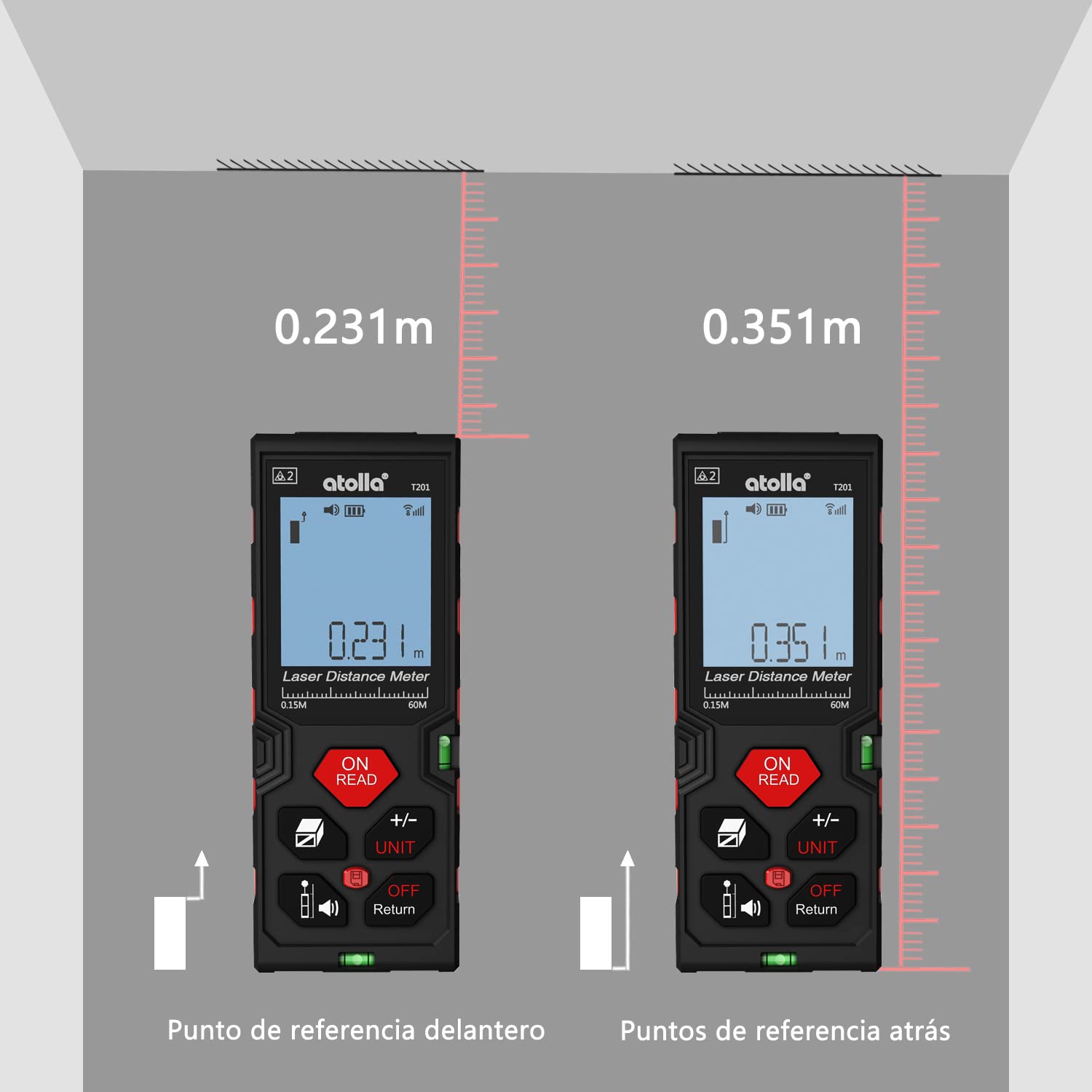
Image: Detailed diagram showing the function of each button on the atolla laser rangefinder, including Power/Read, Area/Volume/Indirect Measurement, Reference/Mute, Add/Subtract/Unit, History, and Off/Return.
- ON/READ Button: Powers on the device and initiates a measurement.
- +/- UNIT Button: Switches between measurement units (meters, inches, feet) and performs addition/subtraction.
- Area/Volume/Indirect Measurement Button: Cycles through area, volume, and Pythagorean measurement modes.
- Reference/Mute Button: Changes the measurement reference point (front or rear edge) and toggles the sound.
- History Button: Сакталган өлчөө жазууларына мүмкүнчүлүк алат.
- OFF/Return Button: Powers off the device or returns to the previous screen/mode.
3.2 Негизги өлчөө (бир аралык)
- басыңыз ON/READ аппаратты иштетүү үчүн баскыч.
- Лазерди максаттуу бетке багыттаңыз.
- басыңыз ON/READ button again to take a single measurement. The result will be displayed on the screen.
3.3 Үзгүлтүксүз өлчөө (Min/Max)
This mode is useful for finding the shortest or longest distance to a moving target or for scanning a room.
- басыңыз ON/READ күйгүзүү үчүн баскыч.
- басыңыз ON/READ button and hold it for a few seconds until "MIN/MAX" appears on the display.
- Move the device slowly across the desired area. The display will continuously update with the current, minimum, and maximum measurements.
- басыңыз ON/READ Үзгүлтүксүз өлчөөнү токтотуу үчүн баскычты кайра басыңыз.
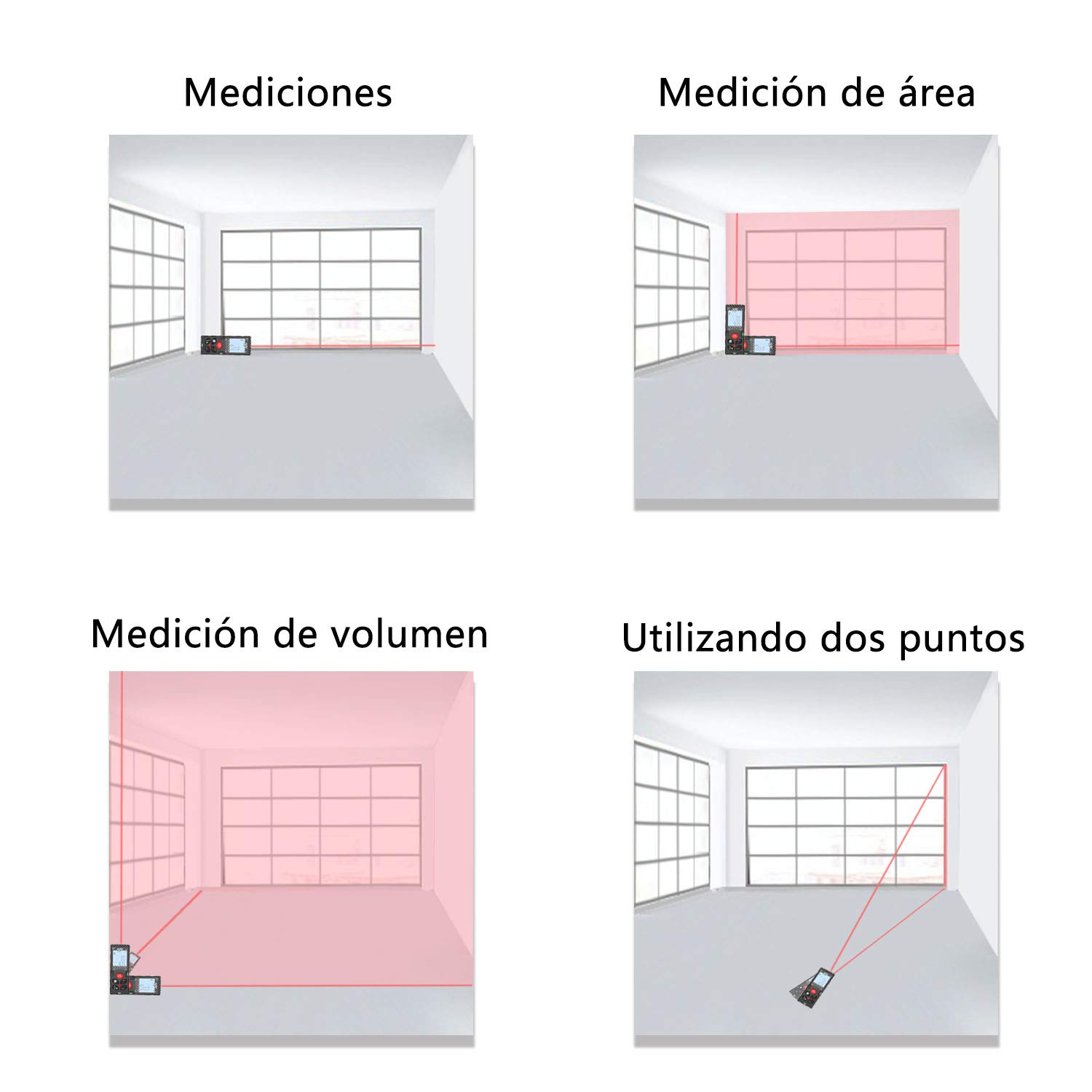
Image: The laser rangefinder displaying continuous measurement results, showing current, minimum, and maximum values.
3.4 Area and Volume Measurement
To measure area or volume:
- басыңыз Area/Volume/Indirect Measurement button once for area measurement (square icon) or twice for volume measurement (cube icon).
- Follow the on-screen prompts to measure the required dimensions (length, width, height). The device will automatically calculate and display the area or volume.
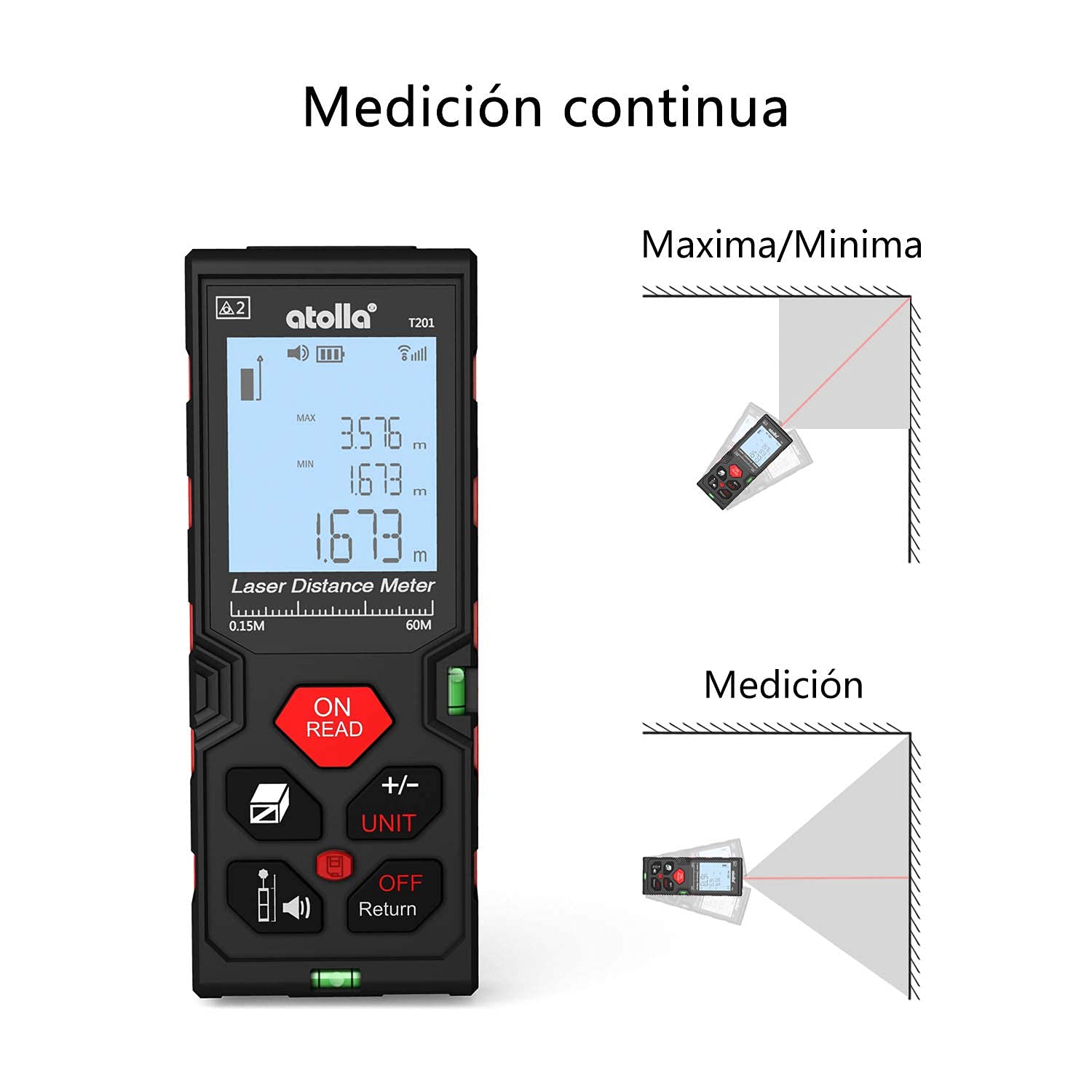
Image: The device screen illustrating how to change measurement units between meters, inches, and feet.
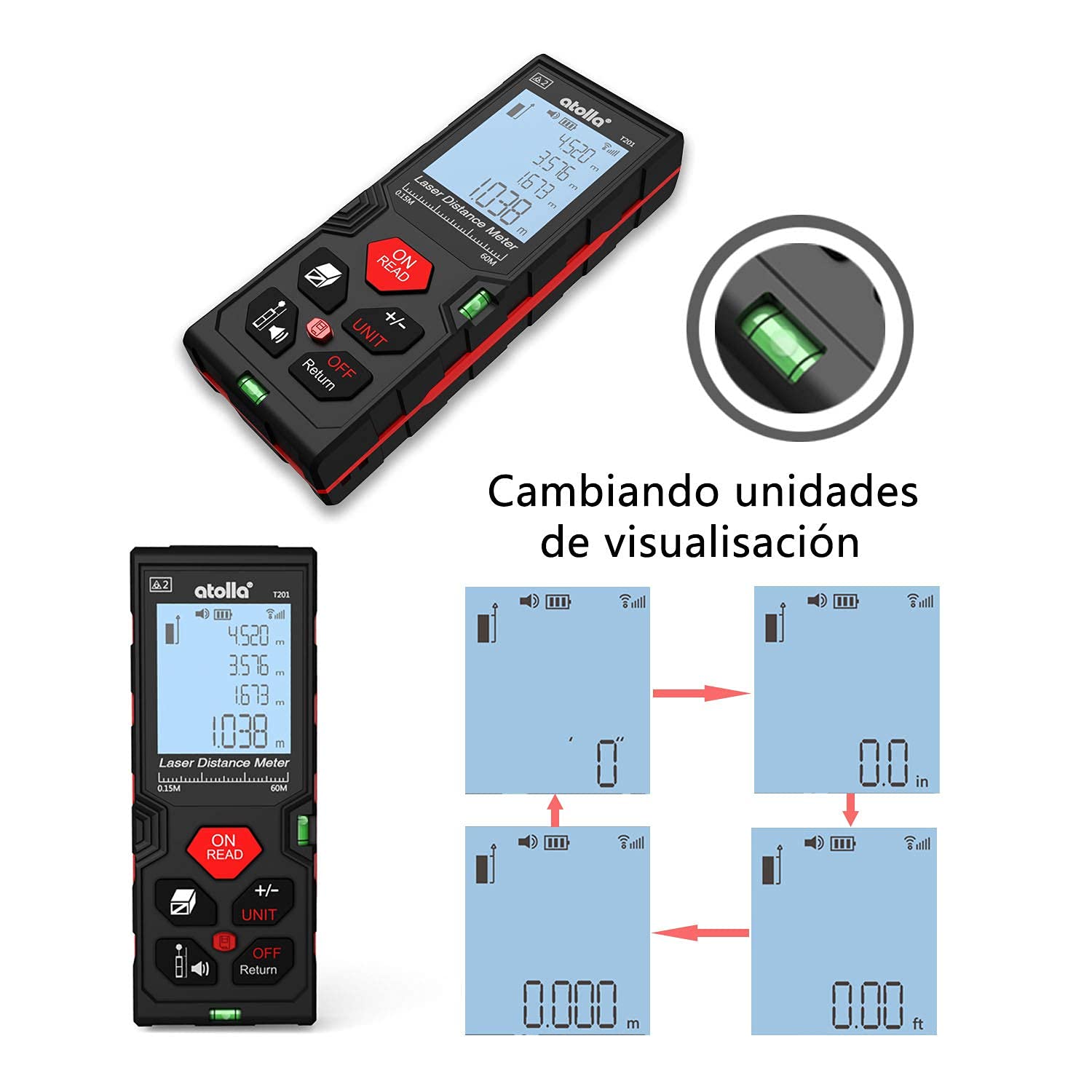
Image: Comparison of measurements taken from the front reference point and the rear reference point of the device.
Video: Demonstrates various measurement functions of the laser distance meter, including area and volume calculations. (Duration: 0:47)
3.5 Pythagorean Indirect Measurement
This mode allows for indirect height or distance measurements using the Pythagorean theorem.
- басыңыз Area/Volume/Indirect Measurement button until the desired Pythagorean mode icon appears (e.g., triangle with two or three points).
- Follow the on-screen instructions to take the necessary measurements (e.g., hypotenuse, base). The device will calculate the unknown dimension.

Сүрөт: Visual examples of single distance measurement, area measurement, volume measurement, and indirect measurement using two points.
3.6 Бирдикти конверсиялоо
To change the measurement unit (meter, inch, foot):
- Түзмөк күйүп турганда, баскычын басыңыз +/- UNIT Жеткиликтүү бирдиктерди карап чыгуу үчүн баскычын кайра-кайра басыңыз.
- Тандалган бирдик экранда көрсөтүлөт.
3.7 Маалыматтарды сактоо жана кайра чакырып алуу
Аппарат 20 өлчөө жазуусун сактай алат.
- After a measurement, the result is automatically stored.
- басыңыз тарых баскычына view сакталган жазуулар.
- Use the arrow buttons (if available, or +/- UNIT) to navigate through the records.

Image: A hand holding the laser rangefinder, demonstrating the data storage feature on the display.
3.8 Үнсүз кылуу функциясы
To mute the device's sound:
- басыңыз Reference/Mute button to toggle the sound on or off.
- A mute icon will appear on the screen when the sound is off.

Image: The laser rangefinder being used in a library-like setting, with the mute function active, indicated by a speaker-off icon.
4. Техникалык тейлөө
4.1 Тазалоо
- Аппаратты жумшак менен сүртүңүз, гamp кездеме. Абразивдүү тазалагычтарды же эриткичтерди колдонбоңуз.
- Keep the laser lens clean to ensure accurate measurements. Use a soft, lint-free cloth specifically designed for optical lenses.
4.2 Сактоо
- Аппаратты түз күн нурунан жана экстремалдык температурадан алыс салкын, кургак жерде сактаңыз.
- Узак мөөнөткө сактасаңыз, акып кетпеш үчүн батарейкаларды алып салыңыз.
4.3 IP54 коргоосу
The atolla T201 is rated IP54, meaning it is dust-protected and protected against splashing water from any direction. While durable, avoid submerging the device in water or exposing it to heavy rain.

Image: The laser rangefinder demonstrating its IP54 rating, showing resistance to dust and water splashes.
5. Кыйынчылыктарды
If you encounter issues with your atolla Laser Rangefinder, please refer to the following common problems and solutions:
- Түзмөк күйбөйт:
- Check if the batteries are correctly inserted with the right polarity.
- Жаңы AAA батарейкалары менен алмаштырыңыз.
- Туура эмес өлчөөлөр:
- Ensure the laser lens is clean and free from obstructions.
- Verify the measurement reference point (front or rear) is correctly set for your application.
- Perform auto-calibration if necessary (refer to the device's on-screen menu or specific instructions for auto-calibration).
- Avoid measuring through glass or highly reflective surfaces, which can cause errors.
- Дисплей күңүрт же окулбайт:
- Батареянын деңгээлин текшерип, аз болсо алмаштырыңыз.
- Ensure the backlight is enabled.
- Device beeps continuously:
- The device might be in continuous measurement mode. Press the ON/READ басуу үчүн баскыч.
- If an error code appears, consult the full manual or contact customer support.
For further assistance, please contact atolla customer support.
6. Техникалык шарттар
| Өзгөчөлүк | Деталь |
|---|---|
| Модель номери | T201 |
| Өлчөө диапазону | 0.15мден 60мге чейин |
| Тактык | ±2мм |
| Өлчөө бирдиктери | Meter, Inch, Foot |
| Өлчөө режимдери | Single, Continuous (Min/Max), Area, Volume, Pythagorean (2-point, 3-point) |
| Маалыматтарды сактоо | 20 XNUMX жазууга чейин |
| Дисплей | 4-line Backlit LCD |
| Power Source | 2 x AAA щелочтуу батарейкалар (кошулган) |
| Автоматтык өчүрүү | 3 мүнөт аракетсиздиктен кийин |
| Материал | PC жана ABS пластик |
| Кирүү коргоо (IP) рейтинги | IP54 (Dust-protected, Splash-proof) |
| Продукциянын өлчөмдөрү | 12.2 x 4.7 x 2.5 см |
| Продукт Салмагы | 111 грамм |
| Түс | Кара жана Кызыл |
7. Кепилдик жана колдоо
7.1 Кайтаруу саясаты
Бул продукт, адатта, сатып алынган күндөн тартып 30 күндүк кайтаруу саясатына ээ. Толук шарттар жана эрежелер үчүн чекене сатуучуңуздун кайтаруу саясатын караңыз.
7.2 Кардарларды колдоо
For any questions, technical support, or warranty claims, please contact atolla customer service through the retailer's platform or the official atolla website. Ensure you have your purchase details and product model number (T201) ready when contacting support.