
atolla CH-204U3-K
Atolla 4-Port USB 3.0 Hub User Manual
Model: CH-204U3-K
Introduction
Thank you for choosing the Atolla 4-Port USB 3.0 Hub. This device expands a single USB 3.0 port into four additional USB 3.0 data ports, offering high-speed data transfer and a dedicated smart charging port. Each data port features an individual on/off switch for convenient control. This manual provides detailed instructions for setup, operation, and maintenance to ensure optimal performance of your hub.
Негизги өзгөчөлүктөрү
- SuperSpeed Syncing: Four USB 3.0 data ports capable of syncing data at speeds up to 5Gbps.
- Акылдуу заряддоо порту: One dedicated charging port providing up to 2.4 Amps for charging devices like iPads and iPhones.
- Individual On/Off Switches: Each USB data port is equipped with an illuminated individual on-off switch for independent control.
- Күчтүү дизайн: Compact case with a sleek glossy UV finish and a durable 65 cm (25.59 inch) cord.
- Кеңири шайкештик: Plug and play functionality with Windows, Mac OS X, and Linux, requiring no drivers. Supports hot swapping.
- Тышкы кубат адаптери: Includes a 5V/3A AC power adapter for stable power delivery to connected devices.
Пакеттин мазмуну
- Atolla 4-Port USB 3.0 Hub
- 5V/3A AC кубат адаптери
- Тез орнотуу боюнча колдонмо (бул колдонмо)
Орнотуу нускамалары
- Кубат адаптерин туташтыруу: Plug the included 5V/3A AC power adapter into the DC 5V input port on the Atolla USB 3.0 Hub. Then, plug the power adapter into a wall outlet. This ensures stable power for all connected devices, especially power-hungry ones like external hard drives.
- Компьютериңизге туташуу: Connect the USB 3.0 cable from the Atolla USB 3.0 Hub to an available USB 3.0 port on your computer (laptop or desktop). The hub is plug-and-play, so no drivers are required.
- Түзмөктөрүңүздү туташтырыңыз: You can now connect your USB devices (e.g., flash drives, external hard drives, keyboards, mice, printers) to the four USB 3.0 data ports on the hub. Use the individual on/off switches to activate or deactivate each port as needed.

Image: The Atolla 4-Port USB 3.0 Hub, showing the hub itself, the included 5V/3A AC power adapter, and the USB 3.0 cable for connecting to a computer.
Operating the Hub
Using Data Ports
The four USB 3.0 data ports allow you to connect multiple USB devices to your computer simultaneously. These ports support SuperSpeed data transfer rates of up to 5Gbps, making them ideal for transferring large fileс тез.

Image: A diagram illustrating the four USB 3.0 data ports and the dedicated smart charging port on the Atolla USB hub, highlighting their functions and data transfer speeds.
Individual On/Off Switches
Each of the four data ports has an independent on/off switch. This feature allows you to power on or off individual devices connected to the hub without unplugging them. This is useful for conserving power or managing device connections.
- To Turn On a Port: Tap the corresponding button next to the port. The blue LED indicator will illuminate.
- To Turn Off a Port: Press and hold the corresponding button for approximately 2 seconds. The blue LED indicator will turn off.

Image: A hand demonstrating the use of the individual on/off switches on the Atolla USB hub, with text indicating how to turn ports on and off.
Акылдуу заряддоо порту
The dedicated smart charging port (marked with a lightning bolt icon) provides up to 2.4 Amps of power, suitable for charging smartphones, tablets, and other USB-powered devices. This port is designed for charging and does not support data transfer.

Image: A visual representation of a USB cable plugged into the smart charging port of the Atolla USB hub, with a lightning effect indicating power delivery.
Шайкештик
The Atolla 4-Port USB 3.0 Hub offers broad compatibility with various operating systems and devices:
- Операциялык системалар: Compatible with Windows 10, 8.1, 8, 7, Vista, XP, Mac OS X (10.x or above), and Linux.
- Түзмөктөр: Supports a wide range of USB devices including keyboards, mice, PCs, laptops, headsets, U-disks (USB flash drives), external hard drives, and game machines.
- Plug and Play: Fully plug and play, requiring no additional drivers for installation.
- Hot Swapping: Supports hot swapping, allowing you to connect or disconnect devices while the hub is powered on without needing to restart your computer.

Image: A graphic illustrating the universal compatibility of the Atolla USB hub with icons representing various devices such as keyboards, PCs, mice, headsets, U-disks, and game machines.
Техникалык шарттар
| Атрибут | Деталь |
|---|---|
| Продукциянын өлчөмдөрү | 4.25 x 1.69 x 0.91 дюйм (108 x 43 x 23 мм) |
| Элемент Салмагы | 6.8 унция |
| Модель номери | CH-204U3-K |
| Бренд | атолла |
| Түс | Кара |
| Аппараттык интерфейс | USB, USB 3.0 |
| Кубаттуу адаптер | 5V/3A AC кубат адаптери |
| Маалыматтарды өткөрүү ылдамдыгы | 5 Гбит/сек чейин (USB 3.0) |
| Port Output кубатталууда | 2.4ге чейин Amps |
| Келип чыккан өлкө | Кытай |
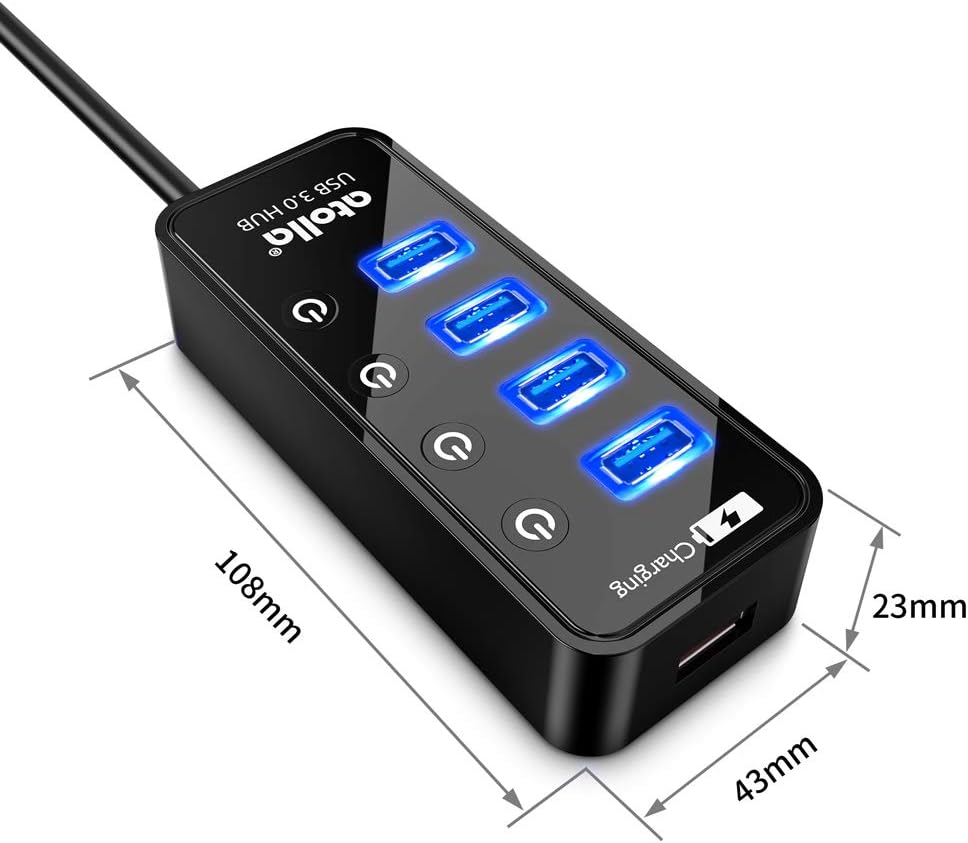
Image: A diagram showing the physical dimensions (length, width, height) of the Atolla 4-Port USB 3.0 Hub in millimeters.
Проблемаларды чечүү
- Түзмөк таанылган жок:
- Ensure the hub's USB cable is securely connected to a USB port on your computer.
- Verify that the power adapter is properly connected to the hub and a working power outlet.
- Try connecting the device directly to your computer's USB port to confirm the device itself is functional.
- If using an individual switch, ensure the port is turned on (blue LED illuminated).
- Компьютериңиздеги башка USB портун колдонуп көрүңүз.
- Маалыматтарды өткөрүү ылдамдыгы жай:
- Ensure both the hub and your connected device are USB 3.0 compatible for optimal speeds. Connecting a USB 2.0 device to a USB 3.0 port will result in USB 2.0 speeds.
- Confirm the hub is connected to a USB 3.0 port on your computer (usually blue colored).
- Ensure the power adapter is connected and providing sufficient power, especially for external hard drives.
- Charging Not Working or Slow:
- Ensure the device is connected to the dedicated smart charging port (lightning bolt icon).
- Verify the power adapter is connected and working.
- Some devices may require higher charging currents than the hub can provide, or may charge slower than with their original wall charger.
- Үзгүлтүксүз туташуу:
- Бардык кабелдик байланыштардын боштугун текшериңиз.
- Кубат адаптери коопсуз туташтырылганын текшериңиз.
- Avoid connecting too many power-hungry devices simultaneously without sufficient external power.
Техникалык тейлөө
To ensure the longevity and optimal performance of your Atolla USB 3.0 Hub, follow these simple maintenance guidelines:
- Тазалоо: Use a soft, dry cloth to wipe the surface of the hub. Avoid using liquid cleaners or abrasive materials, as they may damage the finish or internal components.
- Сактагыч: Узак мөөнөткө пайдаланылбаганда, хабды түз күн нурунан жана өтө температурадан алыс салкын, кургак жерде сактаңыз.
- Колдонуу: Handle the hub with care. Avoid dropping it or subjecting it to strong impacts, which could damage internal circuitry.
- Вентиляция: Ensure the hub is placed in an area with adequate ventilation to prevent overheating, especially when multiple devices are connected and active.
Кепилдик жана колдоо
The Atolla 4-Port USB 3.0 Hub is guaranteed by an atolla 18-Month WarrantyБул кепилдик өндүрүштөгү кемчиликтерди камтыйт жана сиздин продуктуңуз кадимки колдонууда күтүлгөндөй иштешин камсыздайт.
For technical support, warranty claims, or any questions regarding your Atolla product, please contact Atolla customer service. You can typically find contact information on the Atolla official webсайты же продуктуну сатып алган сатуучу аркылуу.
Please have your model number (CH-204U3-K) and purchase details ready when contacting support.
Ask a question about this manual
Ask about setup, troubleshooting, compatibility, parts, safety, or missing instructions. Manuals+ will review the question and use this page’s manual context to help answer it.