
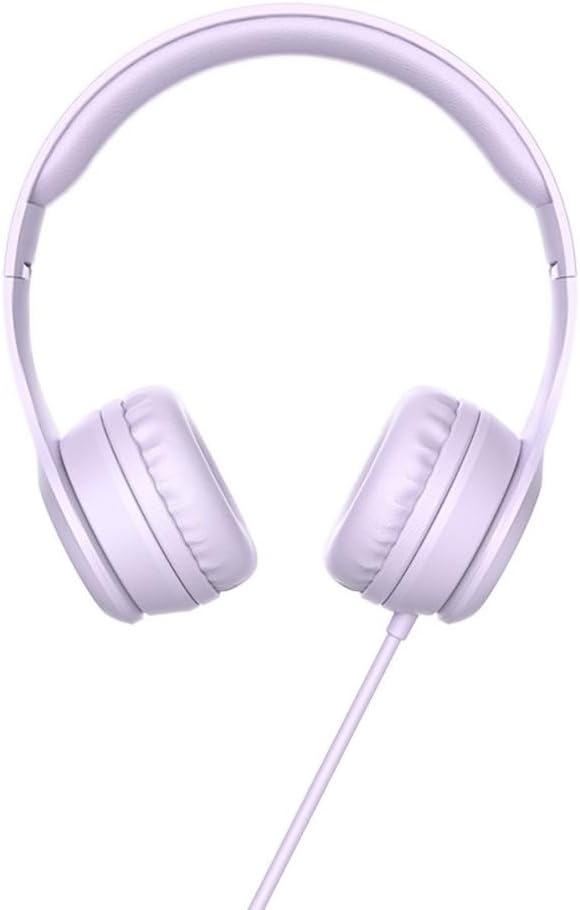
Hoco W21 Graceful Charm Wired Headphones User Manual
Model: W21 Purple | Brand: HOCO
1. Киришүү
Thank you for choosing the Hoco W21 Graceful Charm Wired Headphones. This manual provides detailed instructions for the proper use, setup, and maintenance of your new headphones. Please read this manual thoroughly before using the product to ensure optimal performance and longevity.
2. Продукциянын өзгөчөлүктөрү
- Баяндамачы: 40mm drivers for clear audio.
- Күч: Rated power of 10mW; maximum input power of 50mW.
- Байланыш: Standard Ø3.5mm audio plug for universal compatibility.
- Кабель: High elastic braided cable with a length of 1.2m for durability and flexibility.
- Микрофон: Integrated controller with a microphone for hands-free communication.
- Контролдоо: One-button operation control for easy management of calls and music.
3. Пакеттин мазмуну
Сураныч, кутудан чыкканда пакеттин мазмунун текшериңиз:
- Hoco W21 Graceful Charm Wired Headphones
- Колдонуучунун Колдонмосу (бул документ)

4. Орнотуу
- Кулакчындарды таңгактан чыгарыңыз: Кулакчындарды таңгагынан этияттык менен алып чыгыңыз.
- Identify the Audio Plug: Locate the Ø3.5mm audio plug at the end of the headphone cable.
- Түзмөккө туташуу: Insert the Ø3.5mm audio plug into the headphone jack of your mobile phone, tablet, or any compatible audio device. Ensure the plug is fully inserted for proper audio output.
- Тууралоону тууралоо: Place the headphones over your ears. Adjust the headband to ensure a comfortable and secure fit. The earcups are designed to sit over the ear.

5. Иштөө нускамалары
The Hoco W21 headphones feature a convenient one-button inline control for managing audio and calls.
5.1 Музыканы ойнотуу
- Ойнотуу/тындыруу: Учурдагы тректи ойнотуу же тындыруу үчүн баскычты бир жолу басыңыз.
- Кийинки трек: Кийинки трекке өтүү үчүн баскычты эки жолу тез басыңыз.
- Мурунку трек: Мурунку трекке кайтуу үчүн баскычты үч жолу тез басыңыз.
5.2 Чалууларды башкаруу
- Чалууга жооп берүү/аяктоо: Кирүүчү чалууга жооп берүү же уланып жаткан чалууну аяктоо үчүн баскычты бир жолу басыңыз.
- Чакырууну четке кагуу: Кирүүчү чалууну четке кагуу үчүн баскычты болжол менен 2 секунд басып туруңуз.

6. Техникалык тейлөө
Proper maintenance will extend the life of your headphones.
- Тазалоо: Кулакчындарды жана баш боону тазалоо үчүн жумшак, кургак чүпүрөктү колдонуңуз. Катуу химиялык заттарды же абразивдүү материалдарды колдонбоңуз.
- Сактагыч: Колдонулбай турган учурда, кулакчындарды таза, кургак жерде, өтө жогорку температурадан жана түз күн нурунан алыс сактаңыз. Кабелди чаташтырып албаңыз.
- Нымдуулуктан качыңыз: Do not expose the headphones to water or excessive moisture. They are not waterproof.
- Этияттык менен мамиле кылуу: Avoid dropping the headphones or subjecting them to strong impacts. Do not pull the cable forcefully.

7. Кыйынчылыктарды
| Көйгөй | Мүмкүн себеп | Чечим |
|---|---|---|
| Үн жок же үнү төмөн |
|
|
| Микрофон иштебей жатат |
|
|
| Үн бурмалоо |
|
|
8. Техникалык шарттар
| Модель номери | W21 Purple |
| Бренд | HOCO |
| Диаметри | 40мм |
| Номиналдуу кубаттуулук | 10мВт |
| Максималдуу киргизүү күчү | 50мВт |
| Аудио Plug | Ø3.5мм |
| Кабель түрү | High elastic braid |
| Кабелдин узундугу | 1.2 м |
| Микрофон | Controller with mic |
| Wire Control | One-button operation control |
| Продукциянын өлчөмдөрү | 19.4 x 17.3 x 7.4 см |
| Продукт Салмагы | 109 г |
| Түс | Кызгылт көк |
9. Кепилдик жана колдоо
Hoco products are manufactured to high quality standards. For information regarding warranty coverage and customer support, please refer to the warranty card included with your purchase or visit the official Hoco webсайт. Сатып алуу квитанциясын кепилдик дооматтары үчүн сатып алуунун далили катары сактаңыз.
For technical assistance or further inquiries, please contact your retailer or the authorized service center in your region.