1. Киришүү
Thank you for choosing the Fortte TEZAUR Computer Desk. This manual provides essential information for the safe assembly, operation, and maintenance of your new desk. Please read these instructions carefully before beginning assembly and retain them for future reference.
The Fortte TEZAUR desk is designed for daily use in a home office or gaming setup, offering a functional and ergonomic workspace. It features a rectangular design with a black matte finish combined with orange accents, and includes a single drawer for storage.
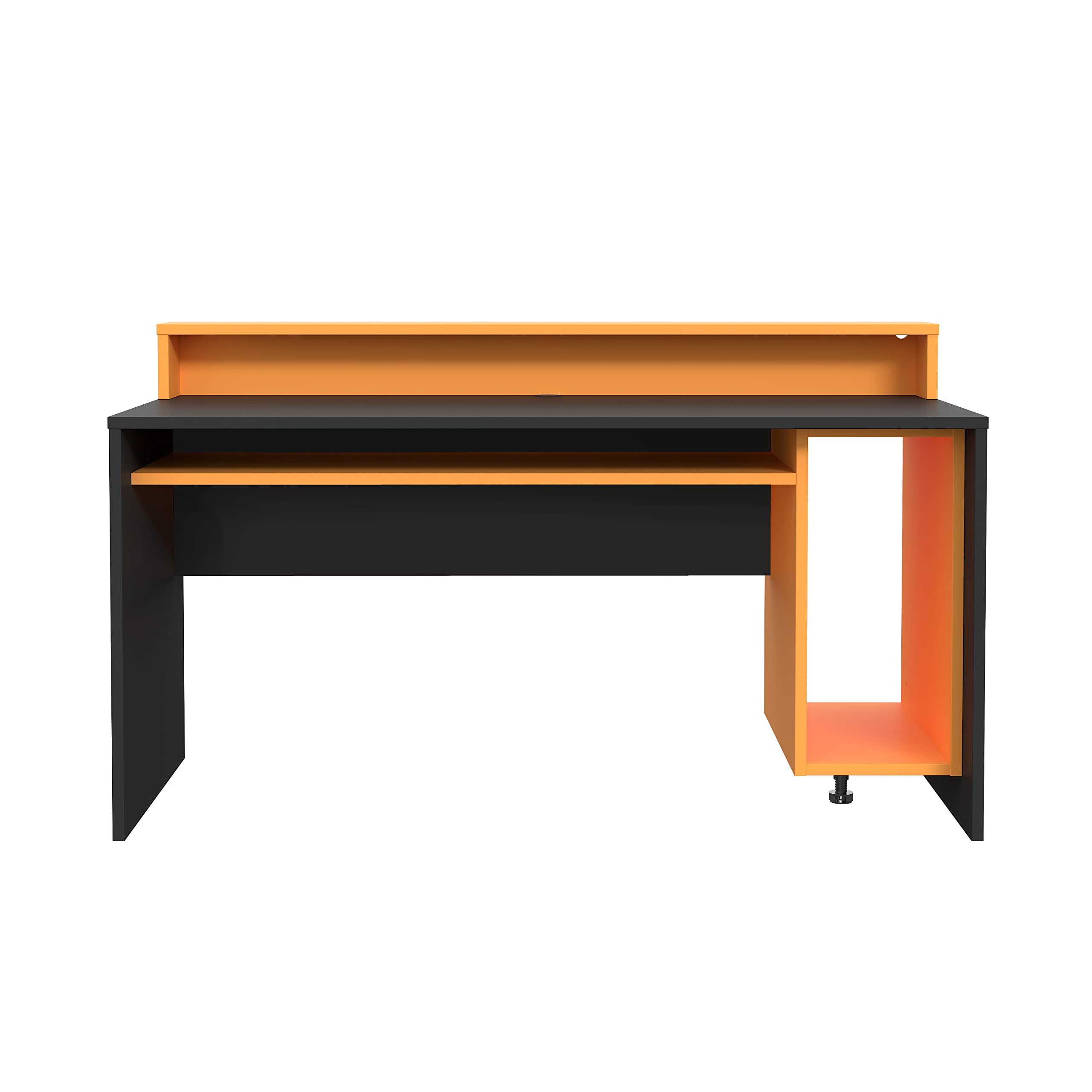
Figure 1: Fortte TEZAUR Computer Desk in a typical setup.
2. Пакеттин мазмуну
Your Fortte TEZAUR Computer Desk is typically shipped in multiple packages. Please ensure all packages are received and inspect them for any signs of damage before opening. If any parts are missing or damaged, please contact customer support immediately.

Figure 2: Product may be shipped in multiple packages.
The packages should contain all necessary components for assembly, including:
- Desk panels (tabletop, side panels, back panel, drawer components)
- Monitor stand/raised platform components
- Hardware pack (screws, dowels, cam locks, drawer slides, etc.)
- Монтаждоо көрсөтмөлөрү (бул колдонмо)
3. Орнотуу жана монтаждоо нускамалары
Assembly of the Fortte TEZAUR Computer Desk requires basic household tools and can typically be completed by one or two adults. Please follow the step-by-step diagrams provided in the separate assembly guide included with your product. Ensure you have sufficient space for assembly and protect your floor surface.
3.1 Керектүү куралдар (кошумча эмес)
- Филлипс бурагыч
- Балка (дубель үчүн)
- Measuring tape (optional, for placement)
3.2 Чогултуу боюнча кеңештер
- Баштоодон мурун бардык бөлүктөрдү жана жабдыктарды аныктаңыз.
- Do not overtighten screws to avoid damaging the wood-based material.
- Чийип кетпеш үчүн жумшак, таза бетке чогултуңуз.
- Ensure all connections are secure before using the desk.
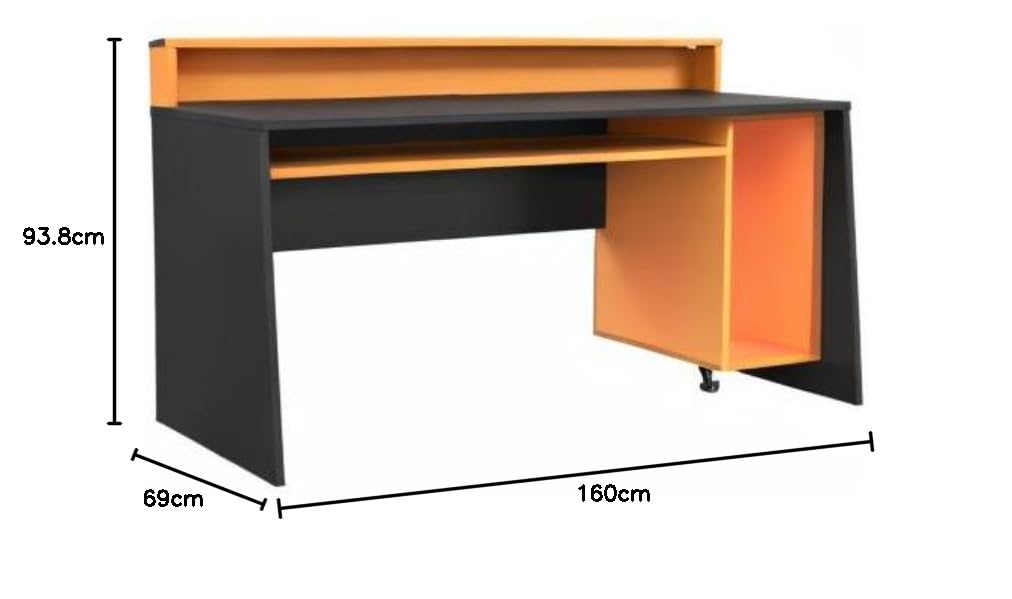
3-сүрөт: Мейкиндикти пландаштыруу үчүн столдун өлчөмдөрү.
4. Иштөө нускамалары
The Fortte TEZAUR Computer Desk is designed for optimal functionality and comfort. Here are some key features and usage guidelines:
- Эргономикалык дизайн: The desk features a raised platform, ideal for placing a monitor at an ergonomic viewing height, reducing neck and eye strain.
- Сактагыч: An open compartment provides ample storage space, and a single drawer offers concealed storage for personal items or office supplies.
- Кабелдик башкаруу: A cable grommet is integrated into the compartment for easy and organized cable routing, keeping your workspace tidy.
- Салмак сыйымдуулугу: The maximum load on the tabletop is 40 kg. The monitor stand can support up to 10 kg, and the compartment can hold up to 5 kg. Do not exceed these limits to ensure stability and longevity of the desk.

Figure 4: Detail of the monitor stand and storage compartment.
5. Техникалык тейлөө
To ensure the longevity and appearance of your Fortte TEZAUR Computer Desk, follow these maintenance guidelines:
- Тазалоо: Үстөлдүн беттерин жумшак менен сүртүңүз, гamp кездеме. Катуу химиялык заттарды, абразивдүү тазалагычтарды же финишке зыян келтирүүчү жылтыраткычтарды колдонуудан алыс болуңуз.
- Төгүлүүлөр: Immediately wipe up any spills to prevent staining or damage to the wood-based material.
- Жылуулук жана нымдуулук: Ысык буюмдарды түз бетине койбоңуз. Коштоочу төшөктөрдү же коргоочу жаздыкчаларды колдонуңуз. Үстөлдүн кыйшайып же өңү өчүп калбашы үчүн, аны ашыкча нымдуулуктан же түз күн нурунан алыс кармаңыз.
- Текшерүүлөр: Мезгил-мезгили менен бардык бурамалар менен арматураларды текшерип туруңуз, алар бекем бойдон калууда. Керек болсо кайра тартыңыз.
6. Кыйынчылыктарды
If you encounter any issues with your Fortte TEZAUR Computer Desk, refer to the following common troubleshooting tips:
- Стол титиреп жатат: Ensure all screws and fittings are securely tightened. Check that the desk is placed on a level surface. Adjust any leveling feet if present.
- Сумка жылмакай жылбай жатат: Verify that the drawer slides are correctly installed and aligned. Ensure no obstructions are in the drawer tracks. Lubricate slides with a silicone-based spray if needed.
- Жетишпеген бөлүктөр: Double-check all packaging materials. If parts are genuinely missing, contact customer support with your purchase details and the specific part numbers from the assembly guide.
- Surface damage during assembly: If minor scratches or chips occur, furniture repair pens or touch-up kits can be used. For significant damage, contact customer support.
7. Техникалык шарттар

Figure 5: Fortte TEZAUR Computer Desk, alternative view.
| Өзгөчөлүк | Деталь |
|---|---|
| Бренд | Forte |
| Модель номери | TZRB212-C913 |
| Түс | Black matte combined with orange |
| Өнүмдүн Өлчөмдөрү (Ж x Y x D) | 160 x 93.8 x 69 см |
| Материал | Engineered wood, Metal, Wood-based materials, Melamine |
| Өзгөчөлүктөр | Ergonomic, Cable management grommet, Damage-resistant ABS edge |
| Тартмалардын саны | 1 |
| Сунушталган колдонуу | Work, Gaming |
| Столдун жүктөө жөндөмдүүлүгү | 40 кг |
| Monitor Stand Load Capacity | 10 кг |
| Compartment Load Capacity | 5 кг |
8. Кепилдик жана колдоо
For information regarding warranty coverage, claims, or technical support, please refer to the warranty card included with your product or contact Forte customer service directly. Keep your proof of purchase for any warranty-related inquiries.
Contact information for Forte customer support can typically be found on the manufacturer's webсайтында же продуктунун таңгагында.