
1. Киришүү
Thank you for choosing the Spacetronik SPE-114 Electric Height Adjustable Desk Frame. This manual provides essential information for the safe and efficient assembly, operation, and maintenance of your new desk frame. Please read these instructions carefully before use and retain them for future reference.
This electric height adjustable desk frame is designed to promote a healthier work environment by allowing seamless transitions between sitting and standing positions. Its advanced features, including memory presets, ensure a personalized and ergonomic workspace.
2. Коопсуздук нускамалары
- Монтаждоодон мурун бардык компоненттер бар экенин жана бузулбаганын текшериңиз. Эгерде кандайдыр бир бөлүктөрү жок же туура эмес болсо, колдонбоңуз.
- Кыймылдуу бөлүктөрдөн жаракат албаш үчүн иш учурунда балдарды жана үй жаныбарларын столдон алыс кармаңыз.
- Do not place hands or other body parts near the moving parts of the frame to avoid pinching.
- Ensure the power cord is not damaged or pinched. Only use the provided power adapter.
- Үстөлдү ашыкча жүктөбөңүз. Максималдуу салмак сыйымдуулугу үчүн мүнөздөмөлөрдү караңыз.
- Avoid placing liquids directly on the control panel or motor housing.
- If the desk frame makes unusual noises, stops moving, or shows error codes, discontinue use and consult the troubleshooting section or contact customer support.
- Бул продукт ички колдонуу үчүн гана арналган.
3. Пакеттин мазмуну
Please verify that all the following components are included in your package. If any parts are missing or damaged, please contact customer support.
- Desk Frame Legs (2)
- Кайчылаш тилке/Тирек устун
- Мотор чогултуу
- Башкаруу панели
- Кубаттуу адаптер жана кабель
- Hardware Kit (screws, bolts, tools)
- User Manual
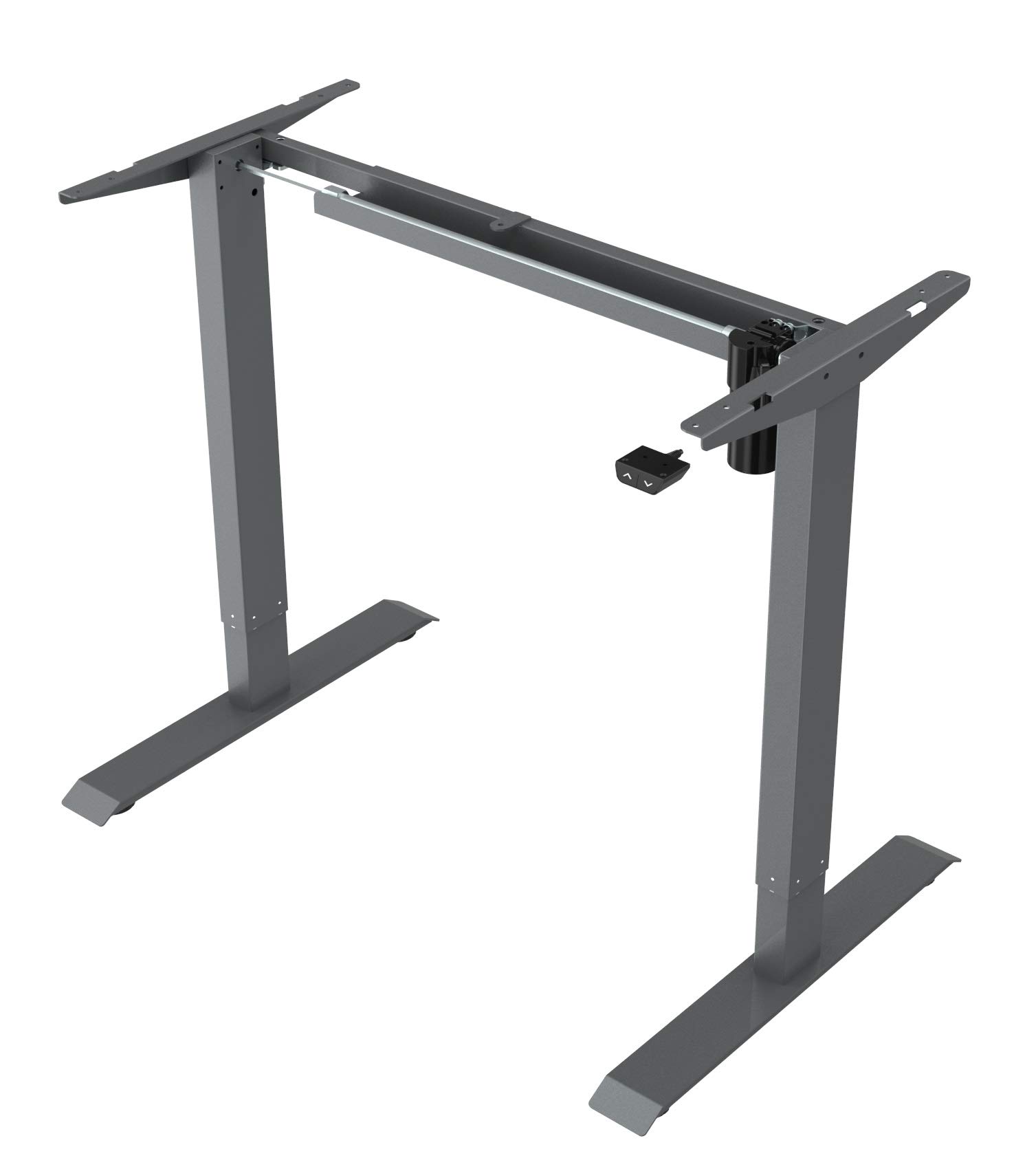
This image displays the main components of the Spacetronik SPE-114 electric height adjustable desk frame, including the legs, crossbar, and motor assembly, ready for assembly.
4. Орнотуу жана чогултуу
Assembly typically requires two people. Ensure you have enough space and the necessary tools (usually included in the hardware kit).
- Компоненттерди таңгактан чыгаруу: Таңгактан кылдаттык менен бардык бөлүктөрүн алып салыңыз жана чийилип калбаш үчүн таза, жумшак бетке жаткызыңыз.
- Буттарды жана рычагды чогултуңуз: Attach the desk legs to the crossbar/support beam using the provided screws and tools. Ensure all connections are secure.
- Мотор жана башкаруу кутучасын орнотуу: Mount the motor assembly and control box to the designated positions on the frame, following the diagrams in the detailed assembly guide (if provided separately).
- Башкаруу панелин тиркөө: Secure the control panel to the underside of your chosen desktop or to the frame in an easily accessible location.
- Кабелдерди туташтыруу: Connect the motor cable, control panel cable, and power adapter to the control box. Ensure all connections are firm.
- Mount Desktop (Not Included): Carefully place your desktop onto the assembled frame. Align the desktop with the pre-drilled holes (if applicable) or mark and drill new pilot holes. Secure the desktop to the frame using appropriate screws.
- Баштапкы кубаттоо: Plug the power adapter into a wall outlet. The desk may perform an initial reset or calibration.

Бурчтуу view of the fully assembled Spacetronik SPE-114 desk frame, showcasing its sturdy construction and grey finish.
5. Иштөө нускамалары
5.1 Башкаруу панелинин үстүнөview

А деталдуу view of the control panel for the Spacetronik SPE-114 desk, featuring up/down buttons and memory preset buttons for three height positions.
The control panel typically features:
- Өйдө (▲) / Төмөн (▼) баскычтары: Press and hold to adjust the desk height. Release to stop.
- Эстутум алдын ала орнотуулары (1, 2, 3): Buttons to save and recall preferred height settings.
- Дисплей: Shows the current desk height in centimeters or inches.
5.2 Бийиктикти тууралоо
Столдун бийиктигин тууралоо үчүн, баскычын басып кармап туруңуз Өйдө (▲) or Төмөн (▼) button until the desk reaches your desired height. Release the button to stop the movement.
5.3 Эстутум алдын ала орнотууларды орнотуу
The desk frame allows you to save up to three preferred height positions:
- Өйдө/Төмөн баскычтары менен үстөлдү каалаган бийиктикке тууралаңыз.
- Press the 'M' or 'SET' button (if available, otherwise proceed to step 3). The display may flash.
- Immediately press one of the memory preset buttons (1, 2, or 3). The current height is now saved to that button.
- Repeat for other desired height positions.
5.4 Эстутумдун алдын ала орнотууларын кайра чакырып алуу
To move the desk to a saved height, simply press the corresponding memory preset button (1, 2, or 3). The desk will automatically move to the saved position.

A person is shown working at a Spacetronik height adjustable desk while using an under-desk exercise bike, illustrating the desk's support for active work styles.
6. Техникалык тейлөө
- Тазалоо: Үстөлдүн алкагын жумшак менен сүртүңүз, гamp cloth. Avoid abrasive cleaners or solvents that could damage the finish. Ensure the desk is unplugged before cleaning.
- Кабелдик башкаруу: Regularly check all cables for wear or damage. Ensure they are neatly organized to prevent tripping hazards or accidental disconnections.
- Бекер текшерүүлөр: Мезгил-мезгили менен бардык бурамалар менен болтторду текшерип туруңуз, алар бекем бойдон калууда. Керек болсо кайра тартыңыз.
- Майлоо: The moving parts of the desk frame are generally maintenance-free and do not require lubrication.
7. Кыйынчылыктарды
| Көйгөй | Мүмкүн себеп | Чечим |
|---|---|---|
| Иш стол кыймылдабайт. | Кубат кабели ажыратылган, мотор кабели бошоп калган, ашыкча жүктөлүп калган же системада ката кеткен. | Check all cable connections. Reduce weight on the desk. Perform a reset (unplug for 30 seconds, then plug back in). |
| Үстел бир калыпта эмес кыймылдайт. | Uneven weight distribution, loose fasteners, or calibration issue. | Distribute weight evenly. Check and tighten all fasteners. Perform a system reset. |
| Ката коду көрсөтүлдү. | Атайын системанын бузулушу. | Refer to the detailed error code list in a separate technical manual (if available) or contact customer support with the specific code. Often, a power cycle (unplug, wait, plug in) can resolve minor errors. |
| Үстөл кыймылдын ортосунда токтойт. | Overheat protection, obstruction, or power interruption. | Allow the motor to cool down for 20 minutes. Check for any obstructions. Ensure stable power supply. |
8. Техникалык шарттар
- Продукциянын өлчөмдөрү (L x W x Y): 65 x 129 x 121 см (25.6 x 50.8 x 47.6 дюйм)
- Салмагы: 22.5 кг (49.6 фунт)
- Өндүрүүчү: Spacetronik
- ASIN: B084HFPW2N
- Article Model Number: SPE-243
- Бөлүмдүн номери: SPE114
- Бренд: Spacetronik
- Форма: Төрт бурчтуу
- Түсү: Боз
- Өзгөчөлүктөр: Ergonomic, Electric height adjustment
- Тарткычтардын саны: 1 (Note: This specification might refer to an optional accessory or a complete desk model, as the product is a frame without a worktop.)
- Ассамблея талап кылынат: Ооба
9. Кепилдик жана колдоо
Spacetronik products are manufactured to high-quality standards. For information regarding warranty coverage, please refer to the warranty card included with your purchase or visit the official Spacetronik webсайт.
If you encounter any issues or have questions not covered in this manual, please contact Spacetronik customer support for assistance. Have your model number (SPE-243) and purchase details ready when contacting support.