

Introduction
Thank you for choosing the XO B24 Foldable Bluetooth Headphones. This manual provides essential information for the safe and efficient use of your device. Please read it carefully before use and retain it for future reference.
The XO B24 headphones are designed for comfort and portability, featuring high-quality materials and a secure fit for an optimal audio experience.
Продукт бүттүview
The XO B24 headphones offer both wired and wireless connectivity, a built-in microphone for calls, and a foldable design for easy storage and transport.
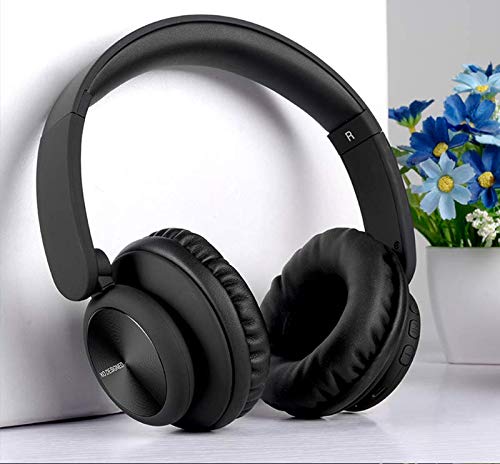
Image: XO B24 Foldable Bluetooth Headphones, showcasing their over-ear design and black color.
Техникалык шарттар
| Өзгөчөлүк | Description |
|---|---|
| Бренд аты | XO |
| Модель аты | B24 |
| Модель номери | XO-B24 |
| Түс | Кара |
| Наушник форма фактору | On-Ear |
| Байланыш технологиясы | Зымдуу, Зымсыз (Bluetooth) |
| Наушник уясы | 3.5 мм Джек |
| Зымсыз байланыш технологиясы | Bluetooth |
| Өзгөчөлүктөр | Includes Microphone, Foldable Design |
| Микрофон | Ооба |
| Noise Cancellation | Жок |
| Башкаруу түрү | Үндү башкаруу, сенсордук башкаруу |
| Шайкеш түзмөктөр | Көп түзмөк |
| Батарея талап кылынат | Ооба |
Жайгашуу
1. Наушниктерди заряддоо
- Берилген USB кубаттоо кабелин кулакчындардын кубаттоо портуна туташтырыңыз.
- USB кабелинин экинчи учун шайкеш келген USB кубат булагына (мисалы, компьютер, дубал адаптери) сайыңыз.
- Кубаттоо учурунда LED индикатору күйүп, толук заряддалгандан кийин өчөт же түсүн өзгөртөт.
2. Bluetooth Жупташтыруу
- Наушниктердин толук заряддалганын текшериңиз.
- Press and hold the Power button on the headphones until the LED indicator flashes rapidly, indicating pairing mode.
- Түзмөгүңүздө (смартфон, планшет, компьютер) Bluetooth иштетип, жеткиликтүү түзмөктөрдү издеңиз.
- Select "XO B24" from the list of found devices.
- Once paired, the LED indicator will stop flashing and may show a solid light or flash slowly.
3. Зымдуу туташуу (милдеттүү эмес)
- Insert one end of the 3.5mm audio cable into the headphone jack on the XO B24.
- Plug the other end of the 3.5mm audio cable into the audio output jack of your device.
- The headphones will operate in wired mode, conserving battery life.
Иштөө нускамалары
Күйгүзүү/өчүрүү
- Күйгүзүү: LED индикатору күйгөнгө чейин Кубат баскычын болжол менен 3 секунд басып туруңуз.
- Өчүрүү: LED индикатору өчкөнгө чейин Кубат баскычын болжол менен 3-5 секунд басып туруңуз.
Музыканы ойнотуу
- Ойнотуу/тындыруу: Press the Multi-function button (often the Power button) once.
- Кийинки трек: Press and hold the Volume Up button or a dedicated 'Next' button.
- Мурунку трек: Press and hold the Volume Down button or a dedicated 'Previous' button.
Үндү көзөмөлдөө
- Көлөмүн жогорулатуу: Үнүн жогорулатуу баскычын басыңыз.
- Көлөмдү азайтуу: Үндү азайтуу баскычын басыңыз.
Чалууларды башкаруу
- Чалууга жооп берүү/аяктоо: Көп функциялуу баскычты бир жолу басыңыз.
- Чакырууну четке кагуу: Көп функциялуу баскычты болжол менен 2 секунд басып, кармап туруңуз.
Бүктөө механизми
- To fold the headphones for storage, gently rotate the earcups inwards towards the headband until they are compact.
- To unfold, reverse the process, ensuring the earcups click securely into place.
Техникалык тейлөө
- Тазалоо: Наушниктерди тазалоо үчүн жумшак, кургак чүпүрөктү колдонуңуз. Абразивдүү тазалагычтарды же эриткичтерди колдонбоңуз.
- Сактагыч: Колдонулбаганда, наушниктерди салкын, кургак жерде, тике күндүн нурунан жана өтө температурадан алыс сактаңыз. Ыкчам сактоо үчүн бүктөлүүчү дизайнды колдонуңуз.
- Батареяга кам көрүү: Батареянын иштөө мөөнөтүн узартуу үчүн, кулакчындарды бат-баттан толук кубаттап турбаңыз. Аларды дайыма колдонууда болбосо да, үзгүлтүксүз заряддаңыз.
- Нымдуулуктан качыңыз: Наушниктерди суудан жана ашыкча нымдуулуктан алыс кармаңыз.
Проблемаларды чечүү
| Көйгөй | Чечим |
|---|---|
| Кулакчындар күйбөйт. | Наушниктердин толук заряддалганын текшериңиз. Кубат булагына туташып, кайра аракет кылыңыз. |
| Bluetooth аркылуу жупташтыруу мүмкүн эмес. | Make sure the headphones are in pairing mode (LED flashing rapidly). Disable and re-enable Bluetooth on your device. Move closer to the headphones. |
| Үн жок же үнү төмөн. | Check the volume levels on both the headphones and your connected device. Ensure the headphones are properly paired or the 3.5mm cable is securely connected. |
| Үн сапаты начар. | Ensure there are no obstructions between the headphones and your device. Try moving closer to your device. Disconnect and reconnect the Bluetooth connection. |
| Микрофон иштебей жатат. | Ensure the headphones are properly connected and selected as the audio input device on your system. Check if the microphone is muted on your device. |
Кепилдик жана колдоо
The XO B24 Foldable Bluetooth Headphones come with a standard manufacturer's warranty. Please refer to the warranty card included in your product packaging for specific terms and conditions.
For technical support, troubleshooting assistance, or warranty claims, please contact your retailer or the official XO customer service. Contact information can typically be found on the product packaging or the manufacturer's webсайт.