
Introduction
The EVOLVEO EASYPHONE FM is a user-friendly mobile phone designed for straightforward communication. It features large, separated keys, a clear display, and essential functions to ensure ease of use. This manual provides instructions for setting up, operating, and maintaining your device.
1. Пакеттин мазмуну
Сураныч, пакетте төмөнкү нерселерди текшериңиз:
- EVOLVEO EASYPHONE FM Mobile Phone
- Заряддоо док
- AC адаптер
- Li-ion 1000 mAh Battery
- User Manual
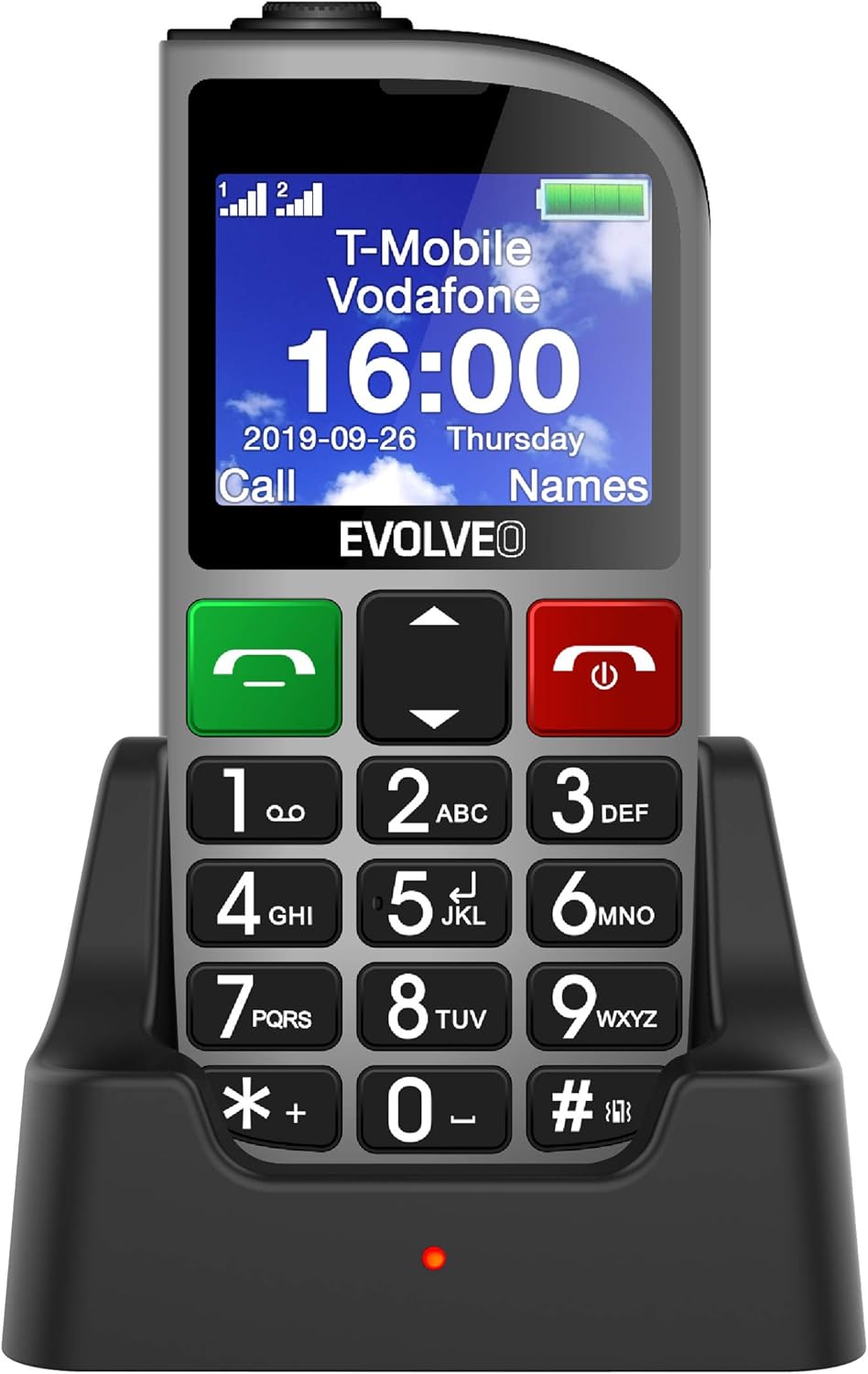
1.1-сүрөт: EVOLVEO EASYPHONE FM placed in its charging dock. The phone features a large display showing time and network information, with prominent green call and red end call buttons, and a numeric keypad below.
2. Орнотуу
2.1. Батареяны орнотуу жана заряддоо
- Телефондун арткы капкагын алып салыңыз.
- Insert the Li-ion 1000 mAh battery, ensuring the contacts align correctly.
- Арткы жапкычты ордуна коюңуз.
- Connect the AC adapter to the charging dock.
- Place the phone into the charging dock. The charging indicator light will illuminate.
- Телефонду биринчи жолу колдонуудан мурун толук заряддоого мүмкүнчүлүк бериңиз.
2.2. SIM-карта(лар) салынууда
The phone supports two SIM cards (Dual SIM) for GSM/GPRS 850/900/1800/1900 MHz networks.
- Телефон өчүк экенин текшериңиз.
- Арткы капкакты жана батареяны алып салыңыз.
- SIM карта уячаларын табыңыз.
- Insert your SIM card(s) into the designated slots, ensuring correct orientation.
- Батареяны жана арткы капкакты кайра салыңыз.
2.3. Inserting a MicroSDHC Card
You can expand the phone's storage for music, photos, and other files by inserting a MicroSDHC card.
- Телефон өчүк экенин текшериңиз.
- Арткы капкакты жана батареяны алып салыңыз.
- Locate the MicroSDHC card slot.
- Gently insert the MicroSDHC card until it clicks into place.
- Батареяны жана арткы капкакты кайра салыңыз.
3. Иштөө нускамалары
3.1. Күйгүзүү/өчүрүү
- Күйгүзүү үчүн: басып, кармап туруңуз Кызыл чекиттүү чалуу/кубат экран күйгүчө баскычын басыңыз.
- Өчүрүү үчүн: басып, кармап туруңуз Кызыл чекиттүү чалуу/кубат button until the power off options appear, then confirm.

3.1-сүрөт: Фронт view of the EVOLVEO EASYPHONE FM, highlighting the large display, call buttons, and numeric keypad for easy dialing.
3.2. Чалууларды кабыл алуу жана кабыл алуу
- Чакыруу: Dial the number using the numeric keypad and press the Жашыл чакыруу баскычы.
- Тез терүү: The phone supports quick access to 8 popular contacts. Assign numbers to keys 2-9 for speed dialing. Press and hold the assigned key to dial.
- Чалуу кабыл алуу: басыңыз Жашыл чакыруу кирүүчү чалууга жооп берүү үчүн баскычты басыңыз.
- Чалууну аяктоо: басыңыз Кызыл чекиттүү чалуу/кубат button to end an active call.
3.3. SMS билдирүүлөрдү жөнөтүү жана алуу
The separated keyboard keys facilitate easy writing of SMS messages.
- Navigate to the Messaging menu.
- Select "Write Message" to compose a new SMS.
- Алуучунун номерин киргизиңиз же байланыштардан тандаңыз.
- Ариптакта аркылуу билдирүүңүздү териңиз.
- Press "Send" to transmit the message.
3.4. Үндү башкаруу
Adjust the call and ringtone volume using the dedicated volume control button located on the left side of the phone.

3.2-сүрөт: Left side of the phone, showing the volume control buttons and the FM radio activation button.
3.5. SOS өзгөчө кырдаал баскычы
The SOS button, located on the back of the device, allows for quick emergency calls and messages.
- Before use, configure up to five emergency contact numbers in the phone settings.
- Шашылыш учурда, баскычын басып, кармап туруңуз SOS баскычы.
- The phone will automatically dial the predefined emergency numbers sequentially and send an emergency message to these contacts.

3.3-сүрөт: Арткы view of the EVOLVEO EASYPHONE FM, showing the prominent red SOS emergency button and the camera lens.
3.6. FM радиосу
The phone includes an FM radio with a dedicated activation button.
- To turn on the FM radio, press the independent FM button on the side of the device.
- The radio can play in the background, allowing you to use other phone functions.
- During an incoming or outgoing call, the radio will automatically mute and resume playback after the call ends.
3.7. Фонар
A powerful flashlight is integrated into the phone, activated by a dedicated button.
- Press the dedicated flashlight button on the side of the phone to turn the flashlight on or off.

3.4-сүрөт: Right side of the phone, showing the dedicated flashlight button.
3.8. Башка өзгөчөлүктөр
- Камера: The phone includes a VGA camera for basic photo capture.
- Музыка ойноткучу: Музыка ойнотуу files stored on your MicroSDHC card.
- Digital Recorder (Dictaphone): Үн жазууларын жаздырыңыз.
- Календар: Маанилүү даталарга жана окуяларга көз салып туруңуз.
- Ойготкуч саат: Эстеткичтер үчүн ойготкучтарды коюу.
- Калькулятор: Негизги эсептөөлөрдү жүргүзүү.
- Чоңойтуучу айнек: Utilize the screen as a magnifying glass.
4. Техникалык тейлөө
4.1. Аспапты тазалоо
- Телефондун бетин жана экранын тазалоо үчүн жумшак, кургак чүпүрөктү колдонуңуз.
- Avoid using liquid cleaners or abrasive materials, as they may damage the device.
- Заряддоо портуна же башка тешиктерге нымдуулук кирбегенин текшериңиз.
4.2. Батареяга кам көрүү
- Батареянын иштөө мөөнөтүн узартуу үчүн, телефонду өтө жогорку температурага дуушар кылбаңыз.
- Charge the battery regularly, but avoid overcharging or letting it completely drain for extended periods.
- Эгер телефон көпкө колдонулбай турган болсо, аны сактоодон мурун батарейкасын болжол менен 50% га чейин заряддаңыз.
5. Кыйынчылыктарды
If you encounter issues with your EVOLVEO EASYPHONE FM, refer to the following common problems and solutions:
5.1. Телефон күйбөйт
- Батарея туура орнотулганын жана заряддалганын текшериңиз.
- Connect the phone to the charger and wait a few minutes before attempting to power it on again.
- Батарея контакттары таза экенин текшериңиз.
5.2. Cannot Make or Receive Calls
- Check if the SIM card(s) are correctly inserted and activated.
- Тармактын камтуусу бар экенине ынаныңыз.
- Verify that the phone is not in airplane mode (if applicable).
- Check your account balance or subscription status with your service provider.
5.3. FM Radio Not Working
- FM сигналы жакшы кабыл алынган аймакта экениңизди текшериңиз.
- Check if the FM radio is properly activated using its dedicated button.
5.4. Маселелерди көрсөтүү
- If the display is dim, check the brightness settings.
- If the screen is unresponsive, try restarting the phone.
6. Техникалык шарттар
| Бренд | Evolveo |
| Модел | EASYPHONE FM |
| Дисплей өлчөмү | 1.8 дюйм |
| Display Resolution | 320 x 240 px |
| Уюлдук технология | 2G (GSM/GPRS 850/900/1800/1900 MHz) |
| SIM колдоо | Кош SIM |
| Байланыш | Bluetooth, 3.5 мм уяча |
| Батарея | Li-ion 1000 мАч |
| Өлчөмдөр | 130 × 61 × 16.5 мм |
| Салмагы | 105 г (батарея менен) |
| Камера | VGA |
| Сактагычты кеңейтүү | MicroSDHC карта уячасы |
Эскертүү: Техникалык мүнөздөмөлөр алдын ала эскертүүсүз өзгөртүлүшү мүмкүн.
7. Кепилдик жана колдоо
For warranty information and technical support, please refer to the warranty card included in your package or visit the official Evolveo webсайт. Кепилдик дооматтар үчүн сатып алганыңыздын далилин сактаңыз.