
Introduction
The Power Dynamics PPA30 is a versatile 30W 100V amplifier designed for small to medium-sized public address and background music applications. This amplifier features multiple input options including microphone inputs, stereo line inputs, Bluetooth connectivity for wireless streaming, and a built-in MP3 player with USB and SD card support. A remote control is included for convenient operation.
Коопсуздук маалыматы
Please read these instructions carefully before using the device. Keep this manual for future reference. Always observe the following safety precautions:
- Аппаратты жамгырга же нымга тийгизбеңиз.
- Корпусун ачпаңыз. Ичинде колдонуучу тейлей турган бөлүктөр жок. Бардык тейлөөлөрдү квалификациялуу кызматкерлерге тапшырыңыз.
- электр менен жабдууну камсыз кылуу voltage аппаратта көрсөтүлгөн талаптарга дал келет.
- Электр шнурын басуудан же кысып калуудан сактаңыз.
- Disconnect the device from the mains during lightning storms or when unused for long periods.
- Place the device on a stable, level surface with adequate ventilation.
Пакеттин мазмуну
Пакетти ачканда бардык буюмдардын бар экендигин жана жакшы абалда экендигин текшериңиз:
- Power Dynamics PPA30 Ampөмүрлүү
- Электр кабели
- Алыстан башкаруу
- User Manual
Продукт бүттүview
Front Panel
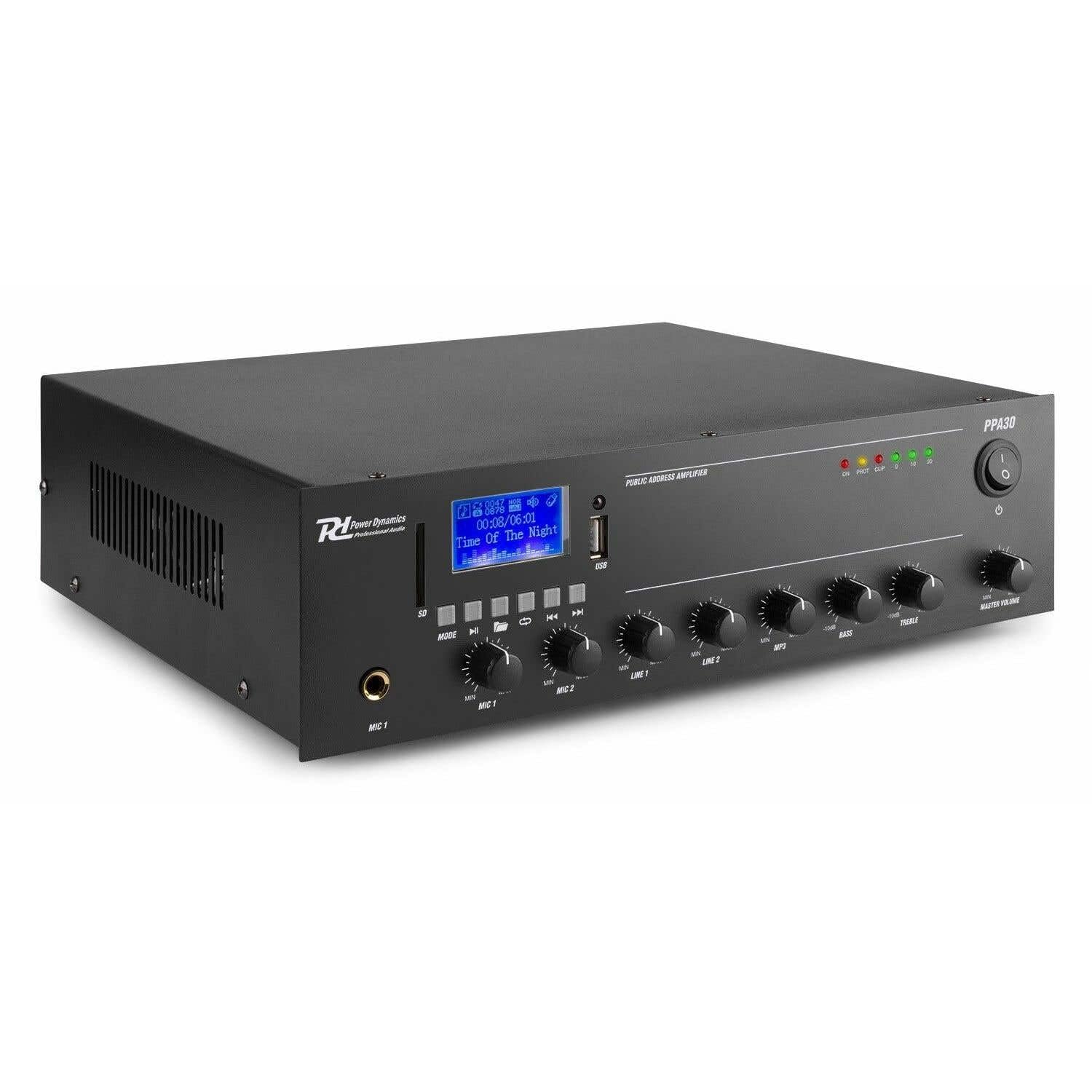
Figure 1: Front Panel Layout of the PPA30 Ampкөтөргүч. Бул сүрөттү көрсөтөт amplifier's front face, including the display screen, USB/SD card slots, control buttons for media playback, input volume controls for microphones and line inputs, bass and treble adjustments, and the master volume knob. The power switch and indicator lights are also visible.
Алдыңкы панель бардык негизги башкаруу элементтерине жана индикаторлорго мүмкүнчүлүк берет:
- Кубат которгучу: бурат ampөмүрдү күйгүзүү же өчүрүү.
- Дисплей экраны: Учурдагы режимди, трек маалыматын жана башка абал көрсөткүчтөрүн көрсөтөт.
- USB/SD карта уячалары: For connecting USB drives or SD cards for MP3 playback.
- Режим баскычы: Switches between input sources (Bluetooth, USB, SD, Line 1, Line 2).
- Медиа ойнотууну көзөмөлдөө: Play/Pause, Previous, Next, Repeat.
- MIC 1 & MIC 2 Киргизүүлөрү: Микрофондор үчүн 6.3 мм уяча киргизүүлөрү.
- MIC 1 & MIC 2 Volume Controls: Adjusts the volume for each microphone input.
- LINE 1 & LINE 2 Volume Controls: Adjusts the volume for line inputs.
- MP3 Volume Control: Adjusts the volume for USB/SD/Bluetooth playback.
- Bass & Treble Controls: Adjusts the low and high frequencies of the audio output.
- Негизги том: өндүрүштүн жалпы көлөмүн көзөмөлдөйт ampөмүрлүү.
- Индикатор жарыктары: Power (ON), Protection (PROT), Clip, and Output Level (0, 10, 20).
Арткы панель

Figure 2: Rear Panel Connections of the PPA30 Amplifier. This image illustrates the back of the amplifier, detailing the AC power input, DC input, speaker output terminals (COM, 8Ω, 70V, 100V), and RCA line inputs (LINE OUT, LINE 1, LINE 2, MIC 2). Safety warnings and product information are also visible.
The rear panel houses the power input, speaker outputs, and additional audio inputs:
- AC кубаттуулугун киргизүү: Connects to the main power supply.
- DC киргизүү: Optional 12V DC power input.
- Динамик чыгаруу терминалдары: Connections for 100V, 70V, and 8 Ohm speakers. Ensure correct impedance matching.
- LINE OUT: RCA output for connecting to another ampөмүр же жаздыруучу түзмөк.
- LINE 1 & LINE 2 Inputs: RCA stereo inputs for external audio sources (e.g., CD player, mixer).
- MIC 2 киргизүү: Additional 6.3mm jack input for a microphone.
Алыстан башкаруу

Figure 3: Remote Control for the PPA30 Amplifier. This image shows the handheld remote control with buttons for power, mode selection, volume adjustment, track navigation, EQ settings, and direct number input for track selection.
The remote control allows for convenient operation from a distance. Functions include power on/off, mode selection, volume control, track navigation, and EQ settings.
Жайгашуу
- Жайгашкан жери: жайгаштырыңыз amplifier on a flat, stable surface. Ensure adequate ventilation around the unit to prevent overheating.
- Динамик туташуу: Connect your 100V, 70V, or 8 Ohm speakers to the appropriate terminals on the rear panel. Ensure correct polarity (+ to + and - to - or COM). For 100V/70V systems, ensure your speakers are compatible and correctly wired for constant voltage.
- Аудио булагы туташуу:
- Микрофондор: Plug microphones into the MIC 1 or MIC 2 inputs on the front panel.
- Сызык түзүлүштөрү: Connect external audio sources (e.g., CD player, mixer) to the LINE 1 or LINE 2 RCA inputs on the rear panel.
- USB/SD карта: Insert a USB drive or SD card into the respective slot on the front panel for MP3 playback.
- Кубат туташуу: Connect the supplied power cable to the AC power input on the rear panel and then to a suitable mains outlet.
- Баштапкы күйгүзүү: күйгүзүңүз amplifier using the power switch on the front panel. The 'ON' indicator light should illuminate.
Иштөө нускамалары
Киргизүү булагын тандоо
басыңыз РЕЖИМ button on the front panel or remote control to cycle through available input sources: Bluetooth, USB, SD, Line 1, Line 2.
Bluetooth операциясы
- колдонуп, Bluetooth режимин тандаңыз РЕЖИМ button. The display will indicate Bluetooth mode.
- Смартфонуңузда, планшетиңизде же компьютериңизде Bluetooth'ду күйгүзүп, жеткиликтүү түзмөктөрдү издеңиз.
- Select "PPA30" from the list of devices to pair. Once paired, you can stream audio wirelessly to the ampөмүрлүү.
- Adjust the MP3 volume control on the front panel or the volume buttons on the remote control.
USB/SD карта ойнотуу
- USB дискти же MP3 аудиосу бар SD картаны салыңыз files тиешелүү уячага.
- The amplifier should automatically switch to USB or SD mode and begin playback. If not, select the correct mode using the РЕЖИМ баскычы.
- Use the Play/Pause, Previous, Next, and Repeat buttons on the front panel or remote control to manage playback.
- Adjust the MP3 volume control.
Микрофонду колдонуу
- Connect your microphone(s) to the MIC 1 or MIC 2 inputs.
- Slowly increase the corresponding MIC 1 or MIC 2 volume control until the desired level is reached.
- Avoid setting the volume too high to prevent feedback or clipping (indicated by the 'CLIP' light).
Line Input Use
- Connect your external audio source to the LINE 1 or LINE 2 RCA inputs.
- Select the appropriate line input using the РЕЖИМ баскычы.
- Adjust the corresponding LINE 1 or LINE 2 volume control.
Тон башкаруу
колдонуу БАС жана ҮЧЧҮ knobs on the front panel to adjust the low and high frequencies of the overall audio output to suit your preference or room acoustics.
Башкы том
The МАСТЕР ТОМУ knob controls the overall output level of all active audio sources. Adjust this to achieve the desired listening volume.
Техникалык тейлөө
- Тазалоо: Сыртын тазалоо үчүн жумшак, кургак чүпүрөктү колдонуңуз ampкөтөргүч. Абразивдүү тазалагычтарды же эриткичтерди колдонбоңуз.
- Вентиляция: Ашыкча ысып кетүүнүн алдын алуу үчүн желдетүү тешиктери жабылбагандыгын текшериңиз.
- Сактагыч: Эгерде түзмөктү узак убакытка сактап койсоңуз, аны электр тармагынан сууруп, салкын, кургак жерде сактаңыз.
Проблемаларды чечүү
| Көйгөй | Мүмкүн себеп | Чечим |
|---|---|---|
| Күч жок | Электр кабели туташкан эмес; Электр өчүрүү; Розеткадан электр энергиясы жок. | Check power cable connection; Turn power switch on; Test outlet with another device. |
| Үн чыгышы жок | Incorrect input selected; Volume too low; Speaker connections loose; Speakers faulty. | Select correct input (MODE button); Increase Master Volume and input specific volume; Check speaker wiring; Test with different speakers. |
| Бурмаланган үн | Volume too high (clipping); Incorrect tone settings; Faulty audio source. | Reduce Master Volume or input volume until 'CLIP' light is off; Adjust Bass/Treble controls; Test with a different audio source. |
| Bluetooth туташпай жатат | Bluetooth mode not selected; Device not in pairing mode; Interference. | камсыз кылуу amplifier is in Bluetooth mode; Make sure your device's Bluetooth is on and searching; Move closer to the ampкөтөргүч; Эки түзмөктү тең өчүрүп-күйгүзүңүз. |
| USB/SD ойнотуу көйгөйлөрү | Туура эмес file формат; Бузулган fileс; USB/SD карта туура эмес салынган. | камсыз кылуу files are MP3 format; Try a different USB/SD card; Reinsert the card/drive. |
Техникалык шарттар
| Өзгөчөлүк | Спецификация |
|---|---|
| Бренд | Күч динамикасы |
| Модел | PPA30 |
| Чыгуу күчү | 30 Ватт |
| Каналдардын саны | 2 |
| Тtage (AC) | 220-230 Volt (AC) |
| Элементтин өлчөмдөрү (LxWxH) | 27 x 32 x 8.6 см |
| Элемент Салмагы | 3.25 килограмм |
| Монтаж түрү | бурун |
| Иштөө температурасы | 40 градус Цельсийге чейин |
| Сертификаттар | CE, RoHS |
Кепилдик жана колдоо
This product is covered by a standard manufacturer's warranty. Please refer to the warranty card included in your package for specific terms and conditions. For technical support, service, or warranty claims, please contact your retailer or the Power Dynamics customer service department. Keep your proof of purchase for warranty validation.
For more information, visit the official Power Dynamics webсайт: www.power-dynamics.eu