
1. Киришүү
This manual provides detailed instructions for the safe and efficient use of your Generic SP-20A Wireless Bluetooth Speaker. Please read this manual thoroughly before operating the device and retain it for future reference.
Пакеттин мазмуну
- SP-20A Wireless Bluetooth Speaker
- USB заряддоо кабели
Ensure all items are present and in good condition. If any items are missing or damaged, contact your retailer.
2. Орнотуу
2.1 Динамикти заряддоо
Before initial use, fully charge the speaker. Connect the supplied USB charging cable to the speaker's micro USB port and the other end to a USB power adapter (not included) or a computer's USB port. The charging indicator light will illuminate during charging and turn off when fully charged.
Note: Battery backup may vary according to the volume level during playback.
2.2 Күйгүзүү/өчүрүү
To power on the speaker, press and hold the Power button for a few seconds until you hear an audible prompt or see an indicator light. To power off, repeat the process.
2.3 Bluetooth жупташтыруу
- Ensure the speaker is powered on and in Bluetooth pairing mode. An indicator light will typically flash, and an audible prompt may be heard.
- Мобилдик түзмөгүңүздө (смартфон, планшет ж.б.) Bluetooth функциясын иштетиңиз.
- Издөө available Bluetooth devices. The speaker will appear as "SP-20A" or similar.
- Select "SP-20A" to connect. Once paired, the speaker will provide an audible confirmation, and the indicator light will stop flashing.
- Динамик күйгүзүлгөндө автоматтык түрдө акыркы жупташтырылган түзмөккө кайра туташуу аракетин көрөт.
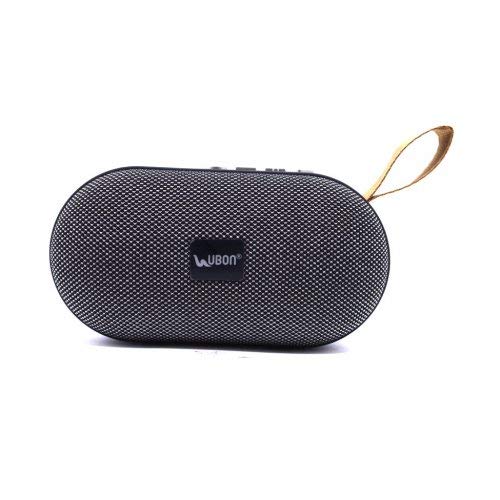
1-сүрөт: Арткы view of the SP-20A speaker, highlighting the USB port, SD card slot, micro USB charging port, and control buttons on the top surface. A carrying strap is visible on the left.
3. Операция
3.1 Bluetooth режими
Once paired with your device, audio will stream wirelessly to the speaker. Use your connected device to control playback (play/pause, skip tracks) and adjust volume. The speaker may also have integrated controls for these functions.
3.2 SD Card and USB Playback
Insert a microSD card or a USB flash drive containing MP3 audio files into the respective slot on the speaker. The speaker will automatically detect the storage device and begin playing music. Use the speaker's control buttons to navigate tracks and adjust volume.
3.3 FM радио режими
To activate FM radio mode, press the Mode button (if available) until you hear the FM radio prompt. The speaker will automatically scan and save available FM stations. Use the skip buttons to cycle through saved stations.
3.4 Үндү башкаруу
Adjust the volume using the dedicated volume buttons on the speaker or through your connected Bluetooth device.
4. Техникалык тейлөө
4.1 Тазалоо
Wipe the speaker with a soft, dry cloth. Do not use abrasive cleaners, waxes, or solvents. Avoid exposing the speaker to excessive moisture.
4.2 Сактоо
Узак мөөнөткө колдонулбаганда, динамикти күн тийбеген жана өтө температурадан алыс, салкын, кургак жерде сактаңыз. Батарейканын иштөө мөөнөтүн сактоо үчүн аны мезгил-мезгили менен заряддоо сунушталат.
5. Кыйынчылыктарды
| Көйгөй | Мүмкүн чечим |
|---|---|
| Динамик күйбөйт. | Батареянын заряддалганын текшериңиз. Динамикти USB кабели аркылуу кубат булагына туташтырыңыз. |
| Bluetooth түзмөгү менен жупташтыруу мүмкүн эмес. |
|
| Үн жок же үнү төмөн. |
|
| SD card/USB playback not working. |
|
6. Техникалык шарттар
| Модель аты | SP-20A |
| Бренд | Жалпы |
| Байланыш технологиясы | USB, Bluetooth |
| Зымсыз технология түрү | Bluetooth |
| Аудио чыгаруу режими | Стерео |
| Динамик түрү | Китеп текчеси |
| Материал | ABS пластик |
| Power Source | Батарея менен иштейт |
| Шайкеш түзмөктөр | Смартфон, Планшет |
| Элемент Салмагы | 173 грамм |
7. Кепилдик жана колдоо
Specific warranty information for the Generic SP-20A Wireless Bluetooth Speaker is not provided in the product details. For warranty claims or technical support, please contact the retailer where the product was purchased or the manufacturer, Balaji Enterprises, directly.
Кепилдикке байланыштуу суроолор үчүн сатып алганыңызды тастыктаган документти ар дайым сактап коюңуз.