
FTVOGUE SVP912
FTVOGUE SVP912 Single-Phase 63A Automatic Reconnection Overvoltage Protector Колдонуучунун колдонмосу
Model: SVP912 | Brand: FTVOGUE
1. Киришүү
This manual provides essential information for the safe and effective installation, operation, and maintenance of your FTVOGUE SVP912 Single-Phase Two-Wire 63A Adjustable Automatic Reconnection Overvoltage Protector. This device is designed to safeguard electrical equipment from damage caused by voltage fluctuations and overcurrents in single-phase AC systems.
The SVP series fully automatic overvoltage жана undervoltage protector is suitable for users or loads with single-phase AC voltage of 230V, 50/60Hz and a rated working current of 63A or less. Its primary functions include protection against overvoltage, undervolvoltage, and overcurrent. The product can instantly cut off the power supply to protect electrical equipment from damage. When the line voltage returns to normal, the protector automatically resumes normal operation.
2. Коопсуздук маалыматы
ЭСКЕРТҮҮ: Electrical installation and maintenance should only be performed by qualified personnel. Failure to follow these instructions may result in electric shock, fire, or serious injury.
- Түзмөктү орнотуудан же тейлөөдөн мурун ар дайым электр кубатынан ажыратыңыз.
- Ensure that line conductors comply with relevant standard current values. The load current must not exceed the protector's maximum protective current value (63A).
- The neutral line (N) must be connected correctly and securely. The live line (L) of the protector is directly connected and does not have a disconnection function.
- After the product is energized, do not touch live parts to avoid electric shock.
- The protector is not isolated or short-circuit protected. Always use a small circuit breaker or miniature circuit breaker upstream to prevent isolation and short circuits. When repairing the circuit, disconnect the front circuit breaker switch. If miniature circuit breaker protection is not used, short-circuit current cannot be interrupted if a short-circuit fault occurs at the input or output of the protector.
- Because the protector has an auto-reclosing function, remove the load element immediately after overcurrent protection activation and protector disconnection to prevent unexpected re-energization.
- Аппаратты нымдуу жерде иштетпеңиз же damp шарттар.
- Түзмөктү өзгөртүүгө же оңдоого аракет кылбаңыз. Квалификациялуу тейлөө кызматкерлерине кайрылыңыз.
3. Продукциянын өзгөчөлүктөрү
- Автоматтык кайра туташуу: Үн чыкканда кубаттуулукту автоматтык түрдө калыбына келтиретtage нормалдуу калыбына келет.
- Overvoltage Коргоо: Жөнгө салынуучу ашыкчаtage protection value and recovery value.
- Undervoltage Коргоо: Protects against low voltage шарттары.
- Ашыкча ток коргоо: Adjustable overcurrent protection and action time.
- Жөнгө салынуучу Параметрлер: Customizable protection values and response times.
- Тtage Дисплей: Integrated display for real-time voltage мониторинг.
- DIN темир жол орнотуу: Standard DIN rail mounting for easy installation in electrical panels.

Figure 1: FTVOGUE SVP912 Adjustable Voltage Protector showing its display, adjustment buttons, and standard DIN rail mounting clip.
4. Орнотуу жана зымдар
Before installation, ensure the main power supply is disconnected. This device is designed for DIN rail mounting within an electrical enclosure.
4.1 Электр өткөргүч схемасы
Connect the protector according to the following diagram. Ensure all connections are tight and secure.
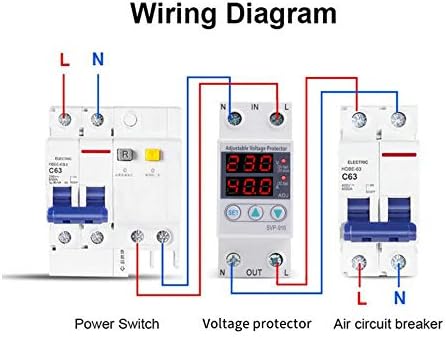
Figure 2: Wiring diagram for the voltage protector. Note the connections for Line (L) and Neutral (N) at both input (IN) and output (OUT) terminals. A power switch and an air circuit breaker are shown in series with the protector.
Орнотуу боюнча маанилүү эскертүүлөр:
- Line conductors must comply with relevant standard current values, and the load current must not exceed the protector's maximum protective current value.
- The neutral line (N) cannot be connected incorrectly and must be secured. The live line (L) of the protector is directly connected and does not have a disconnection function.
- After the product is energized, do not touch live parts to avoid electric shock.
- The protector is not isolated or short-circuit protected. Use a small circuit breaker or miniature circuit breaker upstream to prevent isolation and short circuits. When repairing the circuit, disconnect the front circuit breaker switch. If miniature circuit breaker protection is not used, short-circuit current cannot be interrupted if a short-circuit fault occurs at the input or output of the protector.
- Because the protector has an auto-reclosing function, remove the load element immediately after overcurrent protection activation and protector disconnection.

3-сүрөт: Детальдуу view of the protector's terminals.
5. Иштөө нускамалары
The FTVOGUE SVP912 features a digital display and adjustment buttons for setting protection parameters.
5.1 Дисплей жана баскычтар

Figure 4: Front panel of the protector with display and control buttons.
- Санариптик дисплей: Чыныгы убактагы том көрсөтөтtage (V) and current (A) readings. Indicators for overvoltage (OV), undervoltage (UV), and overcurrent (OC) are also present.
- SET баскычы: Used to enter the parameter setting mode. Press and hold to access adjustable settings.
- UP (▲) Button: Used to increase parameter values during setting.
- DOWN (▼) баскычы: Used to decrease parameter values during setting.
5.2 Параметрлерди тууралоо
- басып, кармап туруңуз SET button for approximately 3-5 seconds until the display starts flashing, indicating entry into setting mode.
- колдонуу ЖОГОРУ (▲) жана ТӨМӨН (▼) buttons to adjust the desired parameter (e.g., overvoltage protection threshold, undervoltage threshold, overcurrent limit).
- басыңыз SET button briefly to cycle through different adjustable parameters.
- Once all parameters are set, wait for a few seconds without pressing any buttons. The device will automatically save the settings and exit the setting mode.
Refer to the specific parameter codes and ranges provided in the full technical specifications for detailed adjustment options.
6. Техникалык тейлөө
The FTVOGUE SVP912 is designed for minimal maintenance. However, periodic checks are recommended to ensure optimal performance and safety.
- Визуалдык текшерүү: Түзмөктү мезгил-мезгили менен физикалык бузулуулардын, түсүнүн өзгөрүшүнүн же бош байланыштардын белгилерин текшерип туруңуз.
- Тазалоо: Ensure the device and its surroundings are free from dust and debris. Use a dry, soft cloth for cleaning. Do not use liquid cleaners.
- Туташуу текшерүүлөрү: Verify that all wiring connections remain tight and secure. Loose connections can lead to overheating or intermittent operation.
- Функционалдык тест: If possible and safe to do so, periodically test the protection functions by simulating an overvoltage же undervoltage condition (e.g., using a variable power supply, if applicable and safe).
Кандайдыр бир тейлөө же текшерүү жүргүзүүдөн мурун ар дайым электр кубатын ажыратыңыз.
7. Кыйынчылыктарды
This section addresses common issues you might encounter with the FTVOGUE SVP912 protector.
| Көйгөй | Мүмкүн себеп | Чечим |
|---|---|---|
| Түзмөк күйбөйт. | Киргизүү кубаты жок; туура эмес зымдар; ички бузук. | Check main power supply. Verify wiring connections (L and N). If problem persists, contact support. |
| Түзмөк тез-тез бузулуп калат. | Тtage fluctuations (over/under); overcurrent condition; sensitive settings. | Киргизүүнү текшерүү томtage stability. Reduce load if overcurrent. Adjust protection thresholds (overvoltage, undervolvoltage, overcurrent) to appropriate levels. |
| Display shows error code or abnormal readings. | Sensor malfunction; internal fault. | Power cycle the device. If the issue persists, contact technical support. |
| Жөндөө режимине кирүү мүмкүн эмес. | SET button not held long enough; button malfunction. | Ensure the SET button is pressed and held for 3-5 seconds. If unresponsive, contact support. |
For issues not listed here, or if troubleshooting steps do not resolve the problem, please contact FTVOGUE customer support.
8. Техникалык шарттар
| Параметр | Нарк |
|---|---|
| Модел | SVP912 (FTVOGUEufgad5g32y-02) |
| Rated Voltage | 230V AC |
| Жыштык | 50/60 Гц |
| Номиналдуу ток | 63 Amperes |
| Overvoltage Коргоо | Жөнгө салынуучу |
| Undervoltage Коргоо | Жөнгө салынуучу |
| Ашыкча ток коргоо | Жөнгө салынуучу |
| Reconnection Type | Автоматтык |
| Дисплей | Digital Voltage/Current Display |
| Монтаждоо | Темир менен |
| Өлчөмдөрү (L x W) | 8.1 cm x 3.6 cm (approx. 85 x 65 x 36 mm) |
| Салмагы | 150 г |
| Origin | Кытай |

Сүрөт 5: Продукциянын өлчөмдөрү.
9. Продукт бүтүп калдыview Video
Видео 1: Кыскача маалыматview of the FTVOGUE SVP912 Adjustable Voltage Protector, showcasing анын дизайны жана негизги өзгөчөлүктөрү.
10. Кепилдик жана колдоо
FTVOGUE products are manufactured to high-quality standards. For warranty information, technical support, or service inquiries, please refer to the contact details provided with your purchase or visit the official FTVOGUE webсайт.
Кепилдик дооматтары үчүн сатып алганыңыздын далилин сактап коюңуз.
Ask a question about this manual
Ask about setup, troubleshooting, compatibility, parts, safety, or missing instructions. Manuals+ will review the question and use this page’s manual context to help answer it.