
Introduction
Welcome to the user manual for the BUFFALO BS-GU2105 5-Port Gigabit Unmanaged Switch. This document provides essential information for the proper installation, operation, and maintenance of your device. Please read this manual thoroughly before using the product to ensure safe and efficient operation.
Продукт бүттүview
The BUFFALO BS-GU2105 is a Layer2 unmanaged switch designed for business environments, offering reliable high-speed network connectivity. It features five Gigabit-compatible ports and a robust metal housing with an integrated power supply.
Негизги өзгөчөлүктөрү:
- 5 Gigabit Ethernet Ports (10/100/1000 BaseT(X))
- Metal Housing with Built-in Power Supply
- Loop Prevention Function (ON/OFF switchable)
- EEE (Energy Efficient Ethernet, 802.3az) Function (ON/OFF switchable)
- Иштөө Температурасынын диапазону: 0°C – 50°C (32°F – 122°F)
- Equipped with Anti-Theft Security Slots
- Flexible Installation: Horizontal or Wall-Mountable
Пакеттин мазмуну
Please verify that all items are present in your package. If any items are missing or damaged, contact your vendor or BUFFALO support.
- BUFFALO BS-GU2105 5-Port Gigabit Unmanaged Switch
- Монтаждоо үчүн магнит
- AC Cable Prevention Band
- Power Cord (integrated power supply)
Орнотуу жана орнотуу
1. Физикалык жайгаштыруу
The BS-GU2105 switch can be placed horizontally on a flat surface or mounted on a wall. Ensure adequate ventilation around the device to prevent overheating. Avoid placing the switch near heat sources or in direct sunlight.

Сүрөт: алдыңкы view of the BUFFALO BS-GU2105 switch, displaying its indicators and switches.
For enhanced security, the switch is equipped with anti-theft security slots. A compatible security cable (not included) can be used to secure the device to a fixed object, preventing unauthorized removal.
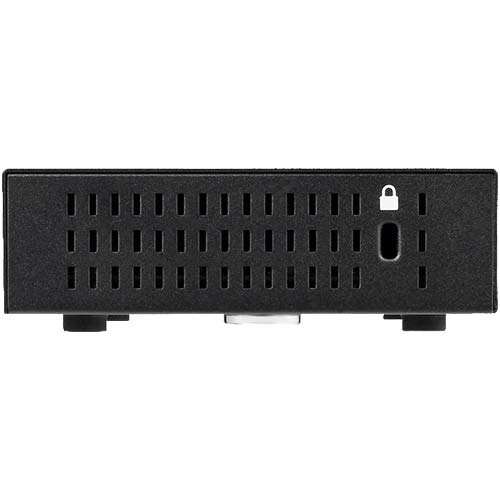
Сүрөт: каптал view of the BUFFALO BS-GU2105 switch, highlighting the security slot.

Image: BUFFALO BS-GU2105 switch with an optional security cable lock installed.
2. Тармак кабелдерин туташтыруу
Connect your network devices (computers, servers, network printers, or other switches) to the RJ-45 ports (1-5) on the rear of the switch using standard Ethernet cables. The switch automatically detects the speed and duplex mode of the connected devices.

Сүрөт: Арткы view of the BUFFALO BS-GU2105 switch, showing the five RJ-45 ports and AC power input.
3. Power Connection
Connect the power cord to the AC-IN port on the rear of the switch and then to a standard power outlet. The switch has a built-in power supply. Use the included AC cable prevention band to secure the power cord, preventing accidental disconnection.
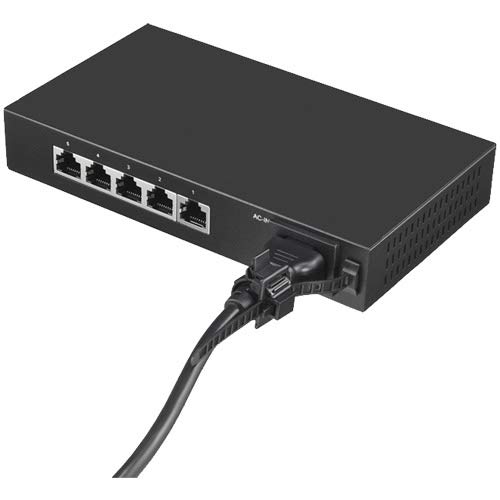
Image: Power cord connected to the BUFFALO BS-GU2105 switch, secured with the AC cable prevention band.
Которгучту иштетүү
LED көрсөткүчтөрү
The front panel of the switch features several LED indicators to provide status information:
- POWER LED: Ажыраткыч күйгүзүлгөндө күйөт.
- LINK/ACT LEDs (1-5): For each port, this LED indicates network activity and connection status.
- Катуу жашыл: A device is connected and operating at 1000 Mbps (Gigabit).
- Жаркылдаган жашыл: Data is being transmitted or received at 1000 Mbps.
- Катуу янтарь: A device is connected and operating at 10/100 Mbps.
- Жаркылдаган янтарь: Data is being transmitted or received at 10/100 Mbps.
- Өчүк: Эч бир түзмөк туташкан эмес же туташкан түзмөк өчүк.
Loop Prevention Function
The BS-GU2105 includes a loop prevention function to avoid network loops that can cause broadcast storms and network instability. This function can be enabled or disabled using the "LOOP PREVENTION" ON/OFF switch on the front panel.
- КҮЙҮК: Loop prevention is active. If a network loop is detected, the affected port will be temporarily disabled to prevent network disruption.
- ӨЧҮК: Loop prevention is inactive.
EEE (Energy Efficient Ethernet) Function
The Energy Efficient Ethernet (EEE) function (IEEE 802.3az) allows the switch to reduce power consumption during periods of low data activity. This function can be enabled or disabled using the "EEE" ON/OFF switch on the front panel.
- КҮЙҮК: EEE is active, reducing power consumption when network traffic is low.
- ӨЧҮК: EEE is inactive.
Техникалык тейлөө
To ensure optimal performance and longevity of your BUFFALO BS-GU2105 switch, follow these maintenance guidelines:
- Keep the device in a clean, dust-free environment.
- Ensure proper ventilation and do not block the air vents.
- Коммутатордун сыртын жумшак, кургак чүпүрөк менен тазалаңыз. Суюк же аэрозоль тазалагычтарды колдонбоңуз.
- Кабелдик туташуулар коопсуз болушу үчүн мезгил-мезгили менен текшерип туруңуз.
Проблемаларды чечүү
If you encounter issues with your BS-GU2105 switch, refer to the following common troubleshooting steps:
- Кубат жок: Ensure the power cord is securely connected to both the switch and a working power outlet. Check if the power outlet is functional.
- Шилтеме жок/Аракет LED: Verify that the Ethernet cable is properly connected to both the switch port and the network device. Ensure the connected device is powered on and functioning correctly. Try a different cable or port.
- Жай тармак ылдамдыгы: Check the LINK/ACT LED color. Green indicates Gigabit speed, while amber indicates 10/100 Mbps. Ensure all connected devices and cables support Gigabit Ethernet for optimal performance.
- Network Instability (if Loop Prevention is OFF): If you experience network instability or broadcast storms, ensure the "LOOP PREVENTION" switch is set to ON.
If problems persist after attempting these steps, please contact technical support.
Техникалык шарттар
| Өзгөчөлүк | Description |
|---|---|
| Бренд | BUFFALO |
| Модел | BS-GU2105 |
| Порттардын саны | 5 x 10/100/1000 BaseT(X) RJ-45 |
| Которуу түрү | Unmanaged, Layer2 |
| Турак жай | Металл |
| Электр камсыздоо | Камтылган |
| Иштөө температурасы | 0°C - 50°C (32°F - 122°F) |
| Өлчөмдөрү (L x W x Y) | 10.04 x 5.71 x 2.76 дюйм (25.5 x 14.5 x 7.0 см) |
| Салмагы | 0.8 килограмм (1.76 фунт) |
| Өзгөчөлүктөр | Loop Prevention, EEE (802.3az), Anti-theft Security Slot, Magnet for mounting, AC Cable Prevention Band |
Кепилдик маалымат
The BUFFALO BS-GU2105 switch comes with a 5-year limited warranty. This includes a standard 3-year warranty, which can be extended by an additional 2 years upon user registration on the official BUFFALO website. Please retain your proof of purchase for warranty claims and refer to the official BUFFALO warranty policy for full terms and conditions.
Техникалык колдоо
For technical assistance, troubleshooting, or further inquiries regarding your BUFFALO BS-GU2105 switch, please visit the official BUFFALO support website or contact their customer service department. Up-to-date contact information and resources can typically be found on the BUFFALO brand's official channels.
BUFFALO Store: Visit the BUFFALO Store on Amazon