
1. Киришүү
The Cloud b Tranquil Turtle is designed to create a calming and soothing environment, helping children fall asleep with its unique light projection and gentle sounds. This manual provides essential information for setup, operation, and maintenance of your Tranquil Turtle.

Figure 1: Cloud b Tranquil Turtle Nightlight (Pink)
2. Продукциянын өзгөчөлүктөрү
- Океан толкунунун проекциясы: Projects moving ocean waves onto the ceiling, creating a serene underwater effect.
- Тынчтануучу үндөр: Offers two calming audio options: a gentle melody and whispering waves.
- Жөнгө салынуучу Орнотуулар: Allows for customization of light brightness and wave movement to suit individual preferences.
- Автоматтык түрдө өчүрүү: Features a 23-minute timer that automatically turns off the light and sound to conserve battery power and promote deep sleep.
- Soft Plush Body: The turtle's body is made from a soft, comforting plush material.
- Long-Life LEDs: Equipped with LEDs that do not heat up, ensuring safety.
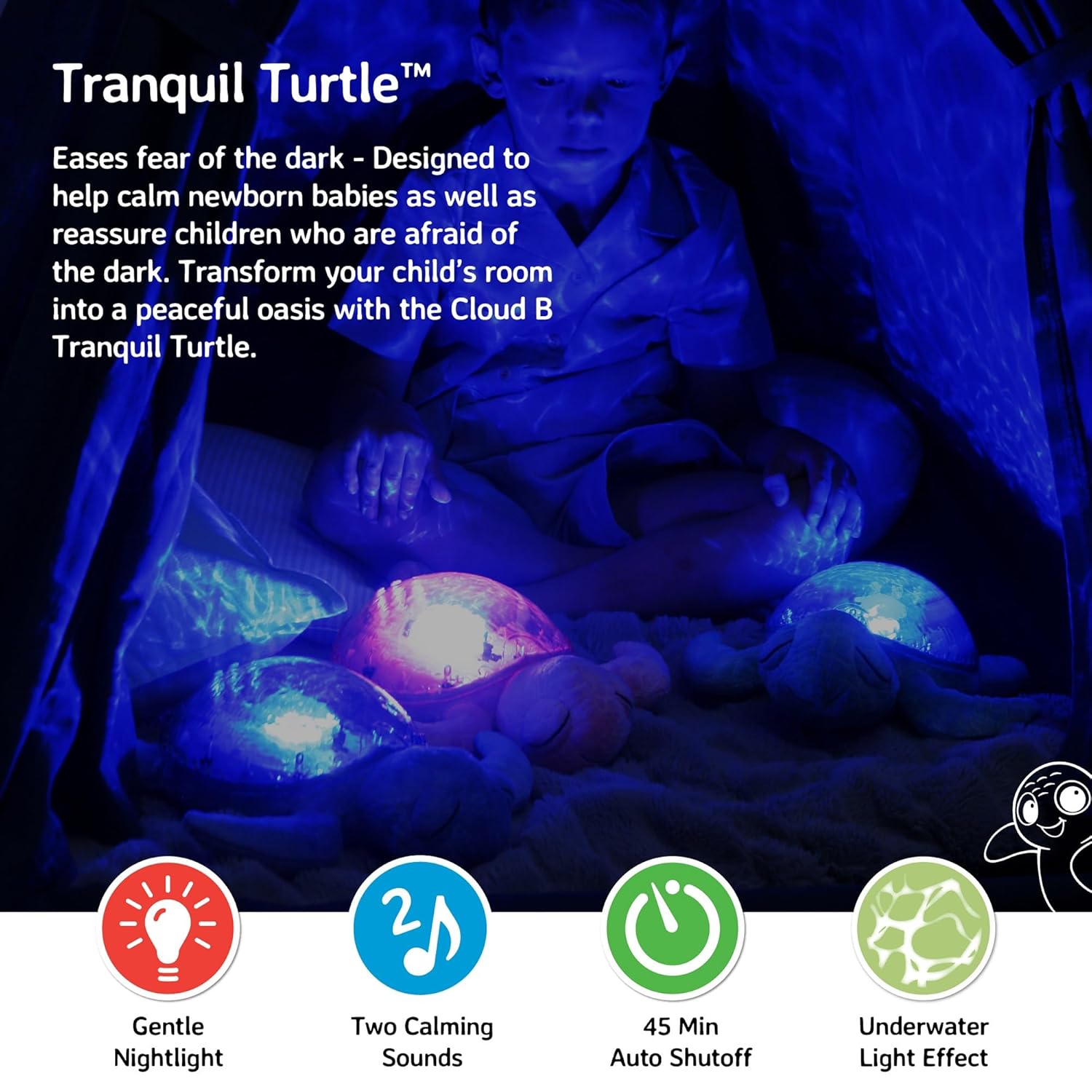
Figure 2: Ocean wave projection in a child's room
3. Пакеттин мазмуну
Пакетте бардык буюмдар бар экенин текшериңиз:
- 1 x Cloud b Tranquil Turtle Nightlight
- 3 x AA батарейкалар (алдын ала орнотулган же өзүнчө камтылган)
4. Орнотуу
4.1 Батареяны орнотуу
The Tranquil Turtle requires 3 AA batteries. These are typically included with your purchase.
- Locate the battery compartment on the underside of the turtle. It is covered by a fabric flap secured with Velcro.
- Open the fabric flap to reveal the plastic battery cover.
- Using a Phillips head screwdriver, unscrew the small screw on the battery cover.
- Батареянын капкагын алып салыңыз.
- Бөлүмдүн ичинде көрсөтүлгөндөй туура полярдуулукту (+/-) камсыз кылып, 3 AA батарейкасын салыңыз.
- Батареянын капкагын ордуна коюп, аны бурама менен бекитиңиз.
- Close the fabric flap.

Figure 3: Battery compartment and controls on the underside
4.2 Алгачкы жайгаштыруу
Place the Tranquil Turtle on a flat surface in the room where it will be used. For optimal projection, place it on the floor or a low table in the center of the room.
5. Иштөө нускамалары
The control buttons are located on the turtle's plastic shell.
5.1 Күйгүзүү/өчүрүү
басыңыз Кубат баскычы (usually marked with a power symbol) on the turtle's shell to turn the unit on or off.
5.2 Light Projection
The Tranquil Turtle projects a calming underwater light effect. You can adjust the light's characteristics:
- Жарыктык: Use the brightness adjustment wheel/switch (located near the battery compartment on the underside) to increase or decrease the intensity of the projected light.
- Wave Movement: басыңыз Wave Movement Button (often marked with a wave symbol) to toggle between static and moving ocean wave projections.

Figure 4: Control buttons on the turtle's shell
5.3 Үн режимдери
The Tranquil Turtle offers two soothing sound options:
- Gentle Melody: A soft, calming musical tune.
- Whispering Waves: Realistic ocean wave sounds.
басыңыз Үн режиминин баскычы (often marked with a music note) to switch between these two sounds. Use the Үн баскычтары (marked with '+' and '-') to adjust the sound level.
5.4 Автоматтык өчүрүү
The Tranquil Turtle is designed to automatically shut off after 23 minutes. This feature helps ensure a completely dark and quiet environment for optimal sleep and conserves battery life.
Video 1: Tranquil Turtle Demo Video (Seller-provided demonstration of features)
This video demonstrates the light projection, sound options, and overall functionality of the Tranquil Turtle.
6. Техникалык тейлөө
6.1 Тазалоо
To clean your Tranquil Turtle, gently wipe the surface with a damp кездеме. Түзмөктү сууга салбаңыз же катуу тазалоочу каражаттарды колдонбоңуз, анткени бул электрондук компоненттерге зыян келтириши мүмкүн.
6.2 Батареяны алмаштыруу
When the light dims or sounds become distorted, it's time to replace the batteries. Follow the battery installation steps in Section 4.1.
7. Кыйынчылыктарды
| Көйгөй | Мүмкүн себеп | Чечим |
|---|---|---|
| Жарык же үн жок | Batteries are dead or incorrectly installed; Power switch is off. | Replace batteries, ensuring correct polarity; Ensure the main power switch (on underside) is in the 'ON' position. |
| Жарык күңүрт | Low battery power; Brightness setting is too low. | Replace batteries; Adjust the brightness wheel/switch to a higher setting. |
| Waves are not moving | Wave movement setting is off. | Press the Wave Movement Button to activate movement. |
| Үн бурмаланган же өтө төмөн | Low battery power; Volume setting is too low. | Replace batteries; Use the Volume Buttons to increase the sound level. |
8. Техникалык шарттар
- Продукциянын өлчөмдөрү: 11.02 x 9.84 x 4 дюйм
- Элемент Салмагы: 1.21 фунт
- Модель номери: CB7423-PK
- Материал түрү: Plastic (shell), Plush (body)
- Кубат булагы: 3 AA батарейка (кошулган)
- Автоматтык түрдө өчүрүү таймери: 23 мүнөт
- Келип чыккан өлкө/регион: Кытай
9. Кепилдик жана колдоо
Cloud b products are manufactured with high-quality materials and undergo rigorous testing. For information regarding warranty coverage or product support, please visit the official Cloud b store or contact their customer service directly.