
1. Киришүү
The ANCEL FX1000 is a professional vehicle diagnostic tool designed to read and clear trouble codes, view live data, and perform various special functions for a single-car manufacturer. It supports full OBD service modes and is compatible with vehicles manufactured from 1996 onwards. This manual provides detailed instructions for setting up and operating your device.
2. Продукциянын өзгөчөлүктөрү
- Full OBDII Service Modes: Supports 8 OBDII service modes for comprehensive diagnostics.
- Multi-System Diagnostics: Capable of diagnosing all major vehicle systems including Engine, Transmission, SRS (Supplemental Restraint System), SAS (Steering Angle Sensor), TPMS (Tire Pressure Monitoring System), ABS (Anti-lock Braking System), and more.
- Атайын функциялар: Includes advanced functions such as DPF (Diesel Particulate Filter) Regeneration, Battery Replacement, ABS Bleeding, Oil Service Reset, EPB (Electronic Parking Brake) Reset, and Throttle Position Adaption.
- Көп тилдүү колдоо: Supports 7 languages: English, French, Spanish, German, Russian, Polish, and Portuguese.
- Manufacturer-Specific Tool: Designed for a single-car manufacturer, allowing in-depth diagnostics for a specific brand's vehicle series.
- Lifetime Free Online Updates: Ensures your device always has the latest software and vehicle coverage.
3. Пакеттин мазмуну
Your ANCEL FX1000 package should include the following items:
- ANCEL FX1000 Diagnostic Tool
- OBDII Connection Cable
- Micro USB Cable (for PC connection and updates)
- Жүктөө колдонмосу
- Катуу кабык ташуучу куту
4. Түзмөктүн жайгашуусу
Familiarize yourself with the buttons and ports on your ANCEL FX1000 device for optimal operation.

Image: ANCEL FX1000 device showing LCD display, Return button, Scroll Left/Right/Up/Down buttons, Fn button, and Ok button. Dimensions are also indicated.
- LCD дисплей: Shows diagnostic information and menu options.
- Кайтаруу баскычы: Мурунку экранга же менюга кайтуу.
- Scroll Buttons (Up/Down/Left/Right): Менюларды карап чыгуу жана параметрлерди тандоо үчүн колдонулат.
- Fn баскычы: Function button, may have context-specific uses.
- OK баскычы: Тандоолорду ырастайт же кошумча менюга кирет.
- OBDII туташтыргычы: Connects the device to the vehicle's OBDII port.
- USB порт: For connecting to a computer for software updates.
5. Орнотуу жана туташуу
Follow these steps to connect your ANCEL FX1000 to your vehicle:
- Унааңыздын OBDII портун табыңыз. Ал, адатта, айдоочу тарабындагы башкаруу панелинин астында жайгашкан.
- Ensure the vehicle's ignition is ON, but the engine is NOT running. For push-button start vehicles, press the start button until all dashboard lights illuminate without starting the engine.
- Plug the OBDII connector from the ANCEL FX1000 into your vehicle's OBDII port. The device will power on automatically.
- Once powered on, the device is ready for use.
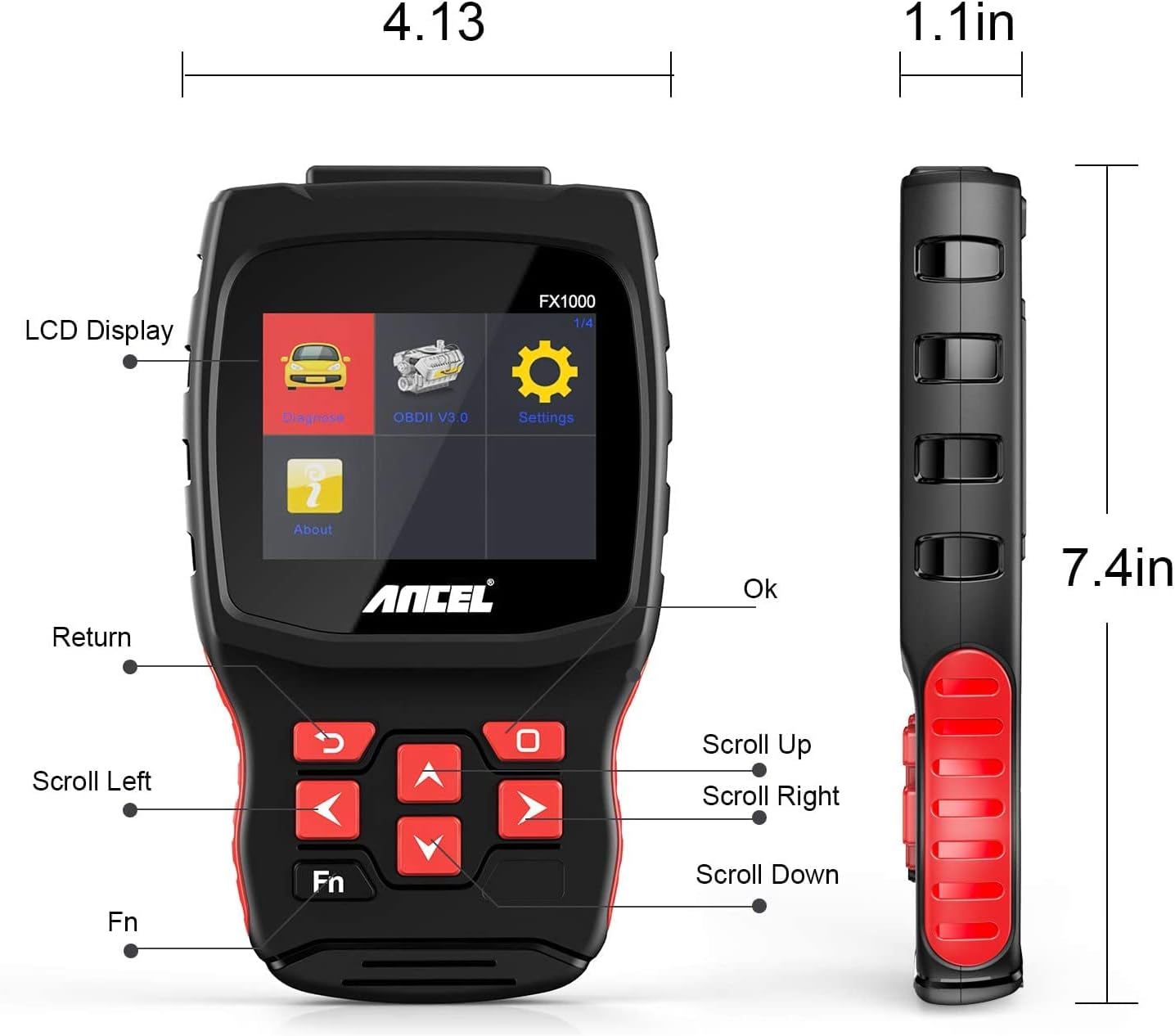
Image: A hand holding the ANCEL FX1000 connected to a vehicle's OBDII port, with the car's dashboard visible.
6. Навигация жана Орнотуулар
The ANCEL FX1000 features a user-friendly interface. Use the arrow buttons to navigate and the OK button to select.
- Диагноз коюу: Access vehicle-specific diagnostic functions.
- OBDII V3.0: Access general OBDII functions for all compatible vehicles.
- Орнотуулар: Configure device preferences.
- Жөнүндө: View device information such as serial number, firmware version, and software version.
Орнотуулар меню параметрлери:
- Тил: Дисплей тилин өзгөртүңүз.
- Бирдиги: Температураны окуу үчүн Цельсий менен Фаренгейттин ортосунда которулуңуз.
- Александра: Enable or disable audible feedback.
- Жаздыруу: View recorded diagnostic data.
- Баскыч сыноо: Test the functionality of the device buttons.
- LCD Test: Test the LCD display.
7. Системалык диагностика
The ANCEL FX1000 allows you to perform in-depth diagnostics on various vehicle systems. After selecting 'Diagnose' and your vehicle's manufacturer (e.g., Toyota), you can choose specific systems.
Image: Visual representation of systems diagnosed by FX1000, including Engine, ABS, TPMS, Transmission, Oil Service, Airbag, Battery, Audio, and Headlight Activate.
Диагностикалык функциялар:
- Read Trouble Code: Retrieves current, pending, and history Diagnostic Trouble Codes (DTCs).
- Clear Trouble Code: Erases DTCs from the vehicle's computer.
- Маалымат агымын окуу: Унаанын сенсорлорунан алынган реалдуу убакыттагы маалымат параметрлерин көрсөтөт.
- Активдүү тест: Allows bidirectional control to test specific components.
- Атайын иш-милдети: Accesses advanced maintenance and service functions.
8. Атайын функциялар
The ANCEL FX1000 offers several special functions for vehicle maintenance:

Image: Visual representation of special functions including Oil Service Reset, ABS Bleeding, TPMS Reset, and EPB Reset.
- Май кызматын баштапкы абалга келтирүү: Май алмаштырылгандан кийин майдын тейлөө жарыгын баштапкы абалга келтирет.
- ABS кан агуу: Performs bleeding functions for the Anti-lock Braking System.
- EPB баштапкы абалга келтирүү: Электрондук тормоз системасын баштапкы абалга келтирет.
- Дроссельдин абалын адаптациялоо: Дроссельдин абал сенсорун тууралайт.
- DPF калыбына келтирүү: Initiates the regeneration process for the Diesel Particulate Filter.
- Батареяны алмаштыруу: Registers new battery replacements.
9. OBDII Functions (General)
The 'OBDII V3.0' menu provides general diagnostic functions compatible with all OBDII-compliant vehicles (1996 and newer).
- Read Current Trouble Code: Displays active DTCs.
- Clear Trouble Code: Erases all stored DTCs.
- Read Current Data: View сенсордун жандуу маалыматтары.
- Read Pending Trouble Code: Displays DTCs that have not yet fully matured.
- Кадрдын маалыматтарын тоңдурууну окуу: Shows a snapshot of vehicle conditions when a DTC was set.
- Readiness Tests: Чыгарылыштарга байланыштуу мониторлордун абалын текшерет.
Readiness Test:
The Readiness Test is crucial for emissions inspections. It indicates whether various emission control systems have completed their self-tests. Look for 'Complete' or 'Supported' status for all monitors. If a monitor shows 'Not Complete' or 'Not Supported', it may indicate an issue or that the drive cycle has not been completed.
10. Clearing Trouble Codes
To clear trouble codes, navigate to the 'Clear Trouble Code' option within the relevant diagnostic menu. The device will prompt you to confirm. After clearing, it is recommended to cycle the vehicle's ignition off and on to ensure all related warning lights are reset.
Note: The ANCEL FX1000 can only read and clear SRS error codes; it does NOT support SRS reset functions.
11. Программаны жаңыртуу
To ensure your ANCEL FX1000 has the latest vehicle coverage and features, regular software updates are recommended. The device offers lifetime free online updates.
- Connect the device to your computer using the provided Micro USB cable.
- Follow the instructions in the 'Download Guide' included in your package to install the update software on your computer.
- Register your device using the serial number and your email address.
- Select the specific car manufacturer software you need for your device.
- Perform the update as prompted by the software.

Image: ANCEL FX1000 connected via USB cable to a laptop, illustrating the update process.
12. Кыйынчылыктарды
If you encounter issues while using your ANCEL FX1000, refer to the following common scenarios:
-
Ask a question about this manual
Ask about setup, troubleshooting, compatibility, parts, safety, or missing instructions. Manuals+ will review the question and use this page’s manual context to help answer it.