
1. Киришүү
Thank you for choosing the Callez USB PC Headset W502U. This manual provides essential information for setting up, operating, and maintaining your headset to ensure optimal performance and a clear communication experience. This headset is designed for use with PCs, Macs, and various UC platforms, making it ideal for business, call centers, and online communication.
2. Кутуда эмне бар
- Callez USB Headset (Model W502U)
- User Manual
3. Продукт бүтүп калдыview
The Callez W502U USB PC Headset is engineered for comfort and clarity, featuring an adjustable design and intuitive controls for a seamless user experience.

Figure 3.1: Callez USB PC Headset in use.
Негизги өзгөчөлүктөрү:
- Жөнгө салынуучу дизайн: Flexible headband fits various head sizes.
- Ызы-чууну жок кылуучу микрофон: Reduces background noise for clear voice transmission.
- Ийкемдүү жебе колу: 330° rotatable microphone can be positioned for optimal voice capture.
- Ergonomic Earpiece: 360° slight adjustment for personalized comfort.
- Жеңил курулуш: Weighs only 57g (1.97oz) for extended wear comfort.
- Plug-and-Play: No drivers required for Windows PC or Mac.
- In-line Controls: Easy access to volume adjustment, microphone mute, and speaker mute.

Figure 3.2: Headset features including adjustable headband, soft ear cushions, noise-cancelling microphone, and flexible boom arm.

Figure 3.3: Detail of the soft ear cushion for comfort.
4. Орнотуу
The Callez USB PC Headset is designed for simple plug-and-play functionality, requiring no additional drivers for most operating systems.
4.1 Гарнитураны туташтыруу
- Компьютериңизде (PC же Mac) жеткиликтүү USB портун табыңыз.
- Гарнитуранын USB туташтыргычын USB портуна сайыңыз.
- Операциялык системаңыз керектүү драйверлерди автоматтык түрдө аныктап, орнотот. Бул процесс бир нече мүнөткө созулушу мүмкүн.
- Once installed, the headset will be ready for use. You may need to select it as the default audio input/output device in your system's sound settings or within your communication application (e.g., Skype, Zoom, Microsoft Teams).

Figure 4.1: Connecting the USB headset to a laptop.
4.2 Ыңгайлуулук үчүн тууралоо
- Баш боосу: Gently extend or retract the headband to fit your head comfortably.
- Микрофон бум: Bend the flexible microphone boom arm to position the microphone approximately 1-2 inches from your mouth for optimal voice clarity. The boom arm can rotate 330 degrees.
- Кулакчындар: The earpieces have a 360-degree slight adjustment to conform to your ears.
5. Операция
The in-line controls on your Callez USB PC Headset provide convenient access to essential audio functions.
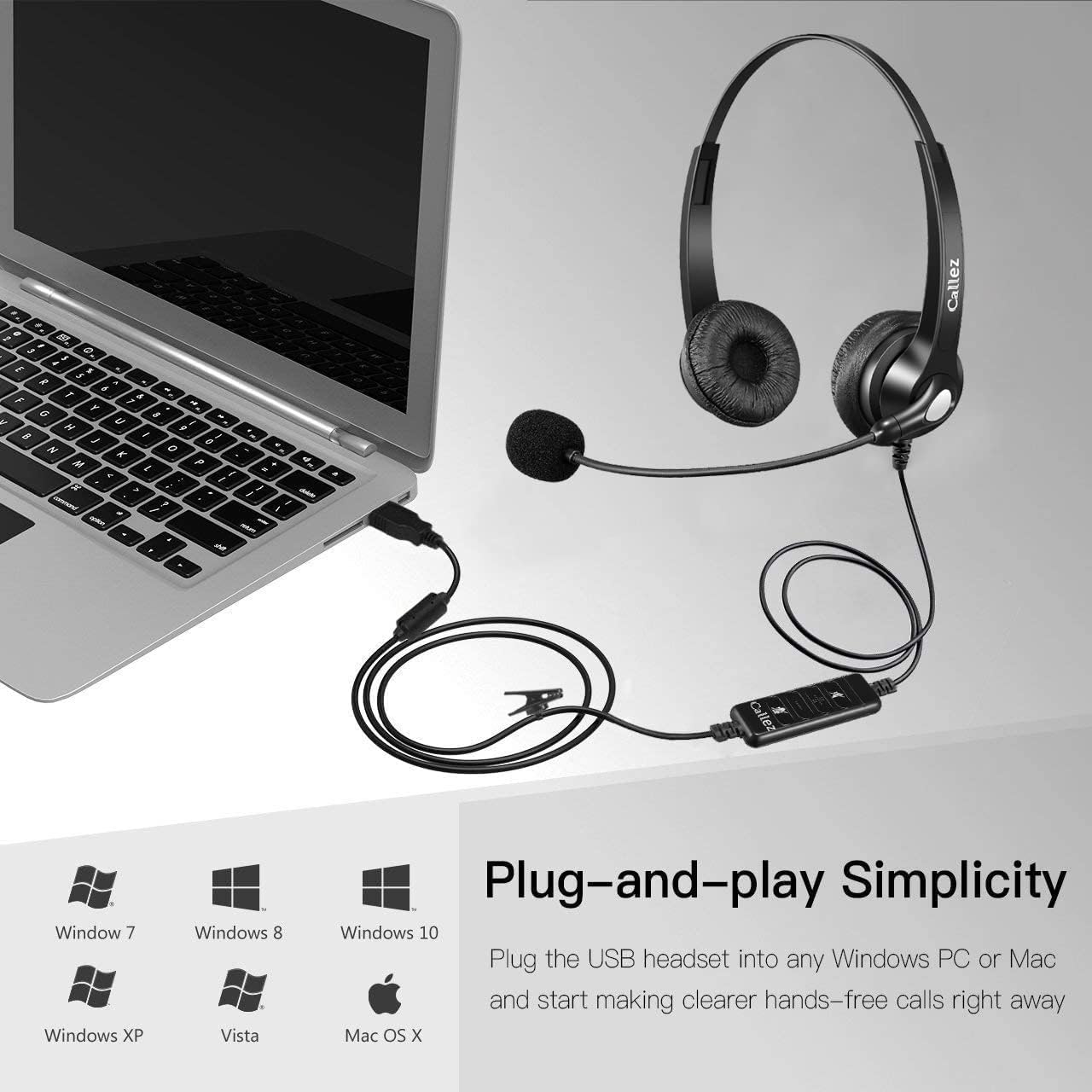
Figure 5.1: In-line audio controls.
5.1 In-line Control Functions:
- Speaker ON/OFF (Mute Speaker): Press this button to mute or unmute the headset speakers. A blue indicator light typically shows the status.
- VOL+ (Үнүн жогорулатуу): Угуу үнүн жогорулатуу үчүн басыңыз.
- VOL- (Көлөмүн төмөндөтүү): Угуу үнүн азайтуу үчүн басыңыз.
- Mic ON/OFF (Mute Microphone): Press this button to mute or unmute the microphone. A red indicator light typically shows the microphone mute status.
- Күч көрсөткүчү: A blue light indicates the headset is powered on and connected.
This video demonstrates how to use the in-line controls to adjust volume and mute the microphone and speakers, showing the corresponding indicator lights.
5.2 Колдонуу сценарийлери
The Callez W502U headset is versatile for various applications:
- Конференция чалуулары: Participate in virtual meetings with clear audio and voice.
- Online Courses/Webinars: Engage in educational content and presentations.
- Skype/UC Platforms: Enjoy clear conversations on communication software.
- Business and Call Centers: Professional-grade audio for customer service and office environments.

Figure 5.2: Various applications of the Callez USB PC Headset.
6. Кыйынчылыктарды
If you encounter issues with your Callez USB PC Headset, please refer to the following common solutions:
| Көйгөй | Чечим |
|---|---|
| Гарнитурадан үн жок |
|
| Микрофон иштебей жатат |
|
| Үн сапаты начар же бурмаланган |
|
| Гарнитураны компьютер тааныбай жатат |
|
7. Техникалык шарттар
Detailed technical specifications for the Callez USB PC Headset W502U:
| Өзгөчөлүк | Деталь |
|---|---|
| Бренд | Callez |
| Модель аты | W502U |
| Түс | Кара |
| Байланыш технологиясы | Зымдуу (USB) |
| Наушник уясы | USB |
| Кулак жайгаштыруу | On-Ear |
| Форма фактору | Супра-Ауралдык |
| Импеданс | 32 Ом |
| Noise Control | Sound Isolation (Noise-Cancelling Microphone) |
| Жыштык диапазону | 20 Гц - 20 000 Гц |
| Айдоочунун өлчөмү | 30 миллиметр |
| Шайкеш түзмөктөр | Mac, Computer, Laptop, PC |
| Өзгөчөлүктөр | Adjustable Headband, Volume Control, Noise Isolation, Lightweight, Microphone Included |
| Материал | Пластик |
| Келип чыккан өлкө | Кытай |
8. Кепилдик жана колдоо
Your Callez USB PC Headset W502U comes with a comprehensive warranty and support to ensure your satisfaction.
8.1 Кепилдик маалыматы
продукт камтыйт а 30 күндүк акчаны кайтаруу кепилдиги жана а 1 жылдык кепилдик from the date of purchase. This warranty covers manufacturing defects and ensures the product performs as described under normal use. Please retain your proof of purchase for warranty claims.
8.2 Кардарларды колдоо
For technical assistance, troubleshooting, or warranty inquiries, please contact Callez customer support through the retailer where you purchased the product or visit the official Callez website for contact details. Our support team is dedicated to providing prompt and effective solutions.