
1. Киришүү
This manual provides instructions for the KIMEX HDMI 2.0 HDCP 2.2 1x16 Splitter. This device allows a single HDMI source to be simultaneously displayed on up to sixteen HDMI-compatible monitors or projectors. It supports HDMI 2.0 and HDCP 2.2 standards, offering resolutions up to 3840x2160 at 60Hz. The splitter also features EDID management and RS232 control for enhanced flexibility in various professional audio-visual setups.
The splitter can also function as a signal regenerator, extending the reach of long HDMI cables.
2. Өзгөчөлүктөрү
- HDMI 2.0 жана HDCP 2.2 колдойт.
- Distributes one HDMI input to sixteen HDMI outputs simultaneously.
- Supports video resolutions up to 4K (3840x2160) at 60Hz.
- Supports data rates up to 6Gbps per TMDS clock, totaling 600MHz.
- 8/10/12-бит терең түстөрдү колдойт.
- Integrated EDID management for optimal display compatibility.
- RS232 control port for external system integration.
3. Пакеттин мазмуну
Пакетте бардык буюмдар бар экенин текшериңиз:
- KIMEX HDMI 2.0 HDCP 2.2 1x16 Splitter
- Кубаттуу адаптер
- User Manual
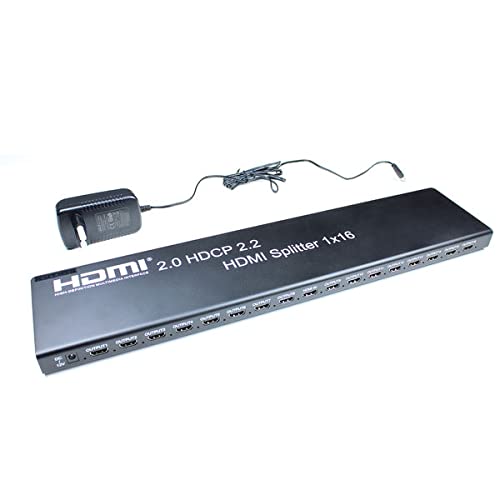
Image 3.1: KIMEX HDMI 1x16 Splitter with its power adapter.
4. Коопсуздук нускамалары
- Бул шайманды сууга же нымга дуушар кылбаңыз.
- Аппаратты жылуулук булактарынын жанына койбоңуз.
- Берилген кубат адаптерин гана колдонуңуз.
- Аппаратты өзүңүз ачууга же оңдоого аракет кылбаңыз. Бардык тейлөөлөрдү квалификациялуу кызматкерлерге тапшырыңыз.
- Ашыкча ысып кетүүнүн алдын алуу үчүн аппараттын айланасында туура желдетүүнү камсыз кылыңыз.
5. Орнотуу
5.1 Байланыш диаграммасы
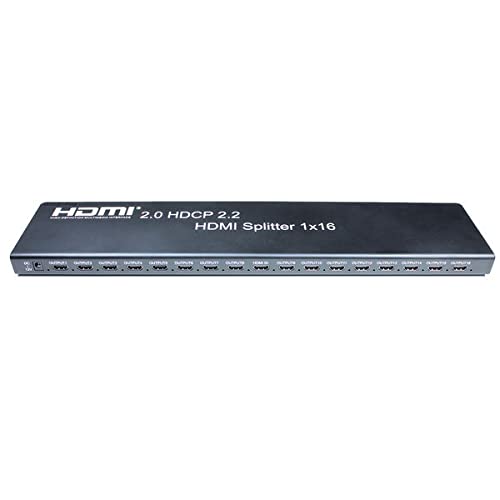
Image 5.1: Front panel of the HDMI Splitter, illustrating the input and sixteen output ports.
5.2 Орнотуу кадамдары
- Өчүрүү түзмөктөрү: Ensure all source devices (e.g., DVD player, computer) and display devices (e.g., monitors, projectors) are powered off before making connections.
- HDMI булагын туташтырыңыз: Connect an HDMI cable from your source device to the HDMI INPUT port on the splitter.
- HDMI дисплейлерин туташтыруу: Connect HDMI cables from the sixteen HDMI OUTPUT ports on the splitter to your display devices.
- Туташуу кубаты: Plug the provided power adapter into the DC 5V port on the splitter, then plug the adapter into a power outlet.
- Түзмөктөрдү күйгүзүү: Power on the display devices first, then the HDMI source device.
- Сигналдын текшерүүсү: Check that the video and audio signals are correctly displayed on all connected monitors.

Сүрөт 5.2: Мурункуample of a multi-display setup, demonstrating the application of a video splitter.
6. Иштөө нускамалары
Once all connections are made and devices are powered on, the HDMI splitter will automatically detect the input signal and distribute it to all connected output displays. No additional configuration is typically required for basic operation.
6.1 EDID башкаруу
The splitter features EDID (Extended Display Identification Data) management to ensure compatibility between the source and various displays. The device will typically read the EDID from the lowest numbered output port (Output 1) and apply it to the source. If there are compatibility issues, ensure that the primary display connected to Output 1 supports the desired resolution and features.
6.2 RS232 Control
The RS232 port allows for external control of the splitter by a control system. This feature is typically used in professional installations for integrated system management. Refer to the RS232 command set documentation (usually provided separately or available from the manufacturer) for detailed control protocols.
7. Техникалык тейлөө
- Аппаратты таза, жумшак, кургак чүпүрөк менен сүртүңүз.
- Катуу химиялык заттарды же абразивдүү тазалагычтарды колдонуудан алыс болуңуз.
- Ensure the device is placed in a well-ventilated area to prevent dust accumulation and overheating.
- Кабелдик байланыштарды дайыма текшерип туруңуз, алар коопсуз.
8. Кыйынчылыктарды
8.1 No Picture on Display
- Күчтү текшерүү: Ensure the splitter and all connected devices are powered on.
- Кабелдерди текшерүү: Verify that all HDMI cables are securely connected to both the splitter and the displays/source. Try replacing cables if necessary.
- Input/Output Selection: Confirm that the correct HDMI input is selected on your display devices.
- Чечилишинин шайкештиги: Ensure your source device's output resolution is supported by all connected displays. The splitter will attempt to match the EDID of the first connected display.
- Түзмөктөрдү кайра иштетүү: Power cycle the source, splitter, and displays in sequence (displays first, then splitter, then source).
8.2 Intermittent Signal
- Кабелдин сапаты: Use high-quality HDMI 2.0 certified cables, especially for 4K60Hz signals and longer distances.
- Кабелдин узундугу: Excessive cable length can cause signal degradation. Consider using shorter cables or active HDMI cables if issues persist.
- Электр камсыздоо: Кубат адаптери бөлгүчкө туруктуу кубат берип жатканын текшериңиз.
8.3 EDID Issues
- If a display is not showing the correct resolution or features, try connecting a display with the desired capabilities to Output 1.
- Some advanced splitters may have EDID modes; consult specific product documentation if available.
9. Техникалык шарттар
| Өзгөчөлүк | Спецификация |
|---|---|
| Модель номери | KIMEX 130-2016 |
| HDMI версиясы | HDMI 2.0 |
| HDCP Нускасы | HDCP 2.2 |
| Киргизүү порттору | 1 x HDMI |
| Output Ports | 16 x HDMI |
| Max чечим | 3840x2160 @ 60Гц |
| Max Data Rate | 6Gbps per TMDS clock (600MHz total) |
| Deep Color колдоо | 8/10/12-бит |
| Башкаруу порту | RS232 |
| Өлчөмдөрү (L x W x Y) | 48 x 11 x 2.5 см |
| Салмагы | 1.8 килограмм |
| Электр камсыздоо | DC 5V (adapter included) |
| Шайкеш түзмөктөр | DVD Player, Computer, etc. |
10. Кепилдик маалыматы
This KIMEX product is covered by a standard manufacturer's warranty. Please retain your proof of purchase for warranty claims. The availability of spare parts is typically 3 years from the date of purchase. For specific warranty terms and conditions, please refer to the documentation provided with your purchase or contact KIMEX customer support.
11. Колдоо
For technical assistance, troubleshooting, or further information regarding your KIMEX HDMI Splitter, please contact KIMEX customer support. Contact details can typically be found on the official KIMEX webсайтында же продуктунун таңгагында.