
1. Киришүү
The Kinter A7BT is a compact 2-channel mini amplifier designed for various audio applications, including home, automotive, and motorcycle setups. It features Bluetooth connectivity, USB and TF card playback, FM radio, and multiple control options. This manual provides detailed instructions for the proper installation, operation, and maintenance of your A7BT ampөмүрлүү.
2. Пакеттин мазмуну
Verify that all items listed below are included in your package. If any items are missing or damaged, please contact Kinter customer support.
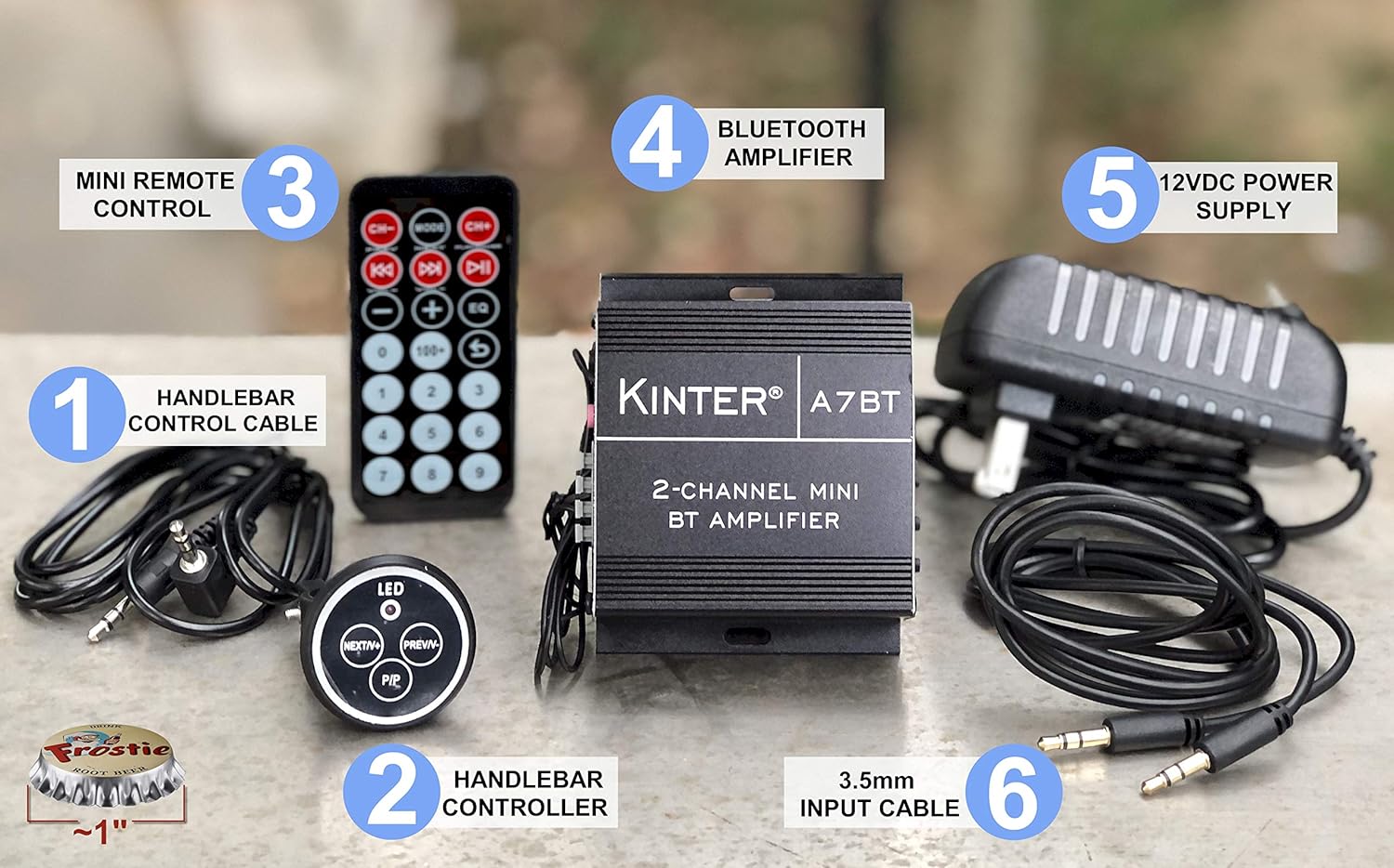
Image: Kinter A7BT amplifier, handlebar controller, IR remote, 12V power supply, and cables.
- Kinter A7BT 2-Channel Mini Bluetooth Ampөмүрлүү
- Wired Handlebar Controller
- Wireless Infrared (IR) Remote Control
- 3.5mm Audio Input Cable (59 inches length)
- 12V DC Power Supply (34 inches length)
3. Продукт бүтүп калдыview
3.1 Алдыңкы жана арткы панелдер
Familiarize yourself with the various controls and connections on the ampөмүрлүү.
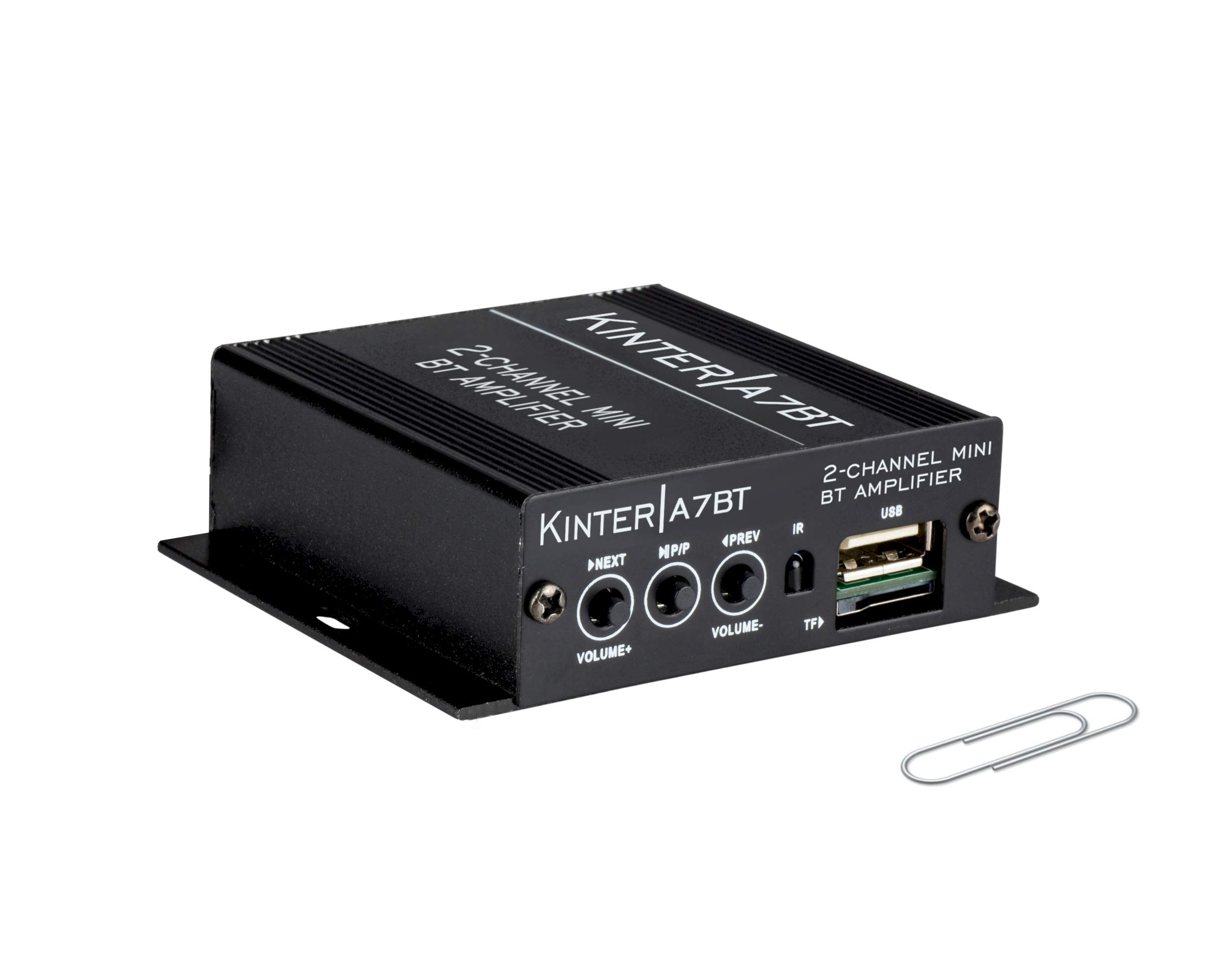
Image: Detailed diagram showing the front and rear panels of the Kinter A7BT amplifier with numbered components.
- NEXT/P (Next Song / Volume Up): Кийинки трекке кыска басыңыз, үнүн жогорулатуу үчүн узакка басыңыз.
- M/P/P (Mode / Play / Pause): Short press for play/pause, long press to change input mode (Bluetooth, AUX, USB/TF, FM).
- PREV/V (Previous Song / Volume Down): Мурунку трек үчүн кыска басыңыз, үнүн азайтуу үчүн көпкө басыңыз.
- IR (Инфракызыл кабылдагыч): For wireless remote control signals.
- TF (TransFlash / Micro SD Card Slot): Аудио ойнотуу үчүн fileTF картасынан.
- USB (USB Port): Аудио ойнотуу үчүн fileUSB флешкасынан. Note: This is not a charging port.
- AUX IN (3.5mm Stereo Audio Input Jack): 3.5 мм кабель аркылуу тышкы аудио түзмөктөрдү туташтыруу үчүн.
- FM АНТЕННА: Connection point for the FM antenna wire.
- REMOTE LINE IN: Input for the wired handlebar remote control.
- SPEAKER OUT (R/L): Terminals for connecting passive speakers (Right and Left channels).
- DC12V (12V DC Power Input): For connecting the 12V DC power supply.
- Bluetooth Operation Indicator: LED indicator for Bluetooth status.
3.2 Handlebar Controller
The wired handlebar controller provides convenient access to essential functions.
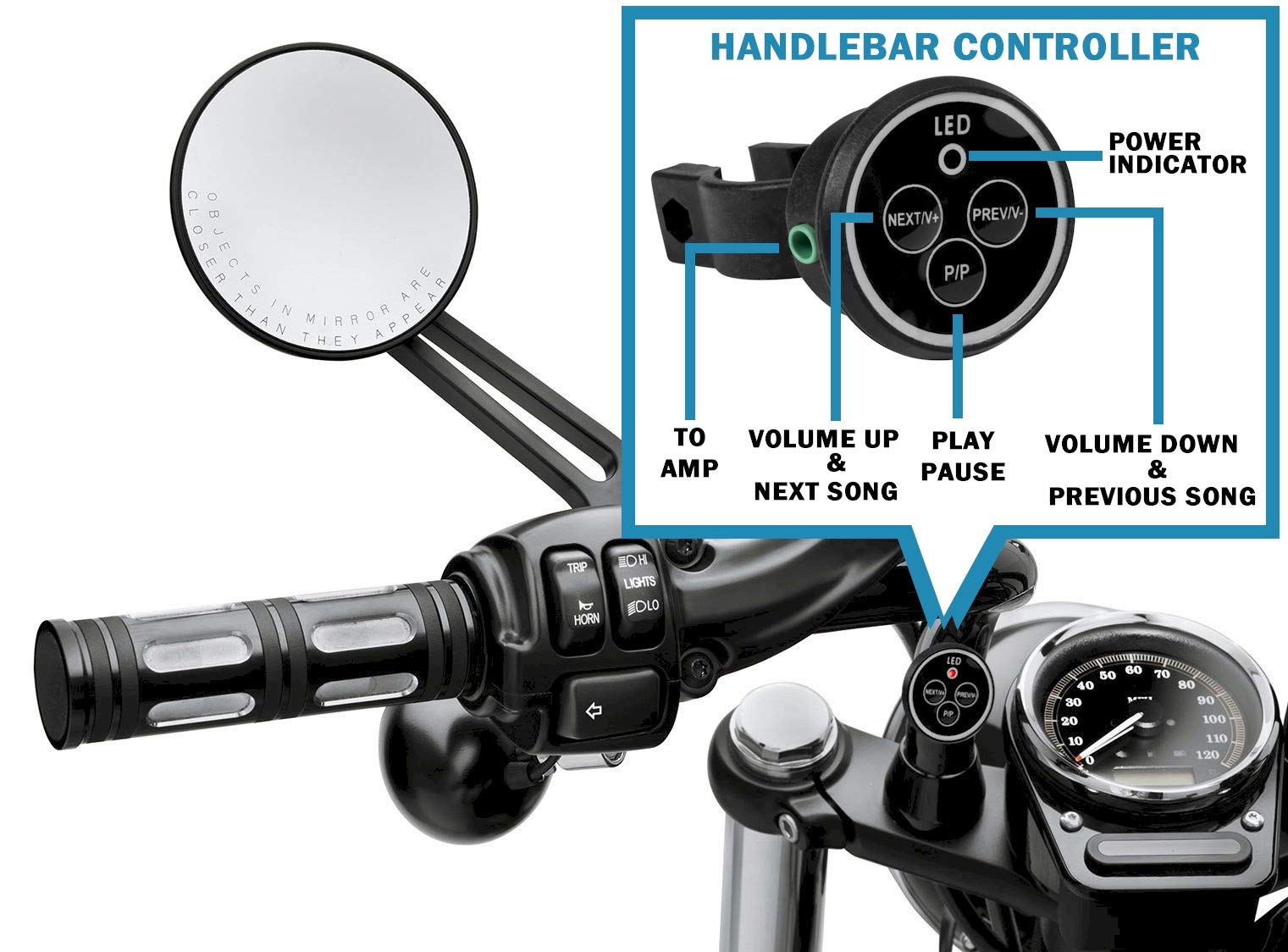
Image: Close-up of the handlebar controller showing LED power indicator, Next/Volume Up, Previous/Volume Down, and Play/Pause buttons.
- LED: Кубат көрсөткүчү.
- КИЙИНКИ/V+: Next Song / Volume Up.
- МУРУНКУ/V-: Previous Song / Volume Down.
- P/P: Ойнотуу / Тыныгуу.
4. Орнотуу
4.1 Кубат туташтыруу
Connect the included 12V DC power supply to the DC12V input on the amplifier. Plug the power supply into a standard wall outlet.
For automotive or motorcycle applications, you can hardwire the amplifier to a 12V battery system. Use the included PSU's wire and connector. Strip the wire as shown in the diagram below. The white wire is POSITIVE (+), and the bare wire is GROUND (-). It is recommended to install a 2 Amp fuse inline (not included) for protection.
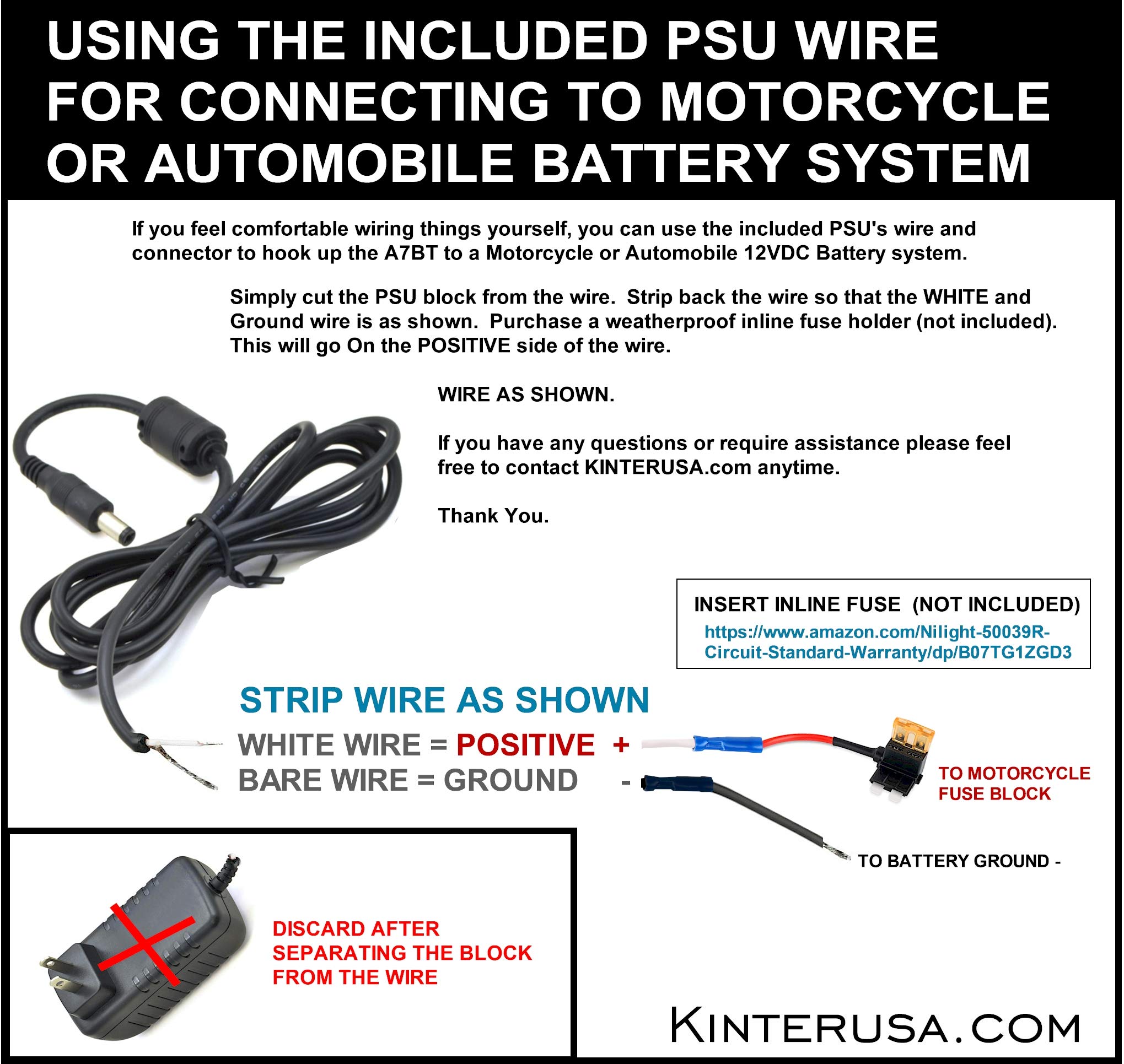
Image: Instructions for connecting the amplifier to a motorcycle or automobile battery, including wire stripping and fuse recommendation.
4.2 Динамиктин туташуусу
Connect your passive speakers to the SPEAKER OUT terminals on the rear panel. Ensure correct polarity (positive to positive, negative to negative) for each channel (Left and Right). Use a small screwdriver to press the terminal tabs, insert the speaker wire, and then release the tab to secure the wire.
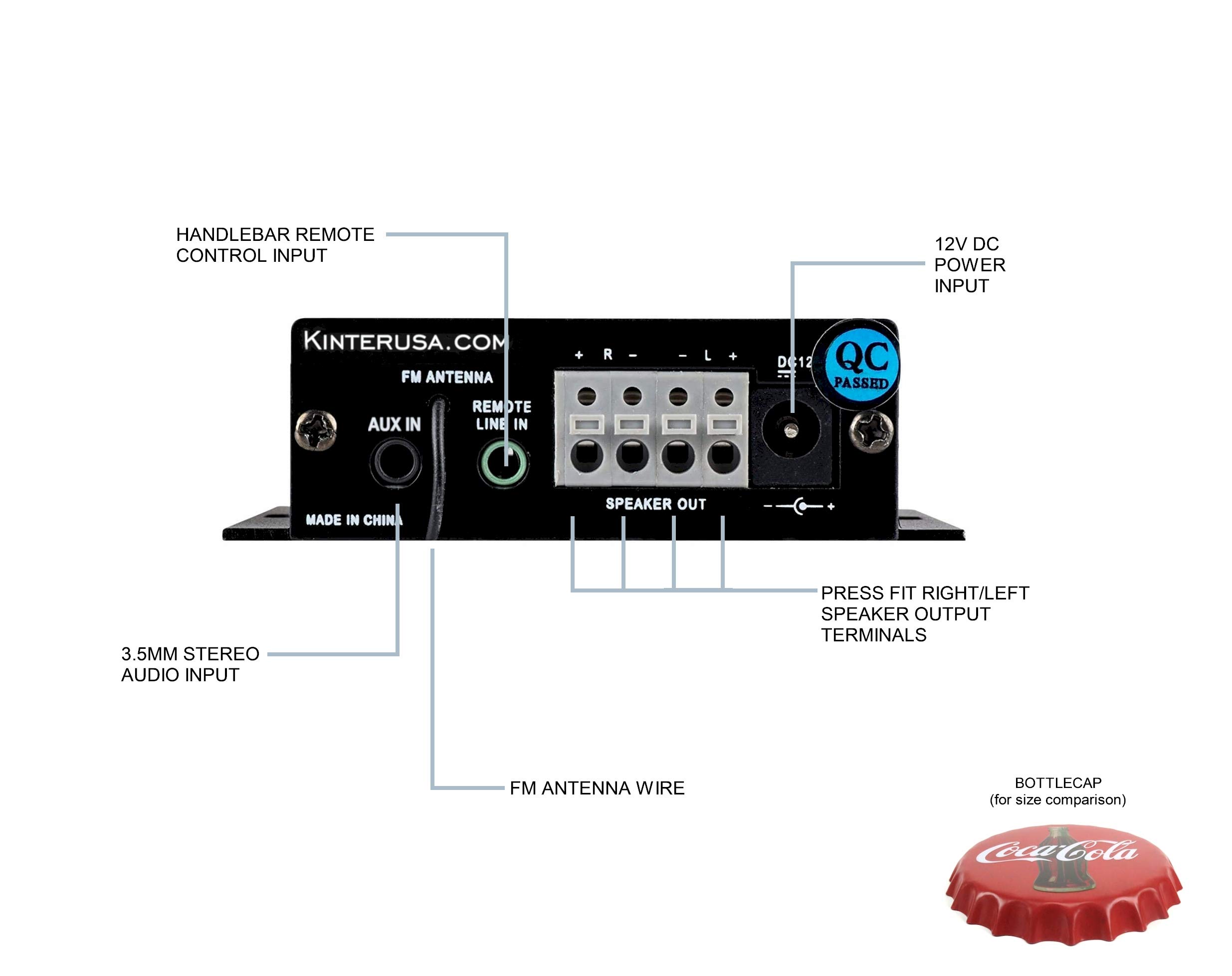
Image: A finger pressing a speaker terminal tab while inserting a speaker wire.
Эскертүү: Avoid using excessively large speaker wire that may cause shorts. Soldering the ends of the speaker wires can prevent stray strands and improve connection reliability.
4.3 Аудио киргизүү байланыштары
- AUX киргизүү: Connect external audio devices (e.g., smartphone, MP3 player) using the included 3.5mm audio cable to the AUX IN jack.
- USB/TF картасы: MP3 аудиосу бар USB флеш-дискти же TF (Micro SD) картасын салыңыз files into the respective ports. The amplifier will automatically detect and play compatible files.
- FM антеннасы: Connect the FM antenna wire to the FM ANTENNA input for radio reception.
4.4 Алыстан башкаруу пультунун туташуусу
- Wired Handlebar Controller: Plug the handlebar controller cable into the REMOTE LINE IN jack on the ampкөтөргүчтүн арткы панели.
- Wireless IR Remote: Ensure the IR receiver on the front panel (labeled 'IR') has a clear line of sight to the remote control.
5. Операция
5.1 Күйгүзүү/өчүрүү
The Kinter A7BT amplifier does not have a dedicated power on/off button. It powers on automatically when connected to a 12V DC power source and powers off when the power source is disconnected.
5.2 Режимди тандоо
басып, кармап туруңуз M/P/P button on the front panel or the 'MODE' button on the IR remote to cycle through the available input modes: Bluetooth, AUX, USB, TF, and FM radio.
5.3 Үндү башкаруу
Adjust the volume using the:
- Алдыңкы панели: көпкө басыңыз NEXT/P button for Volume Up, and long press the PREV/V button for Volume Down.
- Handlebar Controller: колдонуу NEXT/V+ button for Volume Up, and PREV/V- button for Volume Down.
- IR Remote: Use the dedicated Volume Up and Volume Down buttons.
5.4 Ойноону башкаруу
Control audio playback using the:
- Алдыңкы панели: Кыска басуу NEXT/P for next track, short press PREV/V for previous track, short press M/P/P ойнотуу/тыныгуу үчүн.
- Handlebar Controller: Колдонуу NEXT/V+ кийинки трек үчүн, PREV/V- for previous track, and P/P ойнотуу/тыныгуу үчүн.
- IR Remote: Use the dedicated track skip and play/pause buttons.
5.5 Bluetooth жупташтыруу
When the A7BT amplifier is powered on, it is ready for Bluetooth pairing. Follow these steps:
- Ensure Bluetooth is enabled on your audio device (e.g., smartphone, tablet).
- Түзмөгүңүздүн Bluetooth жөндөөлөрүн ачыңыз.
- Жаңы түзмөктөрдү издөө.
- Select "A7BT" from the list of available devices to connect.
- Once connected, the Bluetooth operation indicator will confirm the status.
5.6 FM радиосунун иштеши
In FM mode, use the track skip buttons on the front panel, handlebar controller, or IR remote to scan for and select radio stations.
5.7 USB/TF картасын ойнотуу
When a USB drive or TF card is inserted, the amplifier will automatically switch to the corresponding mode and begin playing audio files. The unit will resume playback from where it left off when powered off and on again. Fast-forwarding within a song is not supported.
6. Техникалык тейлөө
To ensure optimal performance and longevity of your Kinter A7BT amplifier, observe the following maintenance guidelines:
- Вентиляция: камсыз кылуу amplifier is placed in a well-ventilated area. The aluminum casing acts as a heatsink, and proper airflow is crucial to prevent overheating. Avoid enclosing the unit in tight spaces without ventilation.
- Тазалоо: Тазалоо үчүн жумшак, кургак чүпүрөктү колдонуңуз amplifier's exterior. Do not use liquid cleaners or solvents.
- Курчап турган чөйрө: ачыкка чыгарбоо ampэкстремалдык температурага, түз күндүн нуруна, жогорку нымдуулукка же чаңдуу чөйрөгө көтөргүч.
- Байланыштары: Кабелдин бардык туташууларынын бекемдигин жана коррозияга учурабагандыгын текшерүү үчүн мезгил-мезгили менен текшерип туруңуз.
7. Кыйынчылыктарды
If you encounter issues with your Kinter A7BT amplifier, төмөнкү жалпы көйгөйлөрдү жана чечимдерди карагыла:
| Көйгөй | Мүмкүн себеп | Чечим |
|---|---|---|
| Күч жок | Power supply not connected or faulty; vehicle battery issue. | Check power supply connection and outlet. If hardwired, check battery connection and inline fuse (if installed). |
| Үн жок | Incorrect input mode; speaker wires loose or incorrectly connected; volume too low; faulty audio source. | Verify correct input mode. Check speaker wire connections and polarity. Increase volume. Test with a different audio source. |
| Bluetooth туташпай жатат | Amplifier not in Bluetooth mode; device too far; device already paired to another unit. | камсыз кылуу amplifier is in Bluetooth mode. Move device closer. Forget "A7BT" on your device and re-pair. |
| USB/TF картасы ойнотулбай жатат | Колдоого алынбайт file форматтоо; карта/диск туура эмес салынган; бузулган files. | камсыз кылуу files MP3 форматында. Картаны/дискти кайра салыңыз. Башка картаны/дискти колдонуп көрүңүз. |
| Ampкөтөргүч ысып кетет | Poor ventilation; impedance mismatch with speakers. | Ensure adequate airflow around the unit. Verify speaker impedance matches ampкөтөргүчтүн спецификациялары. |
| Пульт иштебей жатат | IR receiver blocked; remote battery low (for wireless IR remote); wired remote connection loose. | Ensure clear line of sight to IR receiver. Replace remote battery. Check wired remote connection. |
8. Техникалык шарттар
Detailed technical specifications for the Kinter A7BT ampөмүрлүү.
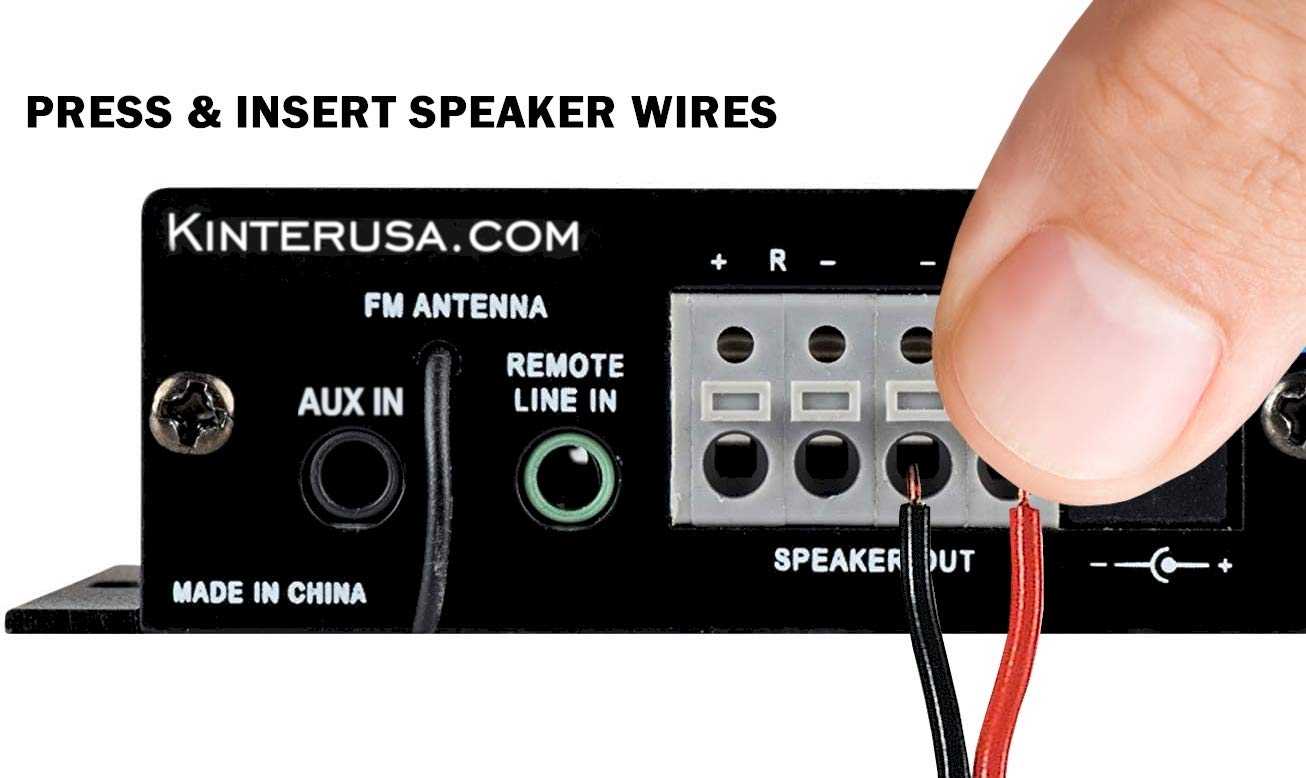
Image: The Kinter A7BT amplifier with its length, width, and height dimensions indicated.
| Өзгөчөлүк | Спецификация |
|---|---|
| Модель номери | A7BT |
| Каналдардын саны | 2 |
| Чыгуу күчү | 2 x 20W (4Ω, 10% THD Max) |
| Киргизүү көлөмүtage | 9-14.4В DC |
| Rated Input Voltage | 12 вольт |
| Номиналдуу киргизүү ток | .3A |
| Frequency Response | 20Гц-20КГц |
| Чыгуу импедансы | 4-8 Ом |
| Сигнал-ызы-чуу катышы (SNR) | ≥80дБ |
| Жалпы гармоникалык бурмалоо (THD) | ≤0.02% 4W |
| FM жыштык диапазону | 87.5-108.0 МГц |
| Input Impedance (FM) | 47К Ом |
| Тышкы көзөмөл | Infrared алыстан башкаруу |
| Иштөө температурасы | 0-46°C (32-115°F) |
| Сактоо температурасы | 0-60°C (32-140°F) |
| Нымдуулук | 10-85% (Operating), 10-95% (Storage) |
| Элементтин өлчөмдөрү (L x W x Y) | 6.4 x 6.4 x 2.5 Centimeters (2.5 x 2.5 x 1 inches approx.) |
9. Кепилдик жана колдоо
The Kinter A7BT amplifier comes with a one-year warranty from the date of purchase. This warranty covers manufacturing defects under normal use. It does not cover damage caused by misuse, accidents, unauthorized modifications, or improper installation.
For technical support, warranty claims, or any questions regarding your Kinter A7BT amplifier, please visit the official KinterUSA webсайтка же түздөн-түз кардарларды тейлөөгө кайрылыңыз.