
1. Киришүү
Thank you for choosing the Alfawise TV Box S95. This device is a high-performance multimedia player designed to enhance your home entertainment experience. It features a powerful Amlogic S905W Quad-core processor, 2GB of RAM, and 16GB of internal storage, running on Android 7.1. This manual provides detailed instructions for setting up, operating, and maintaining your TV Box to ensure optimal performance and longevity.
2. Коопсуздук маалыматы
- Түзмөктү нымдуулукка, жамгыр же өтө жогорку температурага дуушар кылбаңыз.
- Аппаратты жылуулук булактарынын жанына же тике күн нуруна коюудан алыс болуңуз.
- Зыяндын алдын алуу үчүн берилген кубат адаптерин гана колдонуңуз.
- Аппаратты өзүңүз ачууга же оңдоого аракет кылбаңыз. Бардык тейлөөлөрдү квалификациялуу кызматкерлерге тапшырыңыз.
- Аппаратты балдардан жана үй жаныбарларынан алыс кармаңыз.
- Ашыкча ысып кетүүнүн алдын алуу үчүн аппараттын айланасында туура желдетүүнү камсыз кылыңыз.
3. Пакеттин мазмуну
Пакеттин мазмунун кылдат текшериңиз. Эгерде кандайдыр бир буюмдар жок же бузулуп калса, сатуучуга кайрылыңыз.
- Alfawise TV Box S95
- User Manual
- Алыстан башкаруу
- HD Data Cable (HDMI Cable)
- Power Supply адаптер

Image: Contents of the Alfawise TV Box S95 package, including the TV box, user manual, remote control, HD data cable, and power supply.
4. Продукт бүтүп калдыview
The Alfawise TV Box S95 is a compact device designed for easy integration into your home entertainment system. It features various ports for connectivity and expansion.

Сүрөт: алдыңкы view of the Alfawise TV Box S95, showing its sleek black design and digital display.
4.1. Порттар жана байланыштар
The TV Box S95 is equipped with multiple ports to connect to your television, external storage, and network.
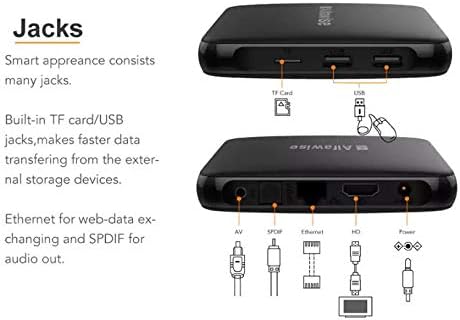
Image: Diagram illustrating the various ports on the Alfawise TV Box S95, including USB, TF Card, AV, SPDIF, Ethernet, HDMI, and Power.
- USB порттору: For connecting USB devices such as external hard drives, USB flash drives, mouse, or keyboard.
- TF карта уячасы: For inserting a MicroSD (TF) card to expand storage.
- AV порт: For connecting to older televisions using an AV cable (composite video and stereo audio).
- SPDIF порту: For digital audio output to a home theater system or soundbar.
- Ethernet порту: For a wired network connection to your router.
- HDMI порту: For connecting to an HDTV or monitor for high-definition video and audio output.
- Кубат киргизүү: Кубат адаптерин туташтыруу үчүн.

Сүрөт: Жакын план view of the rear ports on the Alfawise TV Box S95, showing the AV, SPDIF, Ethernet, HDMI, and Power input connections.
5. Орнотуу
Follow these steps to set up your Alfawise TV Box S95:
- Сыналгыга туташуу: Connect one end of the HDMI cable to the HDMI port on the TV Box and the other end to an available HDMI input on your television. Note the HDMI input number (e.g., HDMI 1, HDMI 2).
- Туташуу кубаты: Кубат адаптерин ТВ кутучасындагы DC 5V портуна сайыңыз, андан кийин адаптерди дубалдагы розеткага сайыңыз.
- Тармакка туташуу (милдеттүү эмес): For a wired connection, connect an Ethernet cable from your router to the Ethernet port on the TV Box. For Wi-Fi, you will configure it after powering on.
- Перифериялык түзүлүштөрдү туташтыруу (кошумча): If using a wired USB mouse or keyboard, plug them into the USB ports on the TV Box.
- Күйгүзүү: Turn on your television and select the correct HDMI input using your TV remote. The TV Box should automatically power on and display the boot screen.
6. Иштөө нускамалары
6.1. Initial Setup and Navigation
- Upon first boot, you may be guided through an initial setup process for language, time zone, and network connection.
- Use the provided remote control or a connected USB mouse/keyboard to navigate the Android 7.1 interface.
- The home screen typically displays shortcuts to popular apps and settings.
6.2. Тармакка кошулуу
To access online content, connect your TV Box to the internet.
- Зымдуу туташуу: If you connected an Ethernet cable during setup, the device should automatically connect to the internet.
- Wi-Fi туташуусу:
- барыңыз Орнотуулар > Network.
- Тандоо Wi-Fi жана аны буруңуз On.
- Тизмеден Wi-Fi тармагын тандаңыз.
- Enter the Wi-Fi password using the on-screen keyboard or connected keyboard.
- Тандоо Туташуу.
6.3. Using External Storage
Сиз медиа ойной аласыз fileUSB дисктерден же TF карталарынан.
- Insert your USB drive into a USB port or your TF card into the TF card slot.
- The system may prompt you to open a file manager or media player. If not, navigate to the Колдонмолор section and open a file manager application to browse your content.
7. Техникалык тейлөө
- Тазалоо: Аппараттын сыртын тазалоо үчүн жумшак, кургак чүпүрөктү колдонуңуз. Суюк тазалагычтарды же аэрозолдорду колдонбоңуз.
- Вентиляция: Ашыкча ысып кетүүнүн алдын алуу үчүн желдетүү тешиктери жабылбагандыгын текшериңиз.
- Программалык камсыздоо жаңыртуулары: Periodically check for system updates in the settings menu to ensure optimal performance and security.
- Сактагыч: Узак мөөнөткө колдонулбаганда, кубат адаптерин ажыратып, аппаратты салкын, кургак жерде сактаңыз.
8. Кыйынчылыктарды
If you encounter issues with your Alfawise TV Box S95, refer to the following common problems and solutions:
| Көйгөй | Мүмкүн себеп | Чечим |
|---|---|---|
| Күч жок | Кубат адаптери туташкан эмес же туура эмес. | Кубат адаптери түзмөккө жана иштеп жаткан розеткага бекем туташтырылганын текшериңиз. Башка розетканы колдонуп көрүңүз. |
| Сыналгыда дисплей жок | Incorrect HDMI input selected or faulty HDMI cable. | Verify your TV is on the correct HDMI input. Try a different HDMI port on your TV or a different HDMI cable. |
| Пульт иштебей жатат | Batteries are low or inserted incorrectly. Obstruction between remote and device. | Replace batteries. Ensure correct polarity. Remove any obstructions. Point the remote directly at the TV Box. |
| Wi-Fi'га туташпай жатат | Туура эмес сырсөз, байланыш аймагынан тышкары же роутердеги көйгөй. | Double-check the Wi-Fi password. Move the TV Box closer to the router. Restart your router. |
| Түзмөк жай иштеп жатат же катып калды | Too many apps running in the background or low storage. | Close unused applications. Clear cache. Restart the device. Consider a factory reset if issues persist (backup data first). |
9. Техникалык шарттар
Detailed technical specifications for the Alfawise TV Box S95:
| Өзгөчөлүк | Description |
|---|---|
| Бренд | Alfawise |
| Модель аты | TV Box S95 |
| Элемент моделинин номери | S95 |
| Өндүрүүчү | Alfawise |
| CPU | Amlogic S905W, Quad-core, up to 2GHz |
| Операция системасы | Android 7.1 |
| Орнотулган RAM өлчөмү | 2 ГБ |
| Эстутум сактоо сыйымдуулугу | 16 ГБ |
| Байланыш технологиясы | USB, Wi-Fi, Ethernet |
| Туташтыргыч түрү | Micro USB, HDMI, AV, SPDIF, Ethernet |
| Шайкеш түзмөктөр | Телевидение |
10. Кепилдик жана колдоо
The Alfawise TV Box S95 comes with a standard manufacturer's warranty. Please refer to the warranty card included in your package for specific terms and conditions. For technical support, troubleshooting assistance beyond this manual, or warranty claims, please contact your retailer or the official Alfawise customer support channels.