
1. Продукт бүтүп калдыview
The Alecto WS-1560 is a wireless weather station designed to provide accurate indoor and outdoor environmental data. Featuring a clear color display and a remote outdoor sensor, it offers comprehensive weather information and additional useful functions for your home.
Негизги өзгөчөлүктөрү:
- Measures indoor and outdoor temperature and humidity.
- Long-range wireless outdoor sensor (up to 100 meters).
- 5.7-inch well-lit color display with animated weather forecast icons.
- Temperature and ice alarm functions.
- Тындырма функциясы бар ойготкуч саат.
- Memory function for latest and highest readings.
- Moon phase indicator, date, day, and time display.
- Battery-operated main unit and outdoor sensor with backup batteries.

Figure 1.1: Alecto WS-1560 Main Unit and Wireless Outdoor Sensor.
2. Пакеттин мазмуну
Ensure all components are present and in good condition upon unpacking:
- Alecto WS-1560 Негизги блогу (Ички дисплей)
- Зымсыз тышкы сенсор
- User Manual
- (Power adapter and batteries may be included depending on package)
Video 2.1: Illustrative video showing typical weather station components and basic setup. (Note: This video is for a related product and may not show the exact Alecto WS-1560 model.)
3. Орнотуу жана орнотуу
3.1. Батареяны орнотуу
Both the main unit and the outdoor sensor require batteries for operation. Ensure you use the correct type and polarity.
- Тышкы сенсор:
- Зымсыз тышкы сенсордун артындагы батарея отсегин ачыңыз.
- 2x AA батарейкаларын (кошумча эмес) полярдуулук белгилерине (+/-) ылайык салыңыз.
- Батарея отсегин бекем жабыңыз.
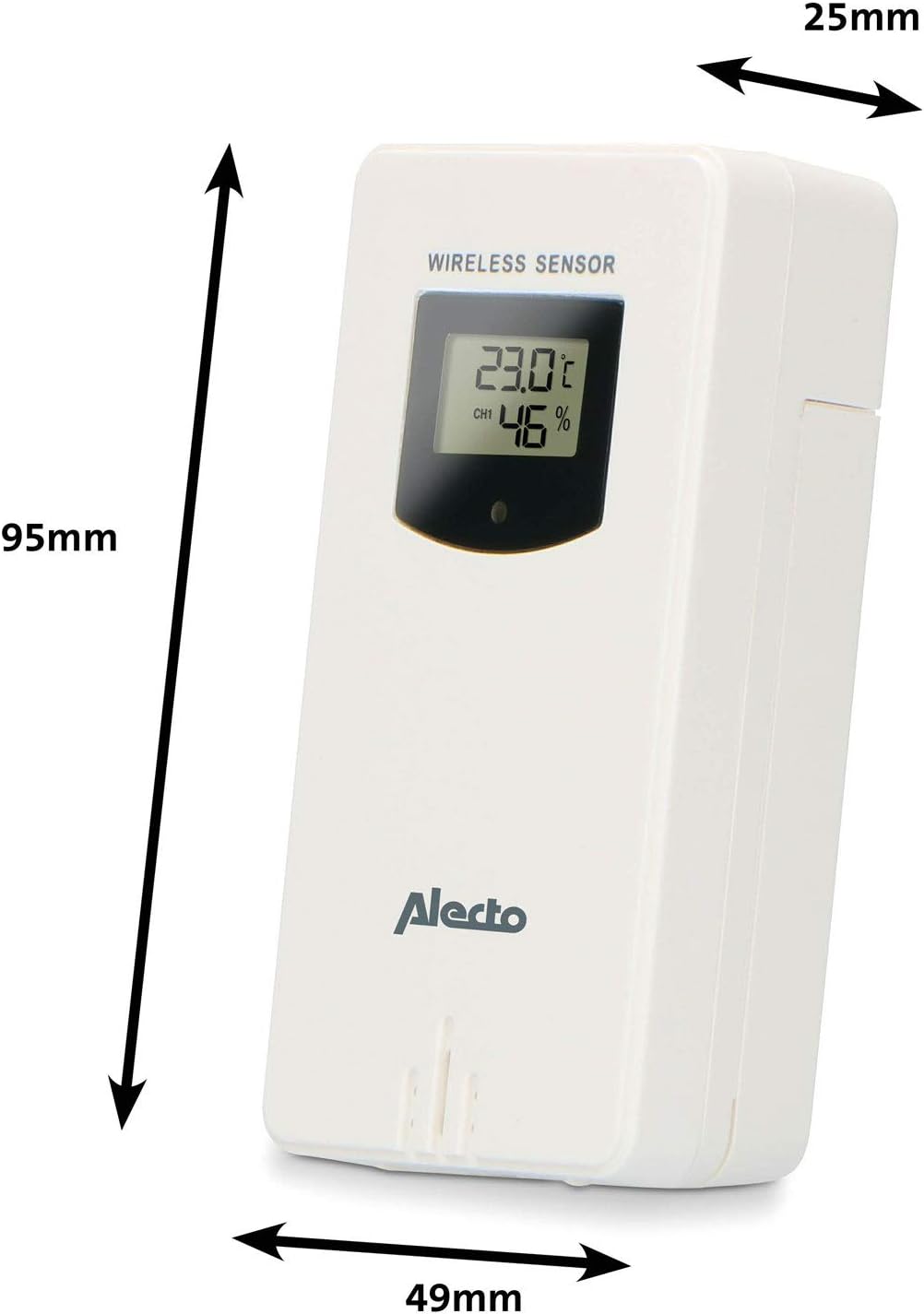
Figure 3.1: Wireless Outdoor Sensor dimensions and battery compartment location.
- Негизги блок:
- Open the battery compartment on the back of the main unit.
- Insert 2x AA batteries (not included) according to the polarity markings (+/-). These serve as backup batteries.
- Батарея отсегин бекем жабыңыз.
- Connect the main unit to a power outlet using the provided power adapter (if included).

Figure 3.2: Main Unit dimensions and power input.
3.2. Сенсордун жайгашуусу
For accurate outdoor readings, proper placement of the wireless sensor is crucial:
- Place the sensor in a shaded area, away from direct sunlight, to prevent inaccurate temperature readings.
- Ensure good air circulation around the sensor.
- Mount the sensor vertically, approximately 1.5 to 2.5 meters (5 to 8 feet) above the ground.
- Avoid placing the sensor near heat sources (e.g., vents, windows) or moisture sources.
- The maximum transmission range is 100 meters (328 feet) in open air. Walls and other obstacles will reduce this range.

3.3-сүрөт: Мисample of outdoor sensor placement on a wall.
3.3. Сенсорду негизги блок менен жупташтыруу
The main unit and sensor should automatically pair once both are powered on. If pairing does not occur:
- Ensure both units have fresh batteries and are within range.
- Кол менен сигнал жөнөтүү үчүн сырткы сенсордун батарея бөлүмүнүн ичиндеги "TX" баскычын басыңыз.
- On the main unit, you may need to initiate a search for the outdoor sensor (refer to the "Operation" section for specific button functions).
4. Операция
4.1. Дисплейдин жайгашуусу
The 5.7-inch color display provides a clear overview of all measured data. Key areas include:
- Сырттагы температура жана нымдуулук: Displays current outdoor conditions.
- Имараттын температурасы жана нымдуулугу: Displays current indoor conditions.
- Animated Weather Forecast: Icons predict upcoming weather (sunny, partly cloudy, cloudy, rainy, snowy).
- Убактысы жана датасы: Учурдагы убакыт, күн жана дата.
- Барометрдик басым: Учурдагы атмосфералык басым.
- Ай фазасы: Айдын учурдагы фазасынын графикалык чагылдырылышы.
- Temperature/Ice Alarm Indicators: Alerts for specific temperature thresholds or potential ice conditions.

4.1-сүрөт: Детальдуу view of the main unit's color display.
4.2. Баскыч функциялары
The main unit features several buttons for setting and adjusting functions. Common buttons include:
- ЖӨНДӨӨ: Enters setup mode for time, date, and other settings.
- РЕЖИМ: Switches between display modes or confirms settings.
- UP/DOWN (or +/-): Adjusts values during setup or cycles through channels.
- ЭСКЕРТҮҮ: Ойготкуч функциясын орнотот же иштетет.
- MEM: Displays maximum/minimum temperature and humidity records. Long press to clear records.
- SNOOZE / LIGHT: Activates snooze during an alarm or adjusts backlight brightness.
Video 4.2: Illustrative video demonstrating various features and settings of a weather station. (Note: This video is for a related product and may not show the exact Alecto WS-1560 model.)
4.3. Убакыт жана дата орнотуу
- Press and hold the "SET" button until the time display starts flashing.
- Use the "UP" or "DOWN" buttons to adjust the hour, then press "SET" to confirm and move to minutes.
- Мүнөт, жыл, ай жана күн үчүн кайталаңыз.
- Press "SET" again to exit the setting mode.
4.4. Ойготкуч орнотуулары
- Press the "ALARM" button once to view коңгуроо убактысы.
- Press and hold the "ALARM" button until the alarm time starts flashing.
- Use the "UP" or "DOWN" buttons to set the desired alarm hour and minute.
- Ырастоо үчүн "АЛАРМ" баскычын басыңыз.
- To activate/deactivate the alarm, press the "ALARM" button briefly when the alarm time is displayed. An alarm icon will appear/disappear.
4.5. Max/Min Records
The weather station automatically records the maximum and minimum temperature and humidity values over a 24-hour period.
- Press the "MEM" button briefly to view the maximum recorded values.
- Press "MEM" again to view the minimum recorded values.
- Press "MEM" a third time to return to current readings.
- To clear the records, press and hold the "MEM" button for a few seconds.
5. Техникалык тейлөө
- Тазалоо: Wipe the display and unit surfaces with a soft, damp кездеме. Абразивдүү тазалагычтарды же эриткичтерди колдонбоңуз.
- Батареяны алмаштыруу: Replace batteries in both the main unit and the outdoor sensor when the low battery indicator appears on the display. Always replace all batteries at the same time with new ones of the same type.
- Сенсорго кам көрүү: Periodically check the outdoor sensor for debris or obstructions that might affect its readings. Ensure it remains in a shaded, well-ventilated area.
6. Кыйынчылыктарды
| Көйгөй | Мүмкүн себеп | Чечим |
|---|---|---|
| No outdoor temperature/humidity reading (or "---" displayed) |
|
|
| Температура/нымдуулук көрсөткүчтөрү туура эмес |
|
|
| Дисплей күңүрт же бош |
|
|
7. Техникалык шарттар
| Модель номери | WS-1560 |
| Бренд | Алекто |
| Кубат булагы (Негизги блок) | Power Adapter (if included) + 2x AA batteries (backup) |
| Кубат булагы (тышкы сенсор) | 2x AA батарейкалар |
| Продукциянын өлчөмдөрү (Негизги бирдик) | 5.1 x 16.5 x 12.3 см |
| Продукт Салмагы | 440 г |
| Зымсыз сенсордук диапазон | 100 метрге чейин (ачык асманда) |
| Дисплей өлчөмү | 5.7 дюйм / 14.5 см |
| Origin | Кытай |
8. Кепилдик жана колдоо
Кепилдик жөнүндө маалымат, техникалык колдоо же тейлөө боюнча суроолор үчүн, өнүмүңүз менен кошо берилген кепилдик картасын караңыз же расмий Alecto дүкөнүнө баш багыңыз. webсайт. Сатып алганыңыздын далили катары сатып алуу дүмүрчөгүңүздү сактаңыз.
Алекто Webсайт: www.alecto.nl (General Alecto website, specific support page may vary)