
1. Киришүү
This manual provides instructions for the operation and maintenance of your Crosley CR612B-AB Corsair Tabletop AM/FM Bluetooth Radio with CD Player and Dual Alarm Clock. Please read this manual thoroughly before using the product to ensure proper function and to prevent damage.

Figure 1: Crosley CR612B-AB Corsair Tabletop AM/FM Bluetooth Radio with CD Player and Dual Alarm Clock.
2. Кутуда эмне бар
Төмөндө тизмеленген нерселердин баары пакетиңизге камтылганын текшериңиз:
- Crosley CR612B Corsair Radio Unit
- AC кубат адаптери
- Instruction Manual
3. Продукт бүтүп калдыview
Familiarize yourself with the various components and controls of your Corsair radio.

Figure 2: Front Panel Controls and Features. This image highlights the headphone jack, alarm clock buttons (Alarm 1, Alarm 2), and the analog tuning dial.
- Үн баскычы: Аудио чыгаруу деңгээлин тууралайт.
- Тунинг баскычы: AM/FM радио жыштыктарын тандайт.
- Режим баскычы: Switches between AM/FM radio, CD player, and Bluetooth modes.
- Уйку баскычы: Уйку таймер функциясын иштетет.
- Alarm 1 / Alarm 2 Buttons: Set and activate dual alarms.
- Убакыт баскычы: Used for setting the clock.
- AM/FM баскычы: Toggles between AM and FM radio bands.
- CD Player Controls: Play/Pause, Stop, Display, CD Mode, Skip/Search (Forward/Backward), Program.
- Гарнитура уячасы: Жеке угуу үчүн.
- Кубат баскычы: Агрегатты күйгүзөт же өчүрөт.
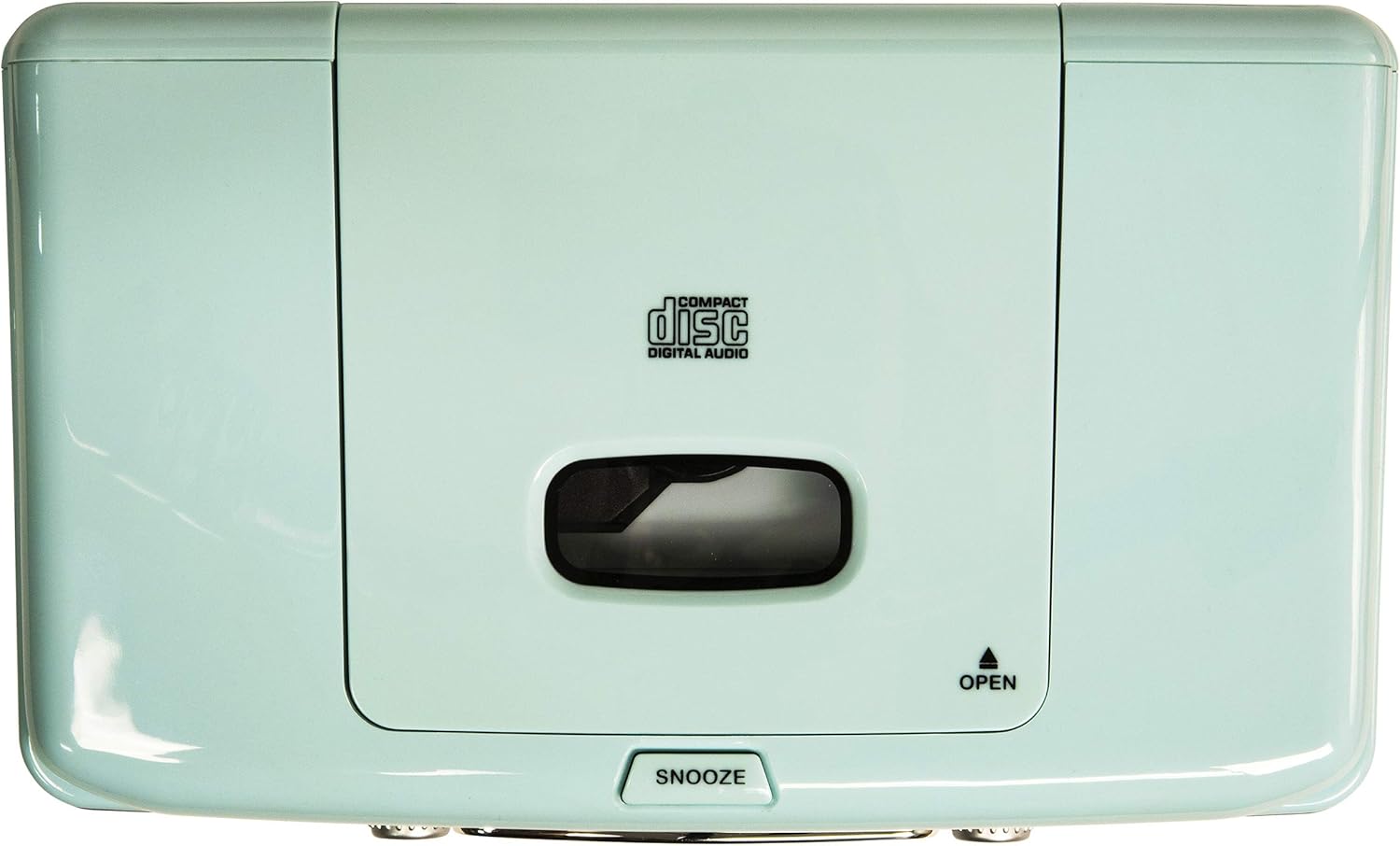
Figure 3: Top Panel. This image shows the top-loading CD player compartment and the Snooze button.

Figure 4: Rear Panel. This image displays the AC power input and the battery compartment for backup power.
4. Орнотуу
4.1 Кубат туташтыруу
- Агрегаттын туруктуу, жалпак бетке коюлганын текшериңиз.
- AC кубат адаптерин блоктун артындагы DC IN уячасына туташтырыңыз.
- AC кубат адаптерин стандарттуу розеткага сайыңыз.
4.2 Батареянын камдык көчүрмөсү (кошумча)
For alarm clock backup during power outages, install one 9V battery (not included) into the battery compartment on the rear of the unit. This will maintain time and alarm settings in case of a power interruption.
4.3 Антеннаны орнотуу
The unit has a built-in AM antenna. For FM reception, extend the wire FM antenna located on the rear of the unit for optimal signal reception.
5. Иштөө нускамалары
5.1 Күйгүзүү/өчүрүү
басыңыз КҮЧ түзмөктү күйгүзүү же өчүрүү үчүн алдыңкы панелде жайгашкан баскычты басыңыз.
5.2 AM/FM радиосу
- басыңыз РЕЖИМ button until 'RADIO' is displayed.
- басыңыз AM/FM AM же FM тилкесин тандоо үчүн баскычты басыңыз.
- айлантыңыз TUNING баскычын басып, каалаган радиостанцияңызды тандаңыз.
- тууралаңыз VOLUME каалаган угуу деңгээлине чейин баскычты басыңыз.
Video 1: Crosley CR612B-AB Corsair AM/FM Bluetooth Radio. This video demonstrates the radio's AM/FM tuning functionality.
5.3 CD ойноткучтун иштеши
- басыңыз РЕЖИМ button until 'CD' is displayed.
- басыңыз АЧУУ CD бөлүмүн ачуу үчүн түзмөктүн үстүндөгү баскычты басыңыз.
- Place a CD with the label side facing up into the compartment.
- CD бөлүктүн капкагын жабыңыз.
- басыңыз ОЙНОО/ТЫНЫТТЫРУ ойнотууну баштоо үчүн
- колдонуу ӨТКӨРҮҮ / ИЗДӨӨ тректер арасында өтүү үчүн баскычтар.
- басыңыз ТОКТОТ ойнотууну аяктоо үчүн баскыч.
- The ПРОГРАММА button allows you to create a custom playback order for tracks.

Figure 5: CD Player Open. This image shows the top-loading CD player ready for disc insertion.
5.4 Bluetooth операциясы
- басыңыз РЕЖИМ button until 'BT' (Bluetooth) is displayed. The unit will enter pairing mode, indicated by a flashing 'BT'.
- Сырткы түзмөгүңүздө Bluetooth'ду иштетиңиз (мисалы, смартфон, планшет).
- Издөө 'Crosley Corsair' in your device's Bluetooth settings and select it to pair.
- Once paired, the 'BT' indicator will stop flashing, and you can stream audio from your device to the radio.
- Adjust the volume on both your external device and the radio for optimal sound.

Figure 6: Bluetooth Streaming. This image illustrates connecting an external device via Bluetooth to the radio.
Video 2: CR612B Corsair Tabletop AM/FM Bluetooth Radio with CD Player. This video provides an overview of the radio's features, including Bluetooth connectivity.
5.5 Ойготкуч сааттын функциялары
- Орнотуу убактысы: басып, кармап туруңуз TIME баскычы. колдонуу ӨТКӨРҮҮ / ИЗДӨӨ buttons to adjust hours and minutes, then press TIME ырастоо үчүн дагы.
- Setting Alarm 1/2: Басыңыз жана кармап туруңуз 1-ДАБЛ or 2-ДАБЛ баскычы. колдонуу ӨТКӨРҮҮ / ИЗДӨӨ buttons to set the alarm time. Press the respective АЛАРМ button again to select the alarm source (Buzzer, Radio, or CD) and confirm.
- Ойготкучту иштетүү/өчүрүү: Кыскача басыңыз 1-ДАБЛ or 2-ДАБЛ Ойготкучту күйгүзүү же өчүрүү үчүн. Иштеп турганда дисплейде ойготкуч сүрөтчөсү пайда болот.
- Чырым: Ойготкуч чыкканда, басыңыз СОЮЗ button on top of the unit to temporarily silence it. The alarm will sound again after a few minutes.
- Уйку таймери: басыңыз УЙКУ button repeatedly to set a sleep timer (e.g., 15, 30, 60, 90 minutes). The unit will automatically turn off after the set time.
5.6 Гарнитураны колдонуу
Plug 3.5mm headphones into the НАДРФОН ДжЕК on the front panel for private listening. The main speakers will be muted automatically.
6. Техникалык тейлөө
6.1 Тазалоо
- Аппараттын сыртын жумшак, кургак чүпүрөк менен сүртүңүз.
- Абразивдүү тазалагычтарды, момдорду же эриткичтерди колдонбоңуз, анткени алар финишке зыян келтириши мүмкүн.
- CD бөлүмүн таза жана чаңсыз кармаңыз.
6.2 Сактоо
When not in use for extended periods, unplug the unit from the power outlet and store it in a cool, dry place.
7. Кыйынчылыктарды
| Көйгөй | Мүмкүн себеп | Чечим |
|---|---|---|
| Күч жок | Электр зымы бекем туташкан эмес. | Ensure the AC power adapter is firmly plugged into the unit and a working wall outlet. |
| Радио кабыл алуу начар | Алсыз сигнал. | Adjust the position of the FM wire antenna. For AM, try repositioning the unit. |
| CD ойнотулбай жатат | CD туура эмес салынган же кир/тырмалып калган. | Ensure the CD is inserted label-side up. Clean the CD with a soft cloth. Try a different CD. |
| Bluetooth туташпай жатат | Түзмөк жупташтыруу режиминде эмес же өтө алыс. | Ensure the radio is in Bluetooth mode and 'BT' is flashing. Move your device closer to the radio. Check your device's Bluetooth settings. |
| Ойготкуч угулбайт | Alarm not set or deactivated. | Verify alarm time and source are set correctly and the alarm is activated (icon visible). |
8. Техникалык шарттар
| Бренд | Crosley |
| Модель номери | CR612B-AB |
| Түс | Aqua Blue |
| Продукциянын өлчөмдөрү (L x W x Y) | 6.75"L x 11.5"W x 7.25"H |
| Байланыш технологиясы | Bluetooth |
| Радио топтору колдоого алынат | AM/FM |
| Аудио чыгаруу режими | Стерео |
| Power Source | AC адаптер |
| Батареяга талап | 1 x 9V battery (for backup, not included) |
| Дисплей түрү | LED |
| Материал | Chrome (accents) |

Figure 7: Product Dimensions. This diagram provides the overall measurements of the unit.
9. Кепилдик жана колдоо
9.1 Кепилдик маалыматы
Бул продукт менен капталган One Year Limited Manufacturer's Warranty. Please refer to the warranty card included in your packaging for full details on coverage and terms.
9.2 Кардарларды колдоо
For technical assistance, troubleshooting, or warranty claims, please contact Crosley customer support. Contact information can typically be found on the manufacturer's official webсайтында же продуктунун таңгагында.