
1. Киришүү
The Lascar EL-SIE-2 is a sophisticated data logger designed to monitor and record environmental humidity and temperature. This device features an integrated display for real-time readings and status, and its advanced onboard software allows for easy configuration and data analysis directly through a web browser, eliminating the need for dedicated software installation.
Негизги өзгөчөлүктөрү:
- Measures and records humidity and temperature from -18°C to 55°C using an internal sensor with ±0.2°C accuracy.
- Logs over 1 million temperature readings onto non-volatile internal memory.
- LCD display shows current temperature readings, minimum and maximum readings, battery level, and alarm status.
- No software download required; configure using a web браузер.
- Recorded readings can be stored to the EasyLog Cloud for viewing on any device or browser.
- Includes two AAA alkaline batteries, a mounting bracket, and a USB cable.
2. Орнотуу
2.1. Батареяны орнотуу
- Locate the battery compartment on the rear of the EL-SIE-2 data logger.
- Бөлүмдүн капкагын ачыңыз.
- Туура полярдуулукту (+/-) камсыз кылуу менен эки AAA щелочтуу батарейканы салыңыз.
- Батарея уясынын капкагын бекем жабыңыз.
2.2. Аппаратты орнотуу
The EL-SIE-2 is supplied with a mounting bracket for secure wall installation.
- Choose a suitable location for mounting, ensuring it is representative of the environment to be monitored.
- Secure the mounting bracket to the desired surface using appropriate fasteners (not included).
- Slide the EL-SIE-2 data logger into the mounted bracket until it clicks into place.
2.3. Баштапкы конфигурация
The EL-SIE-2 features onboard software accessible via a web браузер.
- Connect the data logger to your PC or Mac using the provided USB cable.
- ачуу а web browser (e.g., Chrome, Firefox, Edge). The device will appear as a removable drive.
- Navigate to the device's web interface (usually by opening the drive and clicking on the provided HTML file or navigating to a specific IP address if prompted).
- Follow the on-screen instructions to configure logging parameters such as sample rate, alarm thresholds, and start mode.
3. Операция
3.1. Display Overview
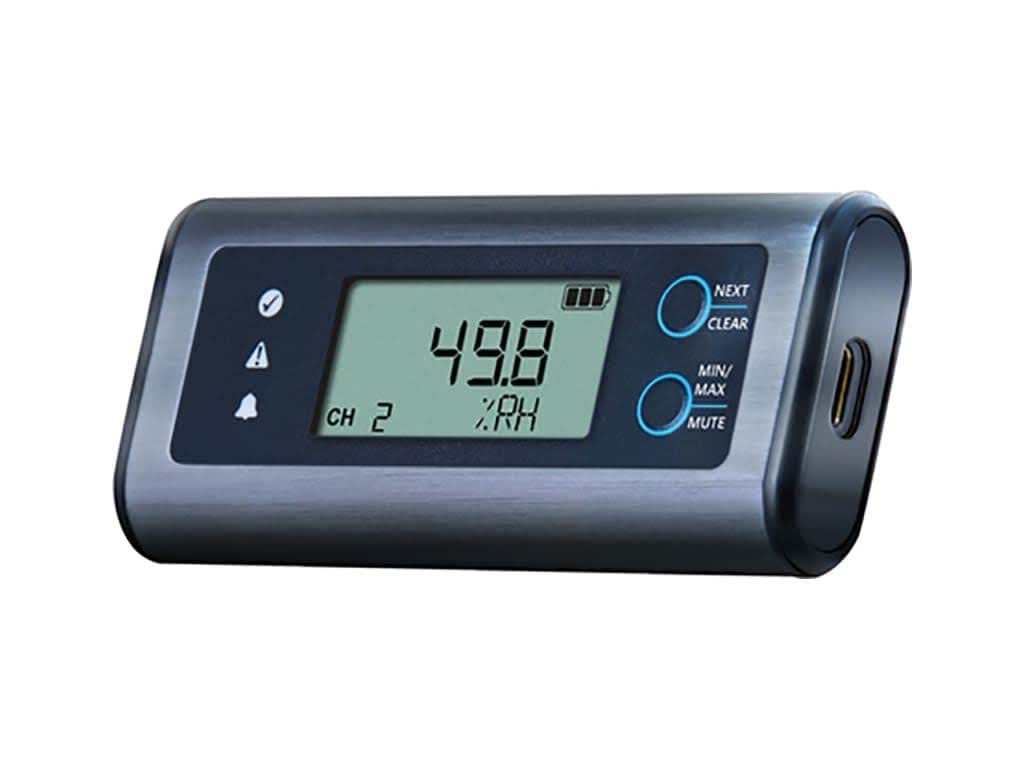
Жакын план view of the Lascar EL-SIE-2 data logger. The device features a rectangular, dark gray casing with a clear LCD screen displaying '49.8 %RH' and 'CH 2'. To the left of the screen are indicator icons for status, alert, and alarm. To the right, two circular buttons are labeled 'NEXT/CLEAR' and 'MIN/MAX/MUTE'. A USB-C port is visible on the right side of the device.
The EL-SIE-2 features a clear LCD that provides immediate information:
- Current Readings: Displays the real-time humidity (%RH) and temperature (°C/°F).
- Батарея деңгээли: An icon indicates the remaining battery life.
- Ойготкучтун абалы: Icons illuminate to indicate if an alarm condition is met.
- Канал көрсөткүчү: 'CH 2' indicates the active measurement channel.
3.2. Баскыч функциялары
- NEXT / CLEAR Button (Top): Press to cycle through display modes or clear certain indicators.
- MIN/MAX / MUTE Button (Bottom): чейин басыңыз view minimum and maximum recorded values. Hold to mute audible alarms.
3.3. Data Logging and Access
Once configured, the EL-SIE-2 will automatically begin logging data according to your settings. Data can be accessed and analyzed in two primary ways:
- Түз байланыш: Connect the logger to a computer via USB. Access the onboard web үчүн интерфейс view, analyze, and download recorded data.
- EasyLog Cloud: Upload recorded data to the EasyLog Cloud for remote access and analysis from any internet-connected device.
4. Техникалык тейлөө
4.1. Батареяны алмаштыруу
The EL-SIE-2 uses two AAA alkaline batteries, which typically last over one year. Replace batteries when the low battery indicator appears on the display to ensure continuous operation and data integrity. Follow the steps outlined in Section 2.1 for battery installation.
4.2. Тазалоо
To clean the device, wipe the exterior with a soft, damp кездеме. Абразивдүү тазалагычтарды колдонбоңуз же аппаратты сууга салбаңыз.
5. Кыйынчылыктарды
5.1. Түзмөк жооп бербей жатат
- Батареянын деңгээлин текшериңиз жана керек болсо алмаштырыңыз.
- USB кабели аппаратка да, компьютерге да бекем туташып турганын текшериңиз.
- Башка USB портуна же компьютерге туташып көрүңүз.
5.2. Data Not Logging
- Verify that the device was properly configured to start logging via the web интерфейс.
- Check the device's internal memory status; if full, download data and clear memory.
6. Техникалык шарттар
| Спецификация | Нарк |
|---|---|
| Элемент моделинин номери | PS-2204A |
| Пакеттин өлчөмдөрү | 6 x 3 x 1 дюйм; 4.8 унция |
| Батареялар талап кылынат | 2 AAA батарейка |
| Батареянын сүрөттөлүшү | щелочтуу |
| Монтаж түрү | Дубалга орнотуу |
| Жогорку температура рейтинги | 55 градус |
| Температуранын тактыгы | 1°C |
| Өндүрүүчү | Lascar Electronics |
| Дата биринчи жеткиликтүү | 19-август, 2019-жыл |
7. Кепилдик жана колдоо
For warranty information, technical support, or service inquiries, please refer to the official Lascar Electronics webсайтка же түздөн-түз кардарларды колдоо менен байланышыңыз. Кепилдик дооматтар үчүн сатып алуу дүмүрчөгүңүздү сактаңыз.