
1. Киришүү
This manual provides instructions for the installation, operation, and maintenance of the WELLYE JR1758RX-2S and JR1958RX-2S 2.4G Bluetooth Remote Control and Receiver Kit. This kit is designed as a replacement part for children's powered ride-on cars. The JR1758RX-2S and JR1958RX-2S models are compatible and can be used interchangeably.

Image: The JR1958RX-2S and JR1758RX-2S control boxes are shown, highlighting their similar appearance and compatibility.
2. Шайкештикти текшерүү
Before installation, ensure this control box is compatible with your child's ride-on car. Open the existing control box compartment in your ride-on car and compare its appearance with the images provided in this manual. If the appearance matches, this part should be suitable for your car.

Сүрөт: деталдуу view of the JR1758RX-2S control box, displaying its model number, supply voltage (DC 12V), load current (Max 15A), and frequency (2.405GHz-2.483GHz).
3. Орнотуу жана орнотуу
This section outlines the basic steps for connecting the control box and pairing the remote control. Professional installation is recommended if you are unfamiliar with electrical wiring.
3.1. Control Box Installation
Connect the control box to the ride-on car's electrical system, including motors and power supply. Ensure all connections are secure and match the original wiring configuration. The control box operates on a 12V supply voltage.
Video: This video demonstrates the basic assembly and wiring of a control box with motors and a power source, showing the components in operation.
3.2. Алыстан башкаруунун батареясын орнотуу
The remote controller requires two AAA (1.5V) batteries. Batteries are not included with the kit.
- Пульттун артындагы батарея отсегин табыңыз.
- Бураманы бошотуп, батареянын капкагын ачуу үчүн бурагычты колдонуңуз.
- Insert two AAA (1.5V) batteries, ensuring correct polarity (+/-).
- Батарейканын капкагын ордуна коюп, бурамасын бекемдеңиз.

Image: A diagram illustrating the remote control's button layout and the process for installing two AAA batteries in its compartment.
3.3. Pairing the Remote Control (Matching Frequency)
The remote control must be paired with the receiver for the first use or after replacing the batteries.
- Load two AAA batteries into the remote controller.
- Hold down the "▲" (Forward) and "▼" (Backward) keys on the remote control simultaneously for 3 seconds to initiate the match code process. The first LED indicator on the remote will flicker.
- Turn on the power switch of the ride-on vehicle.
- The red indicator lights on the remote control will stop flashing, indicating that the pairing process is successful.
4. Пультту иштетүү
Once paired, the remote control allows you to operate the ride-on car. Familiarize yourself with the button functions:
- "S" button: Sets up speed.
- One LED lit: Low speed
- Two LEDs lit: Medium speed
- Three LEDs lit: High speed
- "▲" button: Forward movement.
- "▼" button: Backward movement.
- "◀" button: Turn Left.
- "▶" button: Turn Right.
- "P" button: Hold to apply the brake. All LED indicators will flicker when the brake is engaged.
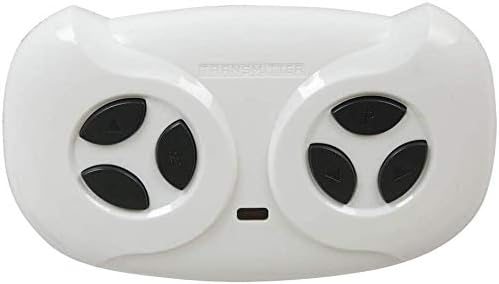
Image: The remote control unit, showing its ergonomic design and the layout of its red control buttons.
5. Техникалык тейлөө
To ensure the longevity and proper functioning of your remote control and receiver kit, follow these maintenance guidelines:
- Keep the control box and remote control dry and away from moisture.
- Агрегаттарды жумшак, кургак чүпүрөк менен тазалаңыз. Катуу химиялык заттарды же абразивдүү тазалагычтарды колдонбоңуз.
- If the ride-on car will not be used for an extended period, remove the batteries from the remote control to prevent leakage.
- Бардык зымдардын туташууларынын бошоп же бузулуп калганын үзгүлтүксүз текшерип туруңуз.
6. Кыйынчылыктарды
If you encounter issues with your remote control and receiver kit, refer to the following common problems and solutions:
| Көйгөй | Мүмкүн себеп | Чечим |
|---|---|---|
| Алыстан башкаруу жооп бербей жатат. |
|
|
| Vehicle moves erratically or not at all. |
|
|
7. Техникалык шарттар
- Бренд: WELLYE
- Модель номерлери: JR1758RX-2S, JR1958RX-2S (compatible)
- Тtage: 12V
- Башкаруу ыкмасы: 2.4G Bluetooth
- Load Current (JR1758RX-2S): Макс 15А
- Load Current (JR1958RX-2S): Макс 30А
- Frequency (JR1758RX-2S): 2.405 ГГц-2.483 ГГц
- Frequency (JR1958RX-2S): 2.407 ГГц-2.473 ГГц
- Продукциянын өлчөмдөрү: Approximately 4 x 3 x 3 inches (Control Box)
- Элемент Салмагы: Болжол менен 5.9 унция
- Сунушталган жаш: 16 years and up (for product use, not for ride-on car operator)
8. Кепилдик жана колдоо
For warranty information or technical support, please contact the manufacturer or your point of purchase. Keep your purchase receipt for any warranty claims.