
Walfront TM610C
Walfront TM610C Intelligent DIN Rail Timing Switch User Manual
Model: TM610C
1. Киришүү
The Walfront TM610C Intelligent DIN Rail Timing Switch is a high-performance, programmable time relay designed for precise control of electrical circuits. This device allows you to automate the switching ON and OFF of various electrical appliances and systems, such as street lights, factory equipment, advertising signs, and more, based on a pre-set 24-hour schedule. Its robust design and easy DIN rail installation make it suitable for a wide range of industrial and domestic applications.
2. Коопсуздук маалыматы
Бул түзмөктү орнотуудан же иштетүүдөн мурун бардык коопсуздук көрсөтмөлөрүн окуп чыгып, түшүнүп алыңыз. Бул көрсөтмөлөрдү аткарбоо электр тогуна урунууга, өрткө же олуттуу жаракат алууга алып келиши мүмкүн.
- Электр коркунучу: Installation and wiring should only be performed by a qualified electrician.
- Электр энергиясын өчүрүү: Always disconnect power at the main circuit breaker before performing any installation, wiring, or maintenance.
- Тtage Шайкештик: камсыз кылуу voltage matches the device's specifications (220V AC).
- Жүктөө жөндөмдүүлүгү: Do not exceed the maximum resistive load of 16 Amperes.
- Туура Жерге салуу: Жергиликтүү электр эрежелерине ылайык, түзмөктүн туура жерге туташтырылганын текшериңиз.
- Үй ичинде гана колдонуу: This device is designed for indoor use in dry environments.
3. Продукциянын өзгөчөлүктөрү
- Жогорку аткаруу: Provides stable and reliable timing control.
- Программалануучу: 24-hour programmable cycle with a minimum setting interval of 15 minutes.
- Кол менен жокко чыгаруу: Features a convenient ON-AUTOMATIC switch for manual control.
- Оңой орнотуу: Designed for standard DIN rail mounting.
- Кубаттын камдык көчүрмөсү: Built-in battery provides up to 100 hours of power backup to maintain time settings during power outages.
- Кеңири колдонуу: Suitable for various electrical equipment requiring scheduled operation.
4. Пакеттин мазмуну
- 1 x Walfront TM610C Intelligent DIN Rail Timing Switch
- 1 х Колдонуучунун колдонмосу (бул документ)
5. Продукт бүтүп калдыview жана компоненттер
Familiarize yourself with the components of the TM610C timing switch.

5.1-сүрөт: Алдыңкы жагы view of the Walfront TM610C timing switch, showing the transparent cover and terminal screws.

5.2-сүрөт: Жогорудан төмөн view of the TM610C with the protective cover open, revealing the 24-hour dial and the manual ON-AUTOMATIC switch.

5.3-сүрөт: Түз алдыңкы бет view of the TM610C, highlighting the time dial and indicator arrow.

5.4-сүрөт: Артка view of the TM610C, displaying the electrical specifications and wiring diagram for connection.
6. Техникалык шарттар
| Параметр | Нарк |
|---|---|
| Модель номери | TM610C |
| Бренд | Walfront |
| Coil Voltage | 220V AC |
| Жыштык | 45-60 Гц |
| Резистивдик жүк | AC250V 16A |
| Байланыш материалы | Жез |
| Байланыш түрү | Адатта ачык |
| Иштөө режими | Автоматтык |
| Монтаж түрү | DIN Rail орнотуу |
| Минималдуу орнотуу аралыгы | күнүнө 15 мүнөт |
| Power Backup | 100 саат |
| Туташтыргыч түрү | Бурама |
| ASIN | B0873DHK41 |
| GTIN | 03512730907995 |
7. Орнотуу жана орнотуу
7.1 DIN темир жолду орнотуу
The TM610C is designed for quick and easy installation on a standard 35mm DIN rail. Simply align the device with the DIN rail and press firmly until it clicks into place.
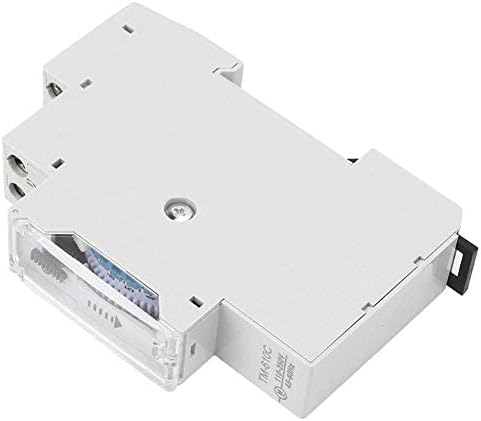
7.1-сүрөт: Side view DIN рельсин орнотуу механизмин көрсөтүү.
7.2 Электр зымдары боюнча нускамалар
ЭСКЕРТҮҮ: Ensure all power is disconnected before wiring. Incorrect wiring can cause damage to the device or connected equipment, and poses a risk of electric shock.
Refer to the wiring diagram on the back of the unit (Figure 5.4) and the instructions below:
- Кубаттуулукту киргизүү (У, У): Connect the 220V AC live (L) and neutral (N) wires to the corresponding input terminals.
- Load Output (1, 2): Connect the load (e.g., light fixture, motor) to the output terminals. Terminal '1' is typically the switched live output, and '2' is the common neutral or return path for the load.
- Ensure all screw terminals are tightened securely to prevent loose connections.
7.2-сүрөт: Detailed wiring diagram on the back of the unit. L and N are input terminals for 110-250VAC. Terminals 1 and 2 are the output contacts for the load (AC250V 16A).
8. Иштөө нускамалары
8.1 Учурдагы убакытты орнотуу
Rotate the dial clockwise until the current time aligns with the arrow indicator on the front of the unit. The dial represents a 24-hour cycle.
8.1-сүрөт: Фронт view showing the 24-hour dial and the time indicator arrow.
8.2 КҮЙГҮЗҮҮ/ӨЧҮРҮҮ ЦИКЛДЕРИН ПРОГРАММАЛОО
The dial has segments, each representing 15 minutes. To program an ON period, push the corresponding segments outwards. To program an OFF period, leave the segments pushed inwards.
- Each segment corresponds to 15 minutes.
- Pushing a segment outwards will turn the connected device ON during that 15-minute interval.
- Leaving a segment inwards will keep the connected device ӨЧҮРҮҮ during that 15-minute interval.
- You can set multiple ON/OFF periods throughout the 24-hour cycle.
8.2-сүрөт: View of the programmable segments on the dial. Segments pushed outwards activate the timer.
8.3 Кол менен өзгөртүү которгучу
The TM610C features a manual override switch with two positions:
- "ON" (I): The connected device will remain continuously ON, overriding the programmed schedule.
- "AUTOMATIC" (Clock Symbol): The device will operate according to the programmed ON/OFF schedule.
Ensure the switch is set to the "AUTOMATIC" position for scheduled operation.
8.3-сүрөт: The manual override switch located near the time dial. Set to 'I' for permanent ON, or the clock symbol for automatic operation.
8.4 Power Backup Function
The TM610C includes an internal battery that provides up to 100 hours of power backup. This feature ensures that the internal clock continues to run and maintains your programmed settings even during power outages, preventing the need for reprogramming after a power interruption.
9. Техникалык тейлөө
- Тазалоо: Түзмөктүн сыртын тазалоо үчүн жумшак, кургак чүпүрөктү колдонуңуз. Суюк тазалоочу каражаттарды же эриткичтерди колдонбоңуз.
- Байланыштары: Зымдардын туташууларынын бекем экенине ынануу үчүн аларды мезгил-мезгили менен текшерип туруңуз.
- Курчап турган чөйрө: Ensure the device is kept in a dry, dust-free environment within its specified operating temperature range.
10. Кыйынчылыктарды
| Көйгөй | Мүмкүн себеп | Чечим |
|---|---|---|
| Device not turning ON/OFF as programmed. |
|
|
| Сааттын териси кыймылдабай жатат. |
|
|
| Туташкан түзмөк электр энергиясын албай жатат. |
|
|
11. Кепилдик жана колдоо
11.1 Кепилдик маалыматы
Walfront products are manufactured to high-quality standards. For specific warranty details, please refer to the warranty policy provided by your retailer or the official Walfront webсайт. Сатып алуу квитанциясын кепилдик дооматтары үчүн сатып алуунун далили катары сактаңыз.
11.2 Кардарларды колдоо
If you encounter any issues or have questions regarding your Walfront TM610C Intelligent DIN Rail Timing Switch that are not covered in this manual, please contact Walfront customer service or your local distributor for assistance. You can often find contact information on the Walfront brand store page or their official webсайт.
Көбүрөөк маалымат алуу үчүн, киргиле Walfront Store on Amazon.
Ask a question about this manual
Ask about setup, troubleshooting, compatibility, parts, safety, or missing instructions. Manuals+ will review the question and use this page’s manual context to help answer it.