
Technicolor C2100T
CenturyLink Prism TV Technicolor C2100T Modem Router User Manual
Модели: C2100T
Introduction
This manual provides comprehensive instructions for the setup, operation, and maintenance of your CenturyLink Prism TV Technicolor C2100T Modem Router. This all-in-one device combines an ADSL2+ & VDSL2 modem with a built-in 4-port simultaneous dual-band (2.4/5GHz) 802.11ac Wi-Fi router, designed for compatibility with CenturyLink DSL service.

1-сүрөт: алдыңкы жана каптал view of the Technicolor C2100T Modem Router.
Орнотуу колдонмосу
Follow these steps to set up your Technicolor C2100T modem router and establish an internet connection.
1. Пакеттен чыгаруу жана жайгаштыруу
- Бардык компоненттерди таңгактан кылдаттык менен алып салыңыз.
- Place the modem router in a central location in your home, away from obstructions and other electronic devices that may cause interference.
- Аппараттын айланасында жетиштүү желдетүүнү камсыз кылыңыз.
2. Аппараттык камсыздоону туташтыруу
- Connect the DSL cable from your wall jack to the "DSL" port on the back of the modem router. If you have a phone line splitter, connect the modem to the DSL port on the splitter.
- Connect the power adapter to the "Power" port on the modem router and then plug it into an electrical outlet.
- For wired connections, connect an Ethernet cable from one of the "Ethernet" ports (Eth.1-4) on the modem router to your computer or other network device.
- Wait for the "Power" and "DSL" indicator lights on the front of the modem to become solid green, indicating a successful connection. The "Internet" light should also turn green once the connection is established.

Figure 2: Front and back panel connections and default login information.
3. Initial Configuration (PPPoE Username/Password)
For CenturyLink DSL service, you will likely need to enter your PPPoE username and password. This information is provided by CenturyLink. If you do not have it, contact CenturyLink support.
- ачуу а web browser on a computer connected to the modem (either via Wi-Fi or Ethernet).
- Дарек тилкесинде териңиз 192.168.0.1 and press Enter. This is the default GUI Address for the modem.
- You will be prompted for an Admin Username and Admin Password. Refer to the sticker on your modem (as shown in Figure 2) for the default credentials. Common defaults are Username: админ жана сырсөз: hadsee7j.
- Once logged in, navigate to the WAN or Internet setup section.
- Select PPPoE as the connection type and enter your CenturyLink-provided username and password. Ensure you enter the username exactly as provided, often without the "@centurylink.net" suffix if the setup wizard automatically adds it.
- Save the settings and allow the modem to reconnect. The "Internet" light should turn solid green.
Иштөө нускамалары
Wi-Fi туташуусу
The C2100T supports dual-band Wi-Fi (2.4GHz and 5GHz). The default Wi-Fi network names (SSIDs) and passwords (Security Keys/Passphrases) are located on the sticker on the modem (refer to Figure 2).
- Зымсыз түзмөгүңүздө (смартфон, планшет, ноутбук) жеткиликтүү Wi-Fi тармактарын издеңиз.
- Select the SSID corresponding to your modem (e.g., "CenturyLink0204" for 2.4GHz or "CenturyLink0204-5G" for 5GHz).
- Enter the Security Key/Passphrase when prompted.
- You can change these settings through the modem's web interface (192.168.0.1) for better security and personalization.
Зымдуу туташуу
Connect devices directly to the Ethernet ports on the back of the modem for a stable and fast connection.
- Use standard Ethernet cables to connect your computer, gaming console, smart TV, or other network devices to any of the four yellow "Ethernet" ports.
- The modem will automatically assign an IP address to the connected device.
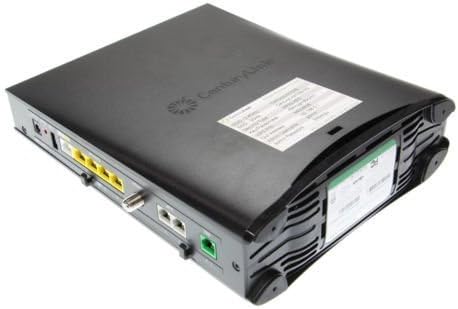
3-сүрөт: Арткы view of the Technicolor C2100T showing port layout.
Техникалык тейлөө
- Кадимки кайра жүктөө: Periodically rebooting your modem (unplugging the power for 30 seconds and plugging it back in) can resolve minor connectivity issues and improve performance.
- Программалык камсыздоонун жаңыртуулары: Check the Technicolor or CenturyLink support website for available firmware updates. Keeping your firmware up-to-date ensures optimal performance and security.
- Физикалык тазалоо: Keep the modem free from dust and debris. Use a soft, dry cloth to clean the exterior. Ensure ventilation holes are not blocked.
- Сырсөз коопсуздугу: Change the default Wi-Fi and admin passwords to strong, unique passwords to prevent unauthorized access to your network and modem settings.
Проблемаларды чечүү
| Көйгөй | Мүмкүн болгон себеп / Чечим |
|---|---|
| No Power / Lights Off | Кубат адаптери модемге жана иштеп жаткан электр розеткасына бекем туташтырылганын текшериңиз. Башка розетканы колдонуп көрүңүз. |
| DSL Light Blinking or Off | Check the DSL cable connection to the wall jack and the modem. Ensure your DSL service is active. Contact CenturyLink if the issue persists. |
| Internet Light Off or Red | This indicates no internet connection. Verify your PPPoE username and password in the modem's web interface. Reboot the modem. Contact CenturyLink if the issue persists. |
| Cannot Access Modem Web Интерфейс (192.168.0.1) | Ensure your device is connected to the modem (wired or Wi-Fi). Try clearing your browser's cache or using a different browser. Verify the IP address is typed correctly. If you changed the admin password and forgot it, a factory reset may be necessary (refer to the "Reset" button on the back of the modem, often requiring a paperclip press for 10-15 seconds). |
| Wi-Fi туташуу маселелери | Check if Wi-Fi is enabled on the modem. Ensure you are using the correct Wi-Fi password. Try moving closer to the modem. Interference from other devices or networks can affect Wi-Fi performance. |
| Тез-тез ажыратуулар | This can be due to line quality issues, modem overheating, or firmware problems. Ensure proper ventilation. Check for firmware updates. Contact CenturyLink to check your DSL line quality. |
Техникалык шарттар
- Модель аты: Technicolor C2100T
- Шайкештик: CenturyLink DSL Service Only (ADSL2+, VDSL2)
- Зымсыз стандарт: 802.11ac
- Жыштык тилкеси: Кош диапазондуу (2.4 ГГц / 5 ГГц)
- Ethernet порттору: 4 x Gigabit Ethernet (LAN)
- Өлчөмдөрү: 10.6 x 10.6 x 2.6 дюйм
- Элемент Салмагы: 3.21 фунт
- Өзгөчө өзгөчөлүгү: WPS (Wi-Fi корголгон орнотуу)
- Камтылган компоненттер: 4-port router (integrated)
Кепилдик жана колдоо
As an Amazon Renewed product, this Technicolor C2100T modem router is backed by the Amazon Renewed Guarantee. This typically provides a 90-day return policy for a refund or replacement if the product does not work as expected.
For technical support related to your internet service or specific modem configurations, please contact CenturyLink customer support. For issues related to the renewed product's functionality or warranty, please contact Amazon customer service or the seller (Flaknet, in this case) through your Amazon order details.
- Amazon жаңыртылган кепилдик: Amazon Renewed жөнүндө көбүрөөк маалымат алыңыз
- CenturyLink Support: Refer to your CenturyLink service agreement or their official webбайланыш маалыматы үчүн сайт.
Ask a question about this manual
Ask about setup, troubleshooting, compatibility, parts, safety, or missing instructions. Manuals+ will review the question and use this page’s manual context to help answer it.