
1. Киришүү
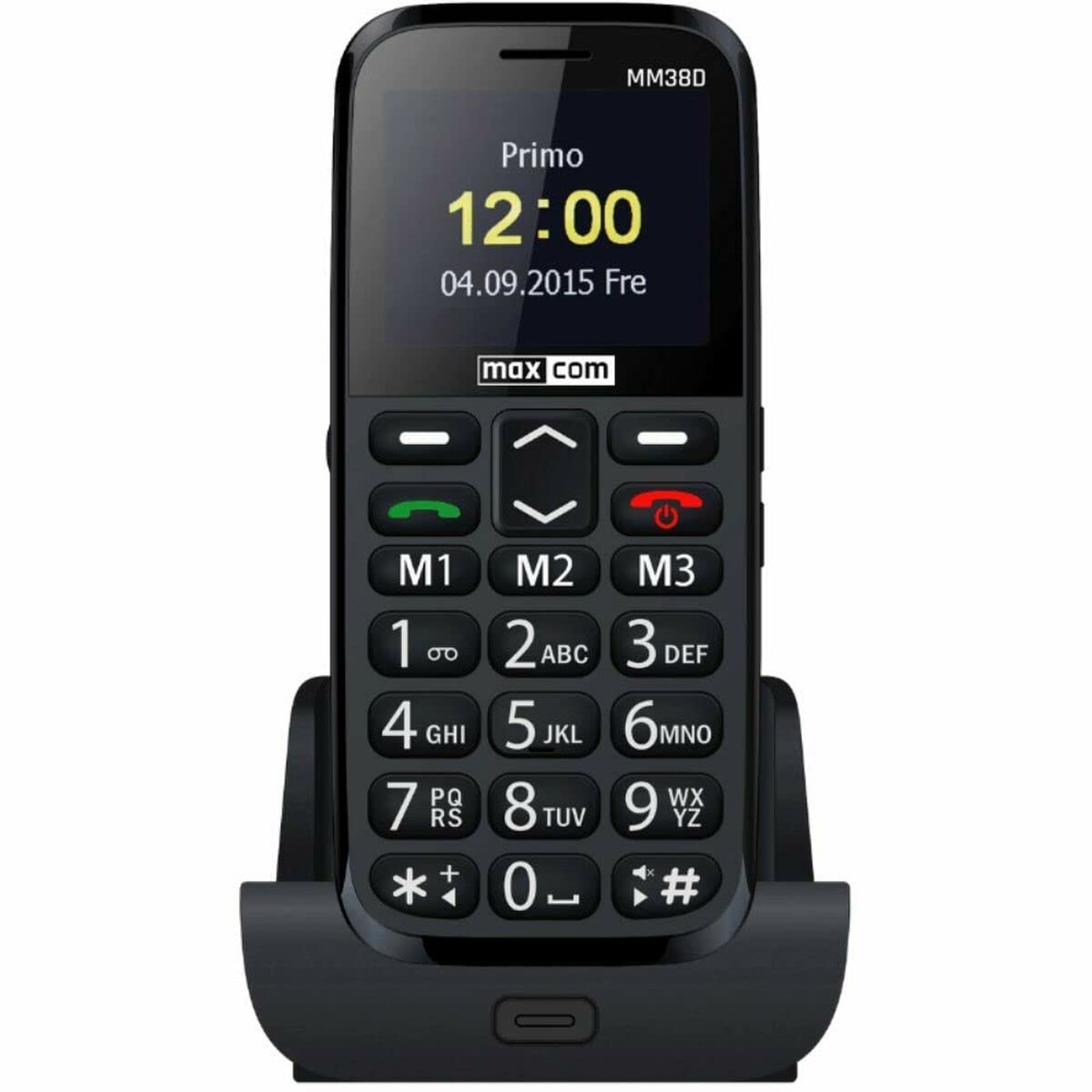
The Maxcom MM38D is a portable senior phone designed for ease of use, featuring large backlit keys, a clear 2.2-inch display, and essential communication functions. This manual provides comprehensive instructions for setting up, operating, and maintaining your device, ensuring you can utilize all its features effectively, including the dedicated SOS button, FM radio, and camera.
2. Коопсуздук маалыматы
- Do not expose the phone to extreme temperatures, direct sunlight, or moisture.
- Use only original or approved batteries and chargers to prevent damage and ensure safety.
- Avoid dropping or subjecting the phone to severe impacts.
- Аппаратты өз алдынча бөлүүгө же оңдоого аракет кылбаңыз. Ыйгарым укуктуу тейлөө кызматкерлерине кайрылыңыз.
- Батареяларды жана аппаратты жергиликтүү эрежелерге ылайык таштаңыз.
3. Пакеттин мазмуну
Before using your Maxcom MM38D, please verify that all the following items are included in the package:
- Maxcom MM38D Phone
- Батарея
- Заряддагыч
- User Manual
4. Түзмөктүн жайгашуусу
Familiarize yourself with the physical components of your Maxcom MM38D phone.
This image displays the rear panel of the Maxcom MM38D phone. Visible components include the camera lens in the upper left, a circular SOS button to its right, and a speaker grille with a grid pattern further to the right. The 'max com' logo is printed at the bottom.
Негизги компоненттер:
- Дисплей экраны: 2.2-inch color display for menus and information.
- Алфавиттик-сандык баскычтоп: Large, backlit keys for dialing and text input.
- Чабыттоо баскычтары: For scrolling through menus and options.
- Call/End Call Buttons: To initiate and terminate calls.
- SOS баскычы: Located on the back for emergency calls and messages.
- Камера: 2-megapixel camera on the rear.
- Кол чырак: Интегралдык жарык булагы.
- Заряддоо порту: Заряддоочу түзүлүштү туташтыруу үчүн.
- Гарнитура уячасы: For connecting headphones (may also serve as FM antenna).
5. Орнотуу
5.1. SIM картаны орнотуу
- Телефондун арткы капкагын алып салыңыз.
- Батареяны кылдаттык менен чыгарып алыңыз.
- Locate the SIM card slot. Insert your 2G compatible SIM card into the slot, ensuring the gold contacts face downwards and the cut corner aligns with the slot's orientation.
- SIM картаны ордунан чыккыча акырын түртүңүз.
5.2. Батареяны орнотуу
- Align the battery's metal contacts with the contacts in the phone's battery compartment.
- Press the battery down gently until it fits securely.
- Арткы капкакты кайра ордуна коюп, анын бекем орнотулганын текшериңиз.
5.3. Батареяны заряддоо
- Заряддоо кабелин телефонуңуздагы заряддоо портуна туташтырыңыз.
- Заряддагычты стандарттуу электр розеткасына сайыңыз.
- Экрандагы батареянын индикатору кубаттоо абалын көрсөтөт. Биринчи жолу колдонуудан мурун телефонду толук кубаттаңыз.
5.4. Күйгүзүү / Өчүрүү
- Күйгүзүү үчүн: басып, кармап туруңуз Чакырууну өчүрүү/аяктоо экран күйгүчө баскычын басыңыз.
- Өчүрүү үчүн: басып, кармап туруңуз Чакырууну өчүрүү/аяктоо button until the power-off options appear, then confirm.
6. Иштөө нускамалары
6.1. Негизги навигация
колдонуу Чабыттоо баскычтары (up, down, left, right) to move through menus and options. Press the central OK/Тандоо тандоону ырастоо үчүн баскычты басыңыз.
6.2. Чалууларды кабыл алуу жана кабыл алуу
- Чалуу үчүн: Телефон номерин баскычтопту колдонуп киргизип, баскычты басыңыз Чалуу баскычы.
- Чалууга жооп берүү үчүн: Телефон шыңгыраганда, басыңыз Чалуу баскычы.
- Чалууну аяктоо үчүн: басыңыз Чакырууну аяктоо баскычы.
- Hands Free Функциясы: Activate the hands-free speaker during a call via the on-screen option.
6.3. Билдирүүлөрдү (SMS) жөнөтүү жана алуу
- дегенге өтүңүз Кабарлар меню.
- Тандоо Кабар жазуу or Жаңы SMS.
- Алфавиттик-сандык баскычтопту колдонуп кабарыңызды териңиз.
- Алуучунун номерин киргизиңиз же байланыштарыңыздан тандаңыз.
- Басыңыз Жөнөтүү.
6.4. Using the SOS Button
The SOS button is a critical safety feature. To use it:
- Ensure emergency contacts are pre-programmed in the phone's settings (usually under SOS settings).
- Шашылыш учурда, баскычын басып, кармап туруңуз SOS баскычы on the back of the phone for a few seconds.
- The phone will automatically call and send a pre-set emergency message to your designated contacts.
6.5. Башка өзгөчөлүктөр
- FM радиосу: Access the 'FM Radio' application from the main menu. Connect headphones to serve as an antenna for better reception.
- Кол чырак: Activate the flashlight function through the menu or a dedicated shortcut key (refer to your phone's specific key assignments).
- Камера: Open the 'Camera' application to take photos. The phone is equipped with a 2-megapixel camera.
- Байланыштар: Store up to 300 contacts. Access the 'Contacts' menu to add, edit, or search for entries.
- Календарь жана ойготкуч: Set reminders and multiple alarms through the 'Calendar' and 'Alarm' applications.
- Bluetooth: Enable Bluetooth in the 'Settings' menu to connect to compatible wireless headsets or other devices.
- Audio/Video Player: Аудио жана видеону ойнотуу files stored on the phone or a Micro SD card.
7. Техникалык тейлөө
- Тазалоо: Use a soft, dry, lint-free cloth to clean the phone's screen and body. Avoid using liquid cleaners or aerosols.
- Батареяга кам көрүү: To prolong battery life, avoid fully discharging the battery frequently. Do not leave the phone connected to the charger for extended periods after it is fully charged.
- Сактагыч: Store the phone in a cool, dry place when not in use. Avoid dusty environments.
- Суу каршылык: The Maxcom MM38D is not water-resistant. Keep it away from liquids.
8. Кыйынчылыктарды
If you encounter issues with your Maxcom MM38D, refer to the following common problems and solutions:
| Көйгөй | Чечим |
|---|---|
| Телефон күйбөйт | Батареянын заряддалганын жана туура салынганын текшериңиз. Телефонду жок дегенде 30 мүнөт заряддап көрүңүз. |
| Чалууларды кабыл алуу же жасоо мүмкүн эмес | Check if the SIM card is properly inserted and activated. Verify network signal strength. Ensure you have sufficient credit or an active plan. |
| SOS баскычы иштебей жатат | Confirm that emergency contacts are set up in the SOS settings menu. Ensure the phone has network coverage. |
| Чалуулар учурунда аудио сапаты начар | Check the call volume settings. Ensure the speaker and microphone are not obstructed. Move to an area with better network reception. |
| Батарея бат эле түгөнөт | Экрандын жарыктыгын азайтыңыз. Колдонулбаган тиркемелерди жабыңыз. Фондук маалыматтарды колдонууну чектеңиз. Эски батареяны алмаштырууну карап көрүңүз. |
9. Техникалык шарттар
| Өзгөчөлүк | Спецификация |
|---|---|
| Бренд | Maxcom |
| Модел | MM38D |
| Операция системасы | Android 10.0 |
| Screen Size | 2.2 дюйм |
| Камеранын чечилиши | 2 мегапиксел |
| Байланыш | Bluetooth, 2G GSM |
| Memory Storage | 1 ГБ |
| Түс | Кара |
| Өзгөчөлүктөр | SOS button, FM Radio, Flashlight, Calendar, Audio/Video Player, Alarm, Hands-free function, Large backlit keys, 300-contact directory, Micro SD support |
10. Кепилдик жана колдоо
For detailed warranty information, terms, and conditions, please refer to the warranty card or documentation included with your purchase. For technical support, product inquiries, or service requests, please visit the official Maxcom webсайтына кириңиз же продуктуңуздун таңгагында көрсөтүлгөн байланыш маалыматын колдонуп, алардын кардарларды тейлөө бөлүмүнө кайрылыңыз.