
Introduction
Thank you for choosing the QCY T9S TWS True Wireless Earbuds. This manual provides essential information for the safe and efficient use of your new earbuds. Please read it carefully before use and retain it for future reference.

Image: QCY T9S TWS Earbuds and charging case, illustrating key features like Bluetooth 5.0 connectivity, low latency, and integration with the QCY app. Also shows battery life details: 20 hours total with case, 70 hours standby, 4 hours call time, 2 hours quick charge.
Кутуда эмне бар
Таңгактан чыгаргандан кийин, төмөндө көрсөтүлгөн нерселердин бардыгы бар экенин жана жакшы абалда экендигин текшериңиз:
- QCY-T9S TWS Earbuds
- Заряддоо кутусу
- 3 жуп кулак учу (S, M, L)
- 3 Pairs of Earwings (S, M, L)
- USB заряддоо кабели
- User Manual

Image: Contents of the QCY T9S package, showing the earbuds, charging case, various eartips and earwings, a USB cable, and the user manual.
Жайгашуу
1. Баштапкы заряддоо
Before first use, fully charge the earbuds and the charging case. Connect the USB charging cable to the charging case and a compatible USB power source (charger under 5V 2.1A). The indicator lights on the case will show charging status.
Эскертүү: Do not use any flash or quick charger.
2. Түзмөгүңүз менен жупташтыруу
- Кулакчындар кубаттоочу кутуда жана корпустун батареясы жетиштүү экенин текшериңиз.
- Заряддоо кутусунун капкагын ачыңыз. Кулакчындар автоматтык түрдө жупташтыруу режимине өтөт.
- Түзмөгүңүздө (смартфон, планшет ж.б.) Bluetooth иштетиңиз.
- Издөө "QCY-T9S" in the list of available Bluetooth devices and select it to connect.
- Туташкандан кийин үн билдирүүсү ийгиликтүү жупташтырууну ырастайт.

Image: QCY T9S earbuds inside their magnetic charging case, highlighting the "Open to pair" functionality and the availability of the QCY exclusive app for enhanced features.
3. QCY Exclusive App
For advanced features and customization, download the QCY exclusive app from your device's app store. The app allows for custom button settings, equalizer adjustments, finding misplaced earbuds, one-tap factory reset, and OTA firmware updates.
Иштөө нускамалары
Touch Controls
The QCY T9S earbuds feature touch-sensitive controls on each earbud (MFB - Multi-Function Button). Refer to the following table for common operations:
| Акция | Функция |
|---|---|
| MFBди басыңыз | Музыка ойнотуу/тындыруу, Чалууга жооп берүү/аяктоо |
| Double press MFB (Right earbud) | Текти алдыга өткөрүп жиберүү |
| Double press MFB (Left earbud) | Тректи артка өткөрүп жиберүү |
| MFBди 1 секунд кармап туруңуз | Ignore Call, Activate Voice Assistant |

Image: Visual guide to the touch controls on the QCY T9S earbuds, detailing actions for music playback, call management, and voice assistant activation.
Колдонмону ыңгайлаштыруу
The QCY app provides extensive customization options:
- Ыңгайлаштырылган баскыч: Reassign touch control functions.
- Мадам: Аудиону тууралооfileсиздин каалооңуз боюнча.
- Delete Connecting Records: Жупташкан түзмөктөрдү башкаруу.
- Кулакчындарды табуу: Туура эмес коюлган кулакчындарды табыңыз.
- One-tap Factory Setting: Reset earbuds to default settings.
- OTA Hardware Updating + New Function Push: Keep your earbuds updated with the latest firmware and features.
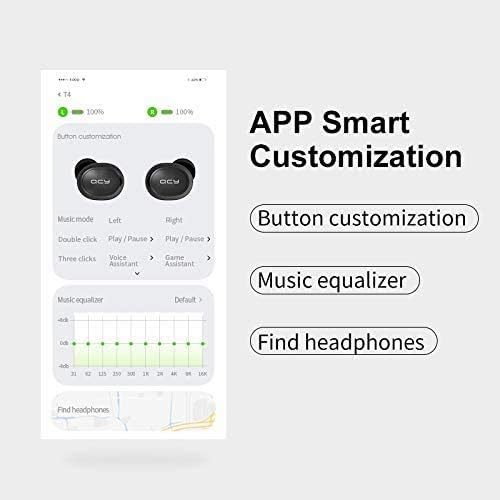
Сүрөт: деталдуу view of the QCY app's smart customization features, including button remapping, sound equalizer settings, and a function to locate lost earbuds.
Техникалык тейлөө
- Тазалоо: Кулакчындарды жана кубаттагыч кутучаны жумшак, кургак чүпүрөк менен үзгүлтүксүз тазалап туруңуз. Суюктуктарды же абразивдүү тазалоочу каражаттарды колдонуудан алыс болуңуз.
- Сактагыч: When not in use, store the earbuds in their magnetic charging case to protect them from dust, damage, and accidental dropping.
- Батареяга кам көрүү: Батареянын иштөө мөөнөтүн узартуу үчүн, кулакчындарды жана кубаттоочу кутуну бат-баттан толук кубаттап турбаңыз. Аларды дайыма колдонууда болбосо да, үзгүлтүксүз заряддаңыз.
- Суу каршылык: The earbuds are rated IPX4 waterproof, meaning they are resistant to splashing water from any direction. Do not submerge them in water or expose them to heavy rain.
Проблемаларды чечүү
| Көйгөй | Чечим |
|---|---|
| Кулакчындар жупташкан жок | Ensure earbuds are charged. Place them back in the case, close the lid, then open it again to re-enter pairing mode. Check your device's Bluetooth settings and try reconnecting. If issues persist, perform a factory reset via the QCY app. |
| Бир гана кулакчын иштейт | Ensure both earbuds are charged. Place both earbuds back into the charging case, close the lid, and then open it again. This should re-sync them. If not, try a factory reset. |
| Үн сапаты начар же үнү төмөн | Check the earbud fit and try different eartip sizes for a better seal. Clean any debris from the earbud speakers. Adjust volume on both your device and through the earbuds' touch controls. Ensure there are no obstructions between the earbuds and your device. |
| Заряддоо маселелери | Ensure the charging cable is securely connected to both the case and the power source. Use a compatible charger (under 5V 2.1A). Clean the charging contacts on both the earbuds and the case. |
| Микрофон иштебей жатат | Ensure the earbuds are properly connected to your device. Check your device's privacy settings to ensure microphone access is granted to the earbuds. Test in a quiet environment. |
Техникалык шарттар
| Өзгөчөлүк | Деталь |
|---|---|
| Bluetooth версиясы | 5.0 |
| Үн сезгичтиги | 104±3 дБ |
| Кулакчындын батареянын кубаттуулугу | 43 мАч |
| Заряддоо корпусунун батареясынын сыйымдуулугу | 380 мАч |
| Импеданс | 16 Ом ± 15% |
| Иштөө диапазону | Over 10 meters (in open space) |
| Чипсет | PAU1603 |
| Күтүү убактысы | 70 саат |
| Заряддоо убактысы | Болжол менен 2 саат |
| Talk Time | Болжол менен 4 саат |
| Музыка убактысы | Approximately 4.5 hours (with charging case: 20 hours) |
| Frequency Response | 20 Гц ~ 20 кГц |
| Өлчөмдөрү (корпус) | 66 × 40 × 30 мм |
| Салмагы | 40 г |
| Суу өткөрбөйт рейтинги | IPX4 |
| Башкаруу ыкмасы | тийүү |
| Шайкеш түзмөктөр | All Bluetooth-enabled devices (Android 5.1 or above for app compatibility) |
Image: A visual summary of the QCY T9S earbuds' technical parameters and included accessories.
Кепилдик жана колдоо
For warranty information, please refer to the warranty card included with your purchase or contact your retailer. For technical support, frequently asked questions, and further assistance, please visit the official QCY webсайтка же кардарларды тейлөөгө кайрылыңыз.
Өндүрүүчү: QCY