
Introduction
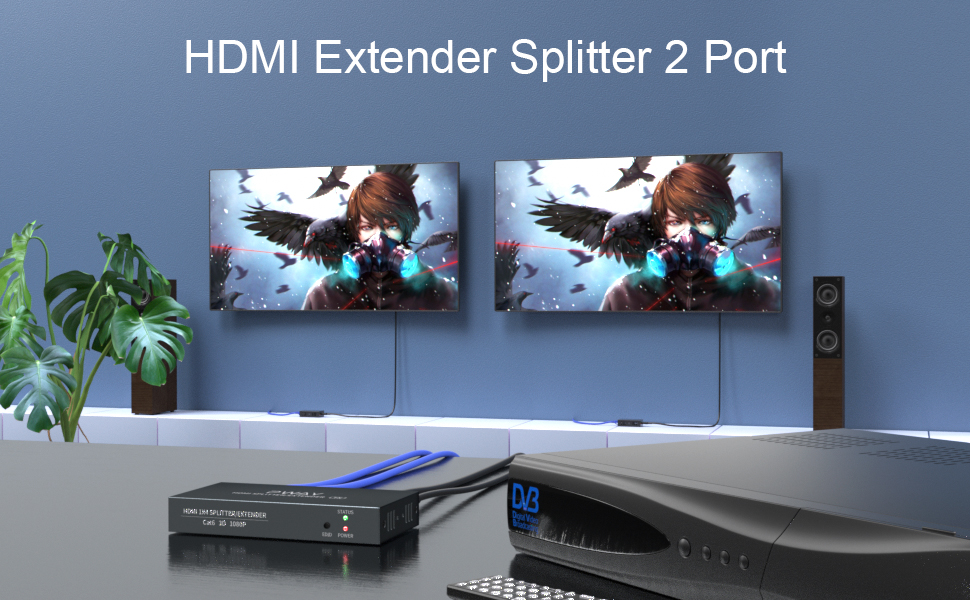
The PWAY PW-HT226P2 is a 1x2 Port HDMI Splitter Extender designed to distribute a single HDMI source to two remote displays over Cat5/5e/6/7 Ethernet cables, extending the signal up to 50 meters (165 feet). It supports Full HD 1080P resolution at 60Hz and features Power over Cable (POC) for simplified power management and EDID copy functionality for enhanced compatibility.

Image: The PWAY PW-HT226P2 HDMI Splitter Extender system, showing the main transmitter unit and two receiver units.
Продукт өзгөчөлүктөрү
- Extended Transmission: Transmits HDMI video and audio signals without latency up to 50 meters (165 feet) over a single Cat5/5e/6/7 Ethernet cable.
- Dual Local Outputs: The transmitter unit includes two local HDMI outputs for connecting displays directly, in addition to the two RJ45 ports for extended connections.
- Жогорку чечим колдоо: Supports resolutions up to 1920x1080P at 60Hz, and is backward compatible with 1080i, 720P, and 720i.
- Power over Cable (POC): Only one power adapter is required to power both the transmitter and receiver units, simplifying installation and reducing cable clutter.
- EDID Copy Function: Equipped with EDID (Extended Display Identification Data) copy functionality to ensure optimal compatibility between the source device and connected displays.
- HDMI 1.3 Compliant: Ensures compatibility with a wide range of HDMI devices.

Сүрөт: бүттүview of the PWAY HDMI Extender Splitter 1x2, highlighting key features such as 3D support, 1080P resolution, 50m extension, and POC.
Пакеттин мазмуну
Таңгактан чыгарганда таңгактын ичиндегисин текшериңиз. Эгерде кандайдыр бир буюмдар жок болсо же бузулуп калса, сатуучуга кайрылыңыз.
- 1x HDMI Splitter Extender Transmitter (TX)
- 2x HDMI Splitter Extender Receiver (RX)
- 1x DC 5V кубат адаптери
- 1x Колдонуучунун колдонмосу (бул документ)

Image: The complete packing list, including the transmitter, two receivers, and the power adapter.
Продукт диаграммасы
Өткөргүч (TX) бирдиги
The transmitter unit connects to your HDMI source and distributes the signal.
- DC 5V: Кубат киргизүү порту.
- HDMI IN: Connect to your HDMI source (e.g., DVD player, game console).
- HDMI OUT (Loop): Two local HDMI outputs for connecting displays directly to the transmitter.
- Cat5/6/7: Two RJ45 output ports for connecting to the receiver units via Ethernet cable.
- STATUS LED: Иштөө абалын көрсөтөт.
- EDID LED: Indicates EDID status.
- POWER LED: Кубаттын абалын көрсөтөт.
Алуучу (RX) бирдиги
The receiver units connect to your displays and receive the extended HDMI signal.
- Cat5/6/7: RJ45 input port for connecting to the transmitter unit via Ethernet cable.
- HDMI OUT: Дисплей түзмөгүңүзгө туташыңыз (мисалы, телевизор, монитор).
- STA LED: Indicates signal status.
- PWR LED: Кубаттын абалын көрсөтөт.

Image: A detailed connection diagram illustrating how to connect the video source, transmitter, Cat5e/6 cables, receivers, and multiple display devices.
Орнотуу нускамалары
- Өчүрүү түзмөктөрү: Ensure all devices, including the HDMI source, displays, and the PWAY extender units, are powered off before beginning installation.
- HDMI булагын туташтырыңыз: Connect your HDMI source device (e.g., Blu-ray player, PC, game console) to the HDMI-IN port on the Transmitter (TX) unit using a high-quality HDMI cable.
- Connect Local Displays (Optional): If you wish to use local displays, connect them to the HDMI ЧЫГЫШЫ (Цикл) ports on the Transmitter (TX) unit using HDMI cables.
- Ethernet кабелдерин туташтыруу: Connect Cat5e/6/7 Ethernet cables from the Cat5/6/7 output ports on the Transmitter (TX) unit to the Cat5/6/7 input ports on each Receiver (RX) unit. Ensure the cables are properly terminated and meet the specified length requirements for your desired resolution (up to 50m for 1080P).
- Connect Remote Displays: Connect your remote display devices (e.g., TV, monitor) to the HDMI OUT port on each Receiver (RX) unit using HDMI cables.
- Күчтү колдонуу: Connect the provided DC 5V power adapter to the DC 5V port on the Transmitter (TX) unit. Due to the POC function, the receiver units will be powered via the Ethernet cable.
- Түзмөктөрдү күйгүзүү: Power on the HDMI source device, then the displays, and finally the PWAY extender units.
Сүрөт: мурункуample setup showing the transmitter connected to a source and two remote displays via receiver units.

Image: A chart indicating the maximum transmission distances based on the type of network cable used: Cat5 up to 40m, Cat5e up to 45m, and Cat6/7 up to 50m.
Иштөө нускамалары
Once all connections are made and power is applied, the system should operate automatically.
- Сигнал аныктоо: The extender units will automatically detect the HDMI input signal and transmit it to the connected displays.
- LED көрсөткүчтөрү:
- Бергич (TX): The POWER LED should be lit when power is supplied. The STATUS LED and EDID LED will indicate active signal and EDID status respectively.
- Алуучу (RX): The PWR LED should be lit, indicating power received via POC. The STA LED will indicate active signal reception.
- EDID башкаруу: The EDID copy function ensures the source device outputs a compatible resolution and audio format for the connected displays. No manual configuration is typically required.
Техникалык тейлөө
To ensure optimal performance and longevity of your PWAY HDMI Splitter Extender, follow these maintenance guidelines:
- Тазалоо: Түзмөктөрдү тазалоо үчүн жумшак, кургак чүпүрөктү колдонуңуз. Суюк же аэрозольдук тазалоочу каражаттарды колдонбоңуз.
- Вентиляция: Ашыкча ысып кетпеши үчүн, шаймандар жакшы желдетилген жерге коюлганын текшериңиз. Желдетүүчү тешиктерди жаппаңыз.
- Кабелдик башкаруу: Кабелдерди иреттүү кармаңыз жана кескин ийилүүлөрдү же ашыкча чыңалууну болтурбоо керек, анткени алар кабелдерге жана портторго зыян келтириши мүмкүн.
- Экологиялык шарттар: Агрегаттарды экстремалдык температурага, нымдуулукка же тике күн нуруна кабылуудан сактаңыз.
Проблемаларды чечүү
If you encounter issues with your HDMI Splitter Extender, refer to the following common problems and solutions:
| Көйгөй | Мүмкүн себеп | Чечим |
|---|---|---|
| Дисплейде видео же аудио жок. |
|
|
| Poor picture quality or flickering. |
|
|
| Receiver unit not powering on. |
|
|
Техникалык шарттар
| Модел | PW-HT226P2 |
| Бренд | PWAY |
| HDMI шайкештиги | HDMI 1.3 |
| HDCP шайкештиги | HDCP 1.2 |
| Колдоого алынган токтомдор | Up to 1080P@60Hz (1920x1080), 1080i, 720P, 720i |
| Өткөрмө аралык | Up to 50m (165ft) over Cat5e/6/7 cable |
| Ethernet кабелине талаптар | Cat5/5e/6/7 (UTP/STP) |
| Электр камсыздоо | DC 5V (кошулган адаптер аркылуу) |
| Өзгөчөлүктөрү | POC (Power over Cable), EDID Copy, Dual Local HDMI Outputs |
Коопсуздук маалыматы
- Аппаратты ажыратпаңыз же өзгөртпөңүз.
- Берилген кубат адаптерин гана колдонуңуз.
- Аппаратты суудан, нымдан жана экстремалдык температурадан алыс кармаңыз.
- Аппаратты түшүрүүдөн же катуу таасирлерден сактаныңыз.
- Ашыкча ысып кетүүнүн алдын алуу үчүн туура желдетүүнү камсыз кылыңыз.
Кепилдик жана колдоо
PWAY products are designed for reliability and performance. For warranty information or technical support, please refer to the warranty card included with your product or visit the official PWAY webсайт. Жардам алуу үчүн сатуучуга да кайрылсаңыз болот.
Кепилдик дооматтары үчүн сатып алганыңыздын далилин сактап коюңуз.