
1. Киришүү
The AVMatrix SC2030 is a professional-grade cross converter designed for seamless conversion between SDI and HDMI signals. This versatile device supports up/down scaling and frame rate conversion, making it suitable for various broadcasting and AV post-production applications. It also features analog audio embedding for comprehensive signal management. Control and configuration are easily managed via built-in DIP switches or PC software through a micro USB connection.
Негизги өзгөчөлүктөрү:
- Input: 1x HDMI or 1x SDI, 1x Analog Audio
- Output: 2x 3G-SDI, 1x HDMI
- Up/down scaling and frame rate conversion capabilities
- Analog audio embedding
- Automatic detection and configuration for HDMI/SDI inputs
- Easy control via DIP switches or PC software (Micro USB)
- Dual threaded locking power for redundant power supply
- Дубалга орнотуу үчүн алынуучу кронштейн дизайны
2. Коопсуздук маалыматы
Please read and understand all safety instructions before operating this device. Failure to follow these instructions may result in electric shock, fire, or damage to the product.
- Электр камсыздоо: Use only the specified power adapter. Ensure the power source voltage is compatible with the device. The device supports dual threaded locking power for redundancy.
- Вентиляция: Эч кандай желдетүүчү тешиктерди жаап албаңыз. Ашыкча ысып кетүүнүн алдын алуу үчүн аппараттын айланасында адекваттуу аба агымын камсыз кылыңыз.
- Нымдуулук: Do not expose the device to rain, moisture, or liquids. Avoid placing objects filled with liquids on or near the device.
- Тазалоо: Тазалоодон мурун электр кубатынан ажыратыңыз. Кургак, жумшак чүпүрөктү колдонуңуз. Суюк же аэрозольдук тазалагычтарды колдонбоңуз.
- Тейлөө: Бул продуктту өзүңүз тейлөөгө аракет кылбаңыз. Бардык тейлөөнү квалификациялуу тейлөө кызматкерлерине тапшырыңыз.
- Жайгашкан жери: Place the device on a stable, flat surface. Avoid placing it in direct sunlight or near heat sources.
3. Продукт бүтүп калдыview
The AVMatrix SC2030 is a compact and robust converter designed for professional video environments. Below is a visual guide to its various ports and controls.

3.1-сүрөт: Алдыңкы жана арткы панелдин үстүндөview of the SC2030 Converter. This image displays the input ports (SDI In, HDMI In, Audio In, USB) on one side and output ports (DC Power 2, DC Power 1, HDMI Out, SDI Out 2, SDI Out 1) on the other side, along with the DIP switches.
Киргизүү порттору:
- SDI IN: Connect your 3G/HD/SD-SDI source here.
- HDMI IN: Connect your HDMI source here.
- AUDIO IN: Connect an analog audio source (3.5mm jack) for embedding into the output signal.
- USB: Micro USB port for PC software control and power supply.
Чыгуу порттору:
- SDI OUT 1 & 2: Two 3G-SDI outputs for connecting to SDI monitors or other devices.
- HDMI OUT: HDMI output for connecting to HDMI displays.
- POWER 1 & 2: Dual threaded locking power inputs for redundant power supply, ensuring continuous operation.

3.2-сүрөт: Side view of the SC2030 Converter highlighting the DIP switches for configuration.
4. Орнотуу жана туташуу
Follow these steps to set up your AVMatrix SC2030 converter:
- Кубат туташуу: Connect the provided power adapter to either POWER 1 or POWER 2 input on the converter. For redundancy, connect a second power adapter to the other power input.
- Киргизүү булагы туташуусу:
- For SDI input: Connect your SDI source device (e.g., camera, SDI DVR) to the SDI IN port using a BNC cable.
- For HDMI input: Connect your HDMI source device (e.g., camera, Blu-Ray DVD, game console) to the HDMI-IN HDMI кабелин колдонуп порт.
- For analog audio embedding: Connect your analog audio source to the AUDIO IN (3.5mm jack) port.
- Чыгаруу түзмөгүнүн туташуусу:
- For SDI output: Connect your SDI display or other SDI devices to the SDI OUT 1 жана/же SDI OUT 2 ports using BNC cables.
- For HDMI output: Connect your HDMI display or projector to the HDMI OUT HDMI кабелин колдонуп порт.
- Configuration (DIP Switches): Before powering on, configure the desired output format, audio embedding, and control mode using the DIP switches. Refer to the "Operating Instructions" section for detailed DIP switch settings.
- Күйгүзүү: Once all connections are secure and DIP switches are set, connect the power adapter(s) to a power outlet. The device will power on automatically.
5. Иштөө нускамалары
The SC2030 offers flexible control options via DIP switches or PC software. The device automatically detects the input signal (HDMI or SDI).
5.1 DIP которуштуруу конфигурациясы
The DIP switches allow you to set the output resolution, frame rate, audio embedding options, and control mode. The table below details the functions of each DIP switch (1=ON, 0=OFF).
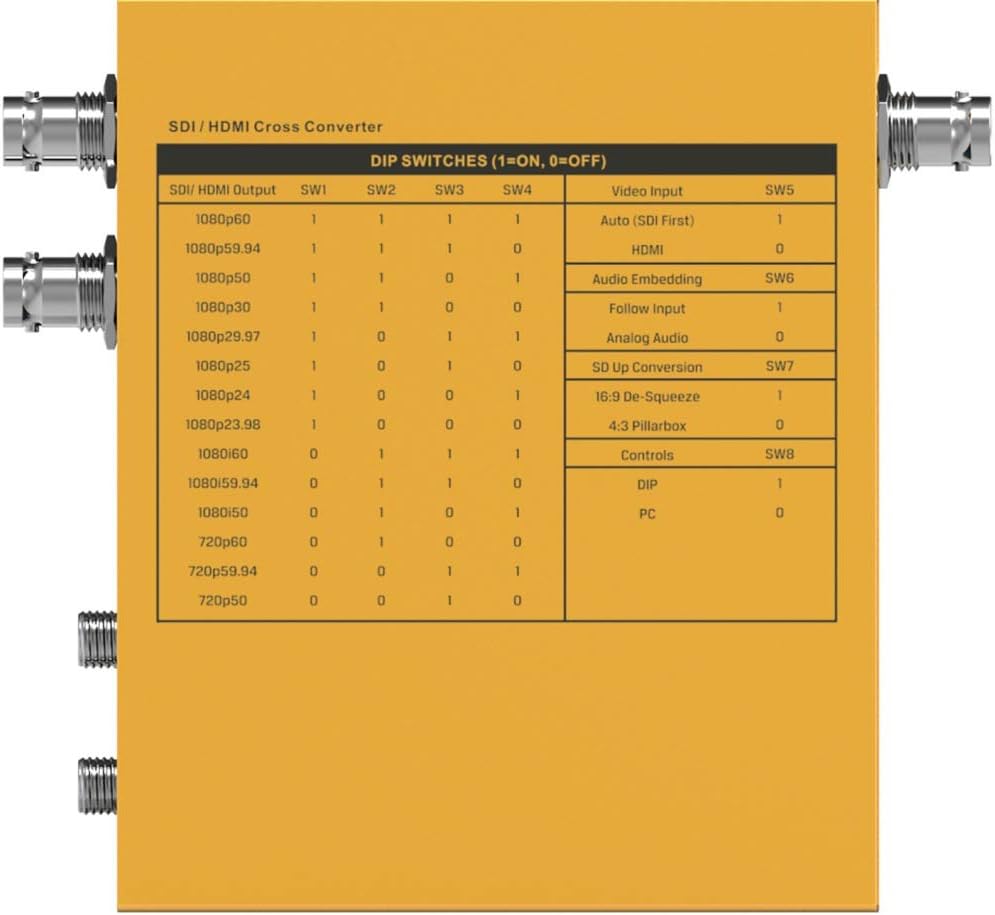
5.1-сүрөт: Detailed DIP Switch Settings for the SC2030. This table shows how to configure SDI/HDMI output, video input, audio embedding, SD up conversion, and control modes using the 8 DIP switches.
DIP которуу функциялары:
- SW1-SW4 (SDI/HDMI Output): These switches control the output resolution and frame rate. Refer to the table in Figure 5.1 for specific combinations (e.g., 1080p60, 1080p59.94, 720p60).
- SW5 (Video Input):
- 1: Auto (SDI First) - Prioritizes SDI input.
- 0: HDMI - Forces HDMI input.
- SW6 (Audio Embedding):
- 1: Follow Input - Audio follows the selected video input.
- 0: Analog Audio - Embeds audio from the 3.5mm analog audio input.
- SW7 (SD Up Conversion):
- 1: 16:9 De-Squeeze - Converts 4:3 SD input to 16:9.
- 0: 4:3 Pillarbox - Maintains 4:3 aspect ratio with pillarbox bars.
- SW8 (Controls):
- 1: DIP - Control via physical DIP switches.
- 0: PC - Control via PC software connected via USB.
5.2 Компьютердик программалык камсыздоону башкаруу
For advanced configuration and real-time monitoring, connect the SC2030 to a PC via the Micro USB port. Ensure SW8 is set to '0' (PC control mode). Download and install the official AVMatrix control software from the manufacturer's website. The software provides a graphical interface to adjust all settings available via DIP switches, plus potentially more granular control and firmware updates.
6. Техникалык тейлөө
Proper maintenance ensures the longevity and optimal performance of your SC2030 converter.
- Тазалоо: Regularly wipe the exterior of the device with a soft, dry, lint-free cloth. Do not use harsh chemicals, solvents, or abrasive cleaners.
- Вентиляция: Ensure that the ventilation holes are free from dust and obstructions.
- Кабелдик байланыштар: Periodically check all cable connections for tightness and wear. Loose connections can lead to signal degradation.
- Сактагыч: Аппаратты узак убакытка сактасаңыз, аны электр кубатынан ажыратып, күн нурунан жана өтө температурадан алыс салкын, кургак жерде сактаңыз.
- Программалык камсыздоонун жаңыртуулары: Check the AVMatrix webпрошивка жаңыртуулары үчүн сайт мезгил-мезгили менен. Микропрограмманы жаңыртып туруу иштин иштешин жакшыртат жана жаңы функцияларды кошо алат.
7. Кыйынчылыктарды
If you encounter issues with your SC2030 converter, refer to the following common problems and solutions:
- Видео чыгаруу жок:
- Verify all cables (HDMI, SDI) are securely connected.
- Ensure the input source is active and outputting a signal.
- Check DIP switch settings for correct output resolution and input selection (SW5).
- Try a different input source or output display to isolate the problem.
- Кубат адаптери туташып турганын жана аппарат күйгүзүлгөнүн текшериңиз.
- Аудио чыгышы жок:
- Аудио кабелдик байланыштарды текшериңиз.
- Verify DIP switch SW6 is set correctly for audio embedding (Follow Input or Analog Audio).
- Ensure the audio source is active and outputting sound.
- Check audio settings on the connected display or receiving device.
- Incorrect Resolution/Frame Rate:
- Adjust DIP switches SW1-SW4 to match the desired output resolution and frame rate.
- Ensure the connected display supports the selected resolution and frame rate.
- Device Not Responding to PC Software:
- Ensure SW8 is set to '0' (PC control mode).
- Verify the Micro USB cable is properly connected.
- Check if the AVMatrix control software is correctly installed and running on your PC.
- Try restarting the PC and the converter.
- Ашыкча ысып кетүү:
- Аппараттын тийиштүү вентиляциясы бар жана капталбаганын текшериңиз.
- Operate the device within its specified operating temperature range.
8. Техникалык шарттар
Below are the technical specifications for the AVMatrix SC2030 Updown Cross Converter:
| Өзгөчөлүк | Спецификация |
|---|---|
| Бренд | AVmatrix |
| Модель номери | SC2030 |
| Монтаж түрү | Дубалга орнотуу |
| Interface Type | HDMI, SDI |
| Каналдардын саны | 2 |
| Продукциянын өлчөмдөрү | 6.8 x 6.7 x 3.7 дюйм |
| Элемент Салмагы | 2.44 фунт |
| SDI Video киргизүү | SD/HD/3G-SDI x 1 |
| HDMI видео киргизүү | HDMI type A x 1 |
| Аналогдук аудио киргизүү | 1/8" (3.5mm) jack x 1 |
| SDI Video Output | SD/HD/3G-SDI x 2 |
| HDMI Video Output | HDMI type A x 1 |
| SDI киргизүү форматын колдоо | 1080p 60/59.94/50/30/29.97/25/24/23.98, 1080i 60/59.94/50, 720p 60/59.94/50/30/29.97/25/24/23.98, 625i, 525i |
| HDMI киргизүү форматын колдоо | 1080p 60/59.94/50/30/29.97/25/24/23.98, 1080i 60/59.94/50, 720p 60/59.94/50, 480i, 60/59.94 |
| SDI шайкештиги | SMPTE 292M, SMPTE 259M, SMPTE 424M |
| SDI түс мейкиндиги жана тактык | ЮВ 4: 2: 2 |
| HDMI Input Color Space and Precision | RGB 4:4:4, YUV 4:2:2, YUV 4:4:4 |
| SDI/HDMI Output Format Support | 1080p 60/59.94/50, 1080i 60/59.94/50, 720p 60/59.94/50 |
| Power Connector | Threaded locking connector, Micro USB |
| Тtage Диапазон | USB 3.3-5V, DC 6-23V |
| Энергияны керектөө | 4W |
| Иштөө температурасы | -20°C ~ 60°C |
| Сактоо температурасы | -30°C ~ 70°C |
| Салыштырмалуу нымдуулук | 0% ~ 90% конденсацияланбайт |
| Кепилдик | 3 жылдык чектелген кепилдик |

8.1-сүрөт: Detailed Technical Specifications of the SC2030 Converter, including inputs, outputs, supported formats, power, and environmental conditions.
9. Кепилдик жана колдоо
9.1 Кепилдик маалыматы
The AVMatrix SC2030 converter comes with a 3 жылдык чектелген кепилдик from the date of purchase. This warranty covers defects in materials and workmanship under normal use. It does not cover damage caused by misuse, accident, unauthorized modifications, or external causes such as power surges.
For warranty claims, please retain your proof of purchase and contact AVMatrix customer support.
9.2 Кардарларды колдоо
For technical assistance, troubleshooting, or general inquiries regarding your AVMatrix SC2030, please visit the official AVMatrix website or contact their customer support team. You may find FAQs, driver downloads, and additional resources online.