
1. Киришүү
This manual provides detailed instructions for the proper use and maintenance of your FLIPSKY VX2 Pro V6 Version Skateboard Remote Control. Please read this manual thoroughly before operating the device to ensure safe and correct usage.
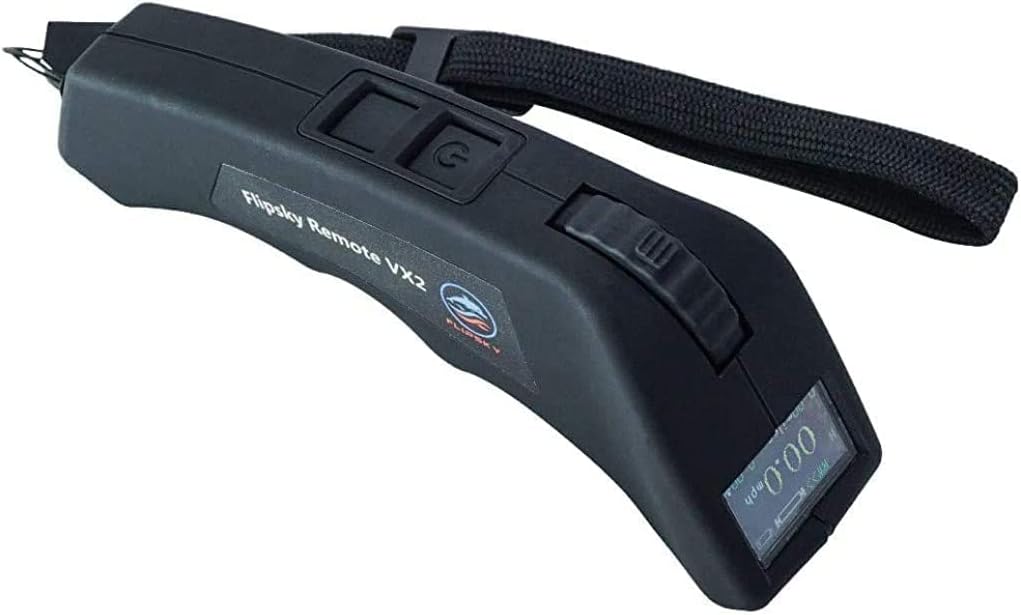
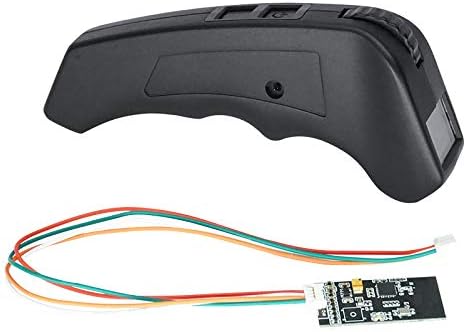
2. Пакеттин мазмуну
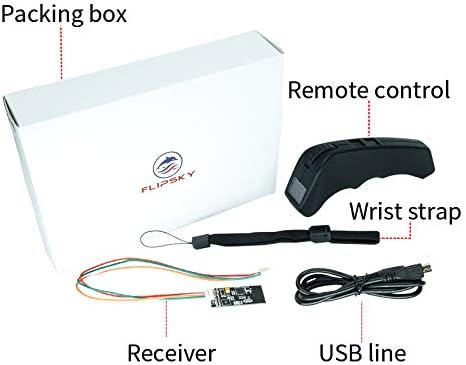
Төмөндө тизмеленген нерселердин баары пакетиңизге камтылганын текшериңиз:
- Remote Control (VX2 Pro V6 Version)
- Алуучу
- Билек боо
- USB заряддоо кабели
3. Продукт бүтүп калдыview
The FLIPSKY VX2 Pro remote control features a color screen and an ergonomic design for comfortable handling. Key components are identified below:
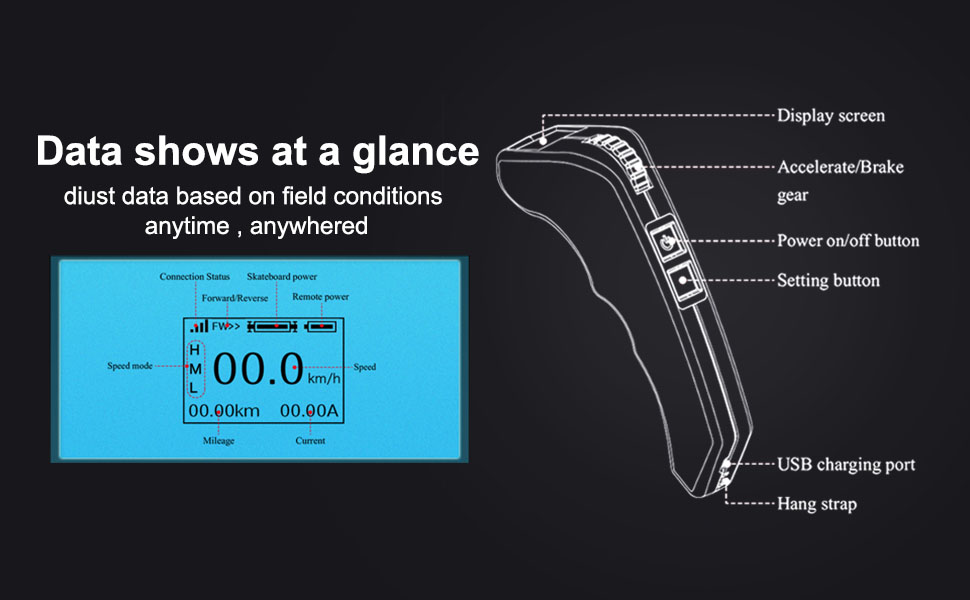
Display Screen Content:
The 0.95" OLED display provides real-time data. The screen typically shows:
- Туташуу абалы: Indicates if the remote is connected to the receiver.
- Skateboard Power: Battery level of the skateboard.
- Remote Power: Battery level of the remote.
- Forward/Reverse Indicator: Shows current direction.
- Ылдамдык режими: Displays current speed setting (H, M, L for High, Medium, Low).
- Ылдамдыгы: Current speed in km/h or miles/h.
- Пробег: Жалпы басып өткөн аралык.
- Учурдагы: Real-time current draw (in Ampэрес).
4. Орнотуу
4.1 Электр өткөргүч схемасы
Connect the receiver to your Electronic Speed Controller (ESC) according to the diagram below. Ensure correct polarity and pin assignment.
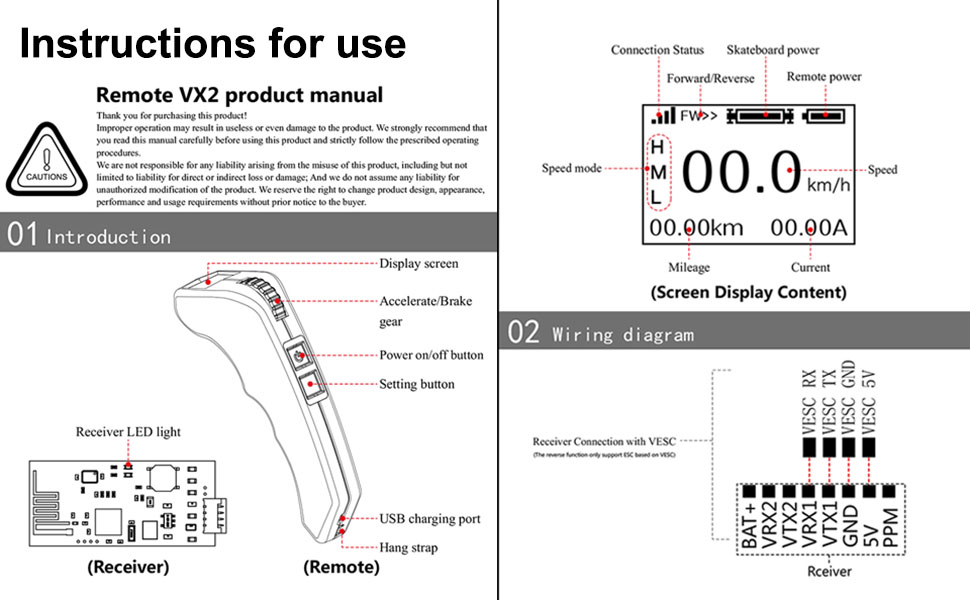
The receiver has pins for VESC RX, VESC TX, VESC GND, and VESC 5V. Connect these to the corresponding pins on your ESC. The receiver also has a LED light to indicate status.
4.2 Жупташтыруу боюнча көрсөтмөлөр
The remote will not function until it is successfully paired with the receiver. Follow these steps to pair your remote:
- 1-кадам: Power on the remote and press the Setting button for 3 seconds. The remote will enter parameter setting mode.
- 2-кадам: Briefly press the Setting button and shift options to "Pairing". Then press the Setting button again until "Pairing" begins blinking. Release the button. The remote is now in Pairing Mode.
- 3-кадам: Power on the receiver. The remote and receiver will attempt to pair. If the screen shows "Pairing succeed", pairing is successful.
Эскерткичтер:
- If the receiver LED light does not illuminate within 10 seconds and then blinks, and the screen shows "Pairing failure" or "Pairing succeed" with a blinking status, it indicates a pairing failure. Re-power the receiver and try pairing again.
- If the signal light is blinking during pairing, retry all steps from the beginning.
5. Операция
5.1 Күйгүзүү/өчүрүү
- Күйгүзүү: Press the power on/off button for 1 second. The screen will display "FLIPSKY".
- Өчүрүү: Press the power on/off button for 2 seconds. The remote will shut down.
- Автоматтык түрдө өчүрүү: The remote will power off in 10 minutes without any operation, except when in cruise control mode.
5.2 Ылдамдануу жана тормоздоо
The remote features an accelerate/brake gear (throttle wheel) for controlling speed.
- Ылдамдатуу: Push the accelerate/brake gear forward to increase speed.
- Тормоздоо: Pull the accelerate/brake gear backward to apply brakes.
5.3 Ылдамдык режимдери
The remote supports three speed modes: Low (L), Medium (M), and High (H).
- To change speed mode: Keep the accelerate/brake gear in its default or original status (neutral position). Briefly press the Setting button to switch between speed modes.
- The remote is set to High speed mode by default after powering on.
5.4 Круиз режими
Cruise mode allows you to maintain a constant speed without continuously holding the throttle.
- Engage Cruise Mode: Push the accelerate gear to the desired speed. While maintaining that speed, briefly press the power button once. Your electric skateboard is now in cruise mode.
- Exit Cruise Mode: Push the accelerate gear or pull the brake gear to exit cruise mode.
5.5 Параметр орнотуу
To access and adjust parameters:
- Press the Setting button for 3 seconds to enter remote setting mode.
- Briefly press the Setting button to shift through the setting options.
- To revise a data setting option: Shift to the option you want to revise. Then press the Setting button for 3 seconds until the option begins blinking.
- While the option is blinking, adjust the accelerate/brake gear to increase or decrease the data.
- Once the revised data is confirmed, briefly press the Power button to confirm the revision and exit the parameter setting menu.
Supported Parameter Settings:
- Setting and saving of Battery Cells
- Уюл жуптары
- Дөңгөлөк түрү
- Мотор шкив
- Wheel Pulley
- Дөңгөлөктүн диаметри
- Газ калибрлөө
Remark: For Wheel Type, Motor Pulley, and Wheel Pulley, settings can only be adjusted if the "Pulley option" is selected.
6. Техникалык тейлөө
To ensure the longevity and optimal performance of your FLIPSKY VX2 Pro remote control, follow these maintenance guidelines:
- Тазалоо: Пультту жумшак, кургак чүпүрөк менен сүртүңүз. Күчтүү химиялык заттарды же абразивдүү тазалоочу каражаттарды колдонбоңуз.
- Сактагыч: Пультту күн нурунан жана экстремалдык температурадан алыс, салкын, кургак жерде сактаңыз.
- Батареяга кам көрүү: The remote uses a rechargeable Li-ion battery. Charge the battery regularly, even if not in use, to maintain its health. Avoid fully discharging the battery for extended periods.
- Таасирден коргоо: Avoid dropping the remote or subjecting it to strong impacts, as this can damage internal components or the display screen.
7. Кыйынчылыктарды
If you encounter issues with your FLIPSKY VX2 Pro remote, refer to the following common problems and solutions:
| Көйгөй | Мүмкүн себеп | Чечим |
|---|---|---|
| Пульт күйбөйт. | Батарея аз же кубат баскычы туура басылган жок. | Charge the remote's battery. Press and hold the power button for 1 second. |
| Remote does not pair with receiver. | Incorrect pairing procedure, receiver not powered, or interference. | Ensure receiver is powered. Re-attempt pairing following Section 4.2. Check for obstructions or other 2.4GHz devices. |
| Loss of signal connection during use. | Interference, distance from receiver, or receiver malfunction. | Ensure clear line of sight between remote and receiver. Reduce distance. Check receiver wiring. If persistent, re-pair the devices. |
| Telemetry data (speed, distance) is inaccurate. | Incorrect parameter settings (e.g., wheel diameter, pulley ratio). | Access Parameter Setting (Section 5.5) and verify that Wheel Diameter, Motor Pulley, and Wheel Pulley settings are correctly configured for your skateboard. |
| Remote screen is blank or unresponsive. | Remote battery depleted, software issue, or hardware damage. | Charge the remote. Try a hard reset by holding the power button for an extended period (e.g., 10 seconds). If the issue persists, contact support. |
8. Техникалык шарттар
| Өзгөчөлүк | Деталь |
|---|---|
| Модел | VX2 Pro V6 Version |
| Дисплей | Colorful Screen, 0.95" OLED |
| Байланыш | 2.4 ГГц радио жыштыгы |
| Ылдамдык режимдери | 3 (Төмөн, Орто, Жогорку) |
| Батарея | Кубатталуучу Li-ion батареясы |
| Реалдуу убакыттагы маалыматтар | Speed, Mileage, Current, Battery Levels |
| Unit Options | km/h and miles/h |
| Шайкештик | FSESC and other ESCs (e.g., FOCBOX), Electric Skateboard, Boat |
| Элемент Салмагы | 6.5 унция (болжол менен 184 грамм) |
9. Кепилдик жана колдоо
Information regarding product warranty and customer support was not available in the provided product data. For warranty details or technical assistance, please refer to the official FLIPSKY webсайтына кириңиз же продукт сатып алынган сатуучуга кайрылыңыз.
For further inquiries, you may also refer to the seller's information:
- Сатуучу: Shenzhen Flipsky Technology Company Limited
- Seller ID: A3QK84HB8OFPD6