
Walfront STC-3028
Walfront STC-3028 Digital Temperature and Humidity Controller User Manual
Model: STC-3028 | Brand: Walfront
Продукт бүттүview
The Walfront STC-3028 is a microcomputer intelligent digital display thermostat designed for precise temperature and humidity control. It features a dual display for simultaneous temperature and humidity readings and comes with an integrated sensor. This controller is suitable for a wide range of applications requiring automatic switching of refrigeration and heating devices.

Сүрөт: алдыңкы view of the Walfront STC-3028 controller with its integrated temperature and humidity sensor. The display shows current temperature and humidity readings.
Негизги өзгөчөлүктөрү
- Туруктуу курулуш: Features an ABS flame retardant plastic shell for enhanced safety and longevity.
- Кош дисплей: Microcomputer intelligent digital display thermostat with dual display for both temperature and humidity.
- Wide Range Control: Offers a wide temperature measuring and controlling range, along with an integrated sensor for accurate readings.
- Жогорку тактык: Large and clear digital display ensures high accuracy in temperature and humidity measurement and control.
- Ар тараптуу колдонмо: Ideal for automatic switching of refrigeration and heating devices in various settings, such as seafood machines and cooling water machines.
Техникалык шарттар
| Атрибут | Нарк |
|---|---|
| Бренд | Walfront |
| Модель номери | СТК-3028 |
| Power Source | 12V (as per current product variant) |
| Материал | ABS+электрондук компоненттер |
| Элемент Салмагы | 5.3 унция (0.15 килограмм) |
| Продукциянын өлчөмдөрү | 5.11 x 4.28 x 3.54 дюйм |
| Дисплей түрү | Санарип |
| Өзгөчөлүктөр | Temperature Measuring and Controlling |
| Колдонуу | Suitable for automatic switching of refrigeration and heating devices such as seafood machines and cooling water machines |
| UPC | 739904722113 |

Image: Detailed dimensions of the STC-3028 controller and its external sensor, showing measurements in both millimeters and inches.
Орнотуу жана зымдарды туташтыруу
Proper wiring is crucial for the safe and effective operation of the STC-3028 controller. Refer to the diagrams below for common wiring configurations.
Электр байланыш схемалары:

Image: Wiring diagrams for the STC-3028. Diagram 1 shows an independent power supply for the load, while Diagram 2 illustrates a shared power supply for the controller and the load. Connections for power, sensor, heating, and cooling outputs are clearly marked.
Маанилүү эскертүү: Ensure all connections are secure and correctly polarized, especially for 12V and 24V models. Consult a qualified electrician if you are unsure about the wiring process.
Иштөө нускамалары
The STC-3028 features a user-friendly interface with clear digital displays and intuitive buttons for setting temperature and humidity parameters.

Сүрөт: Жакын план view of the STC-3028's front panel, labeling the temperature display, humidity display, work indicators, and adjustment buttons for both temperature and humidity settings.
Параметрлерди орнотуу:
- Баштапкы дисплей: The screen initially shows the current temperature and relative humidity (RH%).
- Setting Start Temperature:
- басыңыз Temperature Up (▲) button to display the current start temperature.
- басып, кармап туруңуз Temperature Up (▲) button again until the display blinks. This indicates edit mode.
- колдонуу Temperature Up (▲) жана Temperature Down (▼) buttons to adjust the desired start temperature. Holding the button will scroll numbers faster.
- Setting Stop Temperature:
- басыңыз Temperature Down (▼) button to display the current stop temperature.
- басып, кармап туруңуз Temperature Down (▼) button again until the display blinks.
- колдонуу Temperature Up (▲) жана Temperature Down (▼) buttons to adjust the desired stop temperature.
- Wait a few seconds for the device to exit edit mode and save settings.
- Setting Start Relative Humidity (RH%):
- басыңыз Humidity Up (▲) button to display the current start RH%.
- басып, кармап туруңуз Humidity Up (▲) button again until the display blinks.
- колдонуу Humidity Up (▲) жана Humidity Down (▼) buttons to adjust the desired start RH%.
- Setting Stop Relative Humidity (RH%):
- басыңыз Humidity Down (▼) button to display the current stop RH%.
- басып, кармап туруңуз Humidity Down (▼) button again until the display blinks.
- колдонуу Humidity Up (▲) жана Humidity Down (▼) buttons to adjust the desired stop RH%.
- Wait a few seconds for the device to exit edit mode and save settings.
Логиканы башкаруу: The controller's action (heating/cooling or humidification/dehumidification) depends on the relationship between the start and stop values.
- If Start Temperature < Stop Temperature: Controls a heater.
- If Start Temperature > Stop Temperature: Controls a cooler/fan.
- Similar logic applies to RH% for humidification or dehumidification.
Тиркемелер
The Walfront STC-3028 is a versatile device suitable for various environments requiring precise temperature and humidity regulation.
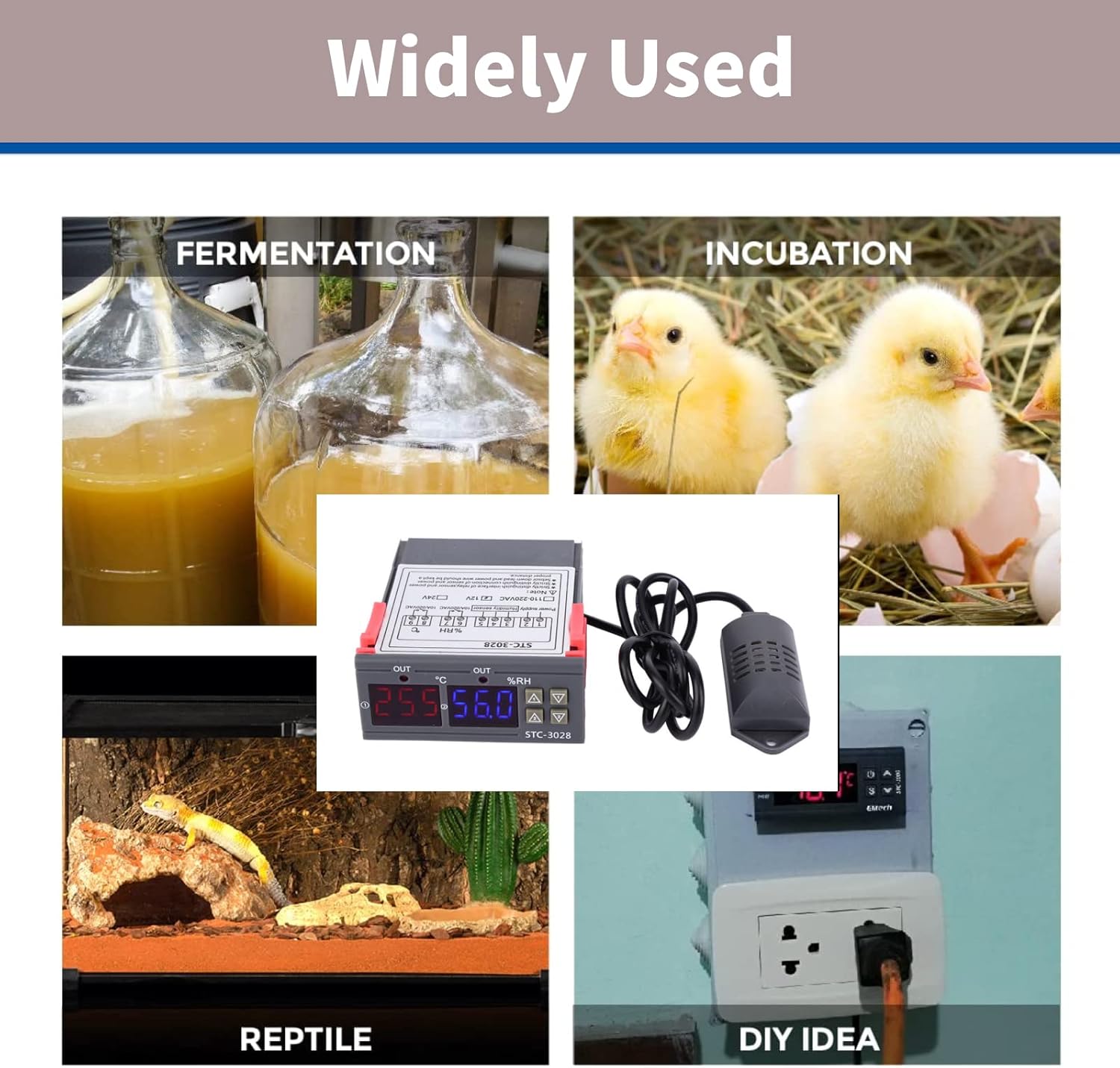
Image: Collage showing diverse applications for the STC-3028, including fermentation, incubation (chickens), reptile habitats, and general DIY temperature/humidity control setups.
- Инкубаторлор: Maintain stable temperature and humidity for hatching eggs.
- Күнөсканалар: Regulate climate for optimal plant growth.
- Сойлоп жүрүүчүлөрдүн жашоо чөйрөсү: Ensure appropriate environmental conditions for exotic pets.
- Fermentation Processes: Control temperature for brewing, yogurt making, etc.
- Storage Facilities: Manage conditions for sensitive goods.
- DIY долбоорлору: Integrate into custom climate control systems.

Image: The STC-3028 controller positioned within a greenhouse environment, illustrating its use in agricultural climate control.
Техникалык тейлөө
To ensure the longevity and accurate performance of your Walfront STC-3028 controller, follow these general maintenance guidelines:
- Тазалоо: Regularly wipe the unit with a soft, dry cloth. Avoid using abrasive cleaners or solvents.
- Сенсорго кам көрүү: Keep the integrated sensor clean and free from dust or debris. Do not immerse the sensor in liquids unless it is specifically designed for such use.
- Экологиялык шарттар: Operate the controller within its specified temperature and humidity ranges. Avoid exposing it to extreme temperatures, direct sunlight, or high moisture environments.
- Туташуу текшерүүлөрү: Бардык зымдардын туташууларынын бекем жана дат баспагандыгын текшерүү үчүн мезгил-мезгили менен текшерип туруңуз.
- Электр камсыздоо: Ensure the power supply matches the controller's voltage requirements (e.g., 12V for this model) to prevent damage.
Проблемаларды чечүү
If you encounter issues with your STC-3028 controller, consider the following common troubleshooting steps:
| Көйгөй | Мүмкүн себеп | Чечим |
|---|---|---|
| Display is blank or unit does not power on. | Электр менен камсыздоо жок, үн туура эмесtage, or loose wiring. | Check power connections. Verify power supply voltage matches unit requirements (12V). Ensure all wires are securely connected. |
| Температура/нымдуулуктун көрсөткүчтөрү так эмес. | Sensor is dirty, damaged, or improperly placed. | Clean the sensor. Inspect sensor cable for damage. Ensure sensor is in the correct environment for measurement and not obstructed. |
| Controller not activating heating/cooling/humidification/dehumidification. | Incorrect parameter settings, faulty wiring to load, or load device malfunction. | Review your start and stop temperature/humidity settings. Check wiring to the controlled device. Test the controlled device independently. |
| Дисплей ката кодун көрсөтөт. | Sensor fault or internal error. | Refer to the specific error code in a more detailed product manual if available. Often indicates a sensor disconnection or malfunction. Reconnect or replace sensor. |
If the problem persists after attempting these steps, contact customer support or a qualified technician.
Кепилдик жана колдоо
Walfront products are manufactured to high quality standards. For information regarding warranty coverage, technical support, or replacement parts, please refer to the contact information provided with your purchase or visit the official Walfront webсайт. Сатып алуу квитанциясын кепилдик дооматтары үчүн сатып алуунун далили катары сактаңыз.
Кошумча жардам алуу үчүн, сиз иш сапары менен болот Walfront Store on Amazon.
Ask a question about this manual
Ask about setup, troubleshooting, compatibility, parts, safety, or missing instructions. Manuals+ will review the question and use this page’s manual context to help answer it.