
1. Киришүү
This document provides essential instructions for the Easytry123 replacement infrared remote control. This remote is designed to function as a direct replacement for specific Philips Smart LCD LED HDTV TV models. It is important to verify that your original remote control matches the appearance of this replacement unit for proper compatibility and functionality. This remote is not a universal remote control and is intended only for the listed models.

1.1-сүрөт: Фронт view of the Easytry123 replacement remote control. This image displays the full layout of buttons, including power, navigation, volume, channel, and numeric keys.
2. Орнотуу
2.1 Батареяны орнотуу
The Easytry123 replacement remote control requires two AAA batteries for operation. No complex setup or coding is needed; simply install the batteries correctly, and the remote will be ready for use.
- Пульттун артындагы батарея отсегин табыңыз.
- Батарея бөлүмүнүн капкагын ылдый жылдырыңыз же ачуу үчүн кулпуну басып, көтөрүңүз.
- Эки AAA батарейкасын салып, оң (+) жана терс (-) терминалдары бөлүмдүн ичиндеги индикаторлорго дал келгенин текшериңиз.
- Батарея бөлүкчөсүнүн капкагын бекем чыккыча ордуна жылдырыңыз.
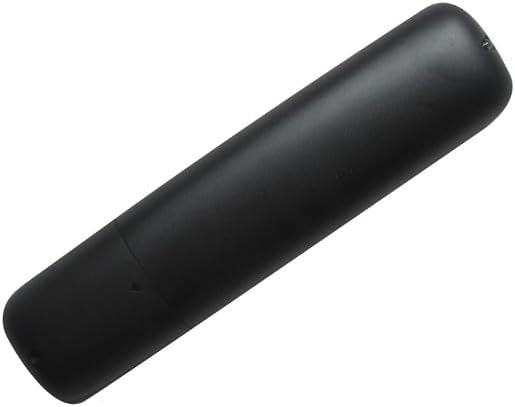
2.1-сүрөт: Артка view батарея бөлүмүнүн капкагын көрсөтүп, алыстан башкаруу пультунун
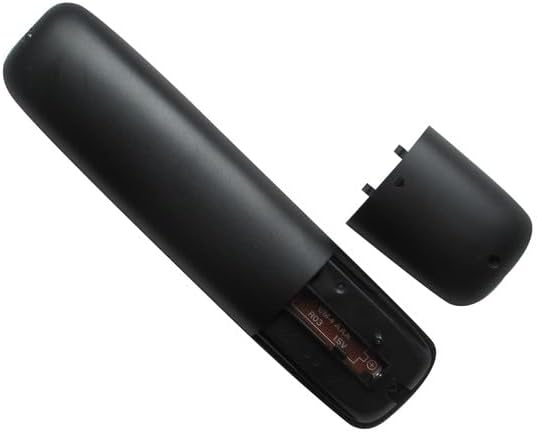
2.2-сүрөт: The remote control with the battery compartment open, illustrating the correct orientation for AAA battery insertion.
3. Иштөө нускамалары
3.1 Негизги функциялар
This replacement remote control provides standard functions for operating your compatible Philips TV. Point the remote directly at your television's infrared receiver for optimal performance.

3.1-сүрөт: Бурчтуу view of the remote control, providing a clear perspective of the button layout and labels.
- Кубат баскычы (Сызыктуу кызыл тегерек): Телевизорду күйгүзөт же өчүрөт.
- Үндү жогорулатуу/төмөндөтүү (VOL +/-): Аудио үнүнүн деңгээлин тууралайт.
- Канал өйдө/төмөн (CH +/-): Телеканалды өзгөртөт.
- Үнсүз баскычы (X менен динамик): Телевизордун үнүн өчүрөт же ачат.
- Source Button (SOURCE): Cycles through available input sources (e.g., HDMI 1, HDMI 2, AV).
- Навигация панели (Өйдө, Төмөн, Солго, Оңго, ОК): Менюларды башкаруу жана экрандагы параметрлерди тандоо үчүн колдонулат.
- Back Button (BACK): Мурунку менюга же экранга кайтат.
- NETTV Button: Provides direct access to Smart TV features or applications.
- Сандык баскычтоп (0-9): Канал номерлерин же башка сандык киргизүүлөрдү түз киргизет.
- APP Buttons (APP1, APP2, APP3, APP4): Dedicated buttons for quick access to specific applications, if supported by your TV model.
- Ойнотуу башкаруулары (ойнотуу, тындыруу, токтотуу, алдыга жылдыруу, артка түрүү): Медианы ойнотууну көзөмөлдөйт.
- CC (Жабык субтитрлер): Toggles closed captioning on or off.
- МААЛЫМАТ: Учурдагы программа же киргизүү жөнүндө маалыматты көрсөтөт.
- ФОРМАТ: Adjusts the screen aspect ratio or picture format.
4. Шайкештик боюнча маанилүү эскертүүлөр
This remote control is specifically designed as a replacement for the Philips TV models listed in the title. It is crucial to:
- Verify Visual Match: Ensure your original remote control has the same appearance as this replacement unit.
- Model Number Confirmation: Confirm that your television's model number is explicitly included in the list of compatible models.
- Функционалдык: While designed to replicate original functions, some advanced or less common features of your original remote may not be fully supported by this replacement.
- Программалоо талап кылынбайт: This remote operates via infrared and does not require any programming or code setup.
5. Техникалык шарттар
- Бренд: Easytry123
- Шайкеш түзмөктөр: Philips Smart LCD LED HDTV Televisions (Specific models listed in title)
- Байланыш технологиясы: Инфракызыл (IR)
- Контроллердин түрү: Control Button
- Кубат булагы: 2 x AAA Батареялар (киргизилген эмес)
- Өзгөчө өзгөчөлүгү: Эргономикалык дизайн, түз алмаштыруу функциясы
6. Кыйынчылыктарды
6.1 Жалпы маселелер
- Пульт жооп бербей жатат:
- Батареялардын туура полярдуулукта (+/-) орнотулганын текшериңиз.
- Эски батареяларды жаңы AAA батареялары менен алмаштырыңыз.
- Пульт менен телевизордун инфракызыл кабыл алгычынын ортосундагы тоскоолдуктарды текшериңиз.
- Confirm that the remote is pointed directly at the TV.
- Кээ бир функциялар иштебейт:
- Verify that your TV model is listed as compatible.
- Understand that some advanced or unique functions of your original remote may not be replicated by this replacement.
- Үзгүлтүктүү жооп:
- Батареялардын жетиштүү кубаты бар экенин текшериңиз.
- Minimize strong light sources (e.g., direct sunlight, fluorescent lights) that might interfere with the IR signal.
7. Кепилдик жана колдоо
Information regarding specific warranty terms or direct customer support for this Easytry123 replacement remote control is not provided in this manual. Please refer to the retailer or your purchase documentation for details on warranty coverage and support options.