
Easytry123 AR-RY12
User Manual for Easytry123 Replacement Remote Control
Model: AR-RY12
Introduction
This manual provides comprehensive instructions for the Easytry123 replacement remote control, designed for various Fujitsu Air Conditioner models including AUYG18LVLB, ASYG07LUCA, ASYG09LUCA, RSB09LDC, RSB18LDC, RSB24LDC, RGV09LA, ASHA09LEC, ASHA12LEC, ASHA18LEC, ASHA12LGC, and ASHA14LGC. This remote control is an infrared (IR) device intended to replace your original unit, offering essential functions for your air conditioning system.

1-сүрөт: Фронт view of the Easytry123 replacement remote control, showing the display and various control buttons.
Жайгашуу
Батарея орнотуу
The remote control requires two AAA batteries (not included). Follow these steps to install them correctly:
- Пульттун артындагы батарея бөлүкчөсүнүн капкагын табыңыз.
- Slide the cover downwards or press the "OPEN" tab and lift to remove it.
- Insert two AAA batteries, ensuring the positive (+) and negative (-) polarities align correctly with the markings inside the compartment.
- Батарея бөлүкчөсүнүн капкагын бекем чыккыча ордуна жылдырыңыз.
Маанилүү: Do not mix old and new batteries, or batteries of different types. Incorrect battery installation can prevent the remote from functioning or cause damage.
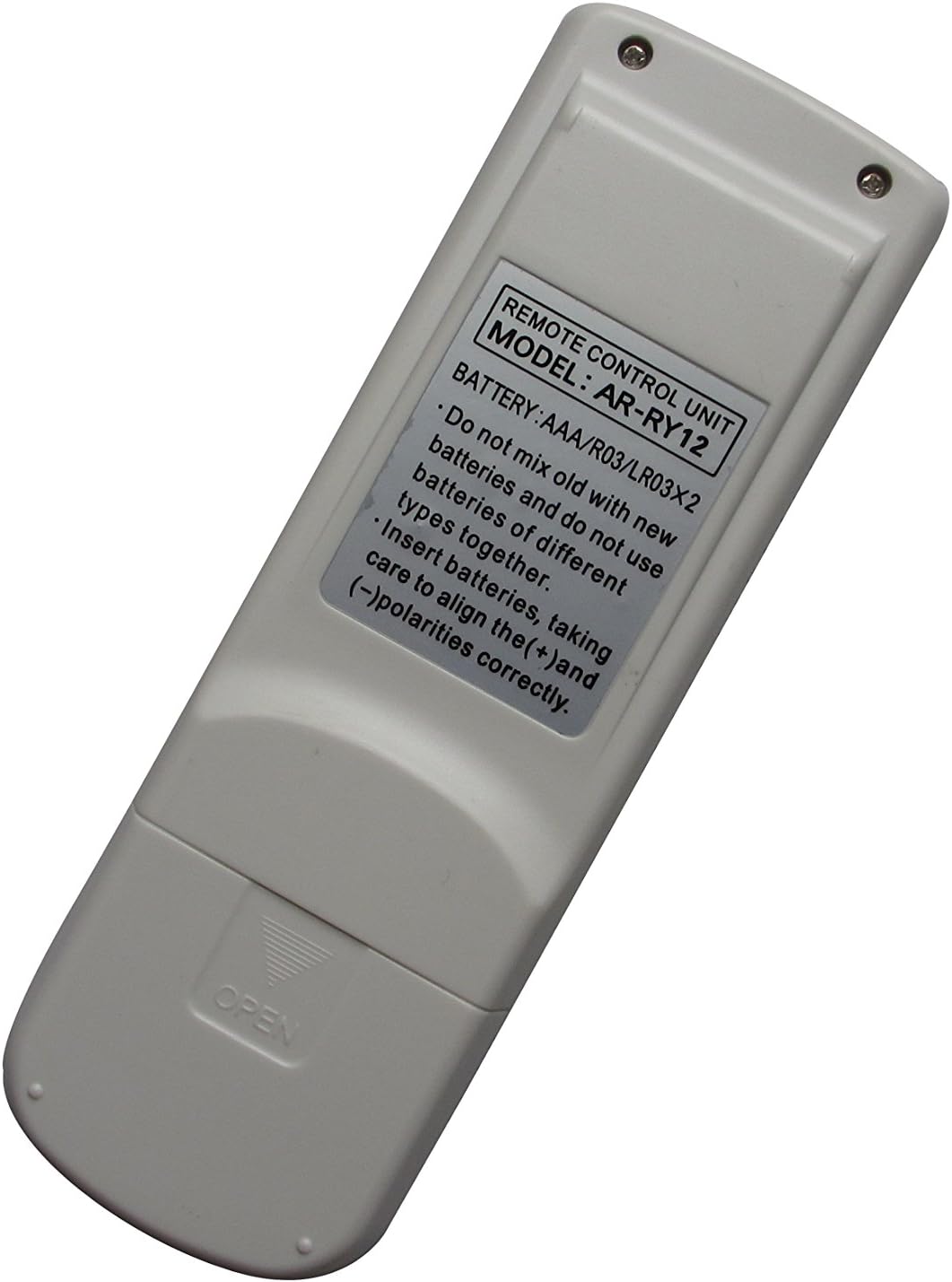

2-сүрөт: Артка view of the remote control (left) indicating the battery compartment, and (right) the compartment open for battery insertion.
Иштөө нускамалары
This remote control features an ergonomic design with clearly labeled buttons for easy operation of your Fujitsu Air Conditioner. Point the remote control directly at the air conditioner's receiver when operating.
Негизги функциялары:
- МАСТЕР БАШКАРУУ: Likely cycles through main operating modes (e.g., Cool, Heat, Fan, Dry, Auto).
- БАШТОО / ТОКТОТУУ: Powers the air conditioner On or Off. This button is typically highlighted (e.g., yellow).
- ФАН БАШКАРУУ: Желдеткичтин ылдамдыгын жөнгө салат (мисалы, Авто, Төмөн, Орто, Жогорку).
- АБА ТАЗАЛУУ: Activates or deactivates the air purification function, if available on your AC unit.
- КУРГАТУУ: Initiates a coil drying function to prevent mold and odors.
- УЙКУ: Activates sleep mode, which typically adjusts temperature and fan speed for comfortable sleep.
- ТЕМПА ЖӨНДӨӨ ▲ / ▼: Керектүү температура жөндөөсүн жогорулатат же азайтат.
- SET ▲ / ▼ (Right side): Used for setting timer or other specific parameters.
- САЛКУУ: Controls the louver swing direction for air distribution.
- ТАЙМЕР РЕЖИМИ: Accesses timer settings for scheduled operation.
- ТАЙМЕР + / -: Adjusts timer settings (e.g., On/Off time).
- СААТТЫ ЖӨНГӨ САЛУУ: Пульттун дисплейинде учурдагы убакытты орнотот.
- ТЕСТ РУНУ: For service or diagnostic purposes; typically not for regular user operation.
- КАЛТЫРУУ: Resets the remote control to default settings. Use a pointed object (like a paperclip) to press this recessed button.
Note: Not all functions may be supported by every Fujitsu Air Conditioner model. Refer to your air conditioner's original manual for specific feature compatibility.
Техникалык тейлөө
Туура кам көрүү пультуңуздун узак мөөнөттүү жана ишенимдүү иштешин камсыз кылат.
- Тазалоо: Wipe the remote control with a soft, dry cloth. Do not use liquid cleaners, sprays, or abrasive materials, as these can damage the remote.
- Батареяны алмаштыруу: Replace batteries when the remote's response becomes sluggish or the display dims. If the remote will not be used for an extended period, remove the batteries to prevent leakage and corrosion.
- Сактагыч: Пультту күн нурунан жана өтө температурадан алыс салкын, кургак жерде сактаңыз.
Проблемаларды чечүү
Эгерде сиз алыстан башкаруу пультуңуз менен көйгөйлөргө туш болсоңуз, төмөнкү чечимдерди колдонуп көрүңүз:
| Көйгөй | Мүмкүн болгон себеп / Чечим |
|---|---|
| Пульт иштебей жатат. |
|
| Кээ бир функциялар иштебейт. |
|
| Дисплей күңүрт же бош. |
|
Техникалык шарттар
- Модел: AR-RY12
- Бренд: Easytry123
- Шайкеш түзмөктөр: Fujitsu Air Conditioners (various models)
- Байланыш технологиясы: Инфракызыл (IR)
- Контроллердин түрү: Control Button
- Өзгөчө өзгөчөлүгү: Эргономикалык дизайн
- Кубат булагы: 2 x AAA Батареялар (киргизилген эмес)
Кепилдик жана колдоо
For information regarding warranty, returns, or technical support, please refer to the seller's policy on the platform where the product was purchased. As this is a replacement remote, specific warranty details may vary.
For further assistance, you may contact the seller directly through the online marketplace.
Ask a question about this manual
Ask about setup, troubleshooting, compatibility, parts, safety, or missing instructions. Manuals+ will review the question and use this page’s manual context to help answer it.