
1. Киришүү
This manual provides instructions for the Easytry123 Replacement Remote Control, designed for use with various Fujitsu air conditioner models. This remote control offers essential functions for operating your air conditioning unit. Please note that while this remote is a functional replacement, it may not support all advanced features present on your original remote control. Refer to the compatibility section to ensure your air conditioner model is supported.
2. Продукт бүтүп калдыview
The Easytry123 Replacement Remote Control features a clear display and intuitively placed buttons for easy operation of your Fujitsu air conditioner.
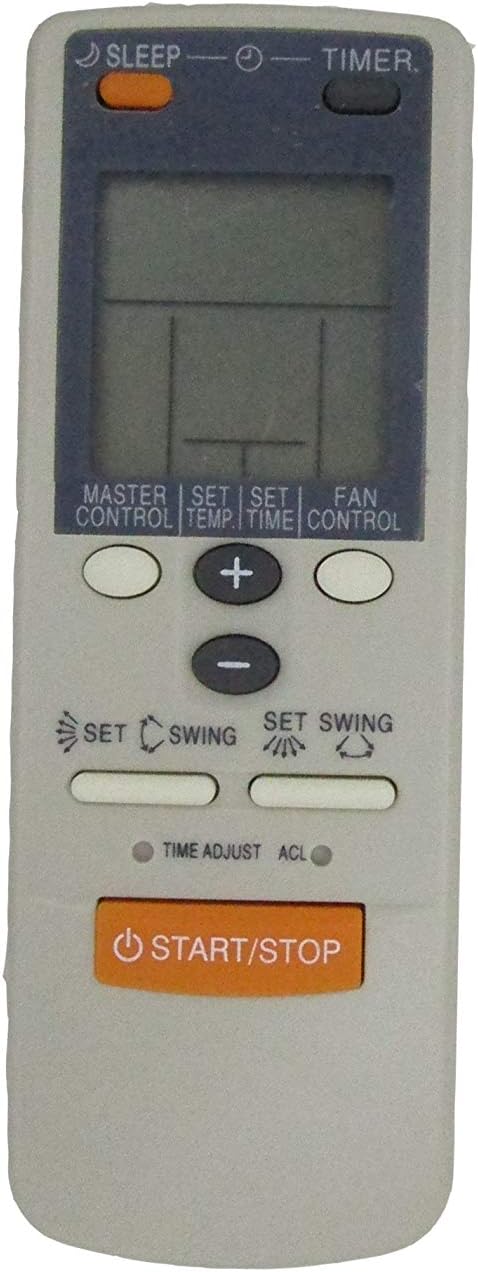
Сүрөт 2.1: Алдыңкы view of the remote control, displaying the LCD screen and various function buttons.

Figure 2.2: Angled perspective of the remote control, providing a view of its overall shape and button arrangement.
3. Орнотуу
3.1 Батареяны орнотуу
The remote control requires two AAA batteries for operation. Batteries are not included with the remote control.
- Пульттун артындагы батарея отсегин табыңыз.
- Батарея бөлүмүнүн капкагын ачуу үчүн ылдый же сыртка жылдырыңыз.
- Оң (+) жана терс (-) терминалдары бөлүмдүн ичиндеги белгилер менен туура дал келишин камсыз кылып, эки AAA батарейкасын салыңыз.
- Батарея бөлүкчөсүнүн капкагын бекем чыккыча ордуна жылдырыңыз.

3.1-сүрөт: Артка view of the remote control, illustrating the battery compartment and battery type requirement.
Маанилүү: Do not mix old and new batteries. Do not mix different types of batteries. Ensure correct polarity when inserting batteries.
4. Иштөө нускамалары
Иштеп жатканда алыстан башкаруу пультун түз эле кондиционердин кабыл алгычына багыттаңыз. Пульт менен түзмөктүн ортосунда эч кандай тоскоолдуктар жок экенин текшериңиз.
- START/STOP баскычы: Кондиционерди КҮЙГҮЗҮҮ же ӨЧҮРҮҮ үчүн басыңыз.
- MASTER CONTROL Button: Cycles through the main operating modes such as Cool, Heat, Fan, Dry, and Auto. Press repeatedly to select the desired mode.
- SET TEMP Button: Used in conjunction with the + жана - каалаган температураны жөндөө үчүн баскычтарды басыңыз.
- FAN CONTROL Button: Adjusts the fan speed. Press repeatedly to cycle through available fan speeds (e.g., Auto, Low, Medium, High).
- SLEEP баскычы: Activates or deactivates the sleep mode, which typically adjusts temperature and fan speed for comfortable sleep and energy saving.
- TIMER баскычы: Used to set the ON or OFF timer for the air conditioner. Follow the on-screen prompts or use the + жана - убакытты белгилөө үчүн баскычтар.
- SET TIME Button: Used for setting the current time or adjusting timer settings.
- + / - Баскычтар: Used to increase or decrease values such as temperature, time, or other settings displayed on the LCD.
- SET SWING (Horizontal Louver Icon) Button: Кондиционердин жалюзилеринин горизонталдык кыймылын башкарат.
- SET SWING (Vertical Louver Icon) Button: Кондиционердин жалюзунун вертикалдуу кыймылын башкарат.
- TIME ADJUST Button: Provides fine-tuning for time-related settings.
- ACL (Accessory Clear/Reset) Button: This is a recessed button, typically used for resetting the remote control's settings. Use a thin, pointed object (like a paperclip) to press it.
5. Шайкештик
This Easytry123 remote control is designed to be compatible with specific Fujitsu air conditioner models, including but not limited to: AWY18FBBJ, AWY24FBBJ, AWY30FBBJ, AWY14UBBJ, AWY18UBBJ, AWY24UBBJ, AWY30UBBJ, AWY18UBAJ, AWY24UBAJ, AU18TFCMF, AU30TFCMF, and AU36TFCMF. It is crucial to verify that your air conditioner model number is listed or confirmed as compatible before use. If your model is not explicitly listed, the remote may not function correctly or may have limited functionality.
6. Кыйынчылыктарды
- Пульт жооп бербей жатат:
- Батареялар туура полярдуулук менен туура салынганын текшериңиз.
- Эски батареяларды жаңы AAA батареялары менен алмаштырыңыз.
- Пульт менен кондиционердин ресиверинин ортосунда эч кандай тоскоолдуктар жок экенин текшериңиз.
- Confirm that the remote is compatible with your specific Fujitsu air conditioner model.
- Чектелген функциялар:
- As a replacement remote, some advanced or specific functions of your original unit may not be supported. This is normal for universal or replacement remotes.
- Refer to the compatibility section to ensure your model is fully supported for basic functions.
- Дисплей күңүрт же бош:
- Replace the batteries. Low battery power can cause a dim or non-functional display.
7. Техникалык шарттар
- Кубат булагы: 2 x AAA Батареялар (киргизилген эмес)
- Шайкештик: Designed for various Fujitsu Air Conditioner models (refer to Section 5)
8. Техникалык тейлөө
- Тазалоо: Пультту жумшак, кургак чүпүрөк менен сүртүңүз. Суюк тазалагычтарды же абразивдүү материалдарды колдонбоңуз.
- Батареяны алмаштыруу: Replace batteries when the remote's range decreases or the display becomes dim. Remove batteries if the remote will not be used for an extended period to prevent leakage.
- Сактагыч: Пультту күн нурунан жана өтө температурадан алыс салкын, кургак жерде сактаңыз.
9. Кепилдик жана колдоо
For information regarding warranty coverage or technical support, please refer to the seller's policies or contact the point of purchase. As this is a replacement product, specific warranty details may vary.