
Introduction
Thank you for choosing the QNECT Smart Video Doorbell. This manual provides essential information for the proper installation, operation, and maintenance of your device. Please read it thoroughly before use to ensure optimal performance and safety.
The QNECT Smart Video Doorbell offers 1080P video resolution, IP65 weather resistance, night vision, two-way audio communication, and compatibility with smart home systems like Alexa and Google Home.
Орнотуу жана орнотуу
The QNECT Smart Video Doorbell is designed for straightforward installation. Ensure you have a stable Wi-Fi connection available at the installation location.
Пакеттин мазмуну
- QNECT Smart Video Doorbell
- Орнотуу аксессуарлары (бурамалар, анкерлер)
- User Manual
Физикалык орнотуу
- Жайгашкан жерди тандаңыз: Select a suitable outdoor location near your door, ensuring a clear view and within Wi-Fi range. The device is IP65 rated, making it resistant to rain.
- Монтаждоо: Use the provided screws and anchors to securely mount the doorbell to the wall. Ensure it is positioned at an appropriate height for optimal viewing.

Сүрөт: алдыңкы view of the QNECT Smart Video Doorbell, showing the camera lens, motion sensor, speaker grille, and illuminated doorbell button.
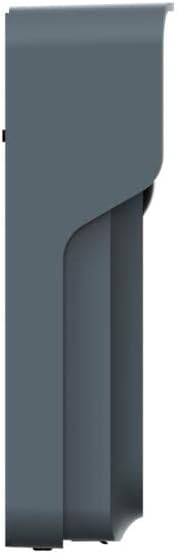
Сүрөт: Side profile of the QNECT Smart Video Doorbell, illustrating its slim design and mounting bracket.
Колдонмо туташуусу
- Download the QNECT App: Издөө the 'QNECT' app on your smartphone's app store (iOS or Android) and install it.
- Каттоо эсебин түзүү: Колдонмону ачып, жаңы колдонуучу каттоо эсебин түзүү үчүн экрандагы нускамаларды аткарыңыз же сизде мурунтан эле бар болсо кириңиз.
- Түзмөк кошуу: Колдонмодо жаңы аппаратты кошуу опциясын тандаңыз. Адатта эшиктин коңгуроосундагы QR кодун сканерлөө же түзмөктүн идентификаторун киргизүүнү камтыган жупташтыруу нускамаларын аткарыңыз.
- Wi-Fi'га туташуу: Configure the doorbell to connect to your home's 2.4GHz Wi-Fi network through the app.
Иштөө нускамалары
Live View жана эки тараптуу аудио
- When someone presses the doorbell, you will receive a notification on your smartphone via the QNECT app.
- Tap the notification to access a live video feed from the doorbell.
- Use the microphone and speaker icons within the app to engage in two-way communication with the visitor at your door, even when you are away from home.
Motion Detection and Night Vision
- The doorbell features a motion sensor that activates when someone approaches, triggering a recording and sending an alert to your phone.
- Equipped with an IR sensor and infrared LED, the doorbell provides clear night vision, ensuring visibility even in low-light conditions.
- The 140° wide-angle lens offers a broad view сиздин босогоңуздан.
Сактагыч параметрлери
Video recordings and event footage can be stored using two methods:
- Булуттагы сактагыч: Subscribe to the optional cloud storage service through the QNECT app for secure online storage of your recordings.
- Micro SD картасы: Insert a compatible micro SD card (not included) into the designated slot on the doorbell for local storage of recordings.
Smart Home интеграциясы
The QNECT Smart Video Doorbell is compatible with popular smart home platforms:
- Alexa: Connect your doorbell to Amazon Alexa to receive announcements when the doorbell is pressed or motion is detected, and view шайкеш келген Echo Show түзмөктөрүндөгү түз эфир.
- Google Home: Integrate with Google Home for similar functionalities, including notifications and live viewing on Google Nest Hub devices.
Техникалык тейлөө
- Тазалоо: Мезгил-мезгили менен камеранын линзасын жана коңгуроонун сыртын жумшак, damp чаңды жана кирди тазалоо үчүн кездеме. Катуу химиялык заттарды же абразивдүү материалдарды колдонуудан алыс болуңуз.
- Программалык камсыздоонун жаңыртуулары: Ensure your doorbell's firmware is up to date through the QNECT app. Updates often include performance improvements and security enhancements.
- Батареяны текшерүү: If your doorbell is battery-powered, monitor the battery level via the app and recharge or replace batteries as needed.
- Wi-Fi туташуусу: Regularly check the Wi-Fi signal strength in the app to ensure a stable connection for optimal performance.
Проблемаларды чечүү
No Power/Doorbell Not Responding
- Check if the battery is charged or if the power connection is secure.
- Ensure the doorbell button is not stuck.
Poor Video Quality or Connectivity Issues
- Verify your Wi-Fi network is active and the signal strength at the doorbell's location is adequate.
- Ensure your router is broadcasting a 2.4GHz Wi-Fi signal, as the doorbell may not support 5GHz.
- Restart your Wi-Fi router and the doorbell.
- Move the doorbell closer to the router or consider a Wi-Fi extender.
Кыймылды аныктоо иштебейт
- Check the motion detection settings in the QNECT app to ensure it is enabled and sensitivity is adjusted correctly.
- Сенсордун ишине тоскоол болгон эч кандай тоскоолдуктар жок экенин текшериңиз view.
Two-Way Audio Problems
- Check your smartphone's volume settings and ensure the app has microphone permissions.
- Ensure the doorbell's speaker and microphone are not obstructed.
Doorbell Not Connecting to Alexa/Google Home
- Ensure the doorbell is properly connected to the QNECT app and has a stable internet connection.
- Follow the specific linking instructions within the Alexa or Google Home app to connect third-party devices.
- Verify that your Alexa/Google Home devices are on the same network as the doorbell.
Техникалык шарттар
| Өзгөчөлүк | Деталь |
|---|---|
| Модель номери | QNEP0007EUN |
| Өндүрүүчү | QNECT |
| Өлчөмдөр | 21.2 x 10.2 x 4.8 см |
| Салмагы | 420 грамм |
| Power Source | Батарея менен иштейт |
| Батарея түрү | Литий-ион |
| Аба ырайына каршылык | IP65 тастыкталган |
| Video Resolution | 1080P |
| Viewбурч | 140° |
| Түнкү көрүнүш | IR Sensor and Infrared LED |
| Сактагыч параметрлери | Cloud, Micro SD Card |
| Smart Home шайкештиги | Alexa, Google Home |
Кепилдик жана колдоо
For warranty information, please refer to the documentation provided with your purchase or visit the official QNECT website. If you encounter any issues or require technical assistance, please contact QNECT customer support through their official channels.
Кепилдик дооматтар үчүн сатып алганыңыздын далилин сактаңыз.