
1. Киришүү
The AVMATRIX VS0601 is a compact, multi-format video switcher designed for professional video production. It features a robust metal housing and supports 6 channels of SDI and HDMI inputs, offering versatile video switching, audio mixing, and various transition effects. The unit is engineered for compatibility with diverse equipment, providing flexibility for live events and broadcast applications.
Негизги өзгөчөлүктөрү:
- 6 channel inputs: 4xSDI and 2xHDMI inputs
- 2xSDI & 1xHDMI PGM outputs, 1xSDI AUX output, 1xSDI & 1xHDMI multiview чыгуулар
- T-Bar/ AUTO/ CUT transitions and MIX/ FADE/ WIPE effects
- Picture-in-Picture (PiP) mode with adjustable size and position
- Audio mixer: 3.5mm stereo/ RCA audio & SDI/ HDMI embedded audio
- Түз эсептөө системасы үчүн GPIO интерфейси
- FTB (Fade to Black) function for emergency situations
2. Орнотуу
2.1 Таңгактан чыгаруу жана текшерүү
Carefully unpack the VS0601 switcher and inspect it for any signs of damage. Ensure all components listed in the packaging are present.
2.2 Кубатты туташтыруу
- Connect the provided DC 12V power adapter to the 'DC 12V' input port on the rear panel of the VS0601.
- Кубат адаптерин ылайыктуу электр розеткасына сайыңыз.
- Ensure the 'OFF/ON' switch on the rear panel is in the 'OFF' position before connecting power.
2.3 Video Input Connections
The VS0601 supports both SDI and HDMI video inputs. The device auto-detects the input signal format.
- SDI Inputs: Connect up to four SDI sources (cameras, media players, etc.) to the 'SDI IN' ports (1-4) using BNC cables.
- HDMI кириштери: Connect up to two HDMI sources to the 'HDMI IN' ports (5-6) using HDMI cables.
2.4 Video Output Connections
The switcher provides multiple program (PGM) and multiview чыгуулар.
- PGM Outputs: Connect your main display or recording device to the 'PGM OUT' SDI (x2) or HDMI (x1) ports.
- AUX чыгышы: Use the 'AUX' SDI output for an additional program feed.
- Мультиview Чыгуулары: Connect a monitor to the 'MULTIVIEW OUT' SDI or HDMI ports to view all input sources simultaneously.
2.5 Аудио байланыштар
- Аудио киргизүү: Connect external audio sources to the 3.5mm stereo audio input or the RCA (L/R) audio input ports.
- Аудио чыгаруу: Connect monitoring headphones or speakers to the 3.5mm stereo audio output or the RCA (L/R) audio output ports.
2.6 Башка байланыштар
- TALLY: Connect a tally system to the DB-15 GPIO interface for live production cues.
- LAN: Use the RJ45 LAN port for network control and time synchronization.

Figure 2.1: Rear panel connections of the AVMATRIX VS0601. This image displays the various input and output ports including SDI IN, HDMI IN, PGM OUT, MULTIVIEW OUT, AUX, Audio IN/OUT, TALLY, LAN, and DC 12V power input.
3. Иштөө нускамалары
3.1 Күйгүзүү/өчүрүү
- To power on, switch the 'OFF/ON' toggle on the rear panel to the 'ON' position.
- To power off, switch the 'OFF/ON' toggle to the 'OFF' position.
3.2 Алдыңкы панелдин башкаруу элементтериview
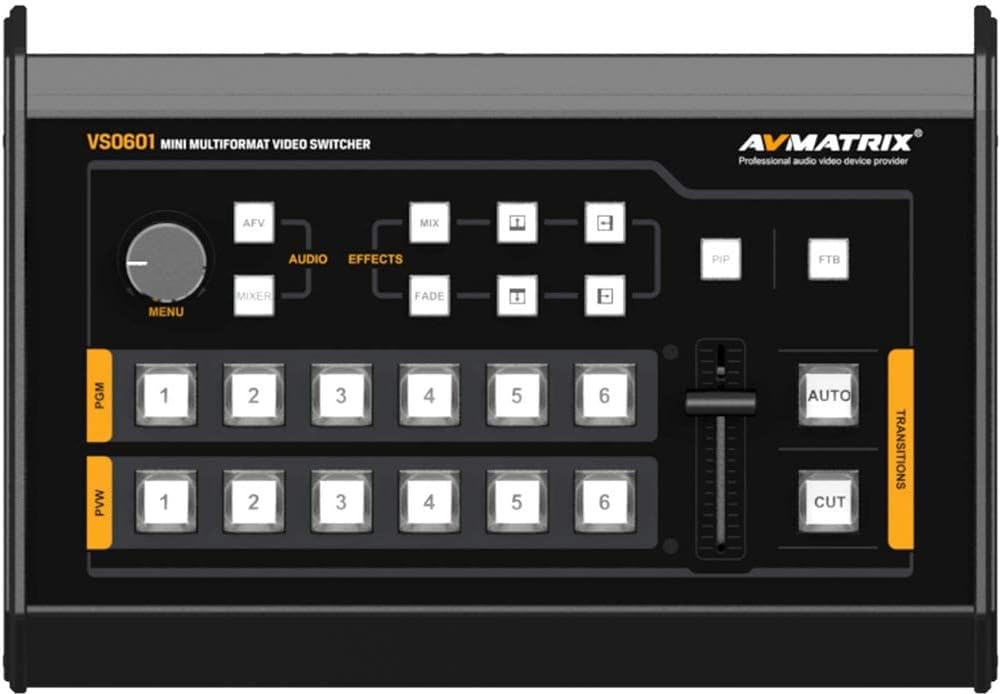
Figure 3.1: Front control panel of the AVMATRIX VS0601. This image highlights the PGM and PVW input selection buttons, T-Bar fader, AUTO/CUT transition buttons, MENU knob, and effect selection buttons (MIX, FADE, WIPE, PiP, FTB).
3.3 Input Selection (PGM & PVW)
The front panel features two rows of numbered buttons (1-6) for Program (PGM) and Preview (PVW) selection.
- PGM (Program): The top row of buttons selects the input currently live on the main output.
- PVW (Preview): The bottom row of buttons selects the input to be prepared for the next transition. This input will be visible on the multiview чыгаруу.
3.4 Өтүүлөр
The VS0601 offers various transition methods and effects.
- CUT: Press the 'CUT' button for an instant, hard cut between the PVW and PGM sources.
- АВТО: Press the 'AUTO' button to execute a smooth transition (e.g., fade, wipe) between PVW and PGM sources at a preset speed.
- T-Bar: Manually control the transition speed and direction by moving the T-Bar fader. Pushing the T-Bar up or down will transition between the PVW and PGM sources.
- Effects (MIX, FADE, WIPE): Select the desired transition effect (MIX, FADE, WIPE) using the dedicated buttons above the T-Bar. The selected effect will be applied when using the AUTO button or T-Bar.
3.5 Сүрөт ичиндеги сүрөт (PiP) режими
Activate PiP mode by pressing the 'PiP' button. Use the 'MENU' knob and associated buttons to adjust the size and position of the PiP window. The PiP source is typically the PVW input, overlaid on the PGM input.
3.6 Аудио аралаштыруу
The audio mixer allows control over embedded SDI/HDMI audio and external analog audio inputs.
- Use the 'AUDIO' buttons and 'MENU' knob to navigate and adjust audio levels for each input.
- The 3.5mm stereo and RCA inputs can be mixed with embedded audio from video sources.
3.7 FTB (Fade to Black)
Press the 'FTB' button to instantly fade the program output to black. Press it again to return to the previous program source.
4. Техникалык тейлөө
4.1 Тазалоо
To maintain optimal performance and appearance, regularly clean the exterior of the VS0601.
- Use a soft, dry cloth to wipe down the unit.
- өжөр белгилери үчүн, жеңил гampчүпүрөктү суу же жумшак, абразивдүү тазалагыч менен жууп салыңыз.
- Катуу химиялык заттарды, эриткичтерди же абразивдүү материалдарды колдонуудан алыс болуңуз, анткени алар жасалгага зыян келтириши мүмкүн.
- Ensure no liquids enter the device through vents or ports.
4.2 Экологиялык шарттар
Operate the VS0601 within the specified environmental ranges to prevent damage and ensure longevity.
- Иштөө температурасы: -20…60°C (-4…140°F)
- Сактоо температурасы: -30…70°C (-22…158°F)
- Иштетүү нымдуулугу: 20%~70% RH (конденсацияланбаган)
Avoid exposing the unit to extreme temperatures, direct sunlight, excessive dust, or high humidity.
4.3 Power Supply Care
Always use the original power adapter provided with the unit. Do not use damaged cables or adapters. Disconnect power during electrical storms or when the unit is not in use for extended periods.
5. Кыйынчылыктарды
This section addresses common issues you might encounter with the AVMATRIX VS0601. If problems persist, contact customer support.
5.1 Видео чыгышы жок
- Күчтү текшерүү: Түзмөктүн кубатка сайылып турганын жана кубат адаптери бекем туташтырылганын текшериңиз.
- Verify Input Sources: Confirm that all video input sources are active and sending a signal.
- Кабелдерди текшерүү: Ensure all SDI and HDMI cables are securely connected to both the switcher and the display/recording device. Try swapping cables if possible.
- Киргизүүнү тандоо: Verify that the correct input is selected on the PGM row of buttons.
- Чыгуу форматы: Check if the output format of the VS0601 is compatible with your display/recording device. The PGM output can be scaled.
5.2 Аудио чыгышы жок
- Аудио байланыштарды текшерүү: Ensure external audio cables are properly connected to the audio input/output ports.
- Аудио деңгээли: Verify that audio levels are not muted or set too low in the audio mixer settings.
- Камтылган аудио: If using embedded audio, confirm the source device is sending audio with the video signal.
5.3 Device Freezes or Unexpected Power Loss
- Электр камсыздоо: Ensure the power adapter is providing stable 12V, 2A power. An unstable power source can cause interruptions.
- Вентиляция: Check that the unit has adequate ventilation and is not overheating. Ensure vents are not blocked.
- Микропрограмма: Check the AVMATRIX website for any available firmware updates that may address stability issues.
- Кайтаруу: Power cycle the device by turning it off, waiting 10 seconds, and then turning it back on.
5.4 Мультиview Not Displaying All Inputs
- Мультиview Чыгуу туташуу: Ensure the monitor is correctly connected to the 'MULTIVIEW OUT' port.
- Киргизүү сигналдары: Confirm that all connected input sources are active and sending valid video signals.
6. Техникалык шарттар
| Өзгөчөлүк | Спецификация |
|---|---|
| Video Inputs | 4x 3G/HD/SD-SDI, 2x HDMI |
| SDI Video Rate | Авто аныктоо, SD/HD/3G-SDI |
| SDI шайкештиги | SMPTE 259M/ SMPTE 292M/ SMPTE 424M |
| PGM Outputs | 2x 3G/HD/SD-SDI; 1x HDMI Type A |
| PGM чыгаруу форматы | 1080p 60/50/30/25/24; 1080i 50/60 |
| Мультиview Чыгуу | 1x 3G-SDI; 1x HDMI Type A |
| Мультиview Чыгуу форматы | 1080p 60 |
| Аудио киргизүү | 1x 3.5mm Stereo audio; 1x RCA (L/R) |
| Аудио чыгаруу | 1x 3.5mm Stereo audio; 1x RCA (L/R) |
| GPIO | Tally, DB-15x1 |
| LAN | RJ45, Synchronize local time |
| Иштөө температурасы | -20…60°С |
| Сактоо температурасы | -30…70°С |
| Операциянын нымдуулугу | 20% ~ 70% RH |
| Энергияны керектөө | ≤ 14.5 Вт |
| Электр камсыздоо | DC 12V, 2A |
| Өлчөмдөр | 6.78" x 2.17" x 9.81" (17.22 x 5.51 x 24.92 см) |
| Салмагы | 2.2 фунт (1 кг) |
7. Кепилдик маалыматы
Specific warranty terms and conditions for the AVMATRIX VS0601 may vary by region and reseller. Please refer to the warranty card included with your product or contact your point of purchase for detailed information regarding warranty coverage, duration, and service procedures. Keep your proof of purchase for warranty claims.
8. Колдоо
For technical assistance, troubleshooting beyond this manual, or service inquiries, please contact AVMATRIX customer support or your authorized reseller. You may also visit the official AVMATRIX webкошумча ресурстар, көп берилүүчү суроолор жана микропрограммалык камсыздоону жаңыртуу үчүн сайт.
Онлайн ресурстар:
- AVMATRIX Official Webсайт: www.avmatrix.net (Эскертүү: Бул толтургуч URL, анык кызмат адамын текшериңиз website for AVMATRIX)