
1. Introduction and Overview
The WANPTEK DPS3010U is a high-precision, adjustable DC power supply designed for various applications requiring stable and reliable power. It features a clear 4-digit LED display that simultaneously shows voltage, ток күчү жана кубаттуулук.
- USB Quick Charge: Equipped with a built-in fast charging protocol identification chip, supporting USB fast charging for compatible devices.
- Коопсуз иш: Incorporates multiple protection mechanisms including Over-Voltage Protection (OVP), Over-Current Protection (OCP), Over-Temperature Protection, and an enhanced short-circuit alarm function.
- Жөнгө салынуучу чыгаруу: Both output voltage and current can be continuously adjusted from 0 up to their nominal values, with options for fine and coarse adjustments for precise control.
- Таза дисплей: The 4-digit LED display provides high accuracy readings for voltage, current, and power, ensuring easy monitoring during operation.
- Кеңири колдонуу: Suitable for a broad range of uses, including mobile phone and computer repair, electrical maintenance, scientific research in laboratories, and industrial production lines.

Сүрөт 1.1: Алдыңкы view of the WANPTEK DPS3010U DC Power Supply, showing the LED display and control knobs.
2. Орнотуу
2.1 Таңгактан чыгаруу жана текшерүү
Carefully remove the power supply and all accessories from the packaging. Inspect all components for any signs of damage during transit. If any damage is found, contact your supplier immediately.
2.2 Пакеттин мазмуну
The standard package for the DPS3010U includes:
- 1 × WANPTEK DPS3010U DC Power Supply Unit
- 1 × Кубат кабели
- 1 × Alligator Clip Test Lead
- 1 × User Manual (English)

Figure 2.1: The DPS3010U power supply shown with its standard accessories: power cord, alligator clip test leads, and user manual.
2.3 Кубат туташтыруу
- Ensure the power supply's input voltagарткы панелдеги e которгуч туура томго коюлганtagсиздин аймагыңыз үчүн (115V же 230V).
- Connect the provided power cord to the power socket on the rear panel of the unit.
- Кубат шнурунун экинчи учун жерге туташтырылган AC розеткасына сайыңыз.

Figure 2.2: Rear panel details, highlighting the cooling fan, input voltage switch (115V/230V), power socket, and fuse box.
3. Иштөө нускамалары
3.1 Алдыңкы панелдин башкаруу элементтери
Familiarize yourself with the front panel controls and indicators:
- Дисплей экраны: Shows Voltage (V), Current (A), and Power (W).
- V-COARSE / V-FINE: Knobs for coarse and fine adjustment of output voltage.
- A-COARSE / A-FINE: Knobs for coarse and fine adjustment of output current.
- Quick Charge (USB): USB port for fast charging compatible devices.
- C.V. / C.C. Indicators: LEDs indicating Constant Voltage (C.V.) or Constant Current (C.C.) operating mode.
- OCP Indicator: LED indicating Over-Current Protection is active.
- Кубат которгучу: Аппаратты КҮЙГҮЗҮП/ӨЧҮРӨТ.
- Чыгуу терминалдары: Positive (+, Red), Negative (-, Black), and Ground (GND, Green) terminals for connecting loads.
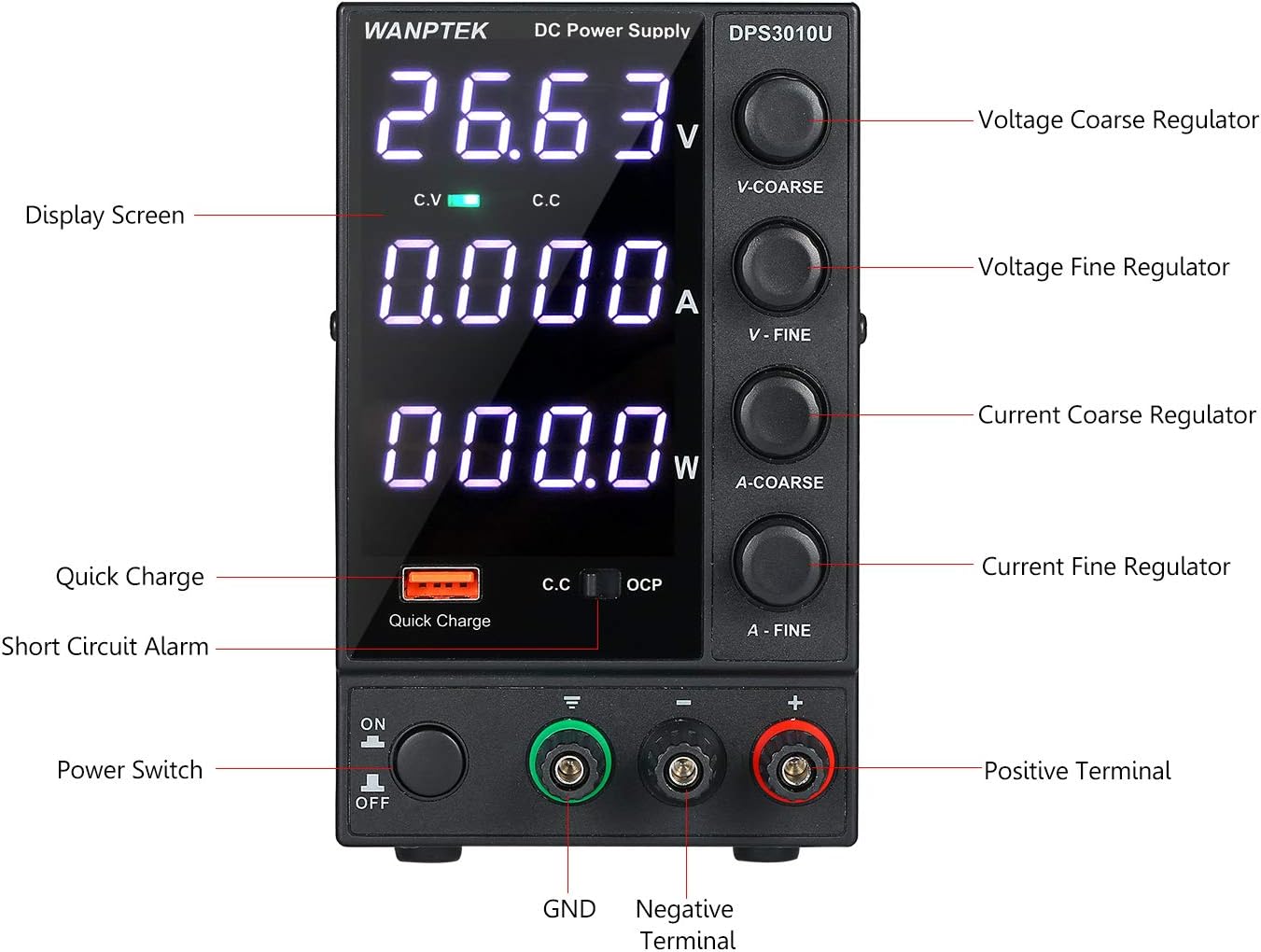
3.1-сүрөт: Детальдуу view of the front panel with labels for all controls and indicators.
3.2 Негизги операция
- Күйгүзүү: Press the Power Switch to turn on the unit. The LED display will illuminate.
- Voltage: Use the V-COARSE knob for large voltage adjustments and the V-FINE knob for precise adjustments. Observe the voltagдисплейде окуу.
- Adjust Current Limit: Use the A-COARSE knob for large current limit adjustments and the A-FINE knob for precise adjustments. This sets the maximum current the power supply will deliver.
- Туташуу жүктөө: Connect your device or circuit to the output terminals. Ensure correct polarity (Positive to Positive, Negative to Negative).
- Монитордун чыгышы: The display will show the actual voltage, current, and power being delivered to the load. The C.V. or C.C. indicator will light up to show the operating mode.
- USB Quick Charge: For fast charging, connect your USB-compatible device to the Quick Charge port. The power supply's built-in chip will identify the fast charging protocol.
4. Техникалык тейлөө
4.1 Жалпы кам көрүү
- Keep the power supply clean and free from dust. Use a soft, dry cloth for cleaning. Do not use liquid cleaners or solvents.
- Avoid operating the unit in environments with excessive dust, humidity, or extreme temperatures.
- Do not block the ventilation openings. Ensure adequate airflow around the unit.
4.2 Муздатуу системасы
The DPS3010U is equipped with an internal cooling fan to dissipate heat during operation. Ensure the fan intake and exhaust vents are clear of obstructions to maintain optimal performance and prevent overheating.

4.1-сүрөт: Каптал view illustrating the cooling fan and intended airflow path for heat dissipation.
4.3 Сактагычты алмаштыруу
If the unit fails to power on, check the fuse located in the fuse box on the rear panel. Replace it with a fuse of the same type and rating (3 Ampere).
5. Кыйынчылыктарды
5.1 Protection Modes
The power supply incorporates several protection features to safeguard both the unit and the connected load:
- Current Limiting Protection: When the load current exceeds the set current limit, the power supply will enter Constant Current (C.C.) mode, limiting the output current to the set value.
- Short Circuit Alarm Stop Output and Self-Recovery: In case of a short circuit at the output terminals, the unit will stop outputting power and trigger an alarm. Once the short circuit is removed, the unit will automatically recover and resume normal operation.
- Ашык-томtage Protection (OVP) / Over-Current Protection (OCP) / Over-Temperature Protection: These internal protections will shut down the output if voltage, current, or internal temperature exceed safe limits.

Figure 5.1: Visual representation of the USB Quick Charging and Short Circuit Protection features.
5.2 Жалпы маселелер жана чечимдер
| Көйгөй | Мүмкүн себеп | Чечим |
|---|---|---|
| Күйгүзүлгөндө кубат жок | Power cord not connected, fuse blown, input voltage которгучу туура эмес. | Check power cord connection. Replace fuse if blown. Verify input voltage которгучту жөндөө. |
| Чыгаруунун көлөмү жокtage/Current | Чыгуу терминалдары туташкан эмес, тtage/current set to zero, protection mode active. | Жүктүн туура туташканын текшериңиз. Үндү тууралаңыз.tage/current knobs. Check for short circuits or overloads. |
| Бирдик ашыкча ысып жатат | Бөгөттөлгөн желдетүү, ашыкча жүк. | Ensure vents are clear. Reduce load or operate within specified limits. |
6. Техникалык шарттар
Detailed technical specifications for the WANPTEK DPS3010U:
| Параметр | Нарк |
|---|---|
| Модел | DPS3010U |
| Output Voltage | 0-30V |
| Output Current | 0-10A |
| Чыгуу күчү | 300 Вт |
| Көмөкчү чыгаруу | USB Quick Charging 18W (supports multiple fast charging protocols) |
| Киргизүү көлөмүtage | AC 230V ± 10%, 50Hz; AC 115V ± 10%, 60Hz |
| Иштөө температурасы | 0~40°C; Humidity: <80% RH |
| Сактоо температурасы | -10~70°C; Humidity: <70% RH |
| Тtage Stability (CV) | ≤0.1% ± 3mV |
| Load Stability (CV) | ≤0.1% ± 3mV |
| Ripple Noise (CV) | ≤20mVrms (Effective value) |
| Current Stability (CC) | ≤0.1% ± 3mA |
| Load Stability (CC) | ≤0.2% ± 3mA |
| Ripple Noise (CC) | ≤5mA (Effective value) |
| Коргоо режими | Current limiting protection / short circuit alarm stop output and self-recovery |
| Дисплей | Four-digit digital tube, three-window display (Voltage, Current, Power) |
| Дисплейдин тактыгы | 0.5% ± 3 сан |
| Дисплейдин чечилиши (Көлөм)tage) | 0.01V |
| Дисплейдин чечилиши (учурдагы) | 0.001A |
| Фузер | 3A |
| Продукциянын өлчөмдөрү (L×W×H) | 246 × 90 × 152 мм (9.68 × 3.54 × 5.98 дюйм) |
| Продукт Салмагы | 1571 грамм (55.42 унция) |

Figure 6.1: Manufacturer's specification table for DPS series power supplies, including the DPS3010U.

Figure 6.2: Dimensional drawing of the DPS3010U, showing length, width, and height measurements.
7. Кепилдик жана колдоо
Information regarding product warranty and customer support was not provided in the available product data. Please refer to the documentation included with your purchase or contact the manufacturer directly for warranty details and technical assistance.