
Introduction
Thank you for choosing the DESIGNA Gaming Desk. This manual provides essential information for the safe assembly, operation, and maintenance of your new gaming desk. Please read these instructions carefully before beginning assembly and retain them for future reference.
Коопсуздук маалыматы
- Салмак сыйымдуулугу: Do not exceed the maximum weight load of 200 lbs (90.7 kg) on the desktop. Overloading can cause damage or injury.
- Ассамблея: Колдонуудан мурун бардык бурамалар жана бекиткичтер бекем бекемделгенин текшериңиз. Мезгил-мезгили менен текшерип, зарыл болсо, кайра бекемдөө.
- Жайгашкан жери: Place the desk on a level surface to prevent instability. Use the adjustable leveling feet to compensate for uneven floors.
- Балдар: Чогултуу учурунда майда бөлүктөрүн балдардан алыс кармаңыз. Бул продукт оюнчук эмес.
- Электр коопсуздугу: When using the USB charging ports, ensure devices are compatible and cables are not damaged. Avoid spilling liquids near electrical components.
Пакеттин мазмуну
Монтаждоодон мурун, бардык компоненттер бар экенин жана бузулбаганын текшериңиз. Эгерде кандайдыр бир бөлүктөрү жок же бузулуп калса, кардарларды колдоо менен байланышыңыз.
- Desktop Panels (Carbon Fiber Texture)
- Desk Legs (I-shaped steel frame)
- Колдоочу устундар жана кронштейндер
- Жөндөлүүчү тегиздөө буттары
- Жыйноочу жабдыктар (бурамалар, Аллен ачкычы)
- Full-Surface Mousepad
- Cup Holder (Reversible)
- Headphone Hooks (Dual)
- Gaming Handle Rack with 4 USB Charging Ports
- Cable Management Grommets and Tray

1-сүрөт: This image provides precise measurements for the desk's length, width, height, and the dimensions of the included handle rack, cup holder, and headphone hook.
Орнотуу жана чогултуу
Адатта, чогултуу эки адамды талап кылат. Төмөнкү кадамдарды кылдаттык менен аткарыңыз:
- Компоненттерди таңгактан чыгаруу: Lay out all parts on a clean, soft surface (e.g., a blanket or carpet) to prevent scratches. Identify each component using the parts list.
- Үстөлдүн рамасын чогултуу: Attach the support beams to the desk legs using the provided screws. Ensure all connections are firm but do not fully tighten yet.
- Иш такта панелдерин тиркөө: Carefully place the desktop panels onto the assembled frame. Align the pre-drilled holes on the desktop with the frame. Secure the desktop to the frame using the appropriate screws.
- Бардык бекиткичтерди бекемдөө: Once the desktop is in place, fully tighten all screws on the frame and desktop connections.
- Тегиздөө буттарын орнотуу: Screw the adjustable leveling feet into the bottom of the desk legs. Adjust them to ensure the desk is stable and level.
- Аксессуарларды тиркөө:
- Кубок ээси: Attach the cup holder to either side of the desk using the designated slot. It is reversible.
- Кулакчын илгичтери: Attach the headphone hooks to the underside of the desk as desired.
- Gaming Handle Rack: Place the gaming handle rack on the desktop or a suitable surface. Connect its USB cable to a power source (e.g., a computer USB port or a USB wall adapter) to enable charging functionality.
- Apply Mousepad: Unroll the full-surface mousepad and carefully place it over the desktop. Ensure it is aligned with the cable management grommets.
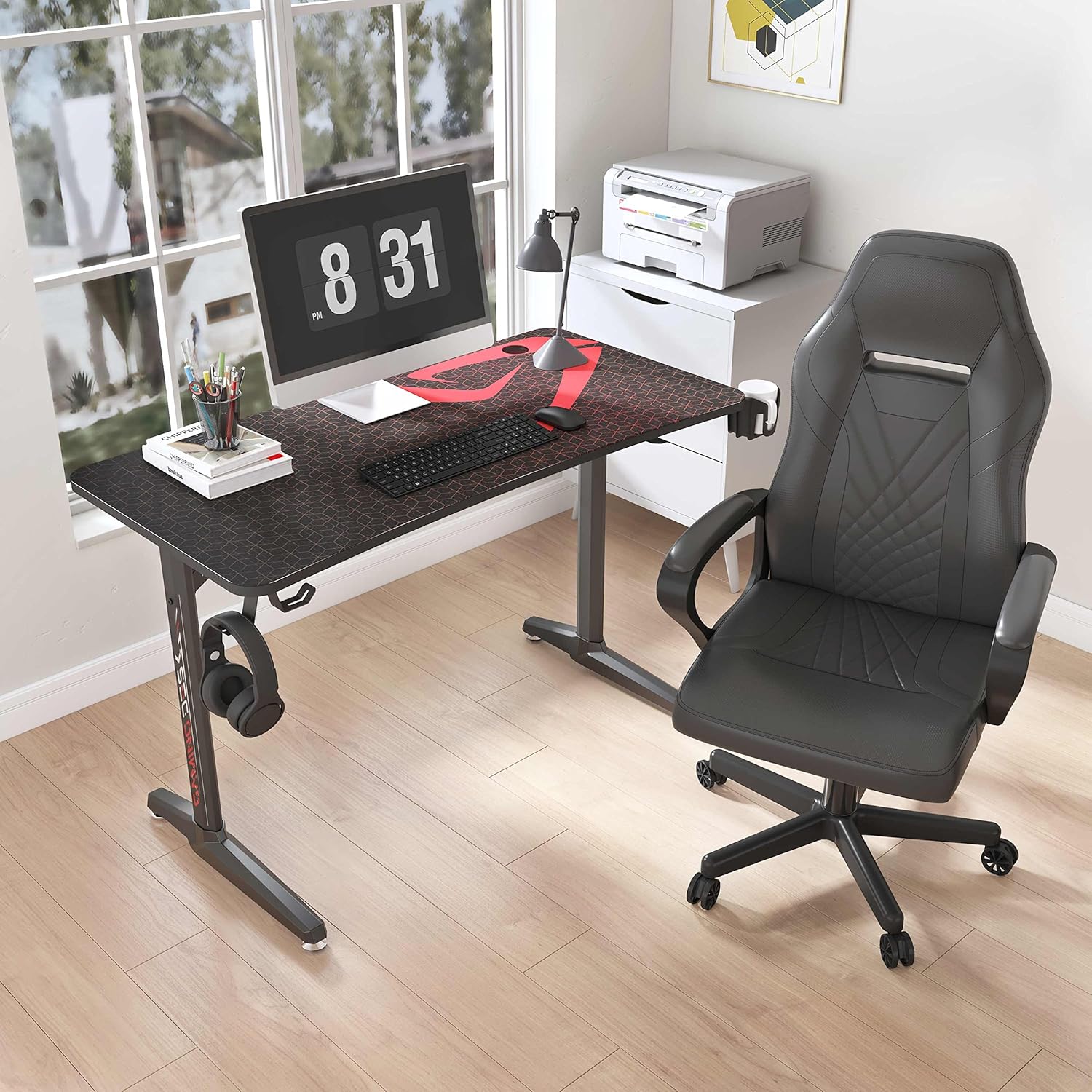
2-сүрөт: Illustrates the robust I-shaped steel frame and the adjustable feet designed to ensure desk stability on uneven surfaces.

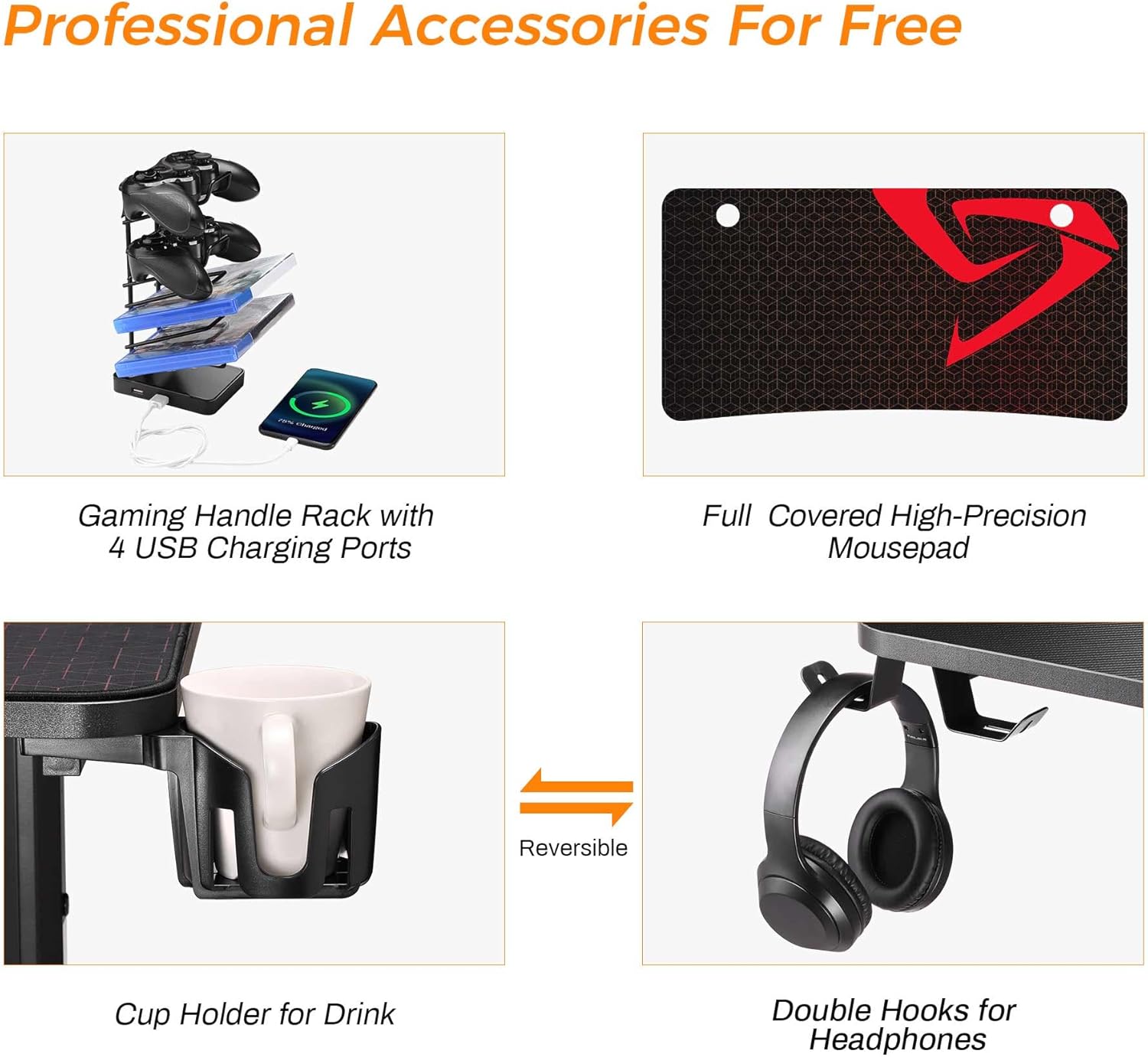
3-сүрөт: A visual guide to the professional accessories that come with the desk, including the multi-device charging rack, the large mousepad, the reversible cup holder, and the dual headphone hooks.
Иштөө нускамалары
Your DESIGNA Gaming Desk is designed for optimal functionality and comfort.
- USB кубаттоо порттору: The gaming handle rack features 4 USB charging ports. Connect your phone, tablet, headphones, or other USB-powered devices for convenient charging. Ensure the rack is connected to a power source.
- Кубок ээси: Use the integrated cup holder to keep your beverages secure and prevent spills on your desktop.
- Кулакчын илгичтери: Hang your gaming headset or other headphones on the hooks to keep them organized and within easy reach.
- Кабелдик башкаруу: Utilize the cable management grommets and tray to route and organize your computer and accessory cables, maintaining a tidy workspace.
4-сүрөт: Detail of the integrated cable management system, showing how cables can be neatly routed through the desktop grommet to reduce clutter.

5-сүрөт: Highlights the key attributes of the desktop surface, including its carbon fiber texture, ergonomic design, and resistance to water and scratches.
Техникалык тейлөө
- Тазалоо: Wipe the carbon fiber desktop and steel frame with a soft, damp кездеме. Абразивдүү тазалагычтардан же финишке зыян келтирүүчү катаал химиялык заттардан алыс болуңуз.
- Mousepad Care: The full-surface mousepad can be cleaned with a damp cloth. Allow it to air dry completely before use.
- Бекер текшерүү: Periodically check all screws and bolts to ensure they remain tight. Re-tighten if necessary to maintain desk stability.
- Төгүлүүлөр: In case of liquid spills, wipe them immediately to prevent potential damage to the desktop or electrical components.
Проблемаларды чечүү
- Үстөл солкулдап турат:
- Бардык монтаж бурамалары толугу менен бекемделгенин текшериңиз.
- Adjust the leveling feet on the bottom of the desk legs to stabilize the desk on uneven floors.
- USB порттору заряддалбай жатат:
- Verify that the gaming handle rack's USB cable is securely connected to a powered USB port (e.g., on your computer or a wall adapter).
- Try connecting a different device or using a different USB cable to rule out device/cable issues.
- Desktop Scratches: While the carbon fiber desktop is scratch-resistant, extreme force or sharp objects can still cause damage. Use the included mousepad for protection during gaming.
Техникалык шарттар
| Өзгөчөлүк | Деталь |
|---|---|
| Бренд | ДИЗАЙНА |
| Модель номери | FN02GAMEDESK47X30X23B |
| Түс | Кара |
| Продукциянын өлчөмдөрү (L x W x Y) | 120.02 x 59.99 x 76.5 см (болжол менен 47.2 x 23.6 x 30.1 дюйм) |
| Материал | Engineered Wood (Desktop), Coated Steel (Frame) |
| Өзгөчөлүктөрү | Ergonomic, Cable Management, USB Charging |
| Элемент Салмагы | 23 килограмм (болжол менен 50.7 фунт) |
| Максималдуу салмак боюнча сунуш | 90.7 кг (200 фунт) |
| Desktop Finish | Laminated Carbon Fiber Texture |
Кепилдик жана колдоо
DESIGNA is committed to providing high-quality products. For any issues regarding product quality, missing parts, or assembly assistance, please contact our customer support. Your satisfaction is our priority.
Кепилдиктин конкреттүү шарттары жана байланыш маалыматы үчүн сатып алуу документтерин караңыз.