
1. Киришүү
This manual provides detailed instructions for the installation, operation, and maintenance of your SpeaKa Professional Dual Monitor Mount, model SP-8986136. This monitor mount is designed for office and retail environments, offering flexible monitor positioning with 360° rotation and stepless adjustment. Please read this manual thoroughly before installation and use to ensure proper function and safety.
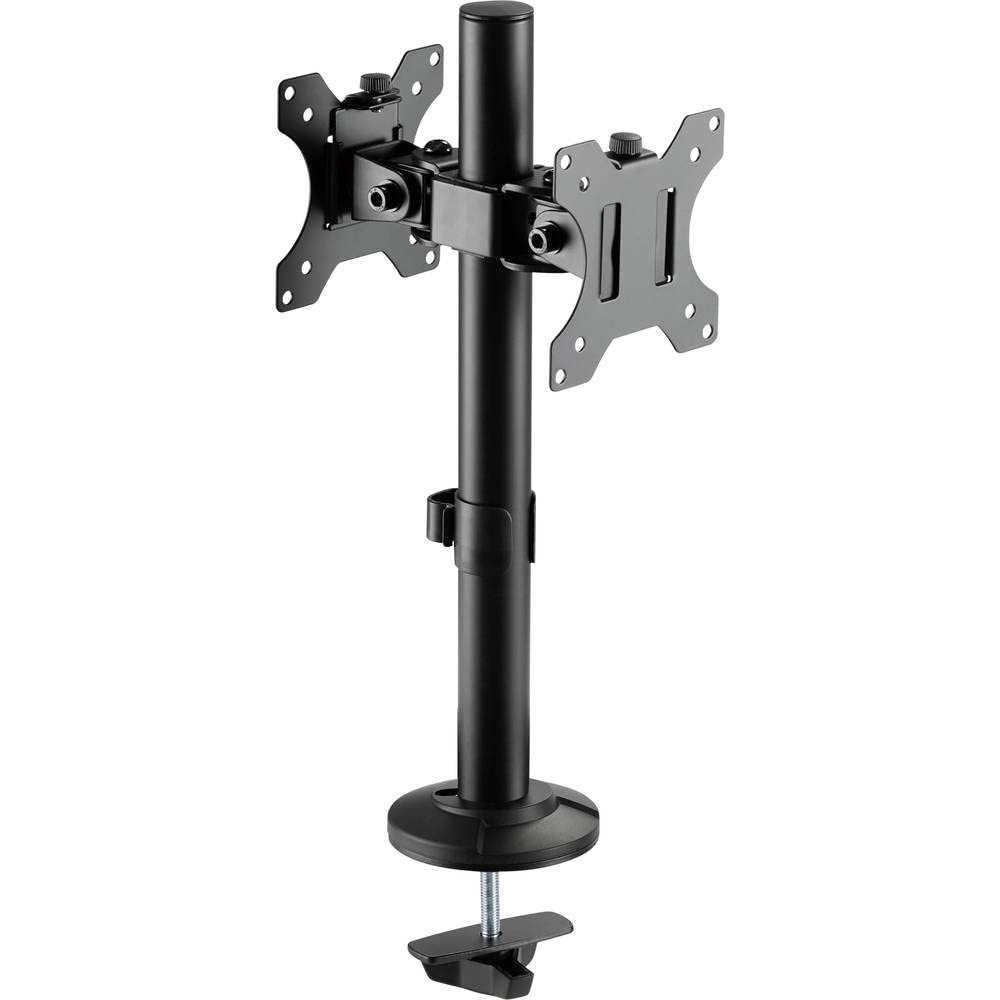
Figure 1: SpeaKa Professional Dual Monitor Mount (SP-8986136) overview.
2. Коопсуздук маалыматы
- Орнотуудан мурун, бардык компоненттердин бар экенин жана бузулбаганын текшериңиз.
- Do not exceed the maximum weight capacity specified for the mount.
- Install the mount on a stable and sturdy surface capable of supporting the combined weight of the mount and monitors.
- Бардык бурамаларды бекем бекитиңиз, бирок жиптерди сыйрып албоо үчүн өтө катуу тартпаңыз.
- Орнотуу учурунда балдарды жана үй жаныбарларын алыс кармаңыз.
- Эгерде кандайдыр бир кыйынчылыктарга туш болсоңуз, квалификациялуу адиске кайрылыңыз.
3. Пакеттин мазмуну
Please verify that all parts are included in your package. If any parts are missing or damaged, contact customer support.
- Main Pole with Clamp База
- VESA Monitor Arms (2x)
- VESA плиталары (2x)
- Optional Screw Base
- Аппараттык комплект (бурамалар, шайбалар, алты бурчтуу ачкычтар)
- Кабелдик башкаруу клиптери
4. Орнотуу жана орнотуу
The SpeaKa Professional Dual Monitor Mount offers two installation options: a clamp base for most tables and desks, and a screw base for added security.
4.1. Choosing Your Mounting Option

2-сүрөт: Clamp base (left) and screw base (right) options.
- Clamp Негизги: Ideal for desks with an edge. Provides strong support without drilling.
- Бурама негизи: Requires drilling a hole through the desk. Offers maximum stability and security.
4.2. Клamp Базаны орнотуу
- cl тиркеңизamp негизи негизги уюлдун түбүнө чейин.
- Position the main pole on your desk edge.
- Клamp орнотмо столго бекем орнотулганга чейин бураңыз. Анын туруктуу жана солкулдабагандыгын текшериңиз.
4.3. Screw Base Installation (Grommet Mount)
- If your desk has a grommet hole, ensure it is large enough for the screw base. If not, drill a suitable hole (consult desk manufacturer for recommendations).
- Attach the screw base to the bottom of the main pole.
- Insert the main pole through the grommet hole.
- Secure the screw base from underneath the desk using the provided hardware. Tighten firmly.
4.4. Attaching Monitor Arms and VESA Plates
- Slide the monitor arms onto the main pole at your desired height. Use the provided Allen key to tighten the set screw on each arm.
- Attach the VESA plates to the back of your monitors using the appropriate screws from the hardware kit. Ensure the VESA pattern (e.g., 75x75mm or 100x100mm) matches your monitor.
- Carefully slide the monitors (with VESA plates attached) onto the monitor arms. Secure them with the locking mechanism on the VESA plate.
5. Иштөө жана тууралоо
The monitor mount allows for various adjustments to achieve an optimal viewтажрыйбасы.
- Бийиктигин тууралоо: Loosen the set screw on the monitor arm, adjust the arm to the desired height on the main pole, and re-tighten the screw.
- Эңкейүүнү тууралоо: The monitor can be tilted up to 90 degrees. Loosen the tilt knob on the VESA plate, adjust the monitor angle, and re-tighten.
- Айланууну жөндөө: The monitor arms can swivel horizontally along the main pole. The VESA plate also allows for 360-degree rotation, enabling portrait or landscape orientation.
- Кабелдик башкаруу: Use the integrated cable management clips on the main pole to route and organize your monitor cables for a tidy workspace.

3-сүрөт: Мисample of dual monitor application in a retail setting.
6. Техникалык тейлөө
Үзгүлтүксүз техникалык тейлөө мониторуңуздун узак мөөнөттүү иштешин жана коопсуз иштешин камсыз кылат.
- Тазалоо: монтажды жумшак менен сүртүңүз, гamp кездеме. Абразивдүү тазалагычтардан же эриткичтерден качыңыз.
- Тыюулугун текшерүү: Мезгил-мезгили менен бардык бурамалар менен байланыштарды текшерип туруңуз, алар бекем бойдон калууда. Керек болсо кайра тартыңыз.
- Салмак сыйымдуулугу: Do not add monitors that exceed the specified weight capacity.
7. Кыйынчылыктарды
| Көйгөй | Мүмкүн себеп | Чечим |
|---|---|---|
| Monitor wobbles or sags. | Screws are loose; mount not securely fastened to desk; monitor too heavy. | Check and tighten all screws on the VESA plate, monitor arm, and desk clamp/screw base. Ensure monitor weight is within limits. |
| Difficulty adjusting monitor position. | Жөндөө баскычтары/бурамалары өтө катуу бекитилген. | Slightly loosen the relevant adjustment knob or screw (e.g., tilt knob, arm height screw) before attempting to adjust. Re-tighten after positioning. |
| Cables are messy. | Кабелдик башкаруу колдонулган эмес. | Route cables through the integrated cable management clips on the main pole. |
8. Техникалык шарттар
| Модель номери | SP-8986136 |
| Бренд | SpeaKa адиси |
| Монтаж түрү | Үстөлгө орнотуу (Cl)amp же Громмет) |
| Кыймыл түрү | Swivel, Tilt, Rotation (360°) |
| Максималдуу кыйшаюу бурч | 90 градус |
| Шайкеш түзмөктөр | Monitor (VESA compatible) |
| Түс | Кара |
| Элемент Салмагы | 2.15 килограмм |
| Пакеттин өлчөмдөрү | 46.3 x 35.2 x 10.1 см |
| Биринчи жеткиликтүү күн | 24-июль, 2020-жыл |
9. Кепилдик маалыматы
SpeaKa Professional products are designed for durability and performance. For specific warranty terms and conditions, please refer to the warranty card included with your product or visit the official SpeaKa Professional webсайт. Кепилдик дооматтар үчүн сатып алганыңыздын далилин сактаңыз.
10. Кардарларды колдоо кызматы
If you have any questions, require technical assistance, or need to report a missing/damaged part, please contact SpeaKa Professional customer support.
- Онлайн колдоо: Visit the official SpeaKa Professional webКөп берилүүчү суроолор жана колдоо булактары үчүн сайт.
- Байланыш маалыматы: Продукциянын таңгагына же расмий дарекке кайрылыңыз website for current contact details (phone, email).