
TERRAMASTER F2-422
TerraMaster F2-422 10GbE NAS User Manual
Модел: F2-422
1. Продукт бүтүп калдыview
The TerraMaster F2-422 is a high-performance 2-bay Network Attached Storage (NAS) server designed for small and medium businesses, as well as demanding home users. Featuring an Apollo J3455 Quad-core CPU and a 10GbE RJ45 port, it delivers exceptional data transfer speeds and robust data protection capabilities. This manual provides comprehensive instructions for setting up, operating, maintaining, and troubleshooting your F2-422 NAS.
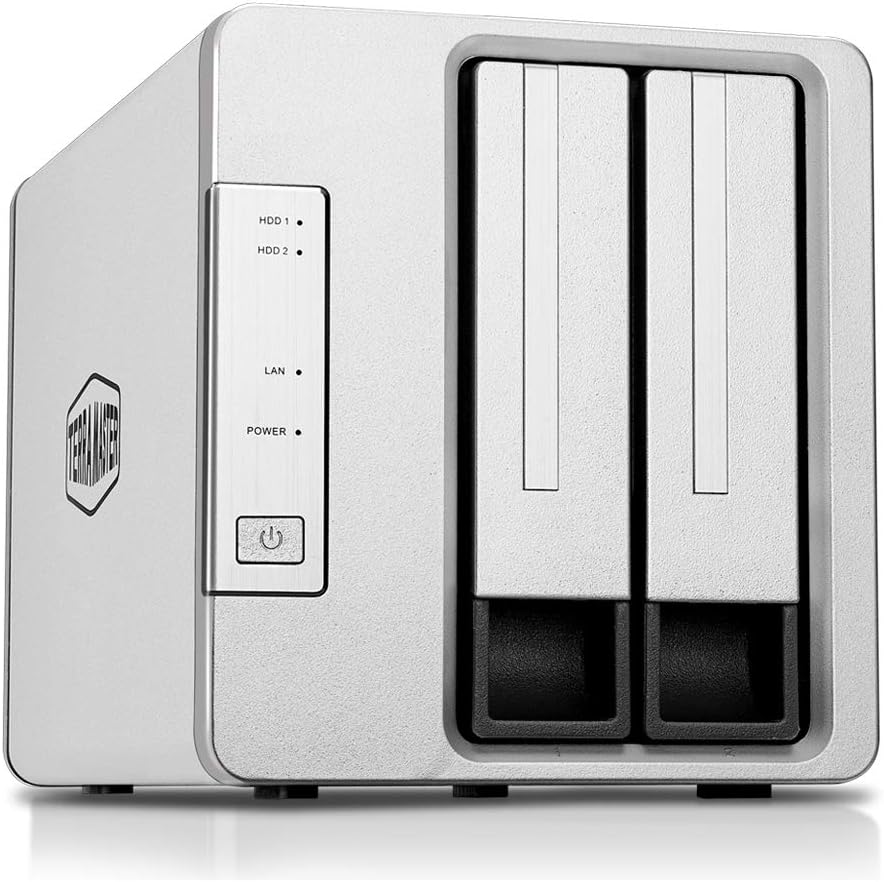
Сүрөт 1: Алдыңкы view of the TerraMaster F2-422 NAS, showing the two drive bays and indicator lights.
Негизги өзгөчөлүктөрү:
- Күчтүү жабдыктар: Apollo Quad-core 1.5GHz CPU with 4GB of RAM (expandable up to 8GB).
- Жогорку ылдамдыктагы туташуу: 1x10GbE RJ45 port offering speeds up to 670MB/s reading and 650MB/s writing. Includes dual 1GbE LAN with failover and Link Aggregation support.
- Өркүндөтүлгөн маалымат коопсуздугу: AES hardware encryption engine for shared folders and network data transmission.
- Өркүндөтүлгөн File Система: Btrfs file system with support for 71,680 system-wide snapshots and 1,024 snapshots per shared folder.
- 4K Video Transcoding: Real-time hardware transcoding for up to two concurrent 4K video streams.
- Натыйжалуу муздатуу: Aluminum-alloy shell and intelligent temperature control ultra-quiet fan for optimal heat dissipation.
- Сактоо сыйымдуулугу: Supports up to 32 TB raw capacity (16 TB drive x 2), compatible with 3.5" and 2.5" SATA HDD, 2.5" SATA SSD.
2. Орнотуу колдонмосу
2.1 Пакеттин мазмуну
Улантуудан мурун, пакетте бардык элементтер бар экенин текшериңиз:
- TerraMaster F2-422 NAS Unit
- Кубаттуу адаптер
- Ethernet кабели
- Ыкчам орнотуу колдонмосу
- Screws for 3.5" and 2.5" drives
2.2 Аппараттык камсыздоону орнотуу
- Катуу дисктерди орнотуу:
Carefully slide open the drive trays from the front of the NAS. Mount your 3.5-inch or 2.5-inch SATA HDDs/SSDs into the trays using the provided screws. Ensure the drives are securely fastened. Slide the trays back into the NAS until they click into place.
- Тармак кабелин туташтыруу:
Connect one end of the Ethernet cable to the 10GbE RJ45 port (or one of the 1GbE ports) on the back of the F2-422 and the other end to your router or network switch.

2-сүрөт: Арткы view of the TerraMaster F2-422, highlighting the 10GbE RJ45 port, Gigabit LAN ports, and USB 3.0 ports.
- Туташуу кубаты:
Connect the power adapter to the DC IN 12V port on the back of the F2-422 and plug the other end into a power outlet. Press the power button on the front of the unit to turn it on.
2.3 Initializing the NAS (TOS Operating System)
Once powered on, the F2-422 will begin its boot sequence. You will need to initialize the NAS and install the TerraMaster Operating System (TOS) via a web бир тармакка туташкан компьютердеги браузер.
- NAS менен таанышыңыз:
ачуу а web browser on your computer and navigate to start.terra-master.com or use the TerraMaster TNAS PC client software to locate your device on the network.
- Экрандагы нускамаларды аткарыңыз:
The web interface will guide you through the initialization process, which includes formatting the hard drives, installing the latest TOS firmware, and creating an administrator account. It is recommended to use the Btrfs file system for its advanced data protection features.
3. Operating the F2-422
3.1 Accessing the TOS Desktop
After initialization, you can access the TOS desktop by entering the NAS's IP address or hostname in your web browser. Log in with your administrator credentials. The TOS desktop provides a user-friendly interface for managing your NAS.
3.2 File Башкаруу жана бөлүшүү
The File Manager application within TOS allows you to browse, upload, download, and manage files and folders on your NAS. You can create shared folders and assign user permissions for secure data access.
- Бөлүшүлгөн папкаларды түзүү: Navigate to Control Panel > Shared Folders to create new shared directories.
- Колдонуучуну жана топту башкаруу: Manage user accounts and groups under Control Panel > User & Group to control access permissions.
- Тармак протоколдору: The F2-422 supports various network file sharing protocols including SMB/CIFS, AFP, NFS, FTP, and WebDAV.
3.3 Data Protection and Backup
The F2-422 offers multiple layers of data security and backup options:
- AES Hardware Encryption: Enable encryption for shared folders to protect sensitive data from unauthorized access.
- Btrfs Snapshots: Utilize the Btrfs file system's snapshot feature to create point-in-time copies of your data, allowing for easy recovery from accidental deletion or corruption.
- Backup & Restore: Configure scheduled backups to external USB drives, remote NAS devices (Rsync), or cloud storage services.
- Cloud Synchronization: Синхрондоштуруу files between your NAS and various cloud storage platforms.
- Time Machine Support: Compatible with Apple Time Machine for macOS backups.

Figure 3: ашыкview of data backup and synchronization features.
3.4 Мультимедиа функциялары
The F2-422 is equipped with hardware transcoding capabilities for multimedia content.
- 4K UHD Video Transcoding: Stream 4K videos to various devices, even if they don't natively support the video format, thanks to real-time transcoding.
- Multimedia Server: Utilize the built-in Multimedia Server to organize and stream your media library to DLNA/UPnP compatible devices.

Figure 4: The F2-422 supports 4K Ultra HD video transcoding for seamless streaming.
4. Техникалык тейлөө
4.1 Системаны жаңыртуу
Regularly check for and install TOS system updates to ensure optimal performance, security, and access to new features. Updates can be found under Control Panel > Update & Restore.
4.2 Дисктин ден соолугуна мониторинг жүргүзүү
Monitor the health of your installed hard drives using the Storage Manager application. This tool provides S.M.A.R.T. information and allows you to perform health checks to prevent data loss due to drive failure.
4.3 Тазалоо
Keep the NAS unit clean and free from dust to ensure proper airflow and cooling. Use a soft, dry cloth for external cleaning. Avoid using liquid cleaners directly on the device.
5. Кыйынчылыктарды
Жалпы маселелер жана чечимдер:
- NAS Not Found on Network:
Ensure the Ethernet cable is securely connected to both the NAS and your router/switch. Verify that the NAS is powered on. Try restarting your router and the NAS. Check your network settings to ensure the NAS is receiving an IP address.
- Жай берилиштерди өткөрүү ылдамдыгы:
Confirm that your network infrastructure (router, switch, cables, client devices) supports 10GbE speeds to fully utilize the F2-422's capabilities. Ensure Link Aggregation is properly configured if using dual 1GbE ports. Check for network congestion or background tasks on the NAS.

Figure 5: Understanding 10GbE network benefits and potential bottlenecks.
- Hard Drive Not Recognized:
Ensure the hard drive is properly seated in its tray and the tray is fully inserted into the NAS. Check if the drive is compatible (3.5" or 2.5" SATA HDD/SSD). If it's a new drive, it may need to be initialized and formatted via Storage Manager.
- Администратордун сырсөзүн унутуп калдыңызбы?
Refer to the TerraMaster support website for instructions on how to reset the administrator password. This usually involves a physical reset button on the device, which may reset network settings but not user data.
6. Техникалык шарттар
| Өзгөчөлүк | Спецификация |
|---|---|
| Бренд | TERRAMASTER |
| Модел | F2-422 |
| CPU | Apollo Quad-core 1.5GHz (Intel J3455) |
| RAM | 4 ГБ (8 ГБ чейин кеңейтүүгө болот) |
| Drive Bays | 2 |
| Шайкеш диск түрлөрү | 3.5" SATA HDD, 2.5" SATA HDD, 2.5" SATA SSD |
| Ички чийки кубаттуулук | 32 TB (16 TB drive x 2) |
| Тармак порттору | 1 x 10GbE RJ45, 2 x 1GbE LAN |
| USB порттору | USB 3.0 (quantity not specified, but visible in image) |
| File Система | Btrfs, EXT4 |
| Өлчөмдөрү (L x W x Y) | 22.71 x 13.31 x 11.91 см |
| Салмагы | 2.38 кг |
| Материал | Алюминий |
7. Кепилдик жана колдоо
7.1 Продукциянын кепилдиги
TerraMaster products typically come with a limited warranty. Please refer to the warranty card included with your product or visit the official TerraMaster webСиздин аймакка тиешелүү деталдуу кепилдик шарттары жана шарттары үчүн сайт.
7.2 Техникалык колдоо
For technical assistance, troubleshooting, or further inquiries, please contact TerraMaster customer support through their official website. You can find FAQs, knowledge base articles, and contact information for support tickets or live chat.
TerraMaster Official Webсайт: www.terra-master.com
Ask a question about this manual
Ask about setup, troubleshooting, compatibility, parts, safety, or missing instructions. Manuals+ will review the question and use this page’s manual context to help answer it.