
Uten Uten 2200
Uten 2200 Electronic Sewing Machine User Manual
Model: 2200 | Brand: Uten
1. Киришүү
Thank you for choosing the Uten 2200 Electronic Sewing Machine. This manual provides comprehensive instructions for the safe and efficient operation, maintenance, and troubleshooting of your new sewing machine. Designed for both beginners and experienced users, the Uten 2200 offers 60 stitch patterns, automatic features, and robust performance for various sewing projects.
Please read this manual thoroughly before using the machine to ensure proper setup and to maximize your sewing experience.
2. Маанилүү коопсуздук нускамалары
- Always unplug the machine from the electrical outlet when cleaning, lubricating, or when removing any covers.
- Бармактарды кыймылдуу бөлүктөрдөн алыс кармаңыз. Тигүүчү машинанын ийнесинин айланасында өзгөчө кылдаттык талап кылынат.
- Туура ийне пластинасын колдонуңуз. Туура эмес пластина ийненин сынып кетишине алып келиши мүмкүн.
- Тигүү учурунда кездемени тартпаңыз же түртпөңүз. Бул ийненин кыйшайып, сынышына алып келиши мүмкүн.
- Ийненин аймагына кандайдыр бир өзгөртүүлөрдү киргизгенде, мисалы, ийнени жип менен өткөрүүдө, ийнени алмаштырууда, катушканы жип менен өткөрүүдө же басмактын бутунун алмаштыруусунда тигүүчү машинаны өчүрүңүз.
- Өндүрүүчү тарабынан сунушталган оригиналдуу аксессуарларды жана тетиктерди гана колдонуңуз.
- Do not operate the machine if it has a damaged cord or plug, if it is not working properly, or if it has been dropped or damaged.
- Keep the machine dry. Do not use it in damp же нымдуу шарттар.
3. Продукт бүтүп калдыview
Familiarize yourself with the main components of your Uten 2200 sewing machine.

3.1-сүрөт: Main components of the Uten 2200 Electronic Sewing Machine. Key parts include the LCD display, speed control, start/stop button, thread tension dial, automatic needle threader, and reverse sewing lever.

3.2-сүрөт: Фронт view of the Uten 2200 sewing machine, showcasing its compact design and stitch pattern guide.
4. Орнотуу
4.1 Таңгактан чыгаруу жана аксессуарлар
Carefully remove the sewing machine and all accessories from the packaging. The accessories are conveniently stored in a removable accessory box located at the front of the machine.
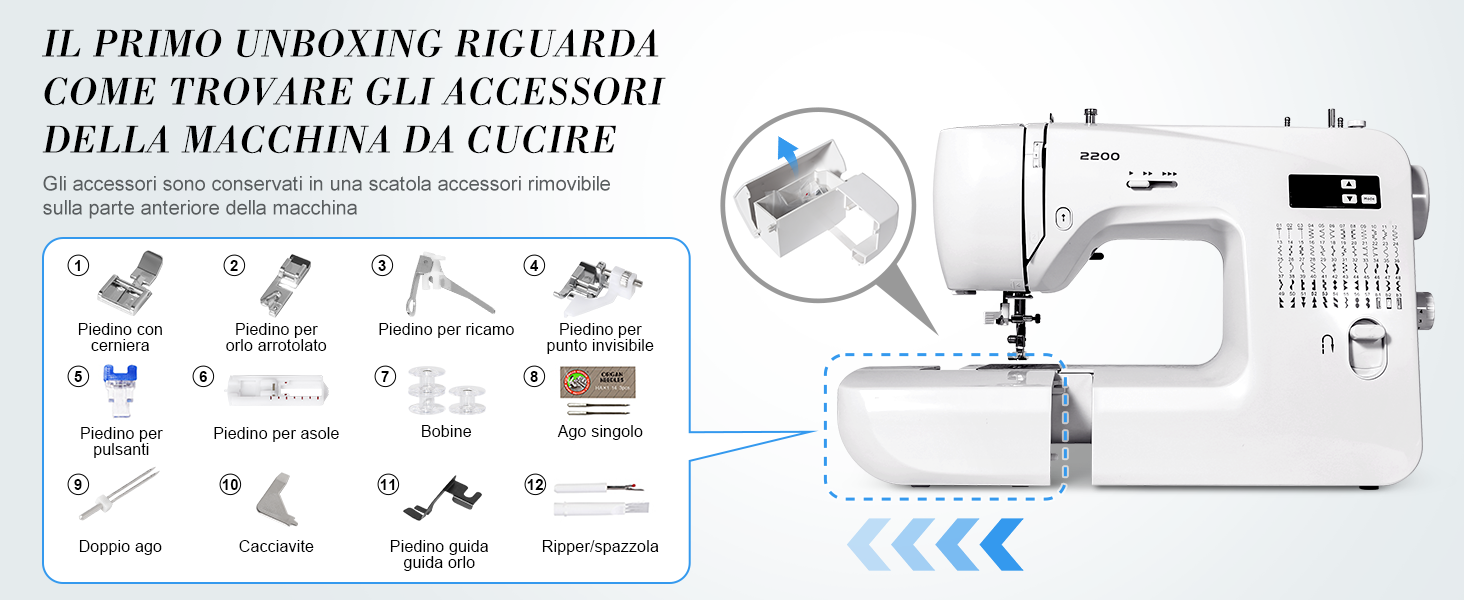
4.1-сүрөт: Location of the accessory box and a visual guide to the included accessories such as power adapter, foot pedal, needles, various presser feet, bobbins, and tools.

4.2-сүрөт: A closer look at the standard accessories provided with your Uten 2200, including different presser feet for specialized tasks.
4.2 Кубат туташтыруу
Connect the power adapter to the machine's cord socket and then plug it into a suitable electrical outlet. Use the power/light switch to turn the machine on or off.
4.3 Бобинди ороо
Proper bobbin winding ensures smooth stitching. Follow the winding path indicated on the machine, place the bobbin onto the bobbin winder spindle, and engage the winder. The machine will automatically stop when the bobbin is full.
4.4 Машинага жип салуу
Correct threading is crucial for optimal performance. Follow the numbered threading guides on the machine. The Uten 2200 features an automatic needle threader for convenience.

4.3-сүрөт: The automatic needle threader simplifies the threading process, making it quicker and easier to get started.
5. Операция
5.1 Basic Sewing Controls
The machine can be operated using the foot pedal or the Start/Stop button for hands-free sewing. Adjust the sewing speed using the manual speed control lever (low to fast).
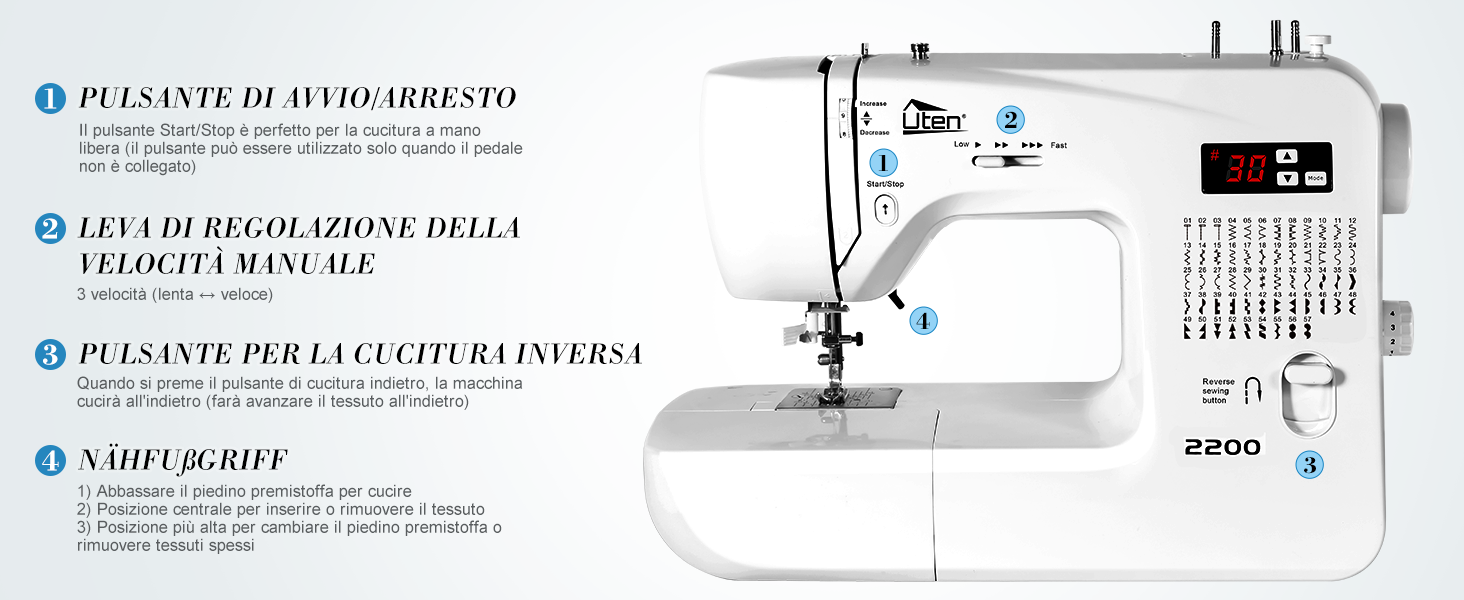
5.1-сүрөт: Key operational controls: Start/Stop button for hands-free sewing, manual speed control lever, and the reverse sewing button for securing stitches.
5.2 Stitch Selection and LCD Display
The Uten 2200 offers 60 types of stitches. Use the intuitive LCD display and mode selection buttons to easily choose your desired stitch pattern and adjust settings like stitch width and length.

5.2-сүрөт: The LCD display shows the selected stitch number, and the machine's body features a comprehensive guide to all 60 available stitch patterns.
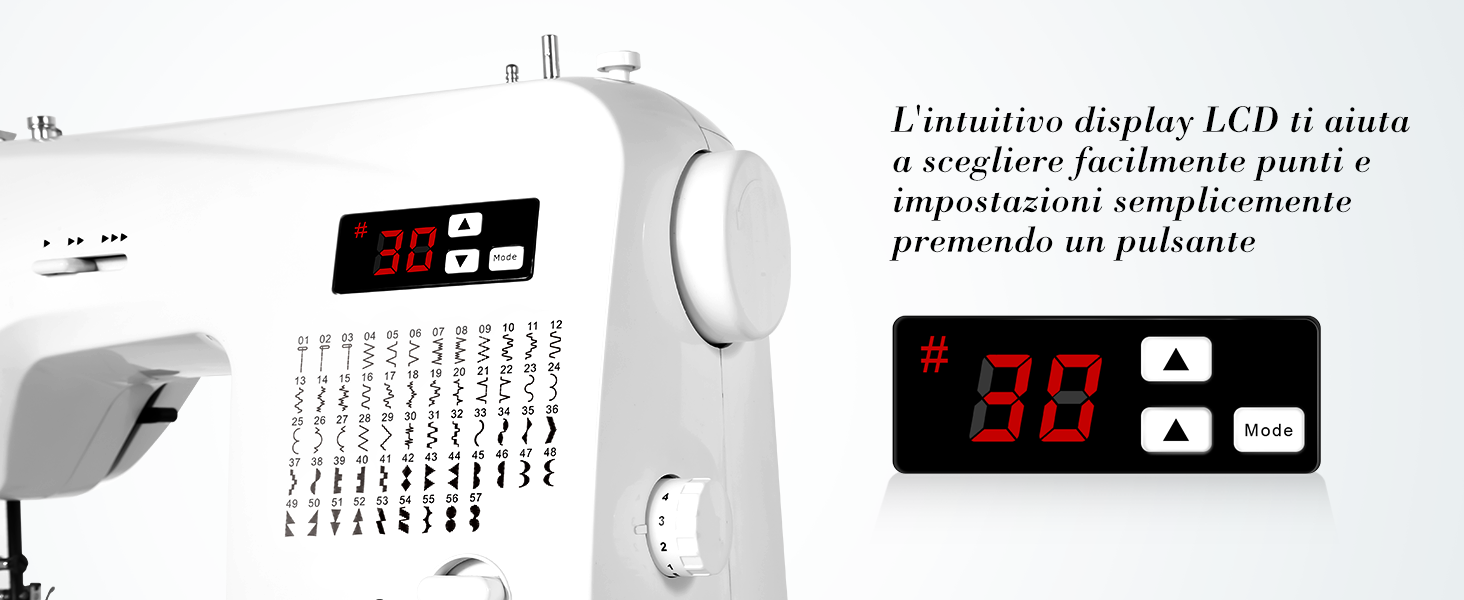
5.3-сүрөт: Деталдаштырылган view of the LCD display and its control buttons for mode selection, increasing/декретasing stitch settings, and indicating stitch width.
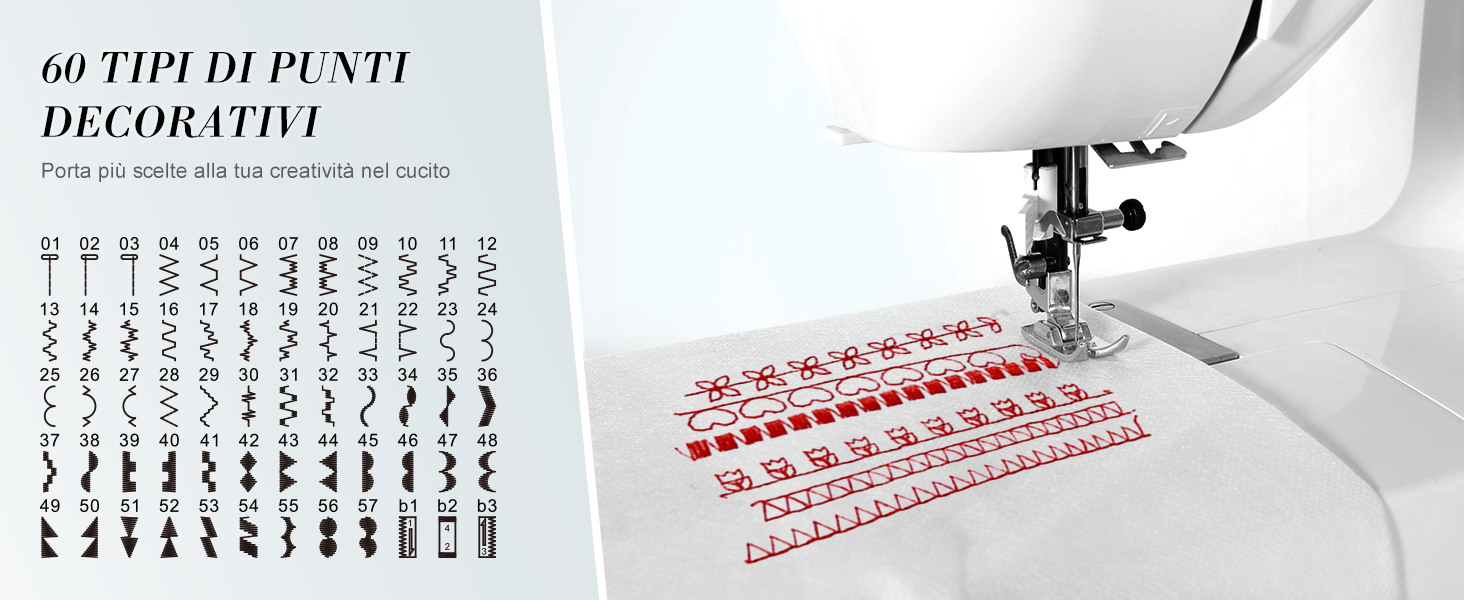
5.4-сүрөт: Visual representation of the 60 decorative stitch types available, allowing for enhanced creativity in your sewing projects.
5.3 Тескери тигүү
Press the reverse sewing button to stitch backward, which is useful for securing the beginning and end of seams.
5.4 Кол менен эркин тигүү
Remove the accessory box to convert the flatbed into a free arm. This feature is ideal for sewing cylindrical items such as sleeves, pant legs, and small children's garments.
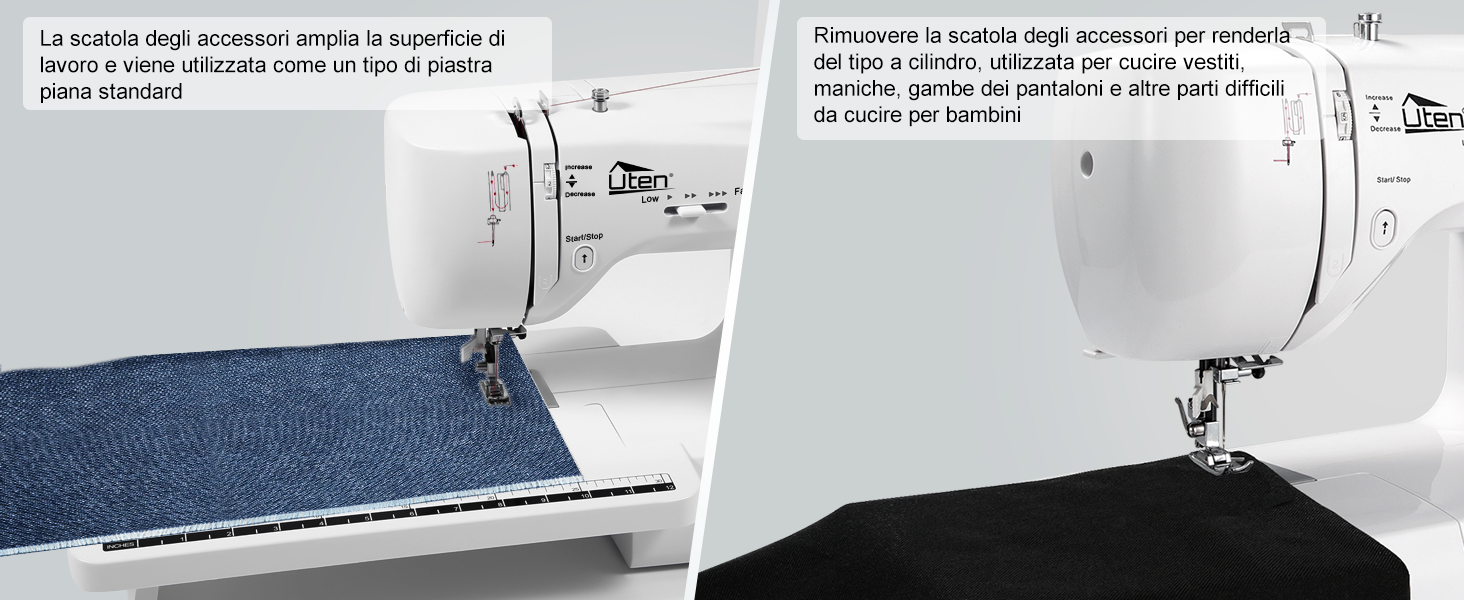
5.5-сүрөт: The machine's design allows for easy conversion from a standard flatbed to a free arm, enhancing versatility for various sewing tasks.
5.5 Buttonholes
The Uten 2200 supports 3 types of buttonhole stitches. Attach the appropriate buttonhole presser foot and follow the machine's instructions for automatic buttonhole creation.
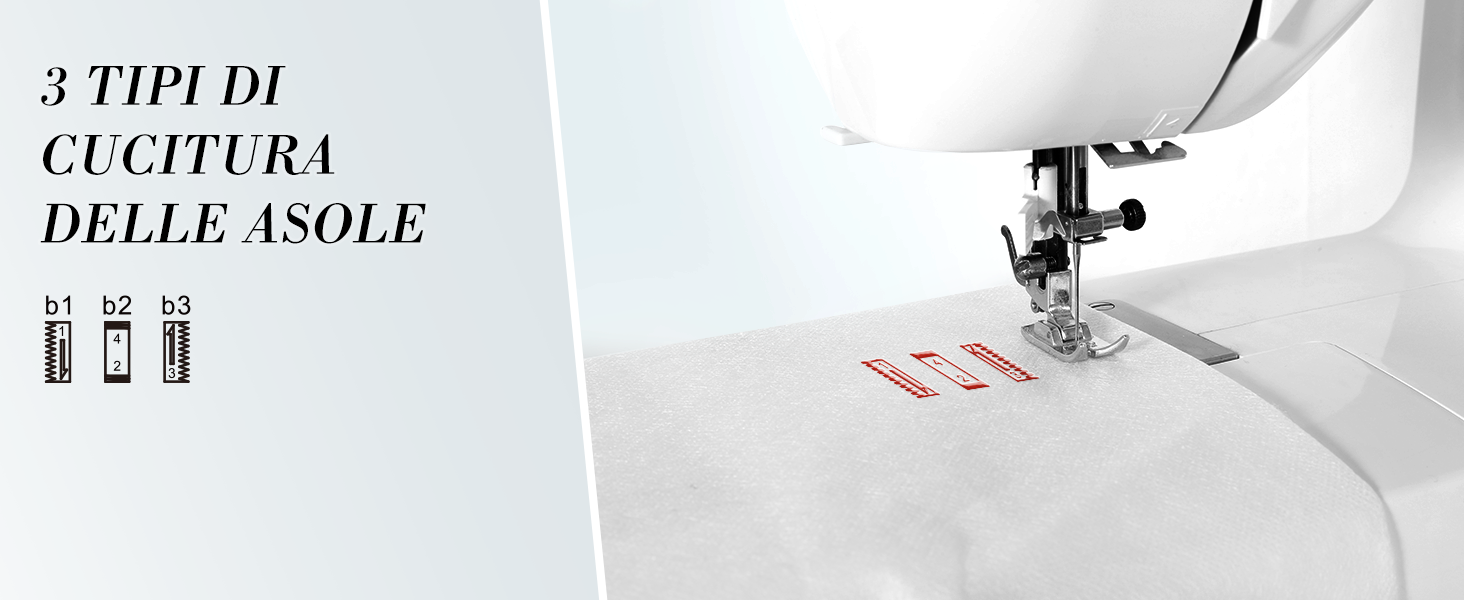
5.6-сүрөт: The three distinct buttonhole stitch types available, providing options for different fabric and design needs.
5.6 Калың кездемелерди тигүү
Equipped with an advanced motor, the Uten 2200 can sew through up to 6 layers of fabric without jamming. Ensure you use the correct needle size and thread tension for thick materials.
- Thin fabrics: Needle size 9 or 11
- Common fabrics: Needle size 11 or 14
- Thick fabrics: Needle size 14 or 16
- Ensure the size and type of the bobbin thread match the upper thread.
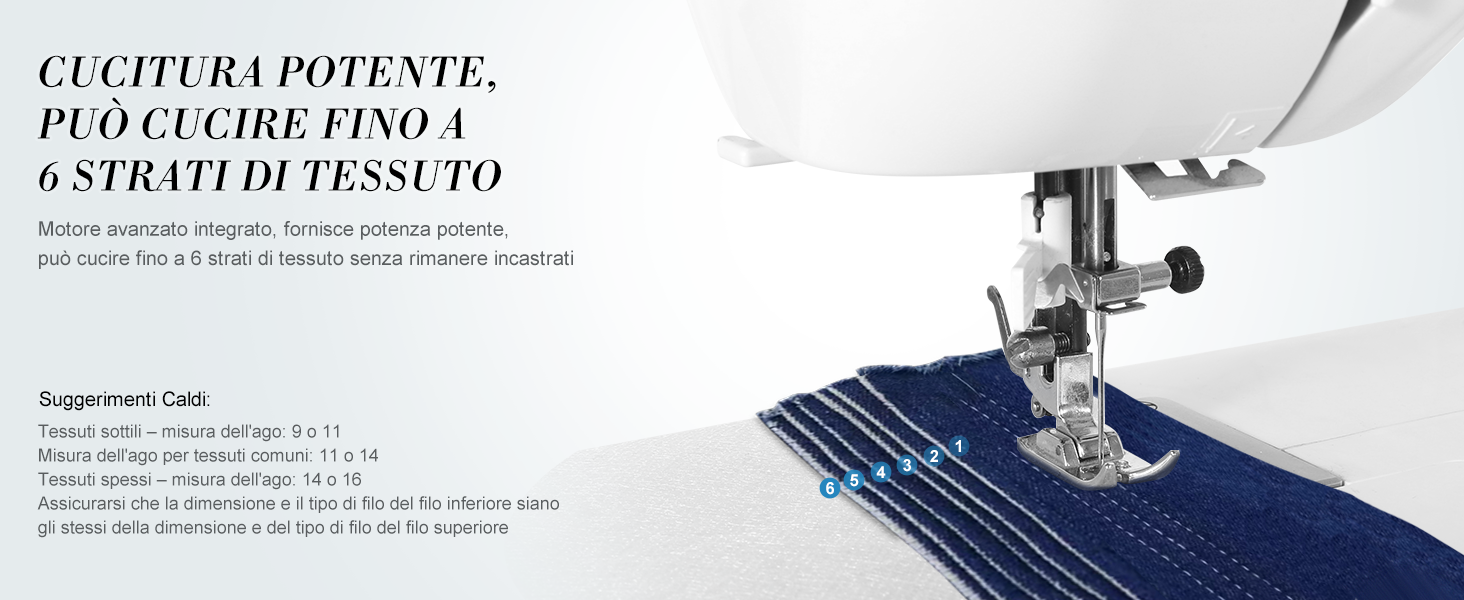
5.7-сүрөт: The powerful motor allows the Uten 2200 to handle multiple layers of fabric, demonstrating its robust sewing capability.
6. Техникалык тейлөө
Үзгүлтүксүз тейлөө тигүүчү машинаңыздын узак иштөөсүн жана оптималдуу иштешин камсыз кылат.
6.1 Тазалоо
Periodically clean the lint and dust from the bobbin case area and feed dogs using the brush provided. Always unplug the machine before cleaning.

6.1-сүрөт: The bobbin and drop feed system area, which should be regularly cleaned to prevent lint buildup and ensure smooth operation.
6.2 Ийне алмаштыруу
Replace the needle regularly, especially if it becomes bent, dull, or if you notice skipped stitches. Use the screwdriver provided to loosen the needle clamp screw, remove the old needle, insert a new one with the flat side facing the back, and tighten the screw.
7. Кыйынчылыктарды
Бул бөлүм сиз кабылышы мүмкүн болгон жалпы көйгөйлөрдү карайт. Татаал көйгөйлөр үчүн кардарларды колдоо бөлүмүнө кайрылыңыз.
| Көйгөй | Мүмкүн себеп | Чечим |
|---|---|---|
| Өткөрүлгөн тигүү | Ийне туура эмес сайылган, ийне ийилген, ийненин кездеменин туура эмес өлчөмү, жип туура эмес өткөрүлгөн. | Reinsert needle correctly, replace bent needle, use appropriate needle, rethread machine. |
| Thread Breaking | Improper threading, thread tension too tight, poor quality thread, bent needle, burr on needle plate. | Rethread machine, adjust tension, use good quality thread, replace needle, check needle plate for damage. |
| Кездеме азыктандырбайт | Feed dogs lowered, lint buildup in feed dogs, presser foot pressure too low. | Raise feed dogs, clean feed dogs, increase presser foot pressure. |
| Машина иштебей жатат | Not plugged in, power switch off, foot pedal not connected, bobbin winder engaged. | Check power connection, turn on switch, connect foot pedal, disengage bobbin winder. |
8. Техникалык шарттар
| Өзгөчөлүк | Деталь |
|---|---|
| Модель номери | Uten 2200 (60 Stitch Points) |
| Өлчөмдөрү (L x W x Y) | Approx. 40 cm x 15.8 cm x 34 cm (15.7 x 6.2 x 13.4 inches) |
| Салмагы | Болжол менен 5.5 кг (12.1 фунт) |
| Тигүү үлгүлөрү | 60 (including decorative and buttonhole stitches) |
| Дисплей | LCD дисплей |
| Ийне сайгыч | Автоматтык |
| Free Arm | Ооба |
| Жарыктандыруу | LED тигүү жарыгы |
| Power Source | Electric (Power Adapter included) |

8.1-сүрөт: Dimensions of the Uten 2200 sewing machine, providing a clear understanding of its size for placement and storage.
9. Кепилдик жана колдоо
Uten products are manufactured to high-quality standards. For warranty information, please refer to the documentation included with your purchase or visit the official Uten website. If you have any questions, require technical assistance, or need to report an issue, please contact Uten customer support through the retailer where you purchased the product or via the contact information provided on the official Uten webсайт.
Кошумча жардам алуу үчүн, сиз да кайрыла аласыз Uten Brand Store on Amazon.
Ask a question about this manual
Ask about setup, troubleshooting, compatibility, parts, safety, or missing instructions. Manuals+ will review the question and use this page’s manual context to help answer it.