
TC Electronic DITTO+ LOOPER
TC Electronic DITTO+ LOOPER Next Generation 60-Minute Multi-session Looper Pedal
Колдонуучунун инструкциясы
Introduction
The TC Electronic DITTO+ LOOPER is a compact and powerful looper pedal designed for musicians. It allows you to record, overdub, and playback musical phrases with ease. With its advanced features, including multi-session storage and extended loop modes, the DITTO+ LOOPER provides unparalleled flexibility for practice, performance, and creative exploration. This manual will guide you through the setup, operation, and maintenance of your new looper pedal.

Сүрөт 1: Алдыңкы view of the DITTO+ LOOPER pedal, highlighting its intuitive interface.
Жайгашуу
Before using your DITTO+ LOOPER, ensure it is properly connected to your audio setup and power supply.
- Кубат туташуу: Connect a standard 9V DC power supply (not included) to the power input jack on the pedal. Ensure the power supply meets the pedal's voltagэ жана учурдагы талаптар.
- Аудио киргизүү: Connect your instrument (e.g., guitar) to the INPUT jack on the side of the pedal using a standard 1/4-inch instrument cable.
- Аудио чыгаруу: Connect the OUTPUT jack of the pedal to your amplifier, audio interface, or next pedal in your signal chain using another 1/4-inch instrument cable.
- USB туташуу (кошумча): For firmware updates or transferring loops, connect the mini-USB port on the pedal to your computer using a USB cable.

2-сүрөт: Бурчтуу view of the DITTO+ LOOPER, illustrating the placement of input/output jacks and power input.
Иштөө нускамалары
The DITTO+ LOOPER offers intuitive controls for recording, playback, and managing your loops.
Basic Looping (DITTO Mode)
- Жаздыруу: Press the footswitch once to start recording. The display will show recording progress.
- Play/Overdub: Press the footswitch again to stop recording and start playback. While playing, press the footswitch once more to begin overdubbing.
- Токтотуу: Double-tap the footswitch to stop playback.
- Тазалоо: While stopped, press and hold the footswitch to clear the current loop.
- Артка кайтаруу/кайталоо: While playing or overdubbing, press and hold the footswitch to undo the last overdub. Repeat to redo.
Multi-Session Management
The DITTO+ LOOPER can store and recall up to 99 individual loop sessions, each with up to 60 minutes of recording time.
- Navigate Sessions: колдонуу UP жана ылдый arrow buttons next to the display to scroll through stored loop sessions. The display shows the current session number.
- Load Session: Once you've selected a session number, press the footswitch to load it.
- Save Session: Loops are automatically saved when you switch sessions or power off the pedal.
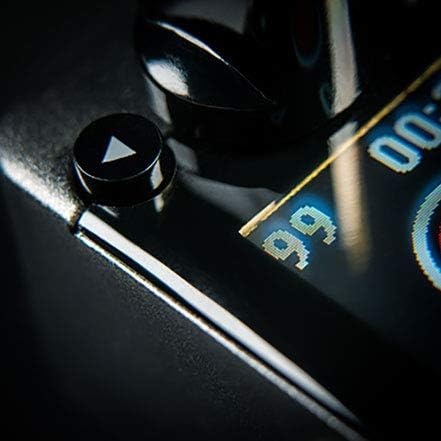
Figure 3: The DITTO+ LOOPER display indicating the ability to store up to 99 loop sessions.
Extend Loop Mode and Auto Cue
The Extend Loop Mode allows you to lay down longer overdubbed phrases over shorter base loops, while Auto Cue assists with timing.
- Activate Extend Loop Mode: Refer to the pedal's advanced settings (usually accessed via a combination of button presses or software) to enable this mode.
- Using Auto Cue: When enabled, Auto Cue helps synchronize your overdub with the start of the loop, ensuring seamless transitions.
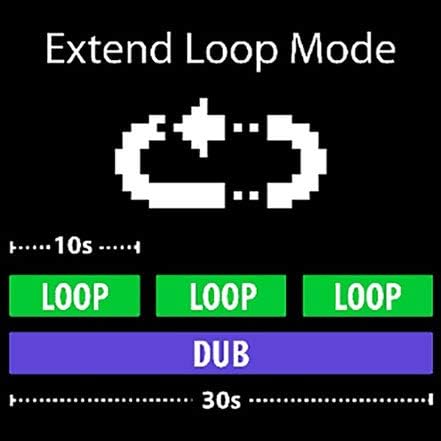
Figure 4: Visual representation of Extend Loop Mode, showing how longer dubs can wrap around shorter loops.
Техникалык тейлөө
To ensure the longevity and optimal performance of your DITTO+ LOOPER, follow these maintenance guidelines:
- Тазалоо: Use a soft, dry cloth to wipe down the pedal. Avoid abrasive cleaners or solvents, which can damage the finish or internal components.
- Сактагыч: Педальды салкын, кургак жерде, күндүн түз нурунан жана өтө жогорку температурадан алыс сактаңыз.
- Электр камсыздоо: Always use a compatible power supply to prevent damage. Disconnect power when not in use for extended periods.
- Программалык камсыздоонун жаңыртуулары: TC электрондук капкагын мезгил-мезгили менен текшерип туруңуз website for firmware updates to ensure your pedal has the latest features and bug fixes.
Проблемаларды чечүү
If you encounter issues with your DITTO+ LOOPER, try the following solutions:
| Көйгөй | Мүмкүн чечим |
|---|---|
| No power/Pedal not turning on |
|
| Үн чыгышы жок |
|
| Loop sounds distorted or noisy |
|
| Cannot save or recall loops |
|
Техникалык шарттар
- Модел: DITTO+ LOOPER
- Бренд: TC электрондук
- Жаздыруу убактысы: 60 мүнөткө чейин
- Loop Sessions: 99ге чейин
- Өлчөмдөрү (L x W x Y): Approximately 1.44" x 0.79" x 0.78" (36.6 x 20.1 x 19.8 mm)
- Салмагы: Болжол менен 7.1 унция (200 грамм)
- Электр камсыздоо: 9V DC, center-negative (not included)
- Байланыш: 1/4" TS Input, 1/4" TS Output, Mini-USB port
- Материал: Пластик
Кепилдик жана колдоо
TC Electronic өнүмдөрү чектелген кепилдик менен камтылган. Кепилдик, өнүмдөрдү каттоо жана техникалык колдоо боюнча толук маалымат алуу үчүн, расмий TC Electronic веб-сайтына кириңиз. webсайтка же кардарларды тейлөө бөлүмүнө кайрылыңыз.
Официалдуу Webсайт: www.tcelectronic.com
Кепилдик дооматтары үчүн сатып алганыңыздын далилин сактап коюңуз.
Ask a question about this manual
Ask about setup, troubleshooting, compatibility, parts, safety, or missing instructions. Manuals+ will review the question and use this page’s manual context to help answer it.