
Продукт бүттүview
The DAYBETTER 44-Key Remote Control is designed to manage 12-24V DC 4-pin LED strip lights, offering a wide range of color and mode options. It features a dual-port connector, allowing control of one or two LED strips simultaneously.

DAYBETTER 44-Key Remote Control and Controller Box with LED Strip Lights
Пакеттин мазмуну
- 1 x 44 баскычтуу инфракызыл пульт
- 1 x LED Controller Box (with two 4-pin output ports)
- 1 х кубат адаптери
Орнотуу нускамалары
Follow these steps to properly set up your DAYBETTER LED strip light system.
- Step 1: Prepare the Remote Control. Before first use, locate the plastic insulation tab in the battery compartment of the 44-key remote control. Pull this tab out to activate the battery.
- Step 2: Connect LED Strips to the Controller. Ensure the power adapter is disconnected. Connect your 4-pin LED strip lights to the output ports on the LED controller box. Align the arrow on the LED strip connector with the arrow on the controller's output port. The controller box has two 4-pin ports, allowing connection of one or two LED strips.
- Step 3: Connect Power Adapter. Connect the power adapter to the DC input port on the LED controller box.
- Step 4: Connect to Power Source. Plug the power adapter into a suitable 12-24V DC power outlet.

Removing the plastic insulation tab from the remote control battery compartment.

Proper alignment of 4-pin LED strip connector with the controller port, ensuring arrow-to-arrow connection.

Жакын план view of the LED controller box, showing the DC power input port and IR sensor.
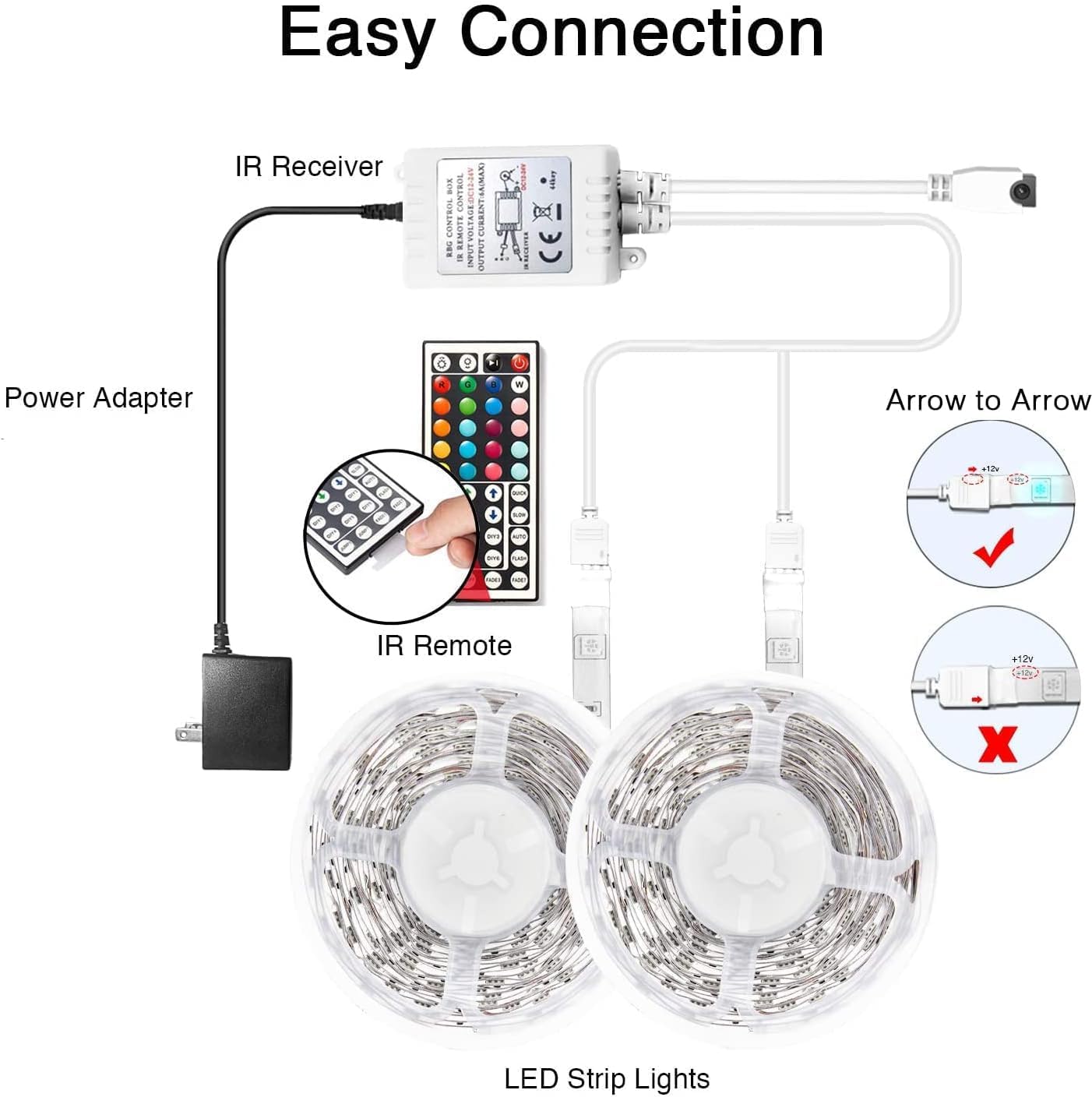
Diagram illustrating the complete connection process: Power Adapter to IR Receiver, IR Receiver to LED Controller, and LED Controller to LED Strip Lights, highlighting correct 4-pin connector orientation.
Operating Your LED Controller
The 44-key remote control allows for comprehensive control over your LED strip lights. Ensure the remote is pointed directly at the IR sensor on the controller box within approximately 30 feet for optimal functionality.
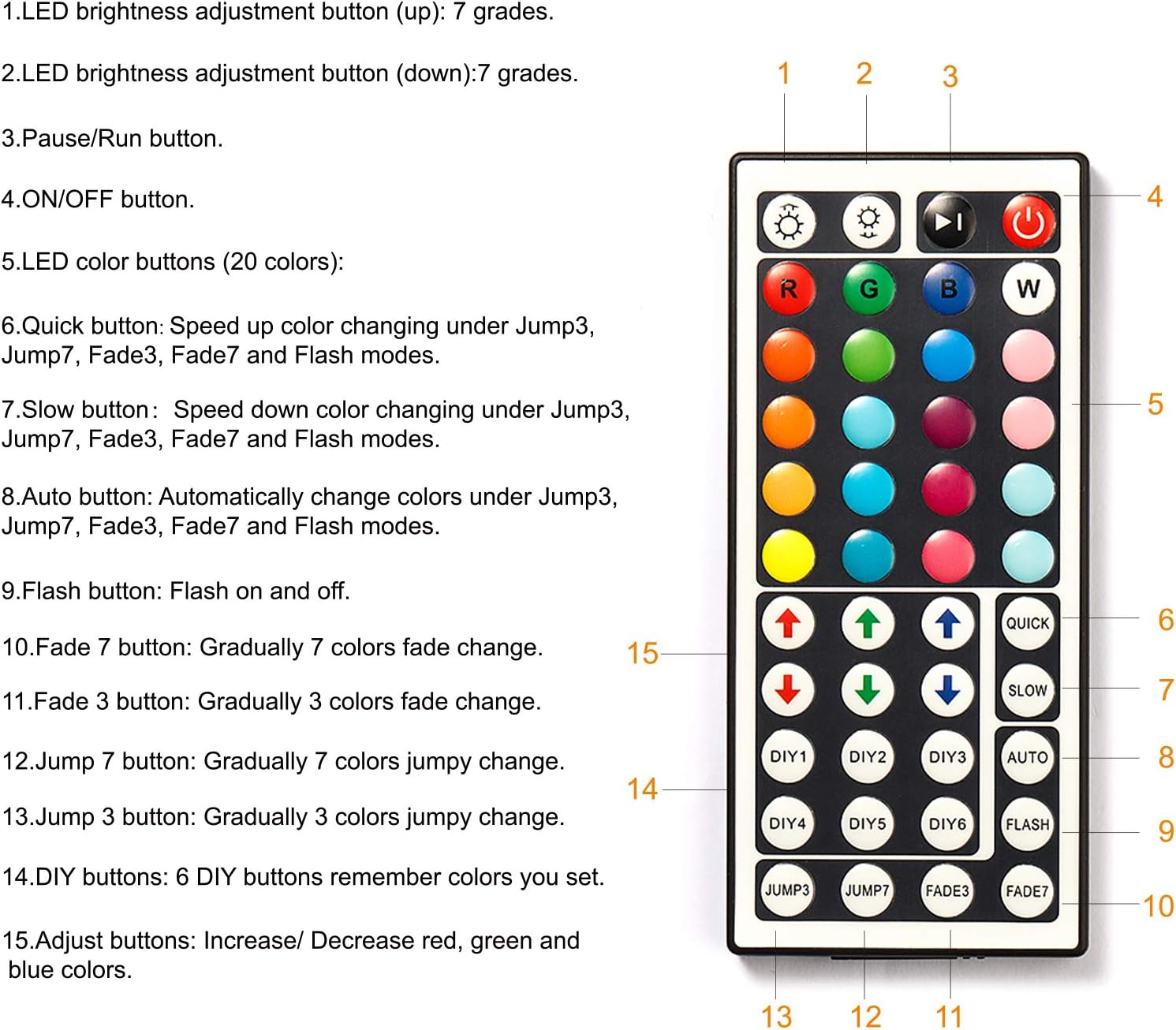
Diagram of the 44-key remote control, detailing the function of each button for color selection, brightness adjustment, and mode changes.
- Күйгүзүү/өчүрүү: басыңыз КҮЙГҮЗҮҮ/ӨЧҮРҮҮ жарыктарды күйгүзүү же өчүрүү үчүн баскычты басыңыз.
- Жарыктыкты жөндөө: колдонуу Brightness Up (өйдө жебе) жана Brightness Down (down arrow) buttons to adjust the light intensity (7 levels).
- Статикалык түстөр: Select from 20 static colors by pressing the corresponding color buttons.
- RGB жөндөөсү: колдонуу R, G, B buttons to fine-tune red, green, and blue color levels.
- Quick/Slow: Adjust the speed of dynamic modes (Jump3, Jump7, Fade3, Fade7, Flash) using the ТЕЗ жана ЖАЯН баскычтар.
- Авто режим: Басыңыз АВТО for automatic color cycling through various modes.
- Жаркыроо режими: Activates a rapid flashing effect.
- Fade Modes:
- FADE7: Gradually fades through 7 colors.
- FADE3: Gradually fades through 3 colors.
- Секирүү режимдери:
- ЖУМП7: Jumps between 7 colors.
- ЖУМП3: Jumps between 3 colors.
- DIY Buttons (DIY1-DIY6): These buttons allow you to save custom color settings. To set a custom color:
- a басыңыз DIY баскычы.
- колдонуу R, G, B adjustment arrows to create your desired color.
- Ошол эле бас DIY button again to save the color.
Техникалык тейлөө
- Тазалоо: Use a dry, soft cloth to clean the controller and remote. Do not use liquid cleaners or abrasive materials.
- Батареяны алмаштыруу: If the remote control's range or responsiveness decreases, replace the battery (CR2025 coin cell, not included). Ensure correct polarity.
- Сактагыч: Түзмөктү узак убакыт бою колдонбогон учурда, аны салкын, кургак жерде, күндүн түз нурунан жана өтө жогорку температурадан алыс сактаңыз.
Проблемаларды чечүү
| Көйгөй | Чечим |
|---|---|
| Жарыктар күйбөйт. | Check power connections. Ensure the power adapter is plugged in and the LED strips are correctly connected (arrow to arrow). Verify the remote control battery is active and correctly inserted. |
| Алыстан башкаруу жооп бербей жатат. | Ensure the plastic insulation tab has been removed from the remote. Point the remote directly at the IR sensor on the controller box. Replace the remote control battery if necessary. The effective range is approximately 30 feet. |
| Жарыктар күңүрт же бүлбүлдөп турат. | Check the power adapter for sufficient voltage (12-24V DC). Ensure all connections are secure. Reduce the length of the LED strip if it exceeds the controller's maximum current capacity (6A). |
| Incorrect colors displayed. | Ensure the 4-pin connectors are aligned correctly (arrow to arrow). Disconnect and reconnect the LED strips. |
| Only one LED strip works. | Verify both 4-pin connectors are properly inserted into the controller's dual ports. Check the connections of the non-working strip. |
Продукт спецификациялары
- Модел: DRF-0362-W
- Бренд: DAYBETTER
- Контроллердин түрү: 44-Key IR Remote Control
- Киргизүү көлөмүtage: 12-24В DC
- Чыгуу порттору: 2 x 4 төөнөгүч
- Максималдуу ток: 6A
- Башкаруу ыкмасы: Infrared (IR) Remote
- Remote колому: Approximately 30 feet (line of sight required)
- Материал: Пластик
- Ички/тышкы колдонуу: Indoor
- Өзгөчөлүктөр: Dimmable, 20 Static Colors, Dynamic Modes (Flash, Fade, Jump), DIY Color Saving
- Compatible LED Strips: 5050, 3528, 2835 (4-pin RGB)
Кепилдик маалымат
For warranty details, please refer to the product packaging or contact DAYBETTER customer service. Keep your purchase receipt as proof of purchase for any warranty claims.
Кардарларды колдоо
If you encounter any issues or have questions regarding your DAYBETTER 44-Key Remote Control, please contact DAYBETTER customer support through the retailer's platform or visit the official DAYBETTER webжардам үчүн сайт.